
Adding Metadata Fields in Bulk
A new Add MARC21 Fields job allows users to add or update MARC fields across multiple titles in a single operation. This job is designed to support large-scale metadata enrichment without requiring normalization rules or individual record editing.
Integrated Metadata and Content Context
While primarily focused on bulk updates, the broader set of digital management enhancements (such as side by side viewing in the Metadata Editor) ensure metadata decisions can be made with direct access to the digital content itself, supporting more accurate and confident updates.
Steps to Add or Edit Metadata in Bulk
Bulk metadata updates are performed using the Add MARC21 Fields job. This job can be run in two primary ways.
Option 1: Run the Job from Search Results
-
Perform a title search in Alma.
-
Select multiple titles using the multi select option.
-
Select Run a Job.

-
Select Add MARC21 Fields.
-
Define the MARC fields to be added.
Alma automatically creates a temporary set behind the scenes based on the selected records.
Option 2: Run the Job from a Set
-
Create an itemized or logical set containing the target titles.
-
Navigate to Admin > Manage Jobs and Sets > Run a Job.
-
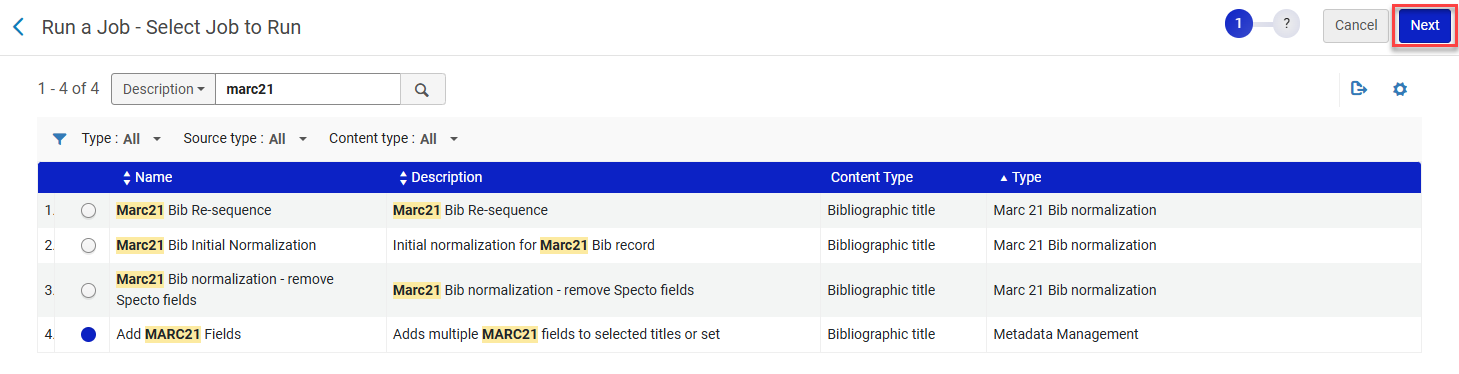
Select the Add MARC21 Fields and select Next.
-
Select the predefined set you want created.
Defining MARC Fields
When configuring the job, users define MARC fields using the same structure as the Metadata Editor:
-
Field tag (three digit MARC21 field)
-
First and second indicators (optional where appropriate)
-
Field value, entered using subfield notation (for example, $a, $v)
-
Repeatable fields can be added multiple times. Multiple fields may be added in a single job submission.
Note: Validation doesn't occur during job configuration, but when Alma Specto Starter attempts to save each record. This means that an error will cause the job to fail at the record level.

When to Use Bulk Metadata Management
-
Bulk metadata updates are useful for:
-
Adding shared subject headings
-
Applying consistent notes or descriptive fields
-
Updating metadata after digitization projects
-
Aligning records with new cataloging standards
-
Retrospective enhancement of legacy digital records
For complex transformations, normalization rules may still be appropriate, but the Add MARC21 Fields job covers most common bulk update scenarios.
Benefits for Users
These updates fundamentally change how libraries approach digital metadata maintenance:
-
Efficiency at scale: Bulk metadata updates eliminate the need to open records individually, saving significant time for institutions managing large digital collections.
-
Consistency across records: Applying the same MARC fields to multiple titles in a single job ensures consistent metadata, which is especially important for shared collections, thematic projects, or retrospective enhancements.
-
Reduced technical overhead: The new job removes the need to design and manage normalization rules for many common metadata updates, lowering the technical barrier for bulk operations.
-
Improved data accuracy: Validation occurs at the record level when changes are saved, ensuring MARC rules are enforced without restricting flexibility during job setup.
-
Supports project based workflows: Ideal for digitization initiatives, metadata remediation projects, collection migrations, and descriptive enhancements driven by external requirements.
