
Transferring Money Between Allocated Funds
This page gives instructions for transferring money between allocated funds in Alma. For an overview of working with acquisitions in Alma, including links to relevant sections such as Invoicing, Working with Orders/PO Lines, Renewals, Configuration, etc., see Introduction to Acquisitions.
- Fund Manager
You can transfer (move) money from one allocated fund to another. This adds a negative allocation to the source fund and a positive allocation to the target fund.
You can transfer money only between funds in the same fiscal period. Depending on the configuration of the Transfers prior to fiscal period parameter within your ledger, you may be able to transfer money a few days before the fiscal period begins, or may be prevented from transferring money for a few days after the fiscal period starts; see Adding a Ledger.
Note that this only works for funds where the current fiscal year matches the calendar dates or the future fiscal year if you have grace days. It does not work for a fiscal year that had an end date in the past.
You transfer funds on the Funds Transfer page (Acquisitions > Acquisitions Infrastructure > Transfer Funds) or on a fund's Transaction tab (see Performing Fund Transactions).
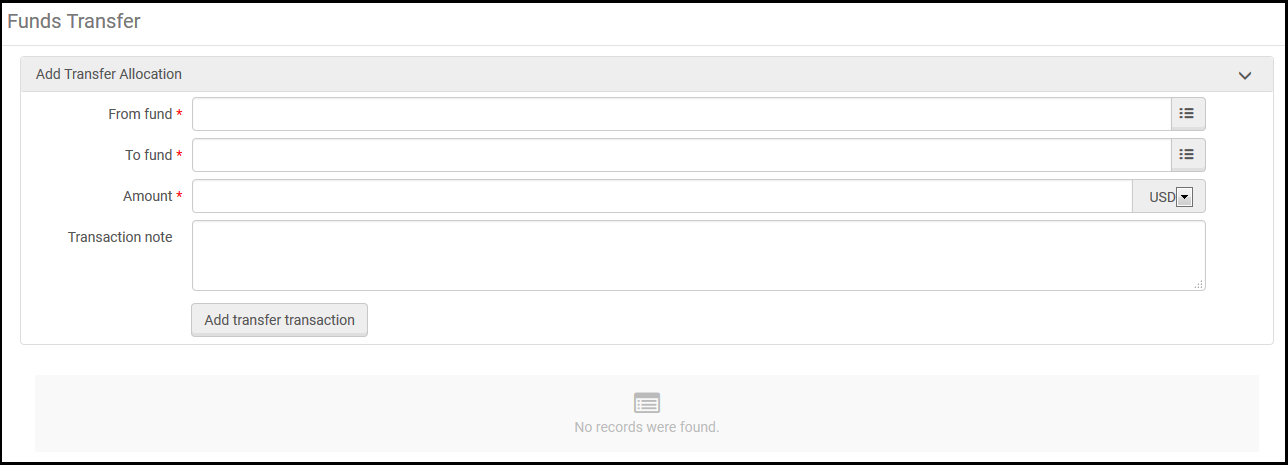
- On the Funds Transfer page, select the fund from which you want to transfer money in From fund.
- In To fund, select the fund to which you want to transfer money.
- In Amount, enter the amount you want to transfer.
- Enter any notes you want to include with the transfer in Transaction note.
- Select Add Transfer Transaction and select Confirm in the confirmation dialog box.The details of the transaction appear on the page, as well as in the Transactions tabs of the relevant funds.
- If the transfer transaction was erroneous, you can cancel it. To do so, delete the transaction from both funds: delete the positive transfer from the source fund, and delete the negative transfer from the target fund.
In order to undo a transfer, you must delete the transactions in both funds. Deleting one will not delete the other.
Page tags: article:topicproduct:almacontent:Documentationlang:englishfund transfertransferring funds
