
Digital Resource Management - January 2017 Enhancements
New Deposit Functionality
A new Deposit functionality was added, allowing library staff to submit content to Alma to be added to the repository on behalf of patrons (Staff-Mediated Deposits). This will be enhanced next release with the ability to deposit via the SWORD API.
To support the Deposit functionality, the following activities can be performed:
- Deposit Configuration – There are several configuration activities that must be performed to allow you to use the Deposit functionality:
- Configuring Deposit profiles – Before deposits can be made, a deposit configuration profile must be created that determines how submitted deposits are processed.
- Configuring Deposit Return Reasons – You can configure the email message sent to depositors when their deposit is returned for corrections.
- Configuring Deposit Decline Reasons – You can configure the email message sent to depositors when their deposit is declined.
- Configuring Patron Deposit Templates – You can configure the template of the email sent to depositors when their deposit is submitted, approved, declined, returned, or withdrawn.
- Search for Deposits – You can search for deposits submitted to Alma.
- Approve Deposits – You can approve deposits submitted to Alma by patrons.
- Staff-Mediated Deposits – Library staff can submit deposits to Alma on behalf of patrons.
Activating/Deactivating Remote Digital Repositories
Remote digital repositories can now be deactivated so that they do not appear in the drop-down list when creating an import profile and adding a digital representation. This way only the remote repositories that are used are displayed.
To support this feature, the following developments have been implemented:
- The Active column appears in the list of remote repositories. A yellow check mark indicates that the remote repository is active. When clicked, remote repository becomes inactive and the check mark becomes gray.
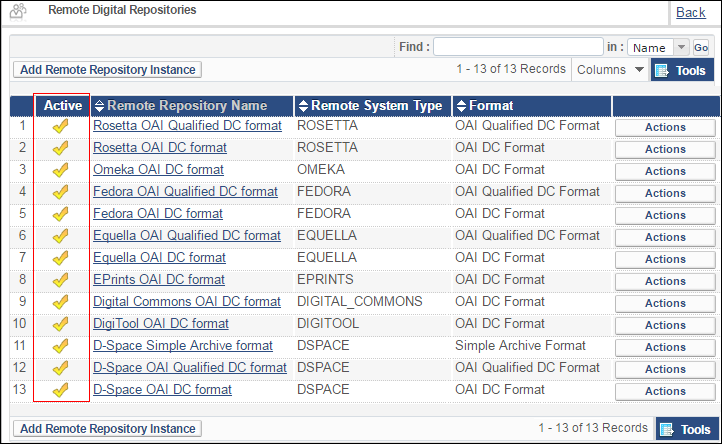
Active Column If an import profile is configured with a remote repository, the remote repository cannot be disabled. - When configuring a remote repository, you can now mark it as Active or Inactive:
Status Drop-Down List
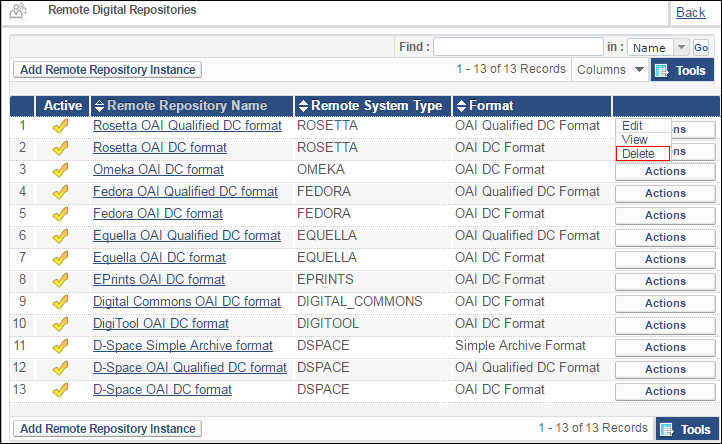
Additionally, you can now delete remote repositories:
MMS ID Column Added to Digital Lists
The MMS ID column was added to the following digital-related pages in Alma:
- Top-Level Collections:
Collections - Sub-Collections:
Sub-Collections
Additional Digital Resource Management Enhancements
- UNIMARC, KORMARC, and MARC21 can now be used interchangeably as the source and target formats when creating digital import profiles.
- The Clean Operational Thumbnails job was removed. This job was not in use.
Page tags: article:topicproduct:almacontent:Documentationlang:english
