
Digital Resource Management - December 2016 Enhancements
Enhancements to Dublin Core Publishing
The following developments were added for publishing in Dublin Core format:
- Alma now supports publishing DC records in DC format. Alma records that contain qualified DC properties can be published with one of two output formats:
- Qualified DC – The DC record is published in its original format
- Simple DC – The dcterms elements of the record are simplified to DC elements
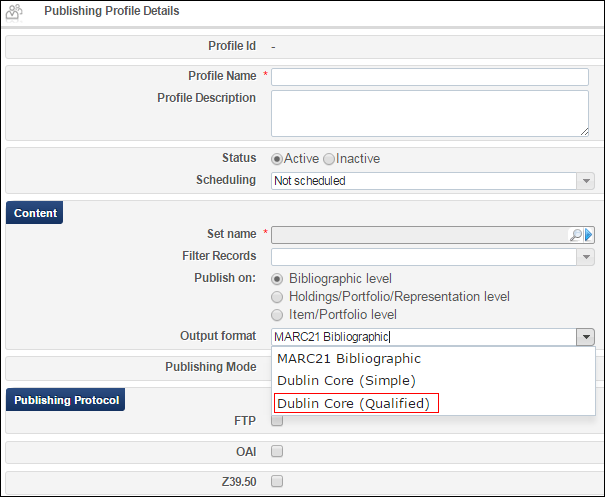 Dublin Core Qualified
 -
When selecting the Dublin Core (Simple) output format with the OAI publishing protocol, the metadata prefix is set to oai_dc and with the Dublin Core (Qualified) output format the metadata prefix is set to oai_qdc.
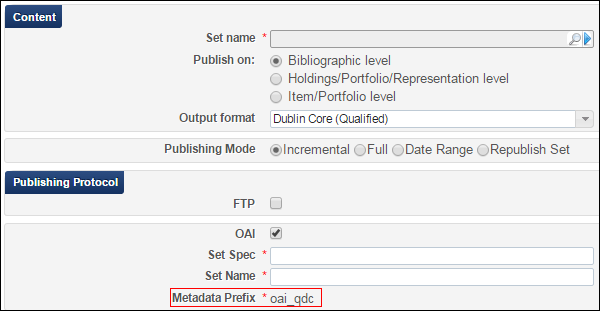 Metadata Prefix
 - In the Digital Enrichmen t section, you can now select a repeatable field from a drop-down list to which you want to add the representation delivery URL. For simple DC, the 15 core DC elements appear:
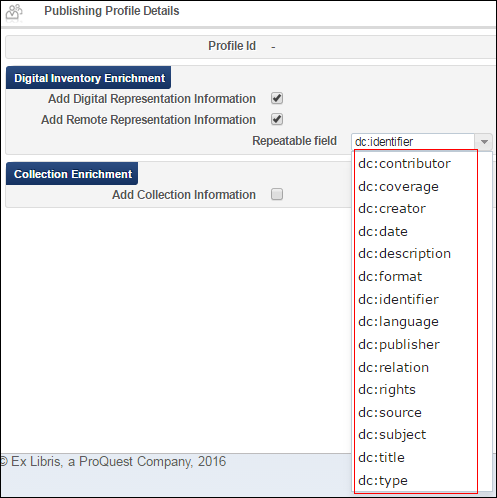 Repeatable Field for Simple DC
For qualified DC, the full list as configured appears, including qualified DC terms:
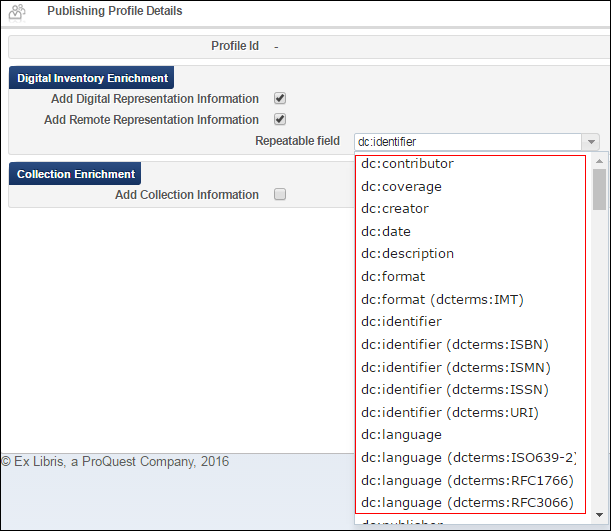 Repeatable Field for Qualified DC
- The following normalization routines occur:
- BIB-level published DC records are enriched with an MMS ID:<dc:identifier>alma:{INST_CODE}/bibs/{MMS_ID}</dc:identifier>
- REP-level published DC records also contain a REP PID:<dc:identifier>alma:{INST_CODE}/bibs/{MMS_ID}/representations/{REP_PID}</dc:identifier>
- BIB-level published DC records are enriched with an MMS ID:
Normalizations are applied post-transformation and post-enrichment.
- A Collection Enrichment section was added, that allows you to add collection information to the DC record, as already exists for MARC:
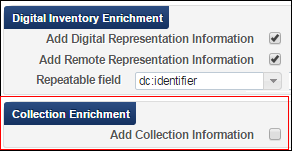
Collection Enrichment Select Add Collection Information to add the following for each collection:<dc:relation>alma:{INST_CODE}/bibs/collections/{COLLECTION_ID}</dc:relation>
For more information, see Publishing and Inventory Enrichment (General Publishing).
Display Representations Based on Public Note
You can now configure Alma to hide a representation in the View It tab, depending on the value of the Public Note field of the representation. This is done by using display logic rules to hide the Representation Delivery Service depending on the value of the Public Note field.
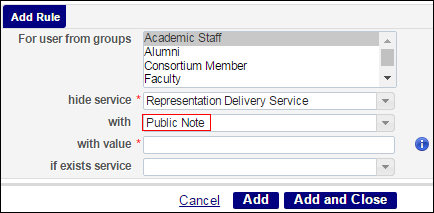
The following are examples of regular expressions with which you can configure the Display Logic Rules to hide representations when the expressions are in the Public Note field. A flag can be used to determine if the expression is case sensitive or not:
- /Restricted Access/ - Matches a public note containing the phrase Restricted Access, case sensitive.
- /Restricted Access/i - Matches a public note containing the phrase Restricted Access, case insensitive.
- /^(?!Open Access$)- Matches a public note that does not equal Open Access, case sensitive.
- /^((?!Open Access).)*$/i - Matches a public note that does not contain the phrase Open Access, case insensitive.
For more information, see Discovery Interface Display Logic.
Enhanced Support for Automatic Generation of Thumbnails
Alma can automatically generate thumbnails from digital files. This allows thumbnails to be displayed without having to provide a thumbnail file or the use of an external system. When uploading digital files, Alma generates a thumbnail image that you can accept or replace. This feature was enhanced with support for the following:
- Additional file formats:
- jpg
- png
- mp4
- wav
- m4v
- doc
- ppt
- docx
- pptx
Alma will continue to support the existing method of providing thumbnails (with a *.thumb extension). This is the preferred method in cases where the first page is unsuitable for a thumbnail. -
The new Thumbnail Generation job was added to create thumbnails from sets of digital files. You can select one of the following options when running the job:
- Add (default) - Generated thumbnails are added where no thumbnail exists.
- Add and Overwrite - Generated thumbnails are added for all files in the set. If one already exists, it is overwritten with a generated thumbnail.
- Delete - Thumbnails are removed for all files in the set.
For more information, see Running Manual Jobs on Defined Sets.
Additional Digital Resource Management Enhancements
- The Collection facet was added to the results that are displayed when you perform a physical, electronic, or digital title repository search. This facet allows you to filter the results by collection.
Page tags: article:topicproduct:almacontent:Documentationlang:english
