Digital Resource Management - June 2016 Enhancements
Exporting Collections as an EAD
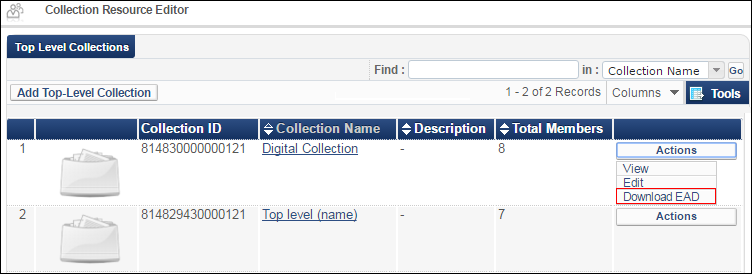
You can download collection information as an EAD (Encoded Archival Description) file. EAD allows for the standardization of collection information in finding aids, such as inventories and indexes, within and across repositories.
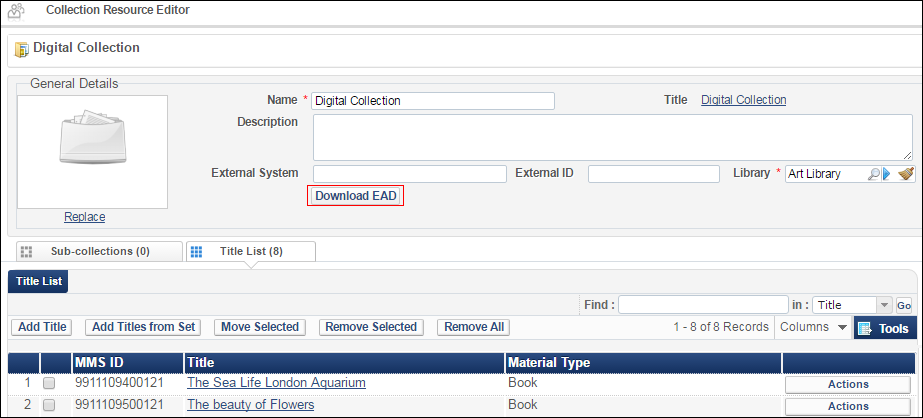
You can download the EAD file from two locations:
When managing collections (Resource Management > Search and Sets > Manage Collections > Actions > Download EAD):Managing Collections
When editing collections (Resource Management > Search and Sets > Manage Collections > Edit):Editing Collections
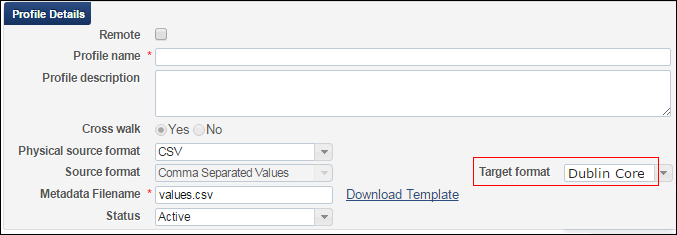
Support for Dublin Core as a Digital Import Profile Target Format
You can now select Dublin Core as the target format for digital import profiles (Resource Management > Resource Configuration > Configuration Menu > Record Import > Import Profiles > Digital) for remote representations (OAI DC) and CSV source formats. Previously, only MARC XML was available as the target format.
Dublin Core Target Format
Additional Digital Resource Management Enhancements
You can now configure the Z39.50 integration profile to include availability information for digital representations for both remote and non-remote representations.Enrich with RepresentationsFor detailed information on the Z39.50 integration profile, see Z39.50 Search.
Right-to-left languages are now supported in the Alma digital viewer.