Several enhancements were implemented to the Usage Data Details dimension of the Usage Data subject area.
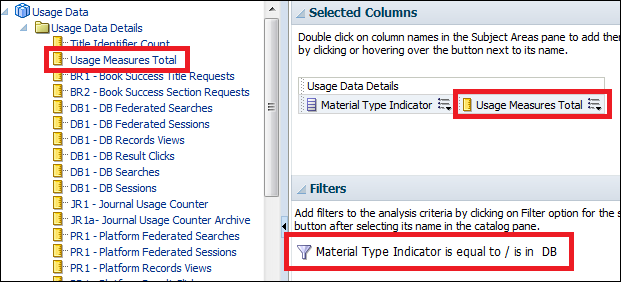
The Usage Measures Total field displays the sum total of all of the other measures for the particular query. Previously, you needed to edit the formula and enter a mathematical calculation.
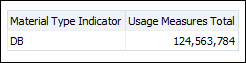
For example, when determining the usage of databases, there is no need to manually add together the various database measures. Filter the Usage Measures Total field by Usage Data Details Material Type Indicator = DB to display all of the database measures combined.
Usage Measures TotalThe following is an example report using these fields:
Usage Measures Total Report
The names of the following fields were changed to be clearer:
For existing reports, there is no need to edit the report and change the queries to the new name.
New Name
Old Name
BR1 - Book Success Title Requests
Book Success Title Requests
BR2 - Book Success Section Requests
Book Success Section Requests
DB1 - DB Federated Searches
DB Federated Searches
DB1 - DB Federated Sessions
DB Federated Sessions
DB1 - DB Records Views
DB Records Views
DB1 - DB Result Clicks
DB Result Clicks
DB1 - DB Searches
DB Searches
DB1 - DB Sessions
DB Sessions
JR1 - Journal Usage Counter
Journal Usage Counter
The following new measures were added as part of the infrastructure for the upcoming support of additional COUNTER reports.
Currently, these fields do not have data and should not be used, because these report types are still not supported.
JR1a - Journal Usage Counter Archive
PR1 - Platform Federated Searches
PR1 - Platform Federated Sessions
PR1 - Platform Result Clicks
PR1 - Platform Records Views
Fields to Support Additional Types of COUNTER Reports
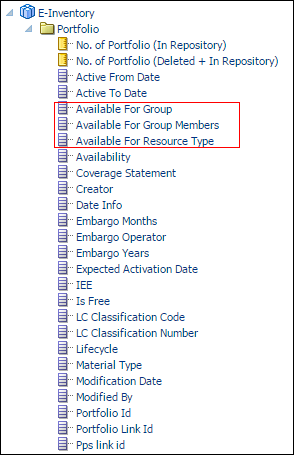
Available For Fields Added to E-Inventory Subject Area
In an Alma Network Zone or multi-campus environment, it is possible to define inventory management groups (Available For settings) for each electronic collection or specific electronic portfolio. Each inventory management group includes one or more institutions. If an activated electronic collection or portfolio is associated with a group, the resource is available only for the institutions in the group. The institutions appear in the repository search results.
The following Available For fields were added to the Portfolio dimension of the E-Inventory subject area:
Available For Group - The group codes available for the specific collection, service, or portfolio.
Available For Group Members - The members of the groups in the Available For Groups field.
Available For Resource Type - The resource type that is available to the member institution.
Available For Fields
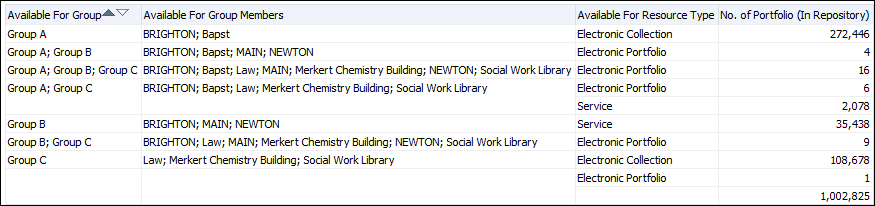
The following is an example of a report using the Available For fields.
Available For Fields Report
Additional Analytics Enhancements
As part of the plans to increase the export size of CSV reports in Analytics, the Analytics OBIEE is being upgraded to version 11.1.1.9. This was handled in Europe on July 10, North America on July 17, and Asia Pacific on July 24. Initially, the exported number of rows from Analytics to a CSV report will be increased to 250,000. At a later stage, this number will be increased to 500,000.
The Transaction Date dimension of the Fines and Fees subject area contains unnecessary fields. These were marked as to be deprecated.
The Fund Amount field located under Fund Information > Fund Measures in the Physical Items subject area was renamed Fund Expenditure. This change does not affect existing reports.
The Creator and Creation Date fields were added under the Block dimension of the Users subject area.

 Usage Measures Total Report