
Adding AI Suggested Titles to Resource Sharing Letters
Adding AI Suggested Titles to Resource Sharing Letters
(New for August 2026)
Institutions can enhance several resource‑sharing notifications with AI‑generated recommendations for similar resources. When enabled, Alma uses an AI component to analyze the requested item and automatically generate an optimized search query based on its bibliographic details.
The query is run against a library‑selected search scope, and the resulting recommendations are included in supported letters, such as the request confirmation, document delivery, and cancellation letters, helping patrons discover additional relevant materials.
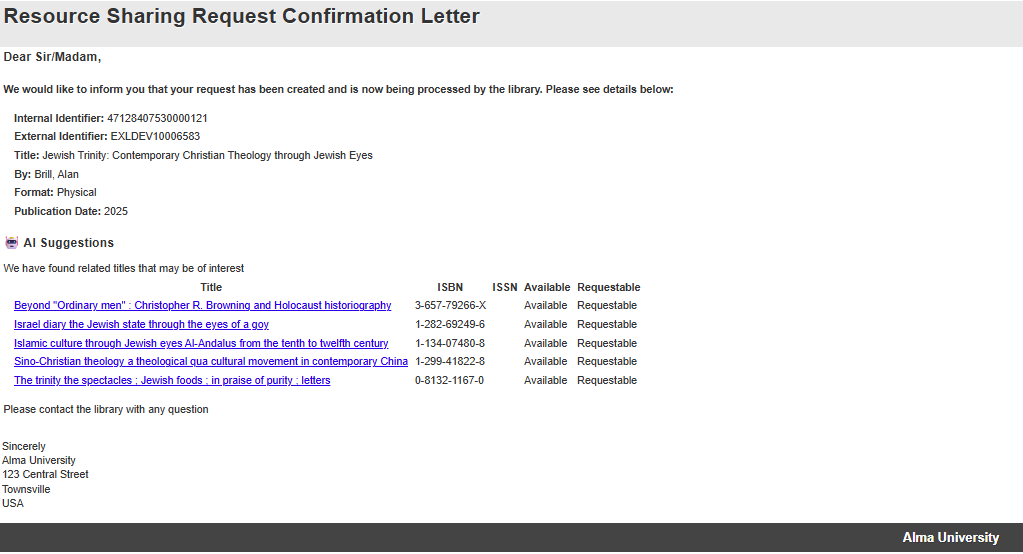
Activation of this feature is fully optional and controlled within each letter’s setup.
The recommendation calculates the availability and requestability of the resource by looking at the local institution’s inventory:
-
Available — The resource has either an electronic resource, or an available physical resource
-
Requestable — The resource has physical inventory
How to Add AI Suggested Titles to Resource Sharing Letters:
-
Turn on the feature in AI Features Management (Configuration > AI Features Management > AI based recommendations for resource sharing requests > Configuration).
-
In the AI Features Resource Sharing Configuration page, customize as needed.
-
Select which letter will include an AI suggestion of related titles
-
Institution Default — Select the Primo search view and scope that the AI agent should use.
-
Campus Overrides — You can override the institution search view and scope at the campus level. Recommendation notifications will be sent to patrons using the search view and scope configured for the patron's affiliated campus.
-
-
Select Save.
-
You can update labels in the letter, for example, aiSuggestedTitlesHeader, Requestable, NotRequestable, etc.
Sample XSL Addition for Adding AI Suggested Titles to Resource Sharing Letters
<xsl:if test="notification_data/suggested_titles/suggested_title_o">
<table role='presentation' cellspacing="0" cellpadding="5" border="0">
<xsl:attribute name="style">
<xsl:call-template name="listStyleCss"/>
<!-- style.xsl -->
</xsl:attribute>
<tr>
<td>
<h3>
<strong>Other resources that may be of interest</strong>
</h3>
<p>*AI recommendations based on your request's metadata. Links open in Library Search.</p>
</td>
</tr>
<xsl:for-each select="notification_data/suggested_titles/suggested_title_o">
<tr>
<td>
<xsl:choose>
<xsl:when test="link !=''">
<a>
<xsl:attribute name="href">
<xsl:value-of select="link"/>
</xsl:attribute>
<xsl:value-of select="title"/>
</a>
</xsl:when>
<xsl:otherwise>
<xsl:value-of select="title"/>
</xsl:otherwise>
</xsl:choose>
<xsl:if test="isbn !=''">
<xsl:text> (@@isbn@@: </xsl:text>
<xsl:value-of select="isbn"/>
<xsl:text>)</xsl:text>
</xsl:if>
<xsl:if test="issn !=''">
<xsl:text> (@@issn@@: </xsl:text>
<xsl:value-of select="issn"/>
<xsl:text>)</xsl:text>
</xsl:if>
<xsl:if test="available = 'true'">
<xsl:text> - </xsl:text>
<strong>@@Available@@</strong>
</xsl:if>
<xsl:if test="available = 'false'">
<xsl:text> - </xsl:text>
<strong>@@Not Available@@</strong>
</xsl:if>
<xsl:if test="requestable = 'true'">
<xsl:text> - </xsl:text>
<strong>@@Requestable@@</strong>
</xsl:if>
<xsl:if test="requestable = 'false'">
<xsl:text> - </xsl:text>
<strong>@@Not Requestable@@</strong>
</xsl:if>
</td>
</tr>
</xsl:for-each>
</table>
<br/>
<br/>
</xsl:if>
Frequently Asked Questions for Adding AI Suggested Titles to Resource Sharing Letters
1. Is our data used to train the AI?
A: No – The AI is not trained on your data, and in fact does not even see it. It only produces a query to retrieve the results based on the borrowing request’s metadata.
2. What LLM are you working with?
A: Models are subject to change as models and capabilities evolve. As of the August 2026 release, the system is working with the OpenAI GPT 5.4 Mini LLM model.
3. What is your policy regarding AI?
A: Clarivate’s Academia & Government policy for use of generative AI is available in the link: https://clarivate.com/ai/academia/policy/
4. How does the system generate the recommendations?
A: The system uses the borrowing request’s metadata to create a search query for the Primo view and search scope your administrator has configured. It then retrieves the search results and ranks them looking for the 5 most relevant responses to include in the letter.
5. Why am I getting slightly different answers for the same question?
A: Large Language Model generative AI tools are agile, and their responses differ between uses and evolve over time. The returned answer by the AI will vary each time according to the information provided to it, and the AI’s internal processing itself.
6. Can I trust the AI to always give the “correct” answer?
A: AI provides data-driven suggestions, not absolute truths. It’s designed to assist decision-making, not replace human judgment. Always consider AI answers as one input among others, especially in complex or high-impact scenarios.
