
Configuring the Request Additional ID
To configure the Request Additional ID, you must have one of the following roles:
- General System Administrator - Enable, Disable, Edit
- Fulfillment Administrator - Enable, Disable, Edit
Overview
Libraries can set the prefix and maximum for the additional ID assigned to hold requests. To access this page, navigate to Configuration > Fulfillment > Request Additional ID Configuration.
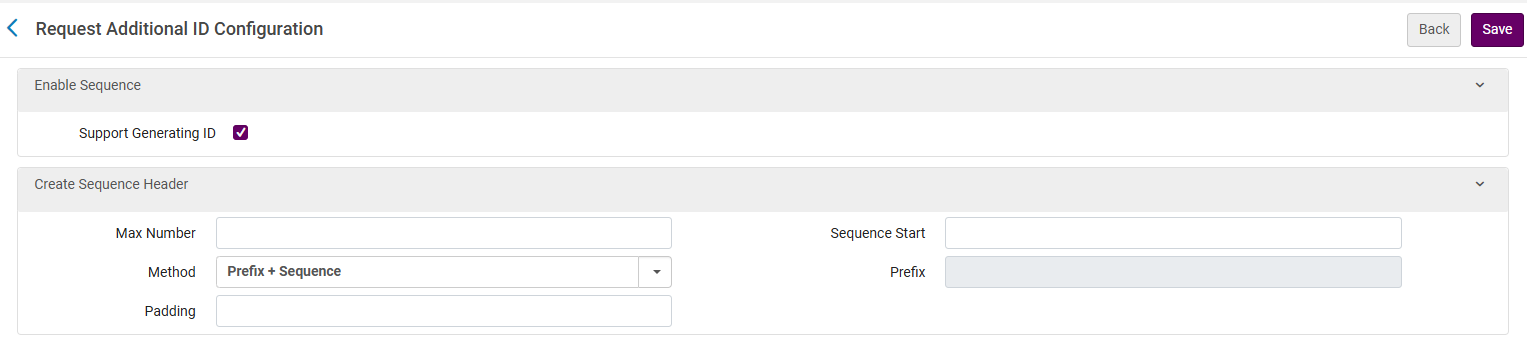
Configuring the Request Additional ID
You can set the sequence, i.e., a running number that continues until the Max Number. Once the Max Number is reached, the sequence returns to the start (see Sequence Start below).
- Support Generating ID - Enables the ID generation. By default this is disabled.
- Max Number - Set the Max number of the numerical sequence. Once the sequence reaches the max number, it will automatically reset to the Sequence Start value (unless there is a manual reset). An example of a Max Number value is - 9999.
-
Method - Sets the method to use for the sequence.
- Prefix + Sequence - When this is selected, you can add a prefix (see Prefix below) to include before the sequence.
- None - When this is selected, the Prefix field is disabled.
- Padding - The maximum number of digits (numbers only) allowed in the numerical part of the sequence. If Padding = 5, then the number will contain five digits.
Example 1: If Max Number is set to 999 and the padding is 3, then after 999 comes 001.
Example 2: If Max Number is set to 9999 and the padding is 5, then after 09999 comes 00001.
Example 3: If Max Number is set to 9999 and the padding is 3, then after 999 comes 001.
- Sequence Start - The initial value of the sequence.
- Prefix - This is available only if the prefix method is selected. It can either be a number, letter or symbol (-, /, #, etc.).
It is recommended for the Padding to be equal to or greater than the number of digits in the Max Number.
Example
Sequence
- Method: Prefix + Sequence
- Prefix: REQ-
- Max number: 9999
- Sequence Start: 1000
- Padding: 5
Additional ID's output
- REQ-01000
- REQ-01001
- REQ-01002
- ....003
