
Alma Roadmap – Completed – 2025 H2
Metadata and Linked Open Data
Bulk Bibliographic Records Enrichment with Automated Copy-Cataloging and AI Title Matching - Early Access
| What's New | Highlights | Impact |
|---|---|---|
|
It is possible to enrich a set of bibliographic records by copy-cataloging from the library's regular search profiles, using automated results filtering and AI title matching. |
|
Reduce the time and effort a cataloger spends on copy-cataloging to enrich bibliographic records. |
Linked Open Data Editor - Early Access
Linked Open Data theme
| What's New | Highlights | Impact |
|---|---|---|
|
Librarians are able to create BIBFRAME records (work and instance) in a new editor. |
|
Libraries can create BIBFRAME Works and Instances as part of the metadata creation workflow inside Alma. |
back to Metadata and Linked Open Data Roadmap
Relative Date Searches in Repository Search

 Idea Exchange
| What's New | Highlights | Impact |
|---|---|---|
|
Date indexes in the repository search, including the physical and electronic inventory searches, support searching by relative date. |
|
The user is able to perform searches and save logical sets such as "Received X days ago", "Available X days ago", etc. |
Resource Management
Alma AI-Powered Insights
| What's New | Highlights | Impact |
|---|---|---|
|
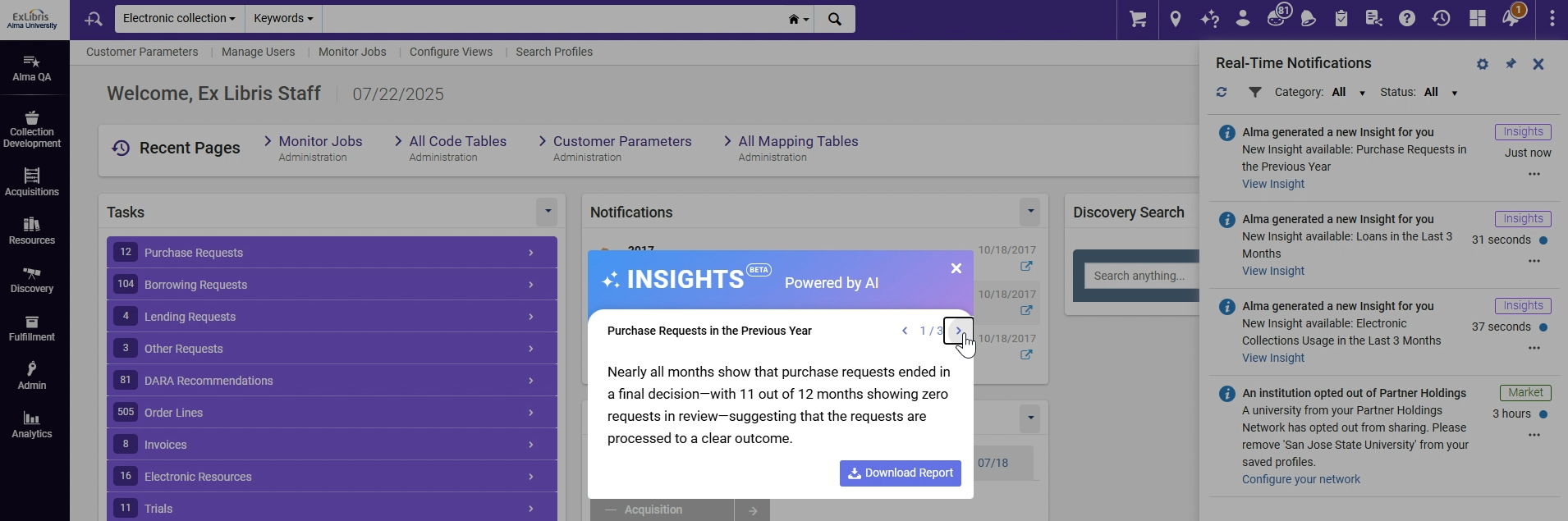
This new AI-powered feature is designed to transform your analytics data into clear, accessible, and meaningful insights—delivered directly within Alma: It periodically highlights relevant trends and information across different areas of the library, helping all team members stay informed and engaged without the need to run complex Analytics reports or sift through raw data. |
Alma began delivering automated insights based on pre-defined Analytics reports. These insights are generated periodically and shared as notifications with users in relevant roles. Users have the option to download the underlying report data for further review. |
Users are receiving key insights directly, reducing the need to generate reports for routine monitoring and helping them quickly understand key aspects of library activity. ​ |
For more information, see Artificial Intelligence in Alma
E-Resource Overview: Out-of-the-box Insight Dashboard
| What's New | Highlights | Impact |
|---|---|---|
|
An out-of-the-box insight dashboard providing an overview of E-Resource activity. |
|
Giving e-resource librarians a clear view of resource activity to help them track performance against KPIs and work more efficiently.. |
Relative Date Searches in Repository Search
Idea Exchange
| What's New | Highlights | Impact |
|---|---|---|
|
Date indexes in the repository search, including the physical and electronic inventory searches, now support searching by relative dates. |
|
Using relative dates, staff users are able to create logical sets and use them efficiently. |
Automatic Upload of Electronic Holdings - Oxford University Press
Idea Exchange
| What's New | Highlights | Impact |
|---|---|---|
|
Upload Electronic Holdings from Oxford University Press replaces the current manual, multi-step workflow for managing Oxford University Press holdings. |
|
Reduces manual work involved in activating and maintaining the library holdings of Oxford University Press electronic resources. |
Acquisitions
"Withdraw" and "Open Predicted Items" Actions in Receiving Workbench
Idea Exchange
| What's New | Highlights | Impact |
|---|---|---|
|
Additional actions were added to the ‘Received Items List' page of the receiving workbench. |
|
Staff users are able to perform item-related actions during receiving operations, eliminating the need to search for the title or navigate to the items list. |
Bulk Management of PO lines
Idea Exchange
| What's New | Highlights | Impact |
|---|---|---|
|
Additional improvements were incorporated into the unified PO lines interface to facilitate more effective bulk management of multiple PO lines on a larger scale. |
|
Improve usability and efficiency by enabling staff users to exclude facets and execute jobs directly from the PO lines list- streamlining workflows and boosting overall productivity. |
Alma AI Assistant for Funds and Ledgers - Early Access
| What's New | Highlights | Impact |
|---|---|---|
|
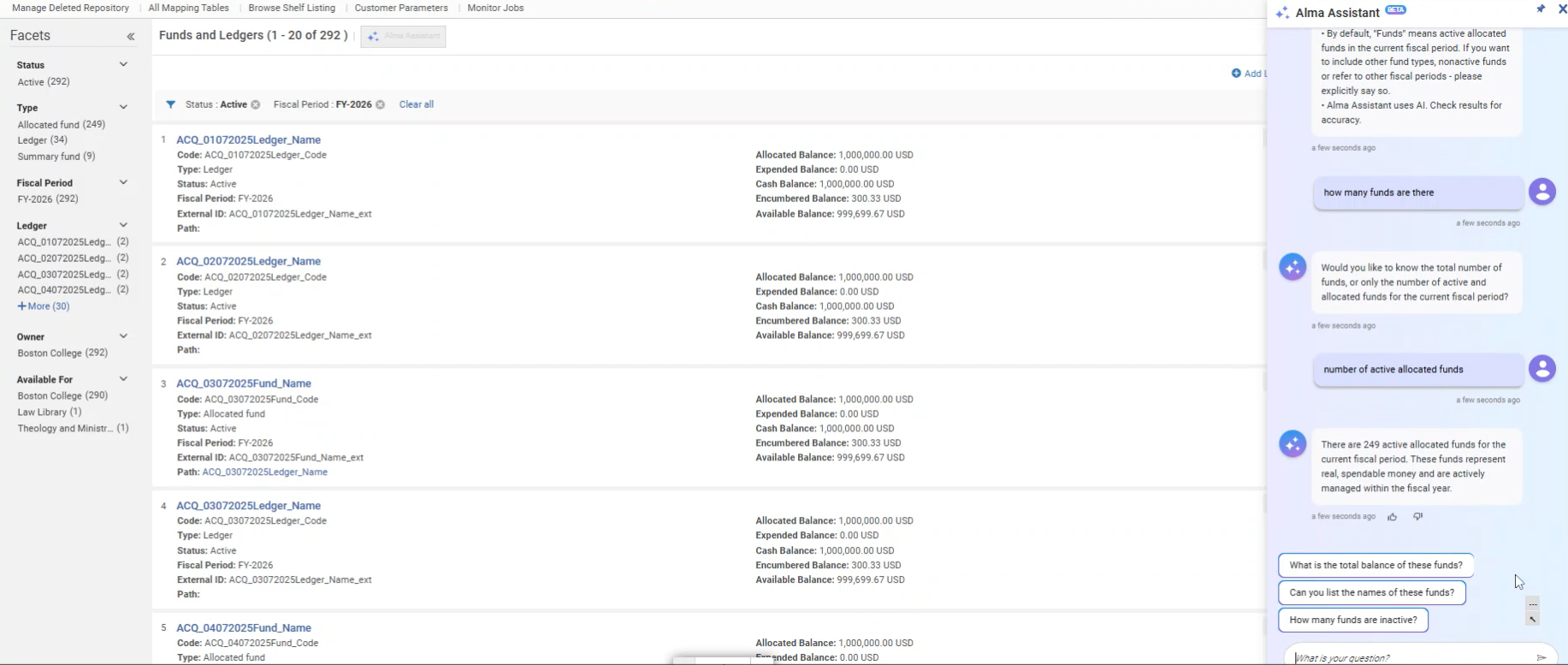
An AI-powered assistant in Alma that answers fund and ledger questions using natural language. It provides real-time, contextual responses without the need to navigate menus or run reports, helping staff work more efficiently and make faster financial decisions. |
|
The Alma AI Assistant simplifies access to financial data, helping staff work more efficiently and make informed decisions faster. It lowers the learning curve for new users and enables experienced staff to manage complex queries with greater ease. |
For more information, see Artificial Intelligence in Alma
COUNTER Usage: Additional Fields and Better Reporting
Idea Exchange
| What's New | Highlights | Impact |
|---|---|---|
|
Additional improvements were incorporated into the COUNTER usage workflows to facilitate more effective harvesting of usage data. |
|
Allowing institutions to compare and analyze usage data effectively, supporting data-driven decision making. |
Back to Acquisitions Roadmap
Fulfillment and Resource Sharing
Waive Fines/Fees in Bulk by Set
 CERV Enhancement (ID #8734)
| What's New | Highlights | Impact |
|---|---|---|
|
Waiving fines based on additional criteria or based on an input file. |
It is possible to waive fines based on additional criteria, such as a Users set or a date range. In addition, it is possible to waive a known set of fees that are listed in an Analytics report. |
Enhanced flexibility in processing fees that have been identified as waived fees. |
Back to Fulfillment & Resource Sharing Roadmap
Additional Library Controlled Request ID
CERV Enhancement (ID #8777)
| What's New | Highlights | Impact |
|---|---|---|
|
An additional ID can be added to requests. The institution can control different attributes of the ID. |
A new request ID is assignable to requests. The institution can set the maximum number after which the ID will reset, as well as a prefix and a padding option for the ID. |
Better control over the IDs that are used to sort request lists. |
Back to Fulfillment & Resource Sharing Roadmap
User Management: Advanced User Search by Role and Scope
| What's New | Highlights | Impact |
|---|---|---|
|
The Advanced Search functionality includes searching for users by their roles and scopes. |
|
This enhancement empowers libraries to locate users based on specific roles and scopes, improving user management and operational efficiency. |
Back to Fulfillment & Resource Sharing Roadmap
User Management: Purge Users Based on User Sets
Idea Exchange
| What's New | Highlights | Impact |
|---|---|---|
|
Institutions can perform user purges based on predefined Users sets. This enhancement allows for greater flexibility and precision in user management by enabling bulk deletions using standard purge validations and the configured delete user policy. |
|
This feature empowers institutions to streamline their user management processes by providing more granular control over user record deletions. It helps optimize system performance and maintain data accuracy by allowing targeted purging of user records according to specific criteria. |
Back to Fulfillment & Resource Sharing Roadmap
User Management: Scheduled Purge User Records Job
Idea Exchange
| What's New | Highlights | Impact |
|---|---|---|
|
The Purge User Records job is enhanced to include scheduling and run automatically, eliminating the need for manual activation. |
|
This enhancement streamlines the process of purging user records by enabling automated scheduling, reducing manual workload, and ensuring timely job execution. |
Back to Fulfillment & Resource Sharing Roadmap
User Experience, Accessibility, and Infrastructure
Main Menu Simplification: Adding Simple Menu View Mode
| What's New | Highlights | Impact |
|---|---|---|
|
In addition to the existing main menu, the librarian now have the option to enable a simplified menu view mode and is able to navigate to entries commonly accessed, and add additional entries by marking it as favorites. |
|
The menu is customizable according to your needs, allowing quick access and improved usability focusing merely on the menu entries you actually need, based on your selection. |
Menu Search Enhancement: Support 'Similar Terms' Functionality in German Language
| What's New | Highlights | Impact |
|---|---|---|
|
Support "similar terms" functionality in German language. |
Search-matching capabilities for non-identical terms in German language. |
The librarian is now able to find relevant entries in the menu based on a standard term in the same language as the interface language. |
LibOW: Alma API to trigger LibOW workflow
| What's New | Highlights | Impact |
|---|---|---|
|
Invoke any Library Open Workflow directly via a new Alma REST API endpoint. This enhancement extends LibOW's integration capabilities by enabling external systems to programmatically trigger complex automation sequences in Alma. |
|
This feature empowers customers to seamlessly integrate LibOW workflows into third party applications and ETL pipelines, reducing manual steps and accelerating end to end automation across library systems. |
Alma Analytics
New Consortial Analytics Interface
| What's New | Highlights | Impact |
|---|---|---|
|
A new Analytics area has been introduced for consortia members to collaborate and manage shared print. |
|
Enables informed decisions, which considers data from other libraries in the consortium. |
E-Resource Overview: Out-of-the-box Insight Dashboard
| What's New | Highlights | Impact |
|---|---|---|
|
An out-of-the-box insight dashboard providing an overview of E-Resource activity. |
|
Giving e-resource librarians a clear view of resource activity to help them track performance against KPIs and work more efficiently.. |
COUNTER Usage: Additional Fields and Better Reporting
Idea Exchange
| What's New | Highlights | Impact |
|---|---|---|
|
Additional improvements were incorporated into the COUNTER usage workflows to facilitate more effective harvesting of usage data. |
|
Allowing institutions to compare and analyze usage data effectively, supporting data-driven decision making. |
New Management Tags for Titles Reports
Idea Exchange
| What's New | Highlights | Impact |
|---|---|---|
|
A new capability to generate reports in the Titles Subject area based on the management tags -
|
Allowing users to verify which records were marked for export and identify missing or failed exports. |
Enabling a broader scope of reporting on Titles |
Consortia
Patron Blocks Across a Network
Idea Exchange
| What's New | Highlights | Impact |
|---|---|---|
|
Fulfillment Network members can share local blocks with the entire network. |
Patron Blocks is copied not only from the source institution but also from the target institutions. |
Libraries are able to better consolidate their fulfillment services across the network. |
Back to Consortia Roadmap
Display Logic Rules - Shared Network Zone choices in Institution Zone
Idea Exchange
| What's New | Highlights | Impact |
|---|---|---|
|
Using the "Display Logic Rules", Network members are able to create rules for the Link Resolver electronic services for electronic collections manage in the Network Zone or the institution. |
|
This enhancement improves efficiency for Consortia by enabling combination of electronic resources activated at both levels (locally and centrally) for the Display Logic Rules. |
Back to Consortia Roadmap
Central Configuration Dashboard - New added services and options
| What's New | Highlights | Impact |
|---|---|---|
|
We continued our ongoing development of the new Central Configuration Dashboard by adding new services and options to the Network Zone operators. The consortia central office has more centralized operational policies. |
The following options and services were added to the new Central Configuration Dashboard:
|
The central office is able to work more efficiently, reducing time spent applying central policies. |
Back to Consortia Roadmap
