
Carga automática de existencias electrónicas
Descripción general
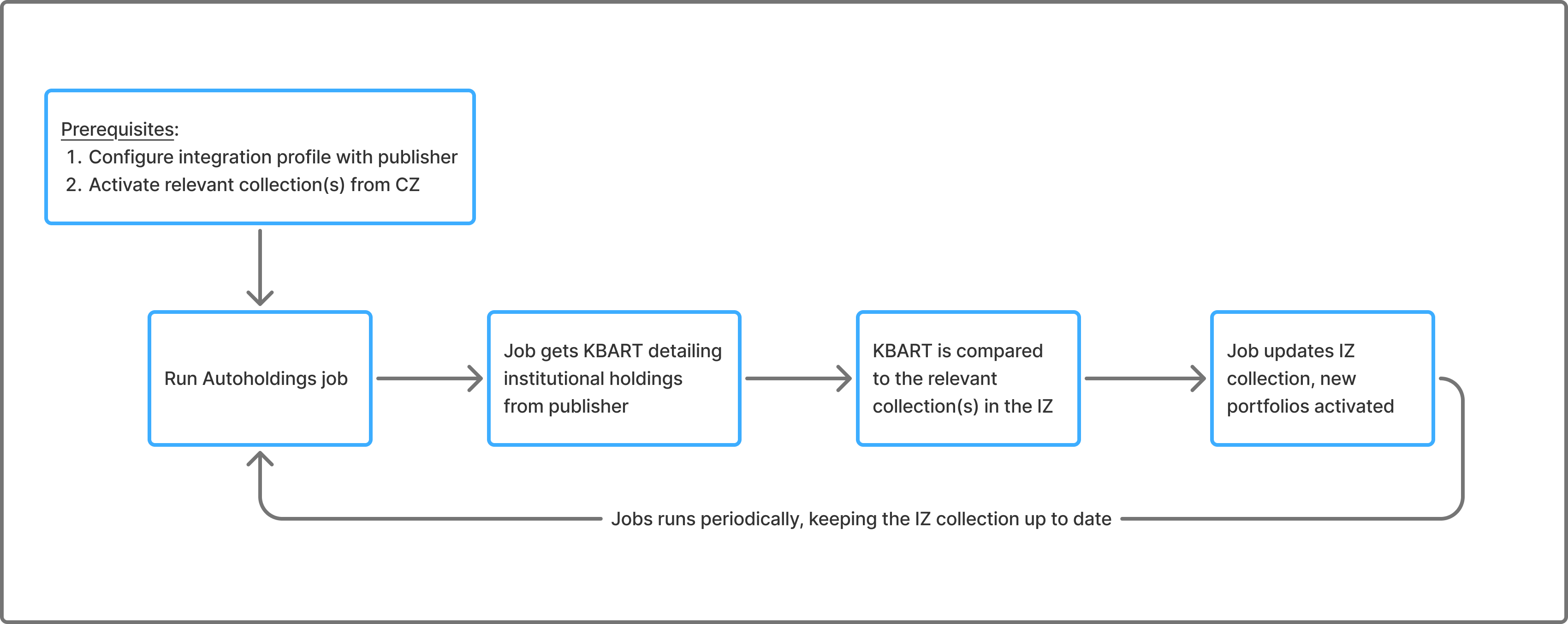
The Upload Electronic Holding (autoholding) process is set to automate the library's procedure of receiving ongoing updates from publishers regarding the library's Electronic holdings. El proceso automatizado se apoya en ficheros KBART que se recuperan automáticamente del editor a Alma. The KBART file which holds the library's holdings is matched to an existing Community Zone collection (which should be activated in the institution for the automatic integration to work) and a Community Zone-activated portfolio is created/removed according to the content of the KBART file. Ex Libris trabaja a conciencia con más y más editores para poder agregarlas e integrarlas a Alma y automatizar más los procesos de la biblioteca. Abajo puede ver una tabla que explica el proceso general:
Proceso de la tarea de autoholding
Frecuencia de actualizaciones
- Las colecciones de la Zona de la Comunidad (CZ) se actualizan diariamente.
- Se recomienda programar las tareas de autoholding para que se ejecuten semanalmente.
- La mayoría de los proveedores actualizan los ficheros de existencias institucionales semanalmente.
El programa específico de la carga se determina en el perfil de integración de cada proveedor; aunque puede haber varias opciones de programación para cada integración, la actualización en sí se hará solo cuando el proveedor tenga los ficheros actualizados. In cases where the scheduled job ran but there were no updates filed on the vendor's end, no updates will be done to the collection in Alma.
Set up the Job
Antes de ejecutar la tarea, debe hacer lo siguiente:
-
Activate the relevant CZ collections (see Autoholdings Integration per Provider). La recomendación de Ex Libris es configurar las colecciones de existencias automáticas para que no activen automáticamente nuevos portafolios (sin autoactivar). The activation of all relevant portfolios is done by the auto holdings job. Only use ‘Automatically activate new portfolios' when you subscribe to all content in a specific collection and want all new portfolios to be automatically activated.
-
Configure an integration profile of type Upload Electronic Holdings, for the specific provider (see Autoholdings Integration per Provider). Después de obtener su token de un proveedor, le recomendamos que espere una semana antes de ejecutar la tarea de existencias automáticas. This allows the provider time to generate your library's holdings file, which Alma will retrieve. If the job is triggered before the file is available, it will complete with errors and display the message: "The holdings file is missing for the institution unique ID.
Cómo la tarea actualiza la colección
The autoholdings job uses specific matching points to match KBART titles with portfolios in the collection.
In cases of multiple matches, the relevant portfolio(s) must be activated manually. For more information, see Monitoring the Upload Electronic Holdings Job.
Alma activates portfolios from the Community Zone based on the KBART file. If the matched portfolio is already activated, the job will update it with the recent coverage data from the kbart file, overriding any existing local coverage. Note that all other portfolio data (including linking, proxy, acquisitions data, etc.) remains unchanged unless the portfolio is deleted.
If the KBART file does not include portfolios that were previously active in Alma (for example, titles are removed from the KBART when access is removed by the provider), the job will delete those portfolios from the collection.
Note, however, that portfolios with associated PO lines are protected from deletion. These portfolios are not removed even if they are missing from the KBART file; instead, they are reported as Skipped Deletes in the job report (see Monitoring the Upload Electronic Holdings Job).
Autoholdings Integration per Provider
La Frecuencia de carga se aplica a la actualización de las existencias institucionales en la plataforma de cada proveedor. Muchos proveedores actualizan los ficheros de existencias institucionales semanalmente. For more details, see Frequency of Updates.
| Proveedor | Cargar Frecuencia * | Vea más |
|---|---|---|
| Oxford University Press | Semanalmente |
Upload Electronic Holdings from Oxford University Press La Zona de la Comunidad ofrece las siguientes colecciones electrónicas de Oxford University Press:
|
| Springer | Semanalmente | Upload Electronic Holdings from Springer
La Zona de la Comunidad ofrece las siguientes colecciones electrónicas de Springer:
|
| Sage | Semanalmente | Upload Electronic Holdings from Sage
La Zona de la Comunidad ofrece las siguientes colecciones electrónicas de Sage:
|
| Elsevier | Semanalmente | Upload Electronic Holdings from Elsevier
The Community Zone consolidates Elsevier's Community Zone collections into the following "Complete" collections:
|
| ProQuest Ebook Central | A diario | Upload Electronic Holdings from ProQuest Ebook Central for Subscriptions/Owned/DDA The Community Zone provides the following ProQuest Ebook Central electronic collection:
ProQuest Ebook Central Upload Electronic Holdings integration handles the following ProQuest Ebook Central titles:
|
| Ovid | Semanalmente | Upload Electronic Holdings from Ovid
La Zona de la Comunidad ofrece las siguientes colecciones electrónicas de Ovid:
|
| Wiley | Semanalmente | Upload Electronic Holdings from Wiley
La carga automática de existencias electrónicas ahora permite a las bibliotecas actualizar sus existencias dentro de las ofertas de revistas y libros de Wiley en un solo proceso automatizado. Una vez habilitado, el proceso descarga automáticamente un fichero de existencias con formato KBART de la plataforma Wiley, carga el fichero y actualiza sus existencias en las colecciones de Wiley. For this purpose, the following dedicated collections were added to the Community Zone, these collections reflect all books and journals available from Wiley:
|
| Taylor and Francis | Semanalmente | Upload Electronic Holdings from Taylor and Francis
La carga automática de existencias electrónicas permite a las bibliotecas actualizar sus existencias dentro de la colección de libros y revistas Taylor y Francis. Una vez habilitado, el proceso descarga automáticamente un fichero de existencias en formato KBART desde la plataforma Taylor & Francis, carga el fichero y actualiza sus existencias en la colección Taylor y Francis. Esta integración evita que los usuarios deban actualizar manualmente los portafolios que se actualizaron desde Taylor y Francis. La Zona de la Comunidad proporciona las siguientes colecciones electrónicas de Taylor y Francis:
|
| Project MUSE | Semanalmente | Upload Electronic Holdings from Project MUSE
Project MUSE relevant collection IDs:
|
| JSTOR | A diario
Running this job "Daily" is more resource-intensive. Ex Libris no bloquea esta opción si se selecciona. |
Upload Electronic Holdings from JSTOR
|
| Preseleccionar | Semanalmente |
Upload Electronic Holdings from Preselect La Zona de la Comunidad ofrece las siguientes colecciones electrónicas de Preselect:
|
Monitoring the Upload Electronic Holdings Job
El informe de la tarea Cargar existencias electrónicas incluye información general, como el número de títulos recién activados y el número de títulos eliminados (portafolios). Además (para todos los proveedores excepto EBC) incluye:
- A link to an Excel file listing all titles in the vendor's file for the specific institution and their processing status.
- A link to the Manage Deleted Repository page to view information on the deleted BIBs and Portfolios. For more information on the Manage Deleted Repository page, see Restoring Deleted Records.La página Gestionar repositorio borrado está en modo de solo visualización para todos los usuarios excepto para los usuarios con el rol 'REPOSITORY_MANAGER'. Repository managers can perform the action "Restore". Restored items are removed from the deleted holdings list.
- Counters for the number of Multiple Matches and Missing MMS errors (No MMS found).
Los portafolios con líneas de orden de compra no se borran en ninguna de los tareas de Cargar existencias electrónicas. They appear under Skipped Deletes in the report.
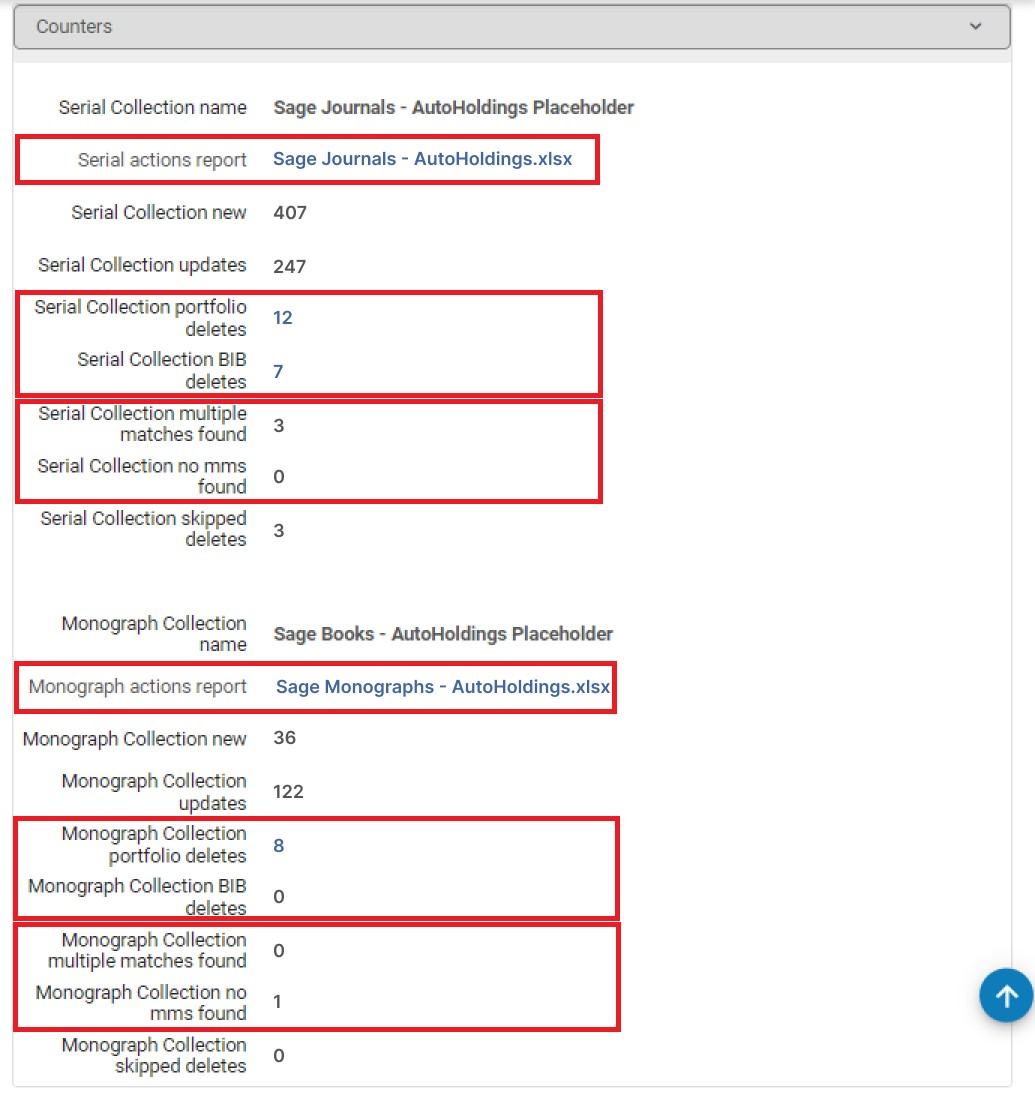 Informe de la tarea - Tarea de existencias electrónicas
En caso de errores en la coincidencia (multicoincidencia o no MMS), se recomienda descargar el fichero y revisarlo.
If the Upload Electronic Holdings job returns a "Completed with failures" message, the job is aborted, and no records are processed. The data is processed the next time the job runs, and the records are processed successfully.
Excel File Structure
The file includes bibliographic information on the title – in Title,ISBN/ISSN columns. Además, el fichero incluye 2 columnas importantes para cada título:
- Action – what happened to the title in Alma
- Errors/Warnings – if there was an issue with the title
Por ejemplo:
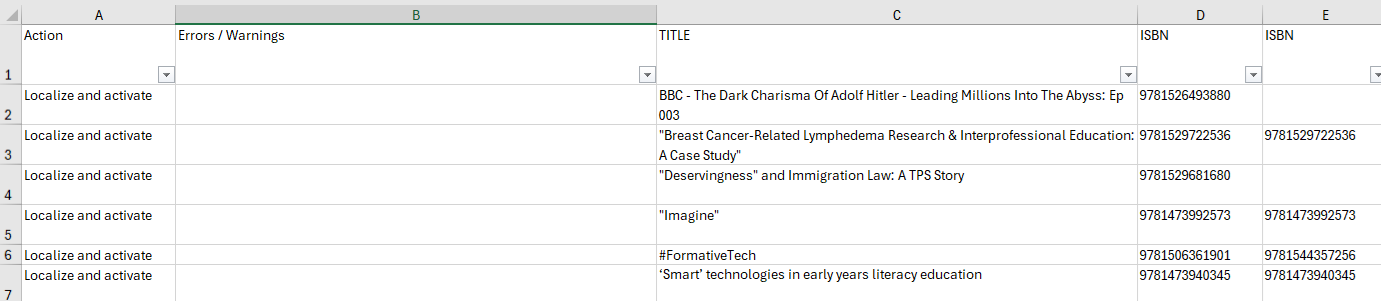
In most cases, the Errors/Warnings column is empty and the corresponding action column is Localize and activate or Update portfolio. Esto significa que se ha encontrado el título y que el portafolio se ha activado correctamente o que el portafolio existente se ha actualizado correctamente. If there is an issue with the specific title, it appears in the Errors/Warnings column.
Dos casos que requieren atención:
- Multiple matches – the autoholdings job matches based on ISBN/ISSN for most providers. Si varios portafolios de la colección de la Zona de la Comunidad correspondiente tienen el mismo ISBN/ISSN, se encuentra una coincidencia múltiple y la tarea no activa automáticamente el portafolio, ya que no sabe cuál activar. En este caso, debe ir directamente a la colección de la Zona de la Comunidad y activar manualmente el portafolio correspondiente. Se trata de una acción puntual. The next run of the job does not deactivate the portfolio that you activated manually as its ISSN/ISBN exists in the input file.
- No MMS found – no match was found in the relevant Community Zone collection. This might happen for new titles that are already in the specific institution's file but were not yet loaded to the Community Zone. En este caso, la recomendación es esperar a la siguiente ejecución de la tarea. If, after a week, the title is still not in the Community Zone, please open a support case.
