
Primoで機関を設定
The steps used to configure the Primo institution, libraries, and IP ranges for Alma integration.
If you are working with Primo VE, see Primo VE documentation for more details.
PrimoをAlmaと組み合わせて使用するには、以下で説明するように、PrimoバックオフィスでPrimo機関を設定する必要があります。
-
Primoバックオフィスで、[Primoホーム] > [継続的な設定ウィザード] > [機関ウィザード]を選択します。
-
機関について、Alma機関のためにPrimo機関を作成していない場合、機関の情報を入力し、[新機関の作成]で[作成]を選択します。作成している場合は、次の手順に進みます。
-
[編集のための機関の選択]セクションで、Almaに使用する機関の横にある[編集]を選択します。
[機関の編集]ページが開きます。
-
[機関の一般的属性]セクションで、次のフィールドを入力します。
-
Alma Institution Code – Enter the institution code defined in Alma.
-
SFX機関 – 空欄のままにします。
-
Source ILS Institution Codes – Enter the institution code defined in Alma.
-
Almaキャンパスコード – キャンパスレベルでPrimo機関を定義する場合、Almaで定義されるAlma目録ネットワークグループを入力します。それ以外の場合、このフィールドは空欄のままにします。
For information regarding the other fields, see Configuring Primo Institutions and Libraries.
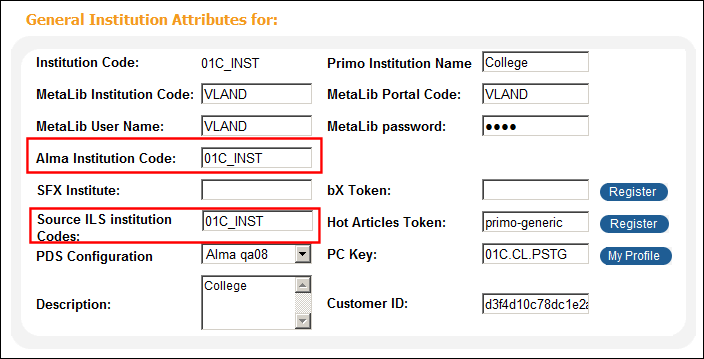 機関の一般的属性(機関ウィザード)
-
-
[基本配信URL]セクションで、次のフィールドを入力します。
パラメータ 詳細 Alma Enter the URL of Alma's link resolver (for more information, see Your Alma Domains).次のフォーマットを使用します。 https://<Alma delivery domain>/view/uresolver/<Alma_institution_code>/openurlたとえば:https://university.userservices.alma.exlibrisgroup.com/view/uresolver/01UNI_INST/openurlAPAC sites should use the accelerated <Alma delivery domain>.例:https://university-a.userservices.alma.exlibrisgroup.com/view/uresolver/01UNI_INST/openurlIf you are defining Primo institution's at the campus level, include the campus code.次のフォーマットを使用します。https://<Alma delivery domain>/view/uresolver/<Alma_institution_code>/openurl-<Alma_campus_code>たとえば:https://university.userservices.alma.exlibrisgroup.com/view/uresolver/01UNI_INST/openurl-NORTHAlmaサービスページURL サービスページビューの基本URLを入力します。For more information, see Base_URL for the Services Page.Currently, this field is used for the bX Hot Articles service (classic Primo UI) and for the bX Recommendations service (new Primo UI).For more information about bX services, see bX Hot Articles and bX Recommendations.次のフォーマットを使用します。
http://<primo server host:port>/openurl/<Primo_Inst_Code>/<Primo_Services_Page_View_Code>?To switch from the classic Primo UI to the new Primo UI, you must select the New UI Enabled check box and specify the view used for the new UI from the Select View drop-down list.
Primoの新しいUIに直接接続するPrimoの新規インストールの場合、次のフォーマットを使用します。
http://<primo server host:port>/primo-explore/openurl?institution=<Primo_Inst_Code>&vid=<Primo_View_Code>For the new Primo UI, it is no longer necessary to create a separate view for the Services page.
RTA Enter the URL that provides Primo with real-time availability statuses.次のフォーマットを使用します。https://<Alma domain>/view/publish_availAPACのサイトは、高速化されたAlmaドメインの代わりに<Alma alternate domain>を使用する必要があります。For details, see Your Alma Domains.API 次を実行するAlma APIのURLを入力します。
-
マイライブラリカードの機能に必要なユーザー情報を返します。
-
MetaLibを使用したリモート検索によって返されたレコードに対して、Alma RSI APIを使用してフルテキストの利用可否表示を返します。
Use the following format:https://<Alma domain>.The URL must be defined previously in the ILS API Configuration mapping table.APACのサイトは、高速化されたAlmaドメインの代わりに<Alma alternate domain>を使用する必要があります。For details, see Your Alma Domains.PCキー
Specify the CDI Key received during the registration of CDI.For more information, see CDI Documentation and Training.
コレクション
コレクションディスカバリーインターフェイスを使用している場合、このフィールドをAPI基本URLと同じ値に設定します。For more information about Collection Discovery, see Configuring Discovery for Alma Collections.
コレクションAPIリクエストは1時間に1回送信され、メモリにキャッシュされます。(「コレクション」フィールドの横に表示される)[コレクションAPIレスポンスの更新]ボタンは、必要に応じて手動でAPIレスポンスを更新することができます。
DBカテゴリ
データベースリポジトリの基本URL。データベースカテゴリでデータベース検索インターフェイスを使用しているAlmaのお客様の場合、このフィールドはAPIフィールドと同じ値に設定する必要があります。For more information, see Configuring the Database Search Interface.
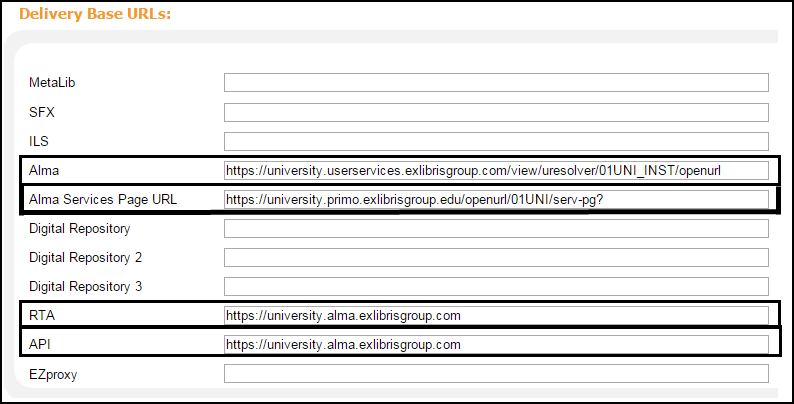 基本配信URL(機関ウィザード)Almaと統合する際、SFXの基本URLフィールドは空欄のままにしておく必要があります。それ以外の場合、システムはPrimoがSFXリンクリゾルバを使用していると想定します。
-
-
If you want switch to the new Primo UI and receive bX recommendations, you must set the New UI Enabled field and populate the Alma Services Page URL field.For additional information, see bX Recommendations.
-
Almaで使用される図書館の名前を取得します。For more information, see Viewing and Exporting the Alma Libraries.
-
[図書館]セクションでは、[機関の編集]ページの次のセクションのいずれかを使用して、Alma関連図書館を定義します。
-
図書館のロード – Almaから図書館をエクスポートするために使用するファイルの名前を入力します。For more information, see Loading Libraries.
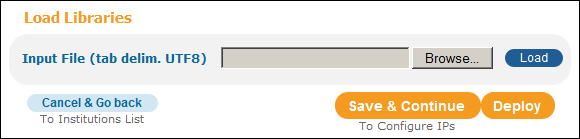 [図書館のロード]セクション(機関ウィザード)
-
新規図書館の作成 – このセクションでは、AlmaからPrimoに個々のコードをマッピングすることができます。次のフィールドに入力します。
-
Primo図書館コード – Primoで使用される図書館のコードを入力します。
-
Primo図書館名 – Primoで使用される図書館の名前を入力します。
-
ソースILS図書館コード – PrimoにマッピングしているAlma図書館コードを入力します。
-
一般的ルールとして、Primo図書館コードは、Almaで使用されるコードと同一にすることができます。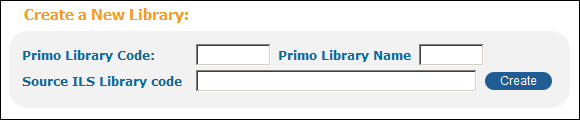 [新規図書館の作成]セクション(機関ウィザード)
-
- [保存して続行]を選択します。
[IPの編集]ページが開きます。
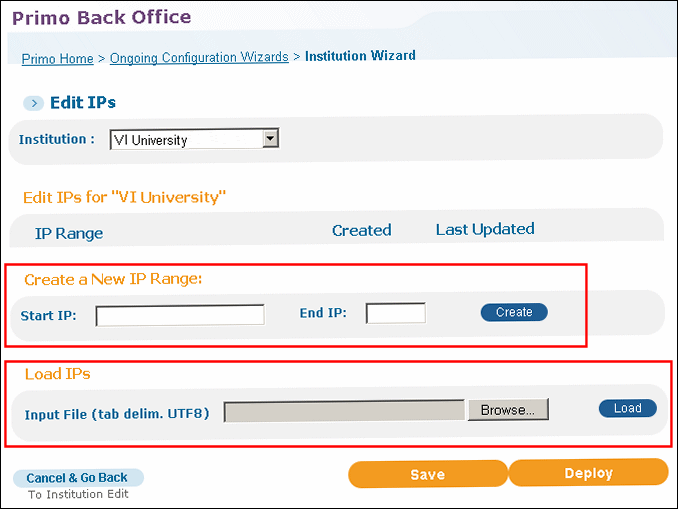 [IPの編集]ページ
-
[IPの編集]ページで、[新しいIPレンジの作成]セクションか[IPのロード]セクションを使用して、機関のIPアドレスを設定します。For more information, see Loading IPs in Primo Documentation.
-
フロントエンドに変更を配置します。
See Alma and Primo Integration Overview (3 min.) for detailed training sessions on Alma-Primo integration.
Page tags: article:topicproduct:almacontent:Documentationlang:englishprimo institutionservices page urlload libraryload IP
