
機関間で切り替え
ネットワークゾーンのメンバー機関にログインすると、ユーザーは別の機関に切り替えることができます。
For links to online help pages related to collaborative networks, see Collaborative Networks.
共同ネットワークのユーザーには、ネットワーク内の複数機関のユーザーアカウントを割り当てることができます。有効にすると、ユーザーは、場所を変更することなく、ユーザーアカウントを持っているメンバー機関を簡単に切り替えることができます。
ユーザー認証にシングルサインオンを使用する共同ネットワークの場合、ユーザーは機関を切り替えるときにログインする必要なく、メンバー機関を切り替えることができます。メンバー機関間の切り替えが再度ログインを要求しないようにするには、ネットワーク内の機関が同じIdPを共有する必要があります。この条件が満たされている場合、AからBに変更すると、同じIdPであるため、SSOログインが有効になります。
ただし、機関間の切り替えはIdPの共有を義務付けていません。The switch is possible also when using internal accounts for authentication, but it requires re-login in with every change.
This feature must be enabled and configured using the customer parameters display_consortia_urls and open_consortia_link_options.
- Access the Go to institution pane from the persistent menu.
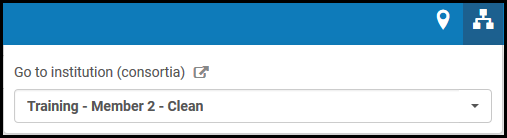
機関リンクを変更する - ログインするメンバー機関を選択します。選択したメンバー機関のAlmaホームページが開きます。
You can add a widget for the Alma home page that allows you to switch between member institutions.
