
電子所蔵の自動アップロード
概要
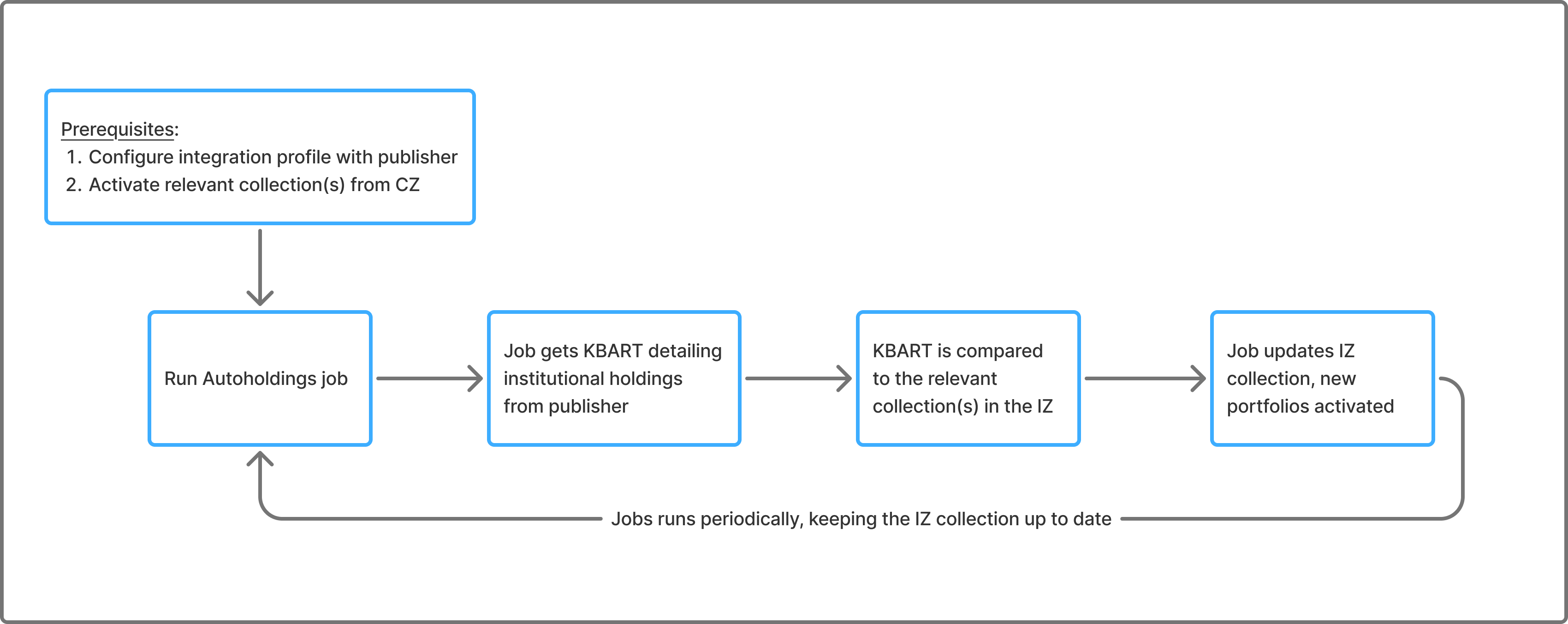
The Upload Electronic Holding (autoholding) process is set to automate the library's procedure of receiving ongoing updates from publishers regarding the library's Electronic holdings.自動プロセスは、出版社からAlmaに自動的に取得されるKBARTファイルに依拠して行われます。The KBART file which holds the library's holdings is matched to an existing Community Zone collection (which should be activated in the institution for the automatic integration to work) and a Community Zone-activated portfolio is created/removed according to the content of the KBART file.Ex Libris は、より多くの出版社との連携に意識的に取り組んでおり、Alma に追加して統合することで、図書館プロセスのさらなる自動化を目指しています。以下は、一般的なプロセスを拡大した図です。
自動所蔵ジョブプロセス
更新頻度
- コミュニティ ゾーン (CZ) コレクションは毎日更新されます。
- 自動所蔵ジョブを毎週実行するようにスケジュールすることをお勧めします。
- ほとんどのプロバイダーは、機関保有ファイルを毎週更新します。
アップロードの具体的なスケジュールは、各プロバイダーの統合プロファイルで決定されます。統合ごとにさまざまなスケジュール オプションがある場合がありますが、実際の更新は、ベンダーが更新されたファイルを持っている場合にのみ行われます。In cases where the scheduled job ran but there were no updates filed on the vendor's end, no updates will be done to the collection in Alma.
Set up the Job
ジョブを実行する前に、次の操作を行う必要があります。
-
Activate the relevant CZ collections (see Autoholdings Integration per Provider).ExLibrisの推奨事項は、自動所蔵資料コレクションを設定して、新しいポートフォリオが自動的にアクティブ化されないようにすることです(自動アクティブ化しない)。The activation of all relevant portfolios is done by the auto holdings job.Only use ‘Automatically activate new portfolios' when you subscribe to all content in a specific collection and want all new portfolios to be automatically activated.
-
Configure an integration profile of type Upload Electronic Holdings, for the specific provider (see Autoholdings Integration per Provider).プロバイダーからトークンを取得した後、自動所蔵資料ジョブを実行する前に1週間待つことをお勧めします。This allows the provider time to generate your library's holdings file, which Alma will retrieve.ファイルが利用可能になる前にジョブがトリガーされた場合、エラーが発生して完了し、「機関の一意のIDの所蔵資料ファイルがありません」というメッセージが表示されます。
ジョブがコレクションを更新する方法
自動所蔵ジョブは、特定の一致ポイントを使用して、KBART タイトルをコレクション内のポートフォリオと一致させます。これは、フィールド 776 $z で検索することによって行われます。
現在、複数の一致が発生した場合、関連するポートフォリオ (またはその両方) を手動でアクティブ化する必要があります。For more information, see Monitoring the Upload Electronic Holdings Job.
Almaはコミュニティゾーンからそれらのポートフォリオをアクティブ化します。KBARTファイルにAlmaですでにアクティブ化されているポートフォリオが含まれていない場合(所蔵資料へのアクセスが出版社によって削除された場合)、Almaは関連するコレクションから彼らのポートフォリオを削除します。
ローカル カバレッジを含むすべての所蔵は、ベンダーのファイル内のカバレッジによって上書きされます。
PO lineは自動所蔵ジョブによって上書きされません。
プロバイダーごとの自動所蔵統合
アップロード頻度は、各プロバイダ プラットフォーム上の機関保有資産の更新に適用されます。多くのプロバイダは、機関の所蔵ファイルを毎週更新します。For more details, see Frequency of Updates.
| プロバイダー | アップロード頻度* | 続きを見る |
|---|---|---|
| Oxford University Press | 週に一度 |
Upload Electronic Holdings from Oxford University Press コミュニティゾーンでは、次のオックスフォード大学出版局の電子コレクションを提供しています:
|
| Springer | 週に一度 | Upload Electronic Holdings from Springer
コミュニティゾーンは、次のSpringer電子コレクションを提供します。
|
| Sage | 週に一度 | Upload Electronic Holdings from Sage
コミュニティゾーンは、次のSage電子コレクションを提供します。
|
| Elsevier | 週に一度 | Upload Electronic Holdings from Elsevier
The Community Zone consolidates Elsevier's Community Zone collections into the following "Complete" collections:
|
| ProQuest Ebook Central | 毎日 | Upload Electronic Holdings from ProQuest Ebook Central for Subscriptions/Owned/DDA The Community Zone provides the following ProQuest Ebook Central electronic collection:
ProQuest Ebook Central Upload Electronic Holdings integration handles the following ProQuest Ebook Central titles:
|
| Ovid | 週に一度 | Upload Electronic Holdings from Ovid
コミュニティゾーンは、次のOvid電子コレクションを提供します。
|
| Wiley | 週に一度 | Upload Electronic Holdings from Wiley
電子所蔵の自動アップロードにより、図書館はWileyジャーナルおよび書籍の提供物内の所蔵を単一の自動プロセスで更新できるようになりました。有効にすると、プロセスは自動的にKBART形式の所蔵ファイルをWileyプラットフォームからダウンロードし、ファイルをアップロードして、Wileyコレクションの所蔵を更新します。 For this purpose, the following dedicated collections were added to the Community Zone, these collections reflect all books and journals available from Wiley:
|
| Taylor およびFrancis | 週に一度 | Upload Electronic Holdings from Taylor and Francis
電子所蔵の自動アップロードにより、図書館は Taylor&Francis の書籍コレクション内の所蔵を更新できます。有効にすると、プロセスはTaylor および Francis プラットフォームからKBART形式の保有ファイルを自動的にダウンロードし、ファイルをアップロードして、Taylor および Francis コレクションの所蔵を更新します。この統合により、Taylor および Francis 側で更新されたポートフォリオを手動で更新する必要がなくなります。 コミュニティゾーンは、次の Taylor および Francis の電子コレクションを提供します。
|
| Project MUSE | 週に一度 | Upload Electronic Holdings from Project MUSE
プロジェクトMUSE関連コレクションID:
|
| JSTOR | 毎日
Running this job "Daily" is more resource-intensive.このオプションを選択した場合、Ex Librisはブロックしません。 |
Upload Electronic Holdings from JSTOR
|
| 事前選択 | 週に一度 |
Upload Electronic Holdings from Preselect コミュニティゾーンは、次の事前選択電子コレクションを提供します。
|
Monitoring the Upload Electronic Holdings Job
電子所蔵アップロードジョブのレポートには、新しくアクティブ化されたタイトルの数や削除されたタイトル (ポートフォリオ) の数などの一般的な情報が含まれます。さらに(EBCを除くすべてのプロバイダーの場合)以下が含まれます。
- A link to an Excel file listing all titles in the vendor's file for the specific institution and their processing status.
- 削除された BIB とポートフォリオに関する情報を表示するための削除されたリポジトリの管理ページへのリンク。For more information on the Manage Deleted Repository page, see Restoring Deleted Records.削除されたリポジトリの管理ページは、「REPOSITORY_MANAGER」を持つユーザーを除くすべてのユーザーに対して表示専用モードになっています。Repository managers can perform the action "Restore".Restored items are removed from the deleted holdings list.
- 複数一致およびMMS不足エラー (MMS が見つかりません) の数のカウンター。
発注書明細を含むポートフォリオは、電子所蔵資料のアップロードジョブのいずれでも削除されません。They appear under Skipped Deletes in the report.
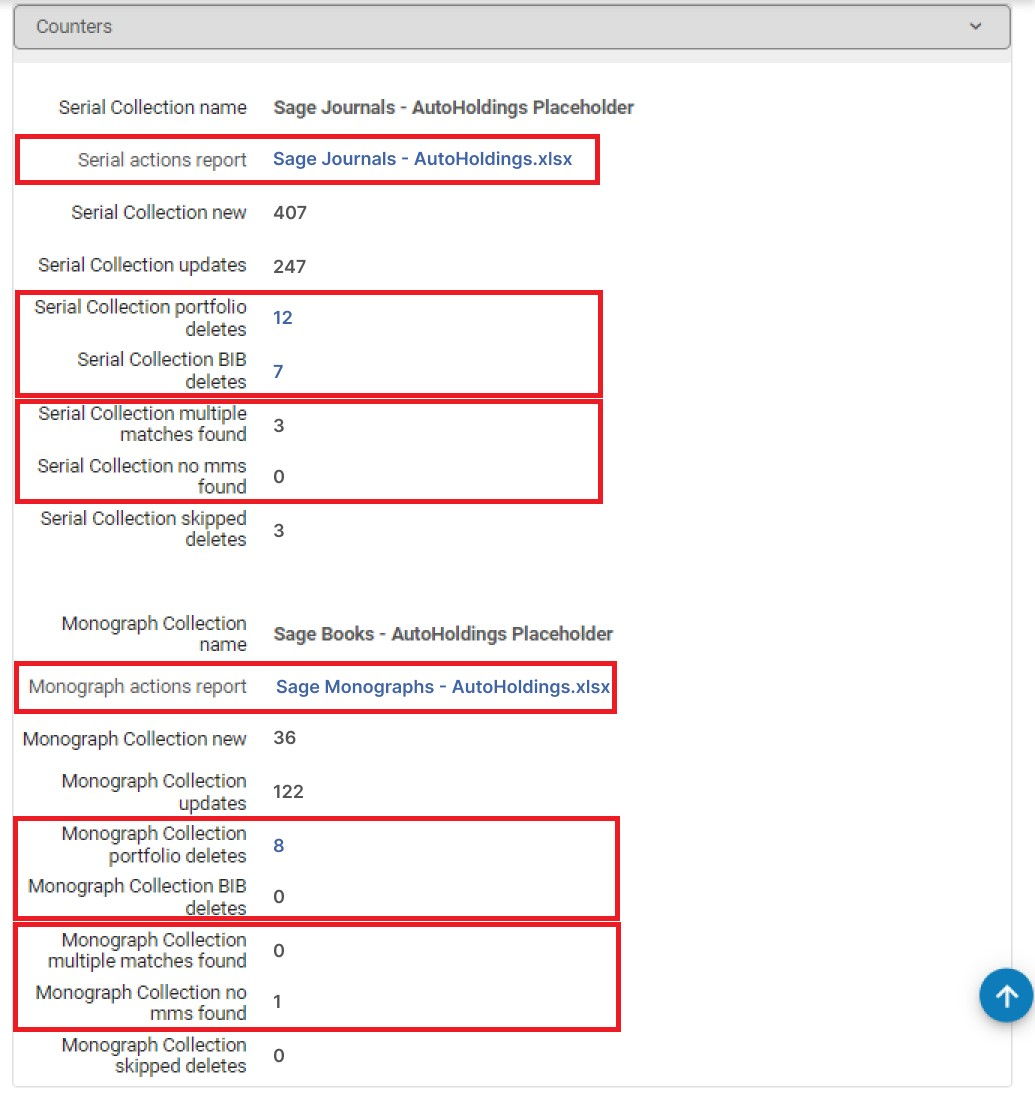 ジョブレポート - 電子所蔵ジョブ
一致エラー(複数マッチングまたはMMSなし)が発生した場合は、ファイルをダウンロードして確認することをお勧めします。
If the Upload Electronic Holdings job returns a "Completed with failures" message, the job is aborted, and no records are processed.The data is processed the next time the job runs, and the records are processed successfully.
Excel File Structure
The file includes bibliographic information on the title – in Title,ISBN/ISSN columns.In addition, the file includes 2 important columns for each title:
- アクション– Almaのタイトルがどうなったのか
- エラー/警告– タイトルに問題があった場合
例:
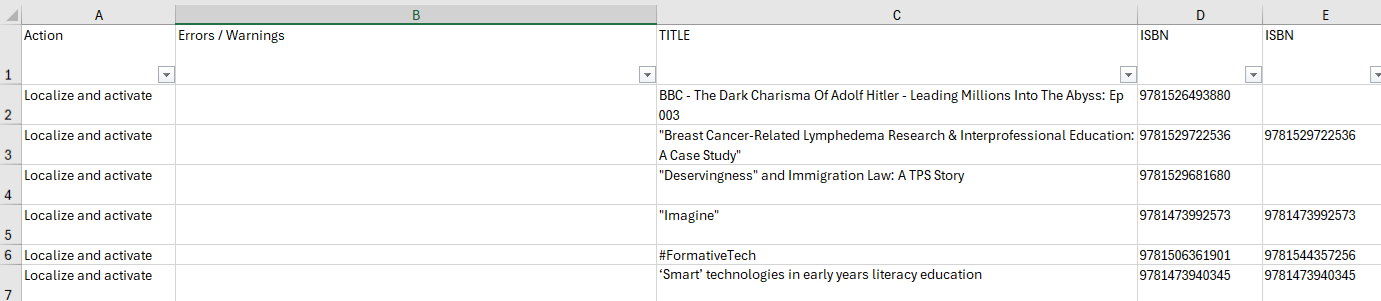
ほとんどの場合、エラー/警告列は空欄で、対応するアクション列がローカライズしてアクティブ化するまたはポートフォリオを更新になっています。これは、タイトルが見つかり、ポートフォリオが正常にアクティブ化されたか、既存のポートフォリオが正常に更新されたことを意味します。特定のタイトルに問題がある場合は、エラー/警告列に表示されます。
注意が必要なケースシナリオは次の 2 つです:
- 複数の一致– ほとんどのプロバイダーでは、自動所蔵ジョブは ISBN/ISSN に基づいて一致します。関連する CZコレクション内の複数のポートフォリオに同じ ISBN/ISSN がある場合、複数の一致が見つかり、どのポートフォリオをアクティブ化すればよいかわからないため、ジョブはポートフォリオを自動的にアクティブ化しません。この場合は、コミュニティゾーンコレクションに直接移動し、関連するポートフォリオを手動でアクティブ化する必要があります。This is a one-time action.The next run of the job does not deactivate the portfolio that you activated manually as its ISSN/ISBN exists in the input file.
- タイトルが見つかりません– 関連するコミュニティゾーンコレクションに一致するものが見つかりませんでした。This might happen for new titles that are already in the specific institution's file but were not yet loaded to the Community Zone.この場合、次のジョブの実行を待つことをお勧めします。If, after a week, the title is still not in the Community Zone, please open a support case.
