
リストアリクエスト作業の表示
恒久的なロケーションに復元する必要があるアイテムのリポートを表示します。
For links to all the main fulfillment documentation pages see Fulfillment.
- フルフィルメント管理者
- 一般システム管理者
The job Requests - Restore Temporary Shelved Items runs nightly to create restore requests (request type = restore item) on all of the institution's temporarily shelved items whose due-back date is the current day or earlier so that these items can be restored to their permanent locations by the circulation desk operators at these locations.(一時的な場所にある返却期日のないアイテムは、このジョブでは無視されます。)
これらのアイテムには次のものが含まれます。
- 終了したコースの図書リストアイテム
- コースの進行中に削除されたリソースなど、一時的に削除されたアイテムのうち返却期日が来たもの
ジョブのリストが[復元ジョブのリスト]ページに表示されます。For information on configuring this job, see Configuring Fulfillment Jobs.
The behavior of this job is affected by the configuration of the Restore Jobs Profiles, which is initially performed during the implementation stage.As part of this configuration, the libraries for which the job should create restore requests, and when the restore requests should be created (how long after the due-back dates of the items), are defined.Only Alma Support can access this configuration.
[復元ジョブのリスト]ページ([フルフィルメント]> [アドバンスツール]> [復元リクエストジョブの表示])で、次のようにアクションメニューから復元ジョブのアクションを選択します。
- 表示–ジョブリポートページを開き、ジョブ詳細のステータス(正常に処理されたアイテムと失敗したアイテムの数など)を表示します。
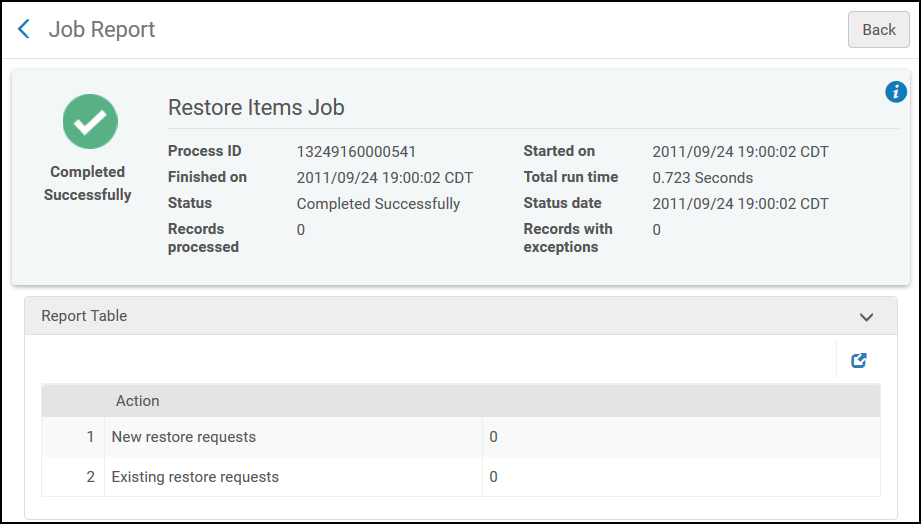
「ジョブリポート」ページ - イベント-イベントリポートページを開き、ジョブの処理中に発生したイベントの詳細を表示します。
「イベントリポート」ページ
Page tags: article:topicAdvanced Toolsproduct:almacontent:Documentationlang:englishRestore request jobView a restore job
