Intota: Licenses
How does my library use Intota to manage licenses?
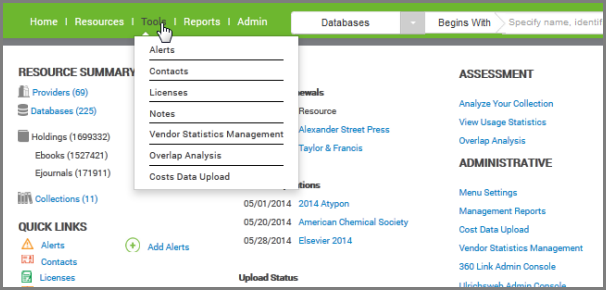
You can keep track of your subscription license agreements and terms of use by attaching licenses to your resources in Intota, and using Intota functionality to communicate to staff and manage access to your resources. Access Licenses by clicking Tools on the menu bar and then selecting Licenses in the submenu:
You can also use the Quick Links section of your Intota home page to access Licenses. The rest of this document covers the following topics:
Background Information about Licenses in IntotaThe system is built to be as flexible as possible to meet libraries' needs. A few aspects in particular to mention:
- Full inheritance: Licenses inherit from provider to database to holding and from collection to database to holding. That means that you can have one license apply at the database level, but add a separate license for a single holding within that database.
- More than one license can be added to a resource, all of which can be active: This was done to allow both a local and a consortia license to be added to a resource.
- Prevailing terms of use: In the case of more than one license that applies to a resource, one of them must be set to indicate its Terms of Use prevail. This feature enables the system to display the correct Terms of Use to an end-user in the hosted-resource discovery tools.
License Terms of Use can be displayed to end-users through the E-Journal Portal or 360 Link. You can choose which terms of use to share with your end-users, while reserving others for staff only, from within Intota.
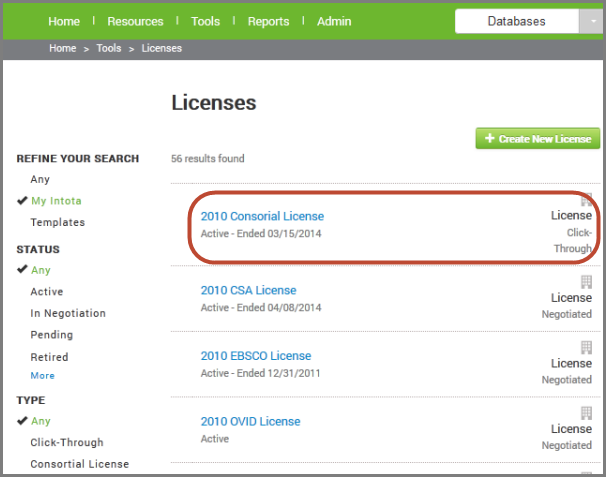
Viewing License DetailsFrom the Licenses page, click on a
license name to view details or use the
License link on the right side to view the preview pane of license information. Use the left side
Refine Your Search facets to narrow your list of results.
Note that another way to access licenses is through your resources in Intota. Licenses you have added for a specific resource display when you are viewing details of the resource (such as when you view a
Database Details page or
Provider Details page ). When viewing the full
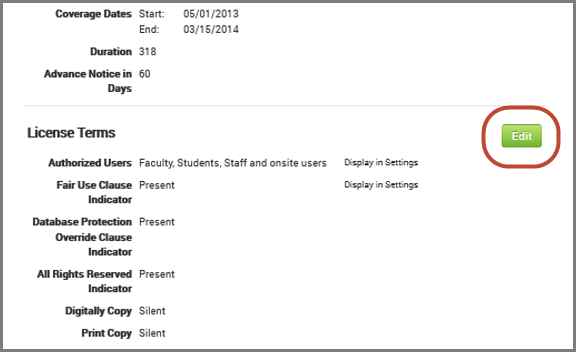
License Details page, by default the fields that display are those fields that are populated; click
Edit to view all available fields.
License information is in three sections:
Related Resources Helpful Steps Prior to Adding Your First License to IntotaSuggested action items before you begin adding your first license:
License Fields and License Language: Familiarize yourself with license fields and license language. Read the
Glossary of Intota Resource Management Terms and read the
Digital Library Federation (DLF) Electronic Resource Manager Initiative (ERMI)
report. Then, read several licenses and look for similarities and differences.
Desired License Information: Determine what license information you want to enter in Intota, what terms you want to display publicly, and how information can and should be entered according to a local standard.
License "template": Create a license "template" in Intota, which will consist of information that is true for most of your licenses. You can use the instructions in the below
Adding License Information Into Intota section but don't add information that will be in specific licenses.
General sense of the license: Before you enter a specific license, read it through without worrying about what piece should be matched with which field. Get a feel for the license as a whole.
License compared to Intota license fields: Read the license again and match text to fields. This can be done by writing on the license, filling out the
license form (template), or entering information directly into Intota. If you use a license form, someone who understands license language can fill out the form and the data can be entered by someone else.
Adding License Information into IntotaA new license can be created in one of three ways:
- Copy one of the common licenses already created in Intota's License Template Library.
- Build your own license in Intota.
- Download and update the License Data Uploader report (spreadsheet) and send it back to us to upload multiple licenses at one time.
Details regarding all three methods are in the
Creating Licenses article.
Associating Resources and LicensesYou can connect resources in your Intota profile with licenses you are also managing in Intota. To do this you can either start from a license and add a resource, or you can start from a resource and add a license. See
Attaching Resources and Licenses.
Displaying License Information to UsersYour E-Journal Portal and 360 Link users can be presented with license terms you manage in Intota. See
Display License Terms of Use in 360 Products.
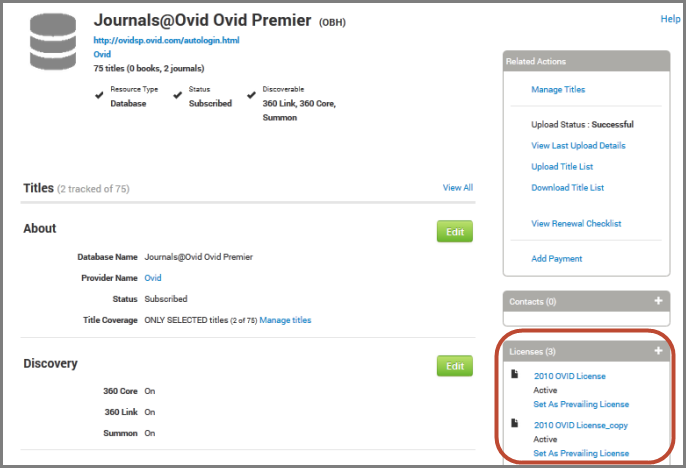
Setting Prevailing License TermsIf your library has more than one license that applies to a particular resource, you can choose which terms of use will prevail, so that your end users see only the correct terms.From the
Database Details page for the resource, use the
"Set as Prevailing License" link in the right side Licenses pane to select your prevailing license.
After you save your selection, the license in the Licenses pane will indicate that it is the prevailing license.
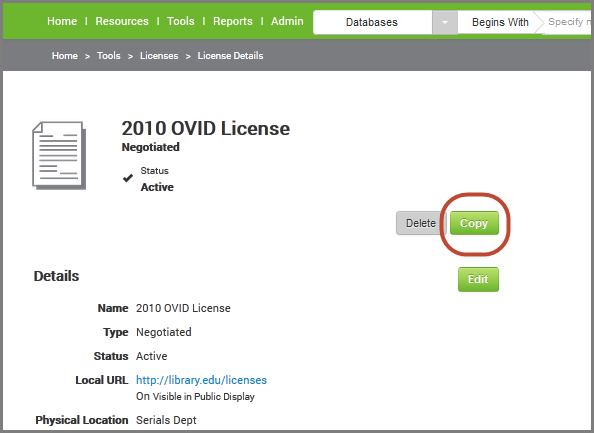
Duplicating a License to Create a License TemplateTo make a license template, you can copy an existing license and use the copy as a template.This feature is especially useful for member libraries that have inherited a license from a consortium, because inherited licenses cannot be edited. Instead, a member library can copy the inherited license and customize the new local license.To copy a license:From the Intota home page, click Tools on the menu bar and then select Licenses in the submenu.Find the license you want to copy and click on it. From the License Details page, click
Copy on the right side.
A new License Details page opens up with your new, copied license. See description of the page in the above Viewing License Details section.
Glossary of Intota Resource Management TermsSee a list of terms and definitions in the
glossary.
- Date Created: 26-May-2014
- Last Edited Date: 14-Jun-2014
- Old Article Number: 10798
Additional Information
Intota: User Guide