
Intota: Training for Getting Started with Intota
What is the recommended learning path for my library that is new to Intota?
Welcome to Intota! These training resources will get you started with Intota's library services platform for collection management, discovery and assessment. The training begins with learning how to populate your Intota profile with important information about your collection, and then from there the training moves into the four ERM (E-Resource Management) data repositories in Intota - Contacts, Licenses, Renewals and Cost - and Intota's flexible tool set for building effective workflows:
- Introduction to Intota
- ERM (E-Resource Management) Basics and Contacts Administration
- Resource Renewals Workflows
- License Administration and Workflows
- Cost/Payments and Funds
- Intota Shared Resource Functionality
- This session is for libraries that subscribe to Intota's Interlibrary Shared Resources feature set for sharing databases and licenses amongst Intota and Client Center profiles of two or more libraries working collectively.
- E-Journal Portal (A to Z List)
- Note that the E-Journal Portal is a discovery tool for Ejournals and Ebooks; it is not an integral part of getting started with Intota's web-scale discovery layer, Summon. Every Intota subscription includes the E-Journal Portal, and many libraries choose to provide it to their end users.
If you are currently using Intota you may find the sessions below to be useful or you can view the Recorded Training Sessions and Special Event Presentations for Management and Discovery Services page under 360 Core / Client Center training to find additional training that goes beyond the core topics listed below.
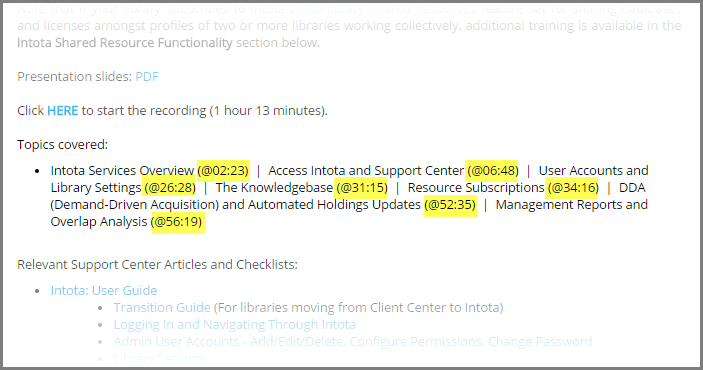
- Need to re-visit a particular training topic? Use the progress bar to jump to the time stamp listed next to the topic:
Need further assistance? Contact your Implementation Manager at Ex Libris. If you do not have their contact information readily available you can always reach your implementation manager by using the Support Portal.
Also remember the Intota user community can be a great resource as you are learning the fundamentals below, and afterwards when you continue to learn more and optimize Intota to best meet your needs. Learn more about the Intota Online Community in the Product Documentation for 360 Core / Client Center.
Objectives include:
- Gain a level of comfort in navigating around Intota for accomplishing your management, discovery and assessment tasks.
- Learn how to maintain your Intota profile with critical information such as the makeup of your eResources and Intota account holders' permission sets.
- Understand how to use Management Reports to extract and analyze your library data.
Note that if your library subscribes to Intota's Interlibrary Shared Resources feature set for sharing databases and licenses amongst profiles of two or more libraries working collectively, additional training is available in the Intota Shared Resource Functionality section below.
Presentation slides: PDF
Click HERE to start the recording (1 hour 13 minutes).
Topics covered:
- Intota Services Overview (02:23) | Access Intota and Support Center (06:48) | User Accounts and Library Settings (26:28) | The Knowledgebase (31:15) | Resource Subscriptions (34:16) | DDA (Demand-Driven Acquisition) and Automated Holdings Updates (52:35) | Management Reports and Overlap Analysis (56:19)
For relevant Support Center Articles and Checklists: Intota: User Guide
ERM (E-Resources Management) Basics and Contacts Administration
Objectives include:
Understand the scope of Intota's four main ERM data repositories (Contacts, Licenses, Renewals, Cost/Payments) and associated workflow tools. Ability to start developing your implementation strategy based on recommendations and best practices from the Intota community. Learn how to administer Contacts.
Presentation slides: PDF
(Sorry, there is no video recording available.)
Topics covered:
- Intota E-Resource Management (ERM) Overview & Impact
- Intota Training Plan and Library Milestones
- Library Project Planning Best Practices
- Intota Data Repositories Overview
- Contacts
- Collections
- Menu Settings
- Management Reports for Contacts
Objectives:
- Learn how to manage subscription renewals effectively with Intota's workflow tools.
- Understand how to generate reports about your renewals.
Presentation slides: Not Applicable. Session is presented 100% within a live Intota profile.
Click HERE to start the recording (49 minutes).
Topics covered:
- Resource Renewals Tool (01:02) | Database Statuses and Menu Management (03:11) | Status Alerts (13:34) | Resource Renewals Tool (22:59) | Resource Renewals Menus (29:48) | Management Reports for Renewals (40:38)
License Administration and Workflows
Objective:
- Find out how to manage licenses and generate reports.
Note that if your library subscribes to Intota's Interlibrary Shared Resources feature set for sharing licenses and databases amongst profiles of two or more libraries working collectively, additional training is available in the Intota Shared Resource Functionality section below. Presentation slides: Not Applicable. Session is presented 100% within a live Intota profile.
Click HERE to start the recording (38 minutes).
Topics covered:
License Administration Workflow (00:00) | Creating a New License (04:06) | License Menus (23:52) | Management Reports for Licenses (26:04)
Objective:
- Understand key points and functionality of adding cost data to Intota resources
Presentation slides: PDF.
Click HERE to start the recording (36 minutes).
Topics Covered:
- Adding Costs Manually
- Cost Payment Menu Manager
- Batch Uploads / Cost Data Uploader
- Management Reports for Costs
- Support Center Documentation
Intota Shared Resource Functionality
Note that this session is applicable to you if your library subscribes to Intota's Interlibrary Shared Resources feature set offering the ability to share databases and licenses amongst Intota and Client Center profiles of two or more libraries working collectively. Objective:
- Understand how a Manager (parent) library can share e-resource and license information in its Intota profile with Member libraries that choose to inherit the data.
Presentation slides: PDF.
Click HERE to start the recording (26 minutes).
Topics covered:
- Interlibrary Shared Resources Model (ISR) in Intota (01:46) | Consortium Manager and Sharing Resources (05:50) | Consortium Members and Inheriting Resources (11:09) | Duplicate Resources (19:10) | Management Report for Sharing and Inheritance (21:36)
Customizing your E-Journal Portal (A to Z List)
The E-Journal Portal is a stand-alone, title-level discovery tool for Ejournals and Ebooks, recently enhanced in July 2016. Learn more in the 360 Services section.
New to the E-Journal Portal?
- Begin with the Customizing your E-Journal Portal session below in order to learn basic concepts for using and configuring the E-Journal Portal. The session was recorded prior to the release of the enhanced interface but the basic concepts apply. Follow up with the above information specific to the enhanced interface.
Customizing your E-Journal Portal session objective:
- Learn how to use the administration console to make changes such as interface options for discovering Ebook titles and integration options with 360 Link.
Presentation slides: PDF.
Click HERE to start the recording (41 minutes).
Topics covered:
- How Researchers Use the E-Journal Portal (01:59) | Maintaining the List of Holdings and Databases 6:37) | Customizing the Look and Feel of your Portal (10:10) | Customizing the Functionality of your Portal (1:18) | Additional Resources (See PDF presentation slides)
For relevant Support Center Articles and Checklists, see the E-Journal Portal User Guide in the 360 Services section.
Page tags: article:topiccontent:Traininglang:englishproduct:intota
