
Leganto September 2025 Release Notes
November 2025 Sneak Preview
-
Syllabus Assistant - Library search workflow for matching items to library collection
Main Features
Syllabus Assistant Available for Instructor Use
September 2025 Leganto URM-249030
The leganto_import_syllabus parameter (Configuration > Leganto > List Management > List Creation) has been enhanced to provide more control over who can upload syllabi and use AI to extract references in Leganto.
The leganto_import_syllabus parameter now supports the following values:
- all– Enables both librarians and instructors to upload syllabi and extract references using AI
- library– Restricts syllabus upload and AI reference extraction to librarians only
- (blank) – Disables the feature for all users
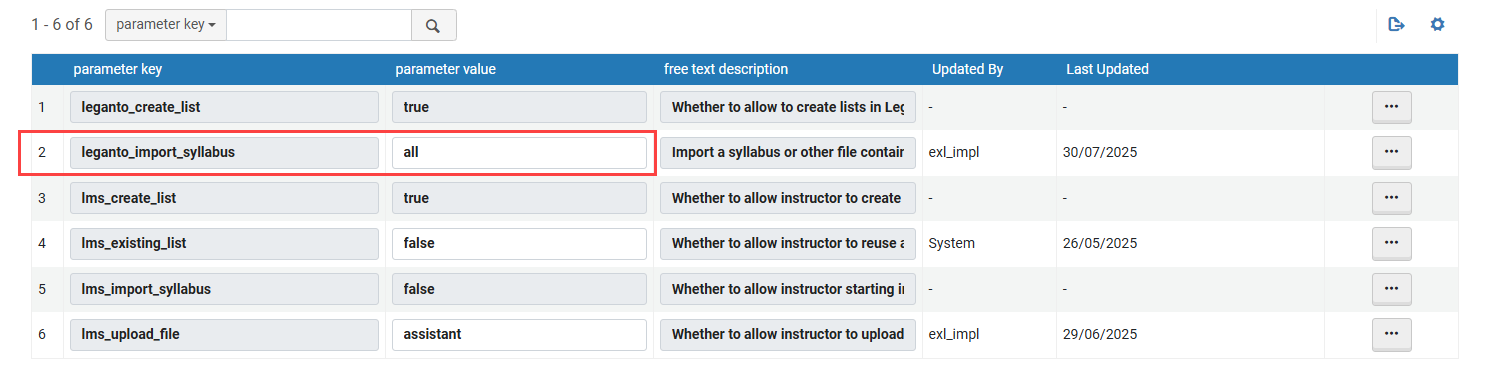
This change enables institutions to extend the benefits of AI-driven list creation to instructors, streamlining workflows and reducing manual effort.
For institutions that previously had the leganto_import_syllabus parameter set to true, the value has been automatically converted to library to preserve existing behavior.
Easier Access to Syllabus Upload
September 2025 Leganto URM-249031
To make syllabus upload and AI-powered list creation more accessible, Leganto now provides more prominent entry points for users permitted to import course materials this way.
When leganto_create_list is set to true(Configuration > Leganto > List Management > List Creation), users who are permitted to upload a syllabus (librarians if leganto_import_syllabus is set to library or both librarians and instructors if the parameter is set to all) see an expanded +Create list menu when browsing lists.
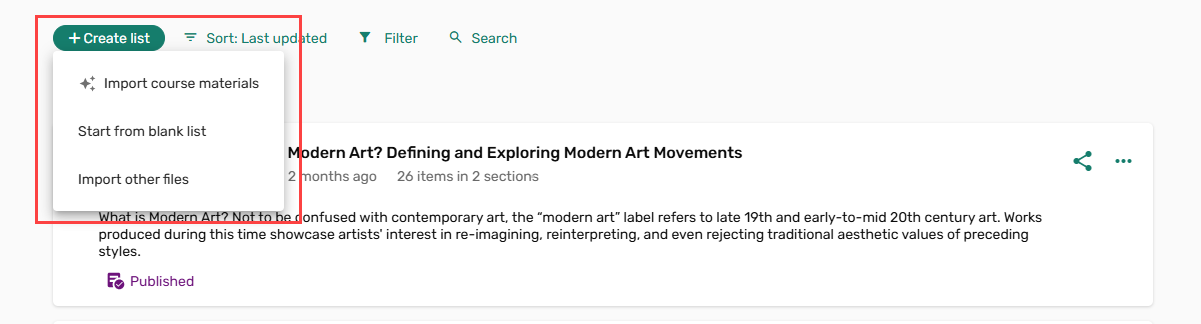
This button opens a dropdown menu with several options, and at the top, there is the new Import course materials option. Selecting Import course materials launches a redesigned interface for uploading syllabus files and pasting references.
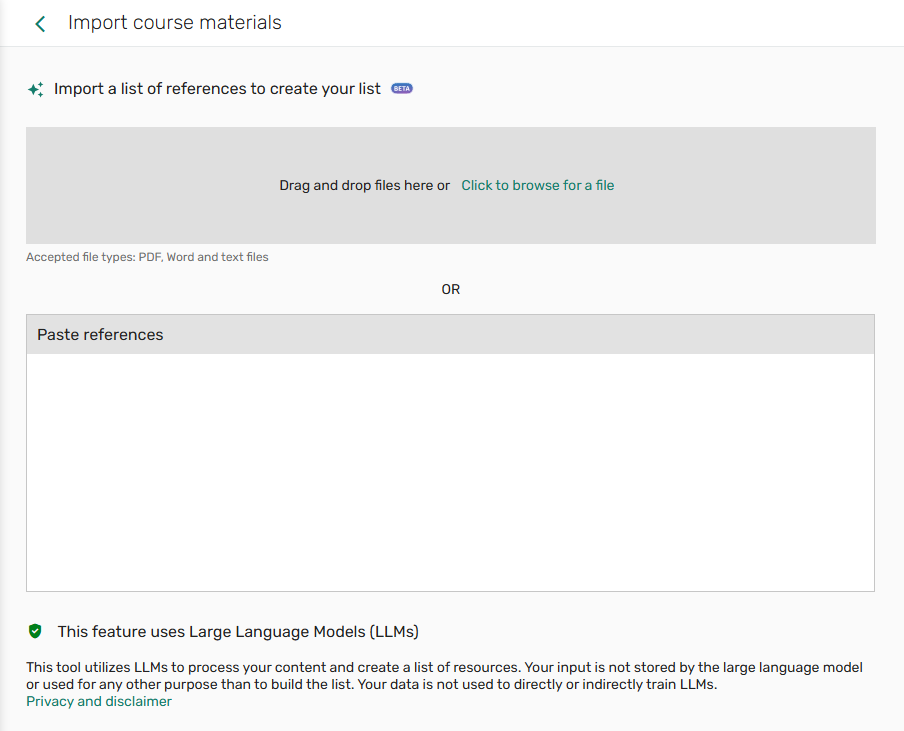
Additionally, when a user is within a list, the +Add button now also includes the Import course materials option. This button opens the same Import course materials interface in a right-hand pane. List creators can use this option to quickly add new items to existing lists.

Instructors Can Now Upload Syllabi When Starting in the LMS
September 2025 Leganto URM-238830
Leganto now allows instructors to upload syllabi from the Quick Start interface in an LMS. For this option to be visible, the lms_import_syllabus parameter in Configuration > Leganto > List Management > List Creation must be set to true(default false).

The Import course materials option allows instructors accessing Leganto through an LMS to import a syllabus or other file containing references, which are then extracted using AI to create a new list. Selecting this option opens the same interface as when an instructor uses the AI assistant to create a list from Leganto.
This enhancement further streamlines course resource management by reducing manual effort. For detailed instructions, see Creating a List from an LMS
Additional Enhancements
- September 2025 LegantoURM-159534 Leganto now supports integration with Unpaywall, which allows users to easily view open-access PDFs for items that include a DOI. To enable this feature, the unpaywall parameter (Configuration > Leganto > General > External Integration) must be set to true(default false). When set to true, PDF files are displayed in the View online section of an item (if a PDF is available). You can also find the Download PDF button when you open an item’s Full details and navigate to Links & availability.
This enhancement allows instructors and students to access content more easily without having to navigate away from a list. For more details about how this integration works, see Enabling Unpaywall.
September 2025 LegantoURM-241135 Leganto now displays a Peer Reviewed label for relevant records in Library Search results, consistent with the indicators shown in Primo.
This enhancement helps instructor quickly identify scholarly, peer-reviewed materials while exploring items within Leganto.

September 2025 LegantoURM-252129 The informational tooltips for physical item loan counts in Analytics have been updated at both the list and item levels.
When viewing Analytics, hovering over the information icon (
 ) now displays improved explanations of the Number of loans metric. Updated tooltips clarify the meaning and scope of the data, helping both instructors and librarians better understand list usage.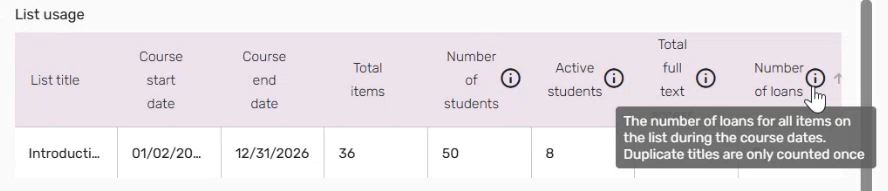

September 2025 Leganto Cite it! is now also available as a Firefox browser extension. You can install the extension from the installation instructions link within User settings > Cite it!, or by searching for the Leganto Cite it! Bookmarking Tool in the official Mozilla Firefox Add-ons store.
For more information, see Firefox Browser Extension.
Resolved Issues
| SF number | Description |
|---|---|
| 08112014 URM-254564 | In some cases, PDF files within items failed to load or download, displaying an Access Denied error in the Alma viewer. This was fixed. |
| 07261892 URM-254497 | In the new UI, removing Leganto privileges from Fulfillment roles did not remove corresponding actions (for example, adding or removing collaborators, public notes, lists, or new items). This was fixed so that privileges are applied consistently. |
| 08060084 URM-253339 | After uploading a file, the Attach a file toggle continued to display even though the user could not add further files. This was fixed. |
| 08086196 URM-253335 | When copying all sections from one list to a new list, the original section order was not preserved in the new list. This was fixed. |
| 08082585 URM-253205 | When exporting a list to Word, the note text appeared with visible HTML tags instead of formatted content. This was fixed. |
| 08076356 URM-252864 | When both page range and chapter number were selected in the Q&A section, the Digitize tag was sometimes added twice to an item after refreshing the page. This was fixed. |
| 08051211 URM-252139 | When using a laptop touchpad, tapping to add a collaborator to a list did not work unless the action was repeated or performed using a button click or mouse. This was fixed. |
| 08050830 URM-252075 | After submitting a digitization request and adding a tag, the same tag was duplicated across the screen until the page was refreshed. This was fixed. |
| 08060293 URM-250240 | When uploading multiple items with files at the same time, the Citation has a New File alert did not appear in Alma. This was fixed. |
| 08034387 URM-249632 | Typing the full name of an item type (for example, "Website") did not filter the dropdown list as expected, whereas partial input did (for example, "Webs"). This was fixed. |
| 08006477 URM-249520 | Unlinking URLs in public notes did not remove the hyperlink but added extra HTML tags, causing broken links and 404 errors. This was fixed so that unlinking properly converts the link to plain text. |
| 08033113 URM-249129 | Instructors were able to restore deleted items from any public list, regardless of ownership. This was fixed so that instructors can only restore deleted items from lists they own or have collaborated on. |
| 08021666 URM-248419 | In the Suggestions menu, the View Original Item link was not always fully visible. Additionally, the Decline, Add to List, and Replace Item buttons were partially hidden, and users had to zoom out to see them fully. Both of these issues were fixed. |
| 07717154 URM-234826 | When moving multiple items up or down a page, the screen did not scroll to keep the selected items in view, causing them to move out of sight. This was fixed, and the page now follows items correctly during movement. |
| 07101729 URM-218829 | Several hundred items linked to DCS digitization were incorrectly set to Rejected status overnight due to a license sync issue introduced in a previous release. This was fixed. |
| 07771318 URM-247906 | Previously, the Leganto Instructor Usage - Citation Usage report contained citations that only had Leganto events. This was fixed, and the report now contains citations with both Leganto events and Loans without events. |
| 08112817 URM-305986 | In the Reading List Loader, the Type dropdown and Run in Report mode checkbox were sometimes not visible for users with the correct roles. This was fixed. |
