
Leganto February 2026 Release Notes
March 2026 Sneak Preview
-
Request accessible file workflow
-
Filter lists by inventory type
Main Features
Infrastructure Enhancements for Upcoming Features
February 2026 Leganto
The February release includes significant behind-the-scenes infrastructure work to support several upcoming enhancements planned for later releases. This work includes preparation for the following initiatives:
- Handling reading list items linked to removed e-resources (LENH-I-6031)
- Enriching citations with additional metadata, such as open access status, OER indicators, and inventory type
- Supporting multiple file uploads per citation
These infrastructure updates ensure that Leganto can deliver these enhancements reliably as they are introduced. For more information about planned developments, see the 2026 roadmap.
Additional Enhancements
-
February 2026 Leganto URM-234530 Leganto now supports working at higher zoom levels to improve accessibility. Students can use Leganto at up to 400% zoom, and instructors can work at up to 200% zoom, without loss of functionality or layout issues.
-
February 2026 Leganto URM-316893 The default empty-state messages in Leganto have been updated to reflect current interface terminology. Unless you customized system labels, the following out-of-the-box labels now reference List catalog instead of the deprecated All lists tab:
- my_lists.student.empty_state– New label:You don’t have any lists yet. Change your search to List catalog to find lists.
- my_lists.empty_state– New label:You don’t have any lists yet. Create a list or change your search to List catalog.
This update removes references to outdated terminology and aligns system messages with the current tab names in the interface.
-
February 2026 Leganto URM-244198 Job reports for Leganto notifications now include detailed counts of successful and failed email deliveries for Detailed Notifications,Full Detailed Notifications, and Upcoming Due Dates Notifications.
When notifications are sent through a job, Leganto now generates events that identify successful and failed email deliveries. Total counts for each outcome are displayed in parentheses. Selecting an event opens an Event Report that shows the primary identifiers of users whose emails were delivered successfully or failed.
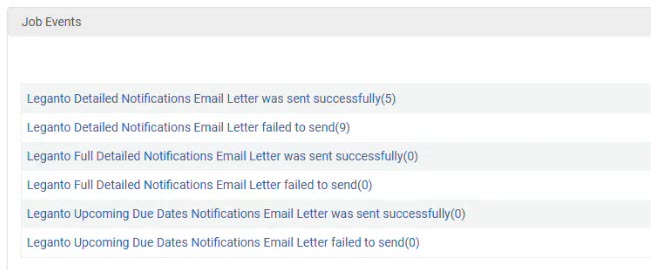
This enhancement provides institutions with clear visibility into email delivery status, supporting more effective tracking and troubleshooting of notification jobs.
-
February 2026 Leganto URM-319177 The Bolk integration now provides two separate actions under Fulfillment > Course Reserves > Citations:Create Bolk Request and Update Bolk Request. Previously, these actions were combined into a single dynamic button that could not be customized or reordered.

With this update, each action can be configured independently, like other row actions in Leganto. Institutions can choose to display one or both actions and control their order in the row action list to better align with local workflows.
- February 2026 Leganto URM-252613 Two Leganto email letters—Link Marked As Broken and Mark As Broken Resolved—were previously unavailable in Norwegian. They are now fully translatable to ensure consistent, localized notifications and more accurate communication for Norwegian-speaking users.
- February 2026 Leganto The Citation Style Language (CSL) styles were refreshed from the central repository as of the January release, which includes a snapshot from October 2025.
Resolved Issues
| SF number | Description |
|---|---|
| 08292104 URM-321026 | When medium or large font sizes were chosen in Accessibility settings, selecting multiple citations caused the list header to be cut off. This issue was fixed so that the header now displays correctly during bulk selection regardless of the chosen font size. |
| 08286222 URM-321022 | In full view, the text in the Item details and Related items tabs always displayed at the default font size, even when medium or large font sizes were selected. This issue was fixed so that both tabs now display the selected font size correctly. |
| 08270022 URM-320842 | Physical inventory in library search sometimes displayed holdings for the wrong campus, and the More Details view did not always show accurate holdings. These issues were resolved so that search results now consistently display inventory for the user's campus and the More Details view always shows correct holdings. |
| 08283089, 08279068, 08282853, 08282882, 08284629, 08285899, 08285666, 08286119, 08286582, 08285691, 08285865, 08285478, 08285818 URM-320697 | Previously, the Course Loader could not update courses if the update involved removing campuses from an existing course. This was fixed so that the Course Loader can now successfully remove campuses during course updates without generating errors. |
| 08264017 URM-319594 | Expanding a section with a long description and then scrolling sometimes caused the description to disappear. In these cases, the text only reappeared when the user refreshed the page. This issue was fixed so that section descriptions now always display correctly. |
| 08191804 URM-319591 | Selecting the Sync Bolk button for a citation in the Reading List refreshed all citations in the list, rather than just the one selected. This was fixed so that only the selected citation's tag is updated when syncing. |
| 08117027, 08223583, 08219940, 08094179 URM-253772 | If Alma and Leganto were open in separate browser tabs and the platforms had different UI languages, making changes in Leganto caused the Alma interface to switch to the Leganto UI language. This was fixed so that Alma now retains its originally selected UI language regardless of actions taken in Leganto. |
| 08116021 URM-313892 | When using the library search in Leganto, CDI records for titles in the Films on Demand collection were appearing as not available, even though they have an access link in Primo. This was fixed so that these records now display as available in Leganto. |
