
Mixpanel Cohorts
Introduction
Cohorts are groups of users who share a certain set of properties or perform a similar sequence of events. In Mixpanel, you can visually define cohorts, view the list of users that comprise them, compare them in your analysis, and share them with the rest of your project teammates.
Here are some examples of cohorts you can create in Mixpanel:
-
First-time users: Users who signed and created a physical request in the last 7 days.
-
US Users: Users who are from the US (or any other country you choose)
-
New Users: Users who registered in the past month (or any other definition of new users)
-
Power Users: Users who used Primo VE on five out of the last seven days (or any other definition of a frequent user)
You can create cohorts using any of Mixpanel's reports or explicitly using the cohort builder. Once a cohort is created, you can save it to a group and filter data in other Mixpanel reports.
Creating Cohorts from a Report's Visualization
As you build a report, you may decide to create a Cohort using the users returned from a report's graph.
-
View a report.
-
Select a bar or graph within the report's visualization to open the menu.
 Graph Menu
 -
Select View Users.
 Open View Users Panel
 -
Select Create Cohort.
 Create Cohort Dialog Box
 -
Enter the name of the Cohort and select Save.
Creating Cohorts from an Event or a Property
You can create Cohorts from various places in Mixpanel (such as the Cohorts page or a report's visualization). You can also create a new Cohort from an Event or Property while editing a report. Unlike creating Cohorts from a report's visualization, the event or property does not automatically filter the list of users.
-
Select an Event or a Property in a report.
 Select Event
 -
Select Create > Cohort to open the Create New Cohort dialog box.
 Create New Cohort Dialog Box
 -
Enter a name for the Cohort, select a filter, and select Create Cohort.
Managing and Creating Cohorts from the Cohorts Page
The Cohorts page lets you perform the following actions on a Cohort by selecting the Cohort's ellipsis: View Users, Visualize Trend, Export, Duplicate, Delete, and Share. In addition to managing and editing existing Cohorts, the Cohorts page lets you build and create new Cohorts. You can select the Description column in the list of Cohorts to provide further details regarding a Cohort.
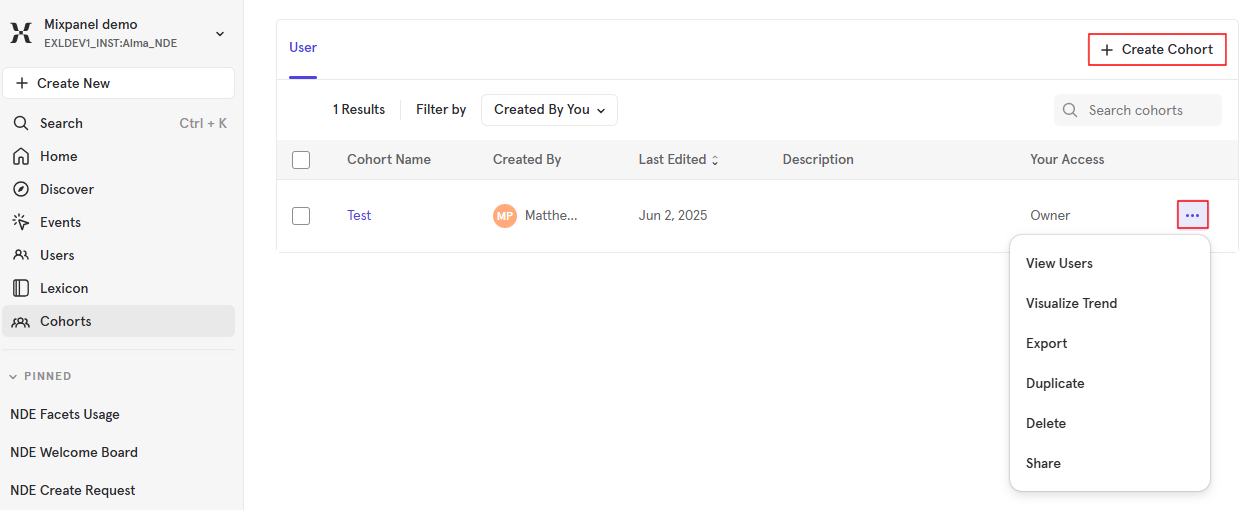
In addition, you can create new Cohorts from this page using the Create Cohort option. Unlike creating Cohorts from a report's visualization, this method requires you to select a filter.
-
Select Cohorts to open the Cohorts page.
 Open Cohorts Page
 -
Select CreateCohort to open the Create New Cohort dialog box.
Create New Cohort Dialog Box -
Enter a name for the Cohort, select a filter, and select Create Cohort.
Page tags: article:topicproduct:primocontent:Documentationlang:english
