
The PNX Extensions Loader Tool
This functionality is not relevant to to Primo VE.
-
You must implement a file splitter program that supports the extensions that you want to add. For more information, see PNX Extensions Loader Tool on the Ex Libris Developer Network.
-
Because the tool relies on knowing the PNX record ID, you must have the original source record ID of the record to which the extension is to be attached.
-
You must be an installation-level staff user to create and execute this tool.
-
This tool will harvest only the files that have been added or modified since the last time the tool was executed.
-
On the Tools Monitoring page, select PNX Extensions Loader in the Create a Tool drop-down list.
The PNX Extensions Loader page opens.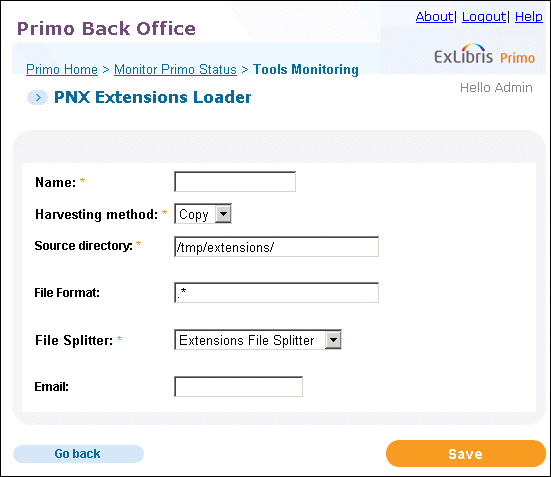 PNX Extensions Loader Page
 -
Enter the following fields:
-
Name– Enter a name for the tool, which you can execute and monitor in the Tool Monitoring list.
-
Harvesting method– Select a harvesting method: FTP, SFTP, or Copy.
-
Source directory– Enter the name of the directory that is holding the harvested records.
-
File format– Enter a regular expression that describes the format of the files to be harvested. This tool will harvest all files that match the expression.
-
File Splitter– Select the file splitter that was implemented to load extensions. For more information on implementing these file splitters, see PNX Extensions Loader Tool on the Ex Libris Developer Network.
-
Email– Enter an e-mail address to which to send a confirmation when the tool completes execution.
-
-
Click Save.
-
Execute the tool when needed. For information on monitoring tools, see Tools Monitoring.
Page tags: article:topicProd:Primocontype:documBack Office GuidePrimo Toolsproduct:primocontent:Documentationlang:english
