
Embedding a Primo Search Tile
This page is specific to the classic Primo UI. Refer to the following pages for your environment:
The Primo Search tile displays on the Front End user interface.
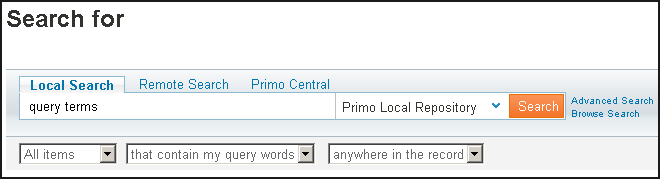
It contains the following components:
-
pull-down lists (combo fields)
-
preconfigured tabs
-
links (Preferences and Advanced Search).
When you embed the search tile into an <iframe> element of an HTML file, you can configure these components. In addition, you can configure where the search results display.
-
Embed the following link in an <iframe> element of any HTML file:
http://FE_hostname:port/primo_library/libweb/action/search.do?embed=true -
To customize the embedded search tile, append additional parameters to the link, separating parameters by &. For more information on each parameter, see the following table. Note that the parameters are case sensitive.
The following example shows a link that embeds a Search tile that includes the Advanced Search link and displays search results in a new window:<IFRAME ID="Primosearch" FRAMEBORDER="0" SCROLLING="NO" WIDTH="750" HEIGHT="300" src=http://server:1701/primo_library/libweb/action/search.do?vid=Auto1&embed=true&resloc=_blank&sadvanced=true> </IFRAME>
Embedded Search Tile Parameters Parameter Description bgcolor
Specify a CSS class name to modify the appearance of the Search tile. The default CSS class is search_bg.
For more information on modifying the look of Primo's Front End, see Customizing Primo’s User Interface.bgcolor2
Specify a CSS class name to modify the appearance of the Search tile. The default CSS class is search.
For more information on modifying the look of Primo's Front End, see Customizing Primo’s User Interface.combo1
Specify whether to display the Resource Type drop-down list for your view. Valid values are true or false. *
combo2
Specify whether to display the Search Target drop-down list for your view. Valid values are true or false.*
combo3
Specify whether to display the Search Operators drop-down list for your view. Valid values are true or false. *
combo4
Specify whether to display the Search Scope drop-down list for your view. Valid values are true or false.*
embed
Specify true to display the embedded Search tile in your local site. Valid values are true or false.
This field is required.height
Specify the height of the Primo Search tile in pixels. If you do not specify this parameter, the height defaults to the size provided by the Primo Front End.
language
Specify a locale for the display language, such as fr_FR. If no locale is specified, the default locale for the view is used.
resloc
Specify one of the following values to indicate where to display the results:
-
_self—Opens the search results in the same <iframe>.
-
_parent—Opens the search results in the parent window.
-
_blank—Opens the search results in a new window.
If you do not specify this parameter, the results display in a new window.sadvanced
Specify true to display the Advanced Search link in the embedded Primo Search tile. Valid values are true or false.
sbrowse
Specify true to display the Browse Search link in the embedded Primo Search tile. Valid values are true or false. The default value is false.
sbutton
Specify a CSS class name to use a different Search button on your Search tile. The default CSS class is go.
For more information on modifying the look of Primo's Front End, see Customizing Primo’s User Interface.slabel
Specify the text that displays above the search field. If you do not specify this parameter, the Search tile displays the Primo default text: Search for.
spreferences
Specify true to display the Preferences link in the embedded Primo Search tile. Valid values are true or false.
vid
Specify the view ID (Code field in View wizard) of the view that you want to display for the embedded Search tile.
If you do not specify this parameter, the local site will display the default view for the Primo Front End.
width
Specify the width of the Primo Search tile in pixels. If you do not specify this parameter, the width defaults to the size provided by the Primo Front End.
The width of the search field determines the minimum width of the Search tile. See the description of the sbwidth parameter for more information.tab
Specify the search tabs to display on the Search tile. If you do not specify this parameter, the Search tile displays all tabs for your view.
sbwidth
Specify the width of the Search field in em units. If you do not specify this parameter, the width defaults to the size provided by the Primo Front End.
* By default, Primo displays all valid drop-down lists for your view. To omit this drop-down list, specify false.
-
Page tags: article:topicProd:Primocontype:documTechnical GuideEmbedding the Primo Search into a Local Siteproduct:primocontent:Documentationlang:english
