Working with Digital Resources - Overview
This section describes the concepts and all of the elements involved in working with digital resources, and provides links to where each element is discussed in detail in the online help.
Watch the Alma Specto Starter training videos, which walk you through the process of managing your digital resources in Alma.
Terminology and Data Model
Roles
The following roles can perform various digital resource-related activities:
- Digital Inventory Operator — required for adding and editing digital representations
- Digital Inventory Operator Extended — required for delete operations
- Collection Inventory Operator — required when adding a new digital representation
The following roles can work with deposits:
- Deposit Manager
- Deposit Operator
- Deposit Operator Extended
- General System Administrator
Data Model
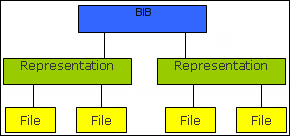
Digital resources are organized in Alma in a three-tiered hierarchy:
- Bibliographic record— The top level consists of the bibliographic record, which contains the metadata of the resource. (This is also true for physical and electronic resources.)
- Representation— The middle level is the representation level. This level acts as a container for the digital files. Multiple representations can be attached to the bibliographic record. One representation can be the primary copy and another a derivative copy, which can differ in format, resolution, and size.
- File— The third level is the file level—that is, the digital files of the resource. There can be several files in each representation.
There are two paradigms of how Alma maintains digital resources:
- Remotely— Alma allows you to store your digital files remotely in a digital management system while maintaining the bibliographic records in Alma.
- Non-Remotely— You maintain all of the digital resource information in Alma, such as bibliographic records, representations, and files.
Collections
By default, Digital Resources must be managed in a collection. Therefore, when creating a digital representation, you must select a collection in which to place it. To change this configuration, contact Ex Libris Support. For information on collections, see Managing Collections.
Access Rights
Access rights determine who can view a digital representation. For detailed information, see Configuring Access Rights Profiles for Digital Objects.
Thumbnails
Thumbnails of digital files can be displayed in search results. When creating digital inventory, Alma will automatically attempt to generate thumbnails for the most common image, document, presentation, and video file formats. You can also provide your own thumbnail during ingest. For detailed information, see Viewer Services.
The process of creating thumbnails in Alma is different than Primo. For more information, see Managing Thumbnails in Primo VE.
Creation of Digital Resources
If a new digital representation is produced for a title, you must add the representation to the title in Alma so that it can be viewed by patrons. The digital representation can reside locally in Alma or in a remote digital repository.
Adding Representations
Staff can add digital representations to titles. For detailed information, see Adding Representations.
Digitization
A patron or staff member can request the digitization of any physical or electronic item, resulting in adding the digitized item as digital inventory. For detailed information, see Digitization Processing.
Deposit
Patrons can submit content to Alma to be added to the repository. For detailed information, see Deposits.
MD Import
Staff can create automated workflows to ingest digital content to Alma in bulk. This workflow consists of the following steps:
- Configuring a digital import profile that tells Alma how to handle digital resources when you perform a bulk upload into Alma. For detailed information, see Managing Import Profiles.
- Preparing a metadata file of the bibliographic records that the import profile uses when importing the files. For detailed information, see Preparing the XML Metadata File or Preparing the CSV Metadata File.
- Uploading the files with their metadata to Alma using the Digital Uploader. For detailed information, see Uploading the Files to Alma.
APIs
Digital content can be created using Alma APIs. For detailed information, see the Developer Network.
Management of Digital Resources
Staff can update and delete individual digital representations and their associated files. For detailed information, see Editing Representation Metadata and Content. For information on performing a bulk update, see Creating Digital Content in Bulk.
Dissemination of Digital Resources
Discovery
Digital titles are discoverable using Primo, Summon, or other discovery tools. The results that appear are determined according to the display logic rules for the representation delivery service. For detailed information, see Configuring Display Logic Rules for the Representation Delivery Service.
For Primo VE, see Configuring Discovery Interface Display Logic for Primo VE.
Delivery
You use the Alma viewers to view digital representations that you discover when searching the repository. For detailed information, see Viewing Digital Representations.
Publishing
Metadata is published by Alma so that it is discoverable. For information on publishing digital records to Primo, the digital output, and the format of the published digital data, see Publishing to Primo. For information on publishing digital records to Summon, see Alma-Summon Integration.
It is not necessary to run a publishing job to export bibliographic records for Primo VE
Export
You can export digital bibliographic records with details about the files and their storage location. To export digital bibliographic records, define the appropriate parameters and run the Export Digital Titles job. For information on running this job, see Export Digital Titles.
Page tags: article:topicDepositproduct:almacontent:Documentationlang:englishdigital data modeldigital collectiondigital access rightscreate digital resource
