
Physical to Electronic (P2E) processing
P2E: Physical to Electronic processing
Most legacy ILS systems have a single format for resources, and for migration purposes, we treat incoming inventory from the ILS as physical. In Alma, electronic resources have a different database structure than physical resources. In order for the migration programs to change physical resources into electronic resources, you have to indicate which resources to change from physical to electronic (P2E).
The p2e process ONLY creates local resources which are not connected to the CZ. Neither can it group resources into package groups. With the p2e process, you can transform a physical item or holding into a standalone local portfolio or a standalone zero-title local database. If it is important for you to have your electronic resources be linked to the CZ, then you may want to NOT use p2e, and instead use a CZ-supported migration:SFX->Alma,360Link->Alma, or the E-resource Activation form.
This document gives a general overview of the process.
Configuration and Setup
The following sections describe input to the P2E (Physical to Electronic) process. Generally, the steps are:
- Generate a P2E input file containing bib record numbers
- Identify which locations are e-locations in the Migration Form Location mapping tab
- Configure P2E_LINK, P2E_NOTE, and P2E_PROVIDER options on the Questionnaire tab of the migration form
Further information on these three inputs are described in the next sections.
1. Generate P2E input file
Provide a textual input file to Ex Libris with the relevant ILS BIB numbers, one bib record per line. The bib records in this input file represent electronic resources and their types (portfolio or database).
The bib record listed may have existing items and/or holdings which should be changed to electronic, or it may have no existing item and/or holding records which should be transformed, and instead a portfolio or database will be generated based on information in the bib.
The input file is provided along with all of the other input files for the migration process.
The file should have a header, like this:
bib,type
12345,portfolio
45678,DB
P2E Input File: Portfolio or Database
In the input file where you provide a list of bib records for transforming a physical resource to electronic, you must also specify if the newly-generated resource should be a Portfolio or Database. During the P2E process, all resources must either be categorized as a portfolio or a database (DB). It is not possible to generate packages during P2E processing, since packages require at least one portfolio. A database is essentially a zero-title package. Post migration, when you add portfolios to the db, you can change them to type 'package'.
Remember that all of the resources generated from P2E are migrated as local, meaning they are not linked to the CZ/Knowledge Base entry for the resource. If you want the resource to be linked to the CZ, then you must either do it manually after go-live, or don't migrate the resource via P2E and migrate it from your link resolver instead. For more information on making a decision about where to migrate a resource from (P2E or link resolver), see Electronic Resource Migration General.
Portfolio: an individual title/resource. In Alma, portfolios can be standalone or part of a package. In P2E, portfolios may only be migrated as standalone with no relationship to any package. If portfolios in your ILS are actually part of a package, it is recommend to start managing the portfolio as part of a package in Alma. As mentioned above, it is not possible to create packages with P2E, but you can change a database to a package quite quickly, and then you can associate the standalone portfolios that were created as a result of the p2e process with the package (local e-collection) in Alma. The advantages of managing resources at the package level are that any information about the package that changes will affect all resources, such as license and access information. You need only manage this information once at the package level instead of multiple times at the portfolio level.
Database: Databases are a type of “Electronic Collection,” but don't have portfolios, and are available to be published as soon as they are defined by a URL and an associated unsuppressed bibliographic record.
When a resource is generated in P2E, no service is created.
2. Identify E-Locations in the Migration Form Location Tab
Identify which locations indicate an electronic resource by marking the location in the migration form's Alma Location mapping tab. This will specify which resource(s) to change to electronic for cases where there is physical and electronic material linked to the same bibliographic record that was specified in the p2e input file.
3. Configure P2E_LINK, P2E_NOTE, and P2E_PROVIDER fields
The following options are listed in the Migration Form, on the Questionnaire tab, near the bottom in the P2E section.
Once the migration program decides to make an e-resource, the information specified below will be used to fill in relevant fields in the generated e-resource.
P2E_LINK: Specify which tag in the bib and/or holding record contains linking information, typically based on the originating holding or bibliographic record's 856 |u field or fields. Each linked field will become a separate electronic record in Alma.
Important:If the specified tag in P2E_LINK is not found, the migration programs still make an e-resource; all fields (link, provider, note) are left empty if no link is present.
The migration programs detect if the text in P2E_LINK is actually a link by looking for the text 'http', 'https', 'HTTP', and 'HTTPS'.
P2E_NOTE: Specify which field contains a linking note, typically based on the 856 |z if it exists in the source holding or bibliographic record.
P2E_PROVIDER: You can optionally provide input as to which field in the BIB (or its holdings) record represents the name of the electronic provider/vendor name.
Functionality for P2E_* fields
When an item or holding record is identified as electronic, when the e-resource is generated, the linking, note, and provider subfields are used in the following order:
- If at least one linking field (e.g. 856) is found which matches P2E_LINK at the holding level, then any tags at the holding level are used. The migration programs stop here and do not move to the bib level.
- If no linking field is found at the holding level, then the migration programs use the linking fields at the bib level (if any).
In each local ILS, you can answer P2E_LINK, P2E_NOTE, and P2E_PROVIDER in the following manner:
- Only one field/subfield is allowed. For example you cannot answer '856 z or 841 a'
- Specific indicators: 85641u – only tags with 41 as the indicator is used.
- No indicator (# is used for a blank character, for example: 8564#u) – only tags with 4 <blank> as an indicator are used.
- All possible indicators: 8564*u – tags with 4 as the first indicator are used. The second indicator is not taken into account. The space character operates the same way as an asterisk (*), for example: 8564 u is the same as 8564*u.
- Special Request: If you need to specify multiple specific indicators, for example 85641 and 85642, it cannot be coded in the migration form but your ExL representative can make a special request to the migration team. Many indicators are possible here (i.e. more than just two).
Example P2E_LINK usage
In the migration form, customer answers for the P2E_LINK question: 85641 u
With the following bibs listed in the p2e file:
Bib 1
85641 $u http://journal.com/link
85640 $u http://journal.com/pdf
Bib 2
85640 $u http://scientificjournal/pdf
Because both bibs are listed in the p2e file, they will both have at least one electronic resource created, depending on how many items or holdings are present with electronic resource location. The p2e process always makes at least one resource if you listed the bib in the p2e file, unless the bib was rejected.
For Bib 1, a resource will be generated for the link for 85641, because that is the only one that matches the P2E_LINK question.
For Bib 2, a resource will be generated, but the link information in the resource will be empty because no 856 matched the P2E_LINK question.
P2E_PROVIDER
The P2E_PROVIDER field should be a vendor name or code. The string will be placed in the vendor interface name field for the local portfolio. If you put in an interface name of an existing vendor interface, the e-resource is linked to the existing vendor interface. Be sure the value in this field is an actual vendor interface name and not a note, because the interfaces are indexed and too many unique interfaces may cause severe response time delay.
General overview of process
The migration programs create at least one electronic resource for each BIB identifier in the p2e file, unless the bib is rejected. If the bib is suppressed, an e-resource is generated but it is inactive. See 'Inactive E-Resources', below.
If there are items/holdings in a location which was specified as electronic, then the items and/or holdings are transformed from Physical to Electronic.
If no holdings/items are present or if all holdings/items are physical (i.e. not marked as electronic), the migration program still creates an electronic resource based on information in the bibliographic record only.
When a resource is generated in P2E, no service is created.
Available For (AF) Groups, also known as Inventory Resource Groups, can not be assigned via the P2E process.
The p2e process also transforms each electronic record's associated order, if present, to an electronic type order rather than physical type order. See the 'Orders associated with transformed e-resources' section below.
Example setup:
- a list of bib records, and an indication if the resource for this bib should be a portfolio or database.
- library/locations which are indicated as being an Electronic Location: for example ONLINE:ELEC
- Linking subfield (P2E_LINK on migration form): for example 856u
- Note subfield (P2E_NOTE on migration form): for example 856z
- Provider subfield (P2E_PROVIDER on migration form): for example 940a
Check for items first
For each bib listed in the p2e file, the migration processing first checks if there are any items in ONLINE:ELEC. Actually, it checks for an item in ANY location which is specified as electronic on the Alma Location mapping tab, but for the purposes of the example we will continue to use ONLINE:ELEC.
If an item in ONLINE:ELEC is found, each item with this location is designated for conversion to electronic. The electronic resource created is based on what was specified in the input file (Portfolio or DB) for this bib.
The resulting e-resource is created with the linking information in an 856u. If the holding record has at least one 856u, then we use only 856u from the holding. We use 856u from the bib only if there were no 856u in the holding.
If there are multiple URLs at the level that the linking source field is found (Holding or Bib), each link field results in an e-inventory record. It is possible that multiple e-resources are created for a single bib. See 'Multiple providers/links on the same record', below, for more information.
Vendor/provider information for the transformed e-resource is taken from the 940 |a, and the linking note is taken from the 856z.
If all of the holding's items are identified with the above pattern (and thus deleted after a e-resource is generated), the remaining holdings associated with those item records are also removed.
Next check itemless holdings
The migration programs then move on to check for holdings in ONLINE:ELEC (or other specified electronic library/location), checking the library/location in 852 $b and $c. A match for each holdings record is converted to a portfolio with the relevant URL, note, and vendor name population in the same manner as described above for items.
After the holding record is transformed, it is deleted.
If no electronic resource found, transform/generate at bib level
If there were no items or holdings for the specified bib at all, or if all items/holdings associated with the bib were in a physical location, then an electronic resource is created at the BIB level. In this case, the BIB is left in place, a new e-inventory record is created with the relevant URL, note, and vendor name population.
In this case, it appears that the P2E process generated an electronic resource out of nothing.
How many e-resources are generated?
If the bib listed in the p2e file is rejected or not present, then no e-resource is generated.
If the bib listed in the p2e file is suppressed, then an e-resource is generated as normal, but it/they are inactive. See 'Inactive E-Resources', below.
If the bib listed in the p2e file has no electronic inventory, either because there is no inventory at all or because the inventory present is not in an electronic location, then an e-resource is generated based on information in the bib only. Note: if there are multiple 856s on a single bib, multiple e-resources could be generated, see Multiple providers/links on the same bib, below.
If the bib listed in the p2e file has inventory in an electronic location, then an e-resource is generated for each one found. If there are three items in an electronic location, then three e-resources are generated. The inventory is removed during the p2e process. In this case, it appears that the inventory is transformed from physical to electronic. Note: more than one e-resource could be generated for each inventory found if multiple 856s are on the same bib, see Multiple providers/links on the same bib below.
Why were so many portfolios created?
There are two different reasons why an abnormally large amount of e-resources might be created during the p2e process. The explanations are in the following two sections: 'Multiple providers/links on the same bib', and 'Multiple fields which contain linking information'. Each section describes why it happens and what you can do to avoid it.
Multiple providers/links on the same bib
- provide the 856 information in the holding record which will be transformed to the e-inventory record. In this case, the inventory record can be directly linked with the 856 in the holding. If there are three holding records, with the 856s in the individual holding records, then only three e-inventory records will be created, and the 856 information will be taken from the holding record.
- if all e-inventory is in the same location, leave all 856s in the bib and provide only one incoming inventory record
Multiple fields which contain linking information
Material Types for E-Resources (Portfolios)
The electronic material type for portfolios is determined by the resource from which it was derived. There is no similar mapping table for databases, since databases have a different functional behavior than portfolios.
When the electronic portfolio is generated from an item, the electronic material type of the portfolio is derived from the item's material type. When the electronic portfolio is generated from a bibliographic or holdings record, the material type is generated by consulting the LDR of the bibliographic or holdings record. First, the Alma physical bibliographic material type is determined based on the Fields that Identify the Bibliographic Material Type table on the Searching in Alma page. Then, that value is mapped to the E-Material type based on the following mapping by the P2E process:
|
Print material type |
Electronic material type |
|
ARTICLE |
JOURNAL |
|
ARTORIG |
OTHERVM |
|
ARTREPRO |
OTHERVM |
|
ATLAS |
MAP |
|
AUDIOBOOK |
RECORD |
|
AUDIOCASSETTE |
RECORD |
|
AUDIORECORDER |
OTHERVM |
|
BACHLORTHESIS |
DISSERTATION |
|
BLURAY |
VIDEO |
|
BLURAYDVD |
VIDEO |
|
BOOK |
BOOK |
|
BOX |
OTHERVM |
|
CALC |
OTHERVM |
|
CAMERA |
OTHERVM |
|
CAMRECORDER |
OTHERVM |
|
CASE |
OTHERVM |
|
CD |
CDROM |
|
CDROM |
CDROM |
|
CHARG |
OTHERVM |
|
CHART |
OTHERVM |
|
DIORAMA |
OTHERVM |
|
DISK |
OTHERVM |
|
DISSERTATION |
DISSERTATION |
|
DVD |
VIDEO |
|
DVDRM |
VIDEO |
|
EPHEMERA |
OTHERVM |
|
EQUIP |
OTHERVM |
|
EREADER |
OTHERVM |
|
FICHE |
OTHERVM |
|
FILM |
OTHERVM |
|
FILMREEL |
VIDEO |
|
FILMSTRIP |
OTHERVM |
|
FLASHCARD |
OTHERVM |
|
FLIPV |
OTHERVM |
|
FLOPPY_DISK |
OTHERVM |
|
FSADT |
OTHERVM |
|
GAME |
OTHERVM |
|
GLOBE |
OTHERVM |
|
GOVRECORD |
DOCUMENT |
|
GRAPHIC |
OTHERVM |
|
HEAD |
OTHERVM |
|
IPAD |
OTHERVM |
|
ISSBD |
JOURNAL |
|
ISSUE |
JOURNAL |
|
ITEM_WITH_AUDIO_CASSETTE |
RECORD |
|
ITEM_WITH_CD |
RECORD |
|
ITEM_WITH_FLOPPY_DISK |
OTHERVM |
|
JOURNAL |
JOURNAL |
|
KEYS |
OTHERVM |
|
KIT |
OTHERVM |
|
LAPTOPACCESSORY |
OTHERVM |
|
LETTER |
DOCUMENT |
|
LOOSELEAF |
DOCUMENT |
|
LP |
RECORD |
|
LPTOP |
OTHERVM |
|
LRDSC |
VIDEO |
|
MANUSCRIPT |
MANUSCRIPT |
|
MAP |
MAP |
|
MASTERTHESIS |
DISSERTATION |
|
MICROCARD |
OTHERVM |
|
MICROFICHE_MASTER |
OTHERVM |
|
MICROFORM |
OTHERVM |
|
MICROOPAQUE |
OTHERVM |
|
MICROSLIDE |
OTHERVM |
|
MIXED |
OTHERVM |
|
MMFILM |
OTHERVM |
|
MOBILEDEVICE |
OTHERVM |
|
MODEL |
OTHERVM |
|
MOTIONPICTURE |
VIDEO |
|
NEWSPAPER |
NEWSPAPER |
|
OTHER |
OTHERVM |
|
OTHERVM |
OTHERVM |
|
OVERSIZE |
BOOK |
|
OVERSIZESCORE |
SCORE |
|
PAMPHLET |
DOCUMENT |
|
PHDTHESIS |
DISSERTATION |
|
PHONODISC |
RECORD |
|
PHOTOGRAPH |
OTHERVM |
|
PICTURE |
OTHERVM |
|
PLAYAWAY |
OTHERVM |
|
PROJECTOR |
OTHERVM |
|
RARE |
OTHERVM |
|
REALIA |
OTHERVM |
|
RECORD |
RECORD |
|
ROOM |
OTHERVM |
|
SCORE |
SCORE |
|
SLIDE |
OTHERVM |
|
SPECIALTHESIS |
DISSERTATION |
|
STREAMINGV |
STREAMINGV |
|
STREAMINGA |
STREAMINGA |
|
TABLET |
OTHERVM |
|
TECHDRAWING |
OTHERVM |
|
THESIS |
DISSERTATION |
|
TOY |
OTHERVM |
|
TRANSPARENCY |
OTHERVM |
|
VIDEOCASSETTE |
VIDEO |
|
VIDEODISC |
VIDEO |
|
VIDEOGAME |
OTHERVM |
|
VRECORD |
VIDEO |
|
VRECORD_OTHER |
VIDEO |
Orders associated with transformed e-resources
After the inventory level for the resource is identified, the system then checks whether a purchase order is associated with the inventory record. If it is, the system converts it to a matching electronic type order.
Alma allows one order per inventory record. When more than one order is identified for a particular record, migration processing will prefer an open and recent order first, where the order is in an electronic location. Other orders will relate to the e-order, but may remain categorized as physical.The most recent open purchase order associated with this bibliographic record becomes electronic as well.
The following criteria are used to determine the best associated order. This list is shown in 'best' sequence, meaning we check each condition in order and as soon as we find a condition which is true, then we use that condition and stop. So, if an order is directly linked to inventory, then we use that link and do not check any other condition.
- attached at the identified inventory level (item, holding)
- open and in an electronic location preferred
- if none found in an electronic location, will use order in a non-electronic location if only one order is attached and the order is not closed
- if none found, will move up to bib level orders
- when multiple orders in an electronic location are found within a given level (holding/item or bib), then the best order is selected based on status, and if multiples are in the same status, then the send date and approval dates are checked (most recent preferred).
- orders which are cancelled or closed are never considered
If you do not wish to use any order which is categorized as non-electronic in the p2e process, inform your Ex Libris representative. This is not common enough to be a question on the migration form but it can be done if desired.
The following are the analogous e-order types for the input Physical order types and e-inventory types defined in the P2E input. As mentioned above, Alma migration identifies only one order to be transformed to electronic with each physical resource.
The following table shows the map of physical order types to the electronic order type.
| P Order Type | E Inventory | E Order type |
|---|---|---|
| Print * One Time | Portfolio | Electronic * One Time |
| Print * One Time | E-Collection (Database) | E-Collection * One Time |
| Print * Subscription | Portfolio | Electronic * Subscription |
| Print * Subscription | E-Collection (Database) | E-Collection * Subscription |
| Print * Standing Order | Portfolio | Electronic * Standing Order |
| Print * Standing Order | E-Collection (Database) | E-collection * Subscription |
The 'Other Services' Purchase Order type is not listed here because it should only be used on non-inventory orders, and by definition an order with electronic inventory has inventory.
Finally, after checking your P2E migrated data, if there are orders which were not transformed to electronic, the migration team has a method to take a reasonable list of orders and change them to e-orders. This should not be considered a 'regular' migration process, but a last-resort fix in cases where orders were missed.
P2E Illustrated Examples
-
Two holdings, one is electronic
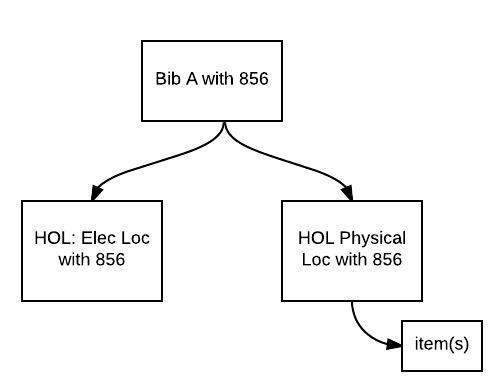
-
One physical holding
Inactive E-Resources
There may be a number of reasons why an e-resource generated by P2E is inactive.
1. If there is no URL, then the e-resource is marked as not active. To find e-resources with a null or empty URL, perform the following searches (depending on the data, both may return results here):
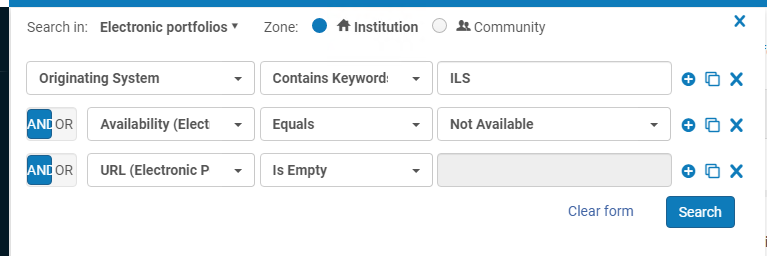
and also
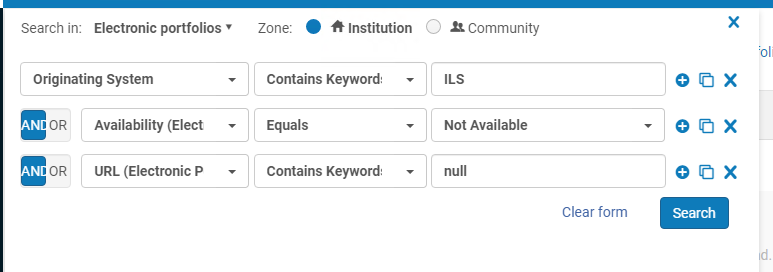
2. If the BIB is suppressed, the e-resource is marked as not active. To find e-resources with a suppressed bib record, perform the following search:
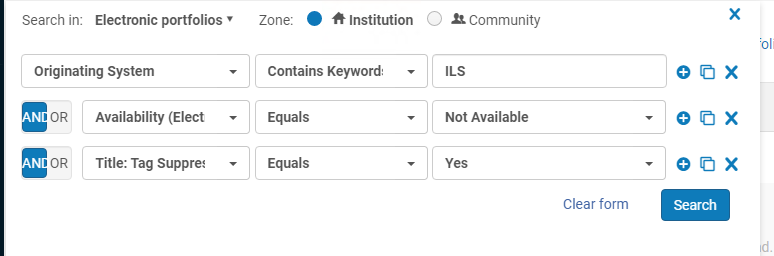
3. If the Holding record associated with the e-resource is suppressed, then the e-resource is marked as not active. This is only relevant when MARC holding records are provided, and the ILS migration supports suppressed holdings. It is not possible to search for inactive resources with a suppressed holding record, since the holding record is removed when an e-resource is generated.
4. The bib may also be suppressed from display if there is an attached order, and the workflow is such that "On Order" information is not displayed to the public. If there are resources which do not fit any of the above categories, this may be a reason why the e-resource is inactive.
Page tags: article:topicproduct:almacontent:Documentationlang:english
