
Configuring External User Groups
(New for February 2026)
On the External User Groups page (Configuration > User Management > External User Groups), you can add external user groups and link each group to a source institution/s or to all institutions. These codes reflect the user groups used by other institutions in the network, and enable setting rules that enable calculating a local user group that will be assigned to a linked account based on the user group at the patron's home institution. Alma uses the external user groups configured on this page to automatically populate the User Group field in the Input Parameters section for Linked Account Rules (see Linking Users in Collaborative Networks).
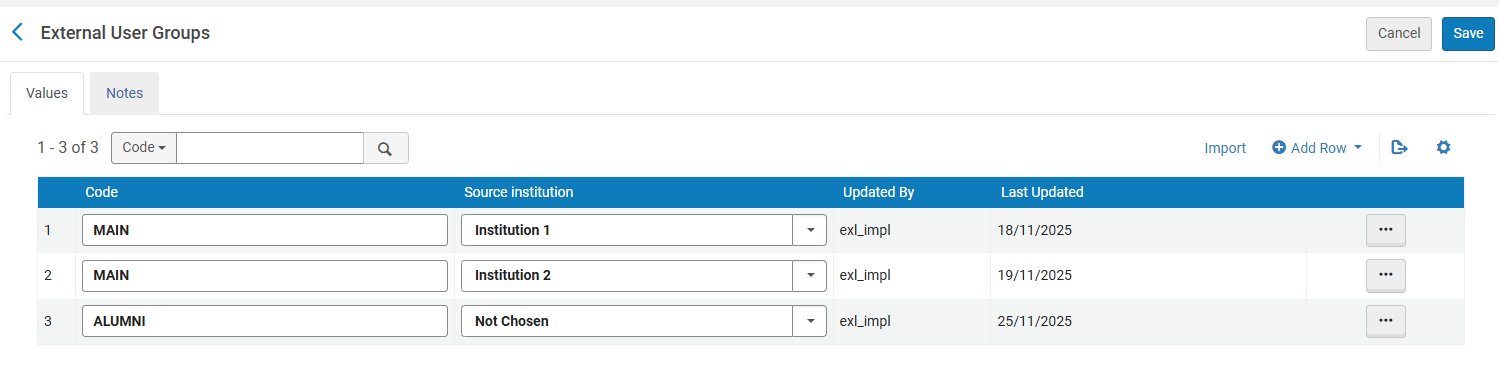
The Code field should be filled manually with a shared understanding across the fulfillment network regarding the list of user groups.
Note that selecting 'Not Chosen' for a Source Institution applies to all institutions in the fulfillment network.
Page tags: product:alma_specto
