Configuring User Information for Pop-ups
- User Administrator
- General System Administrator
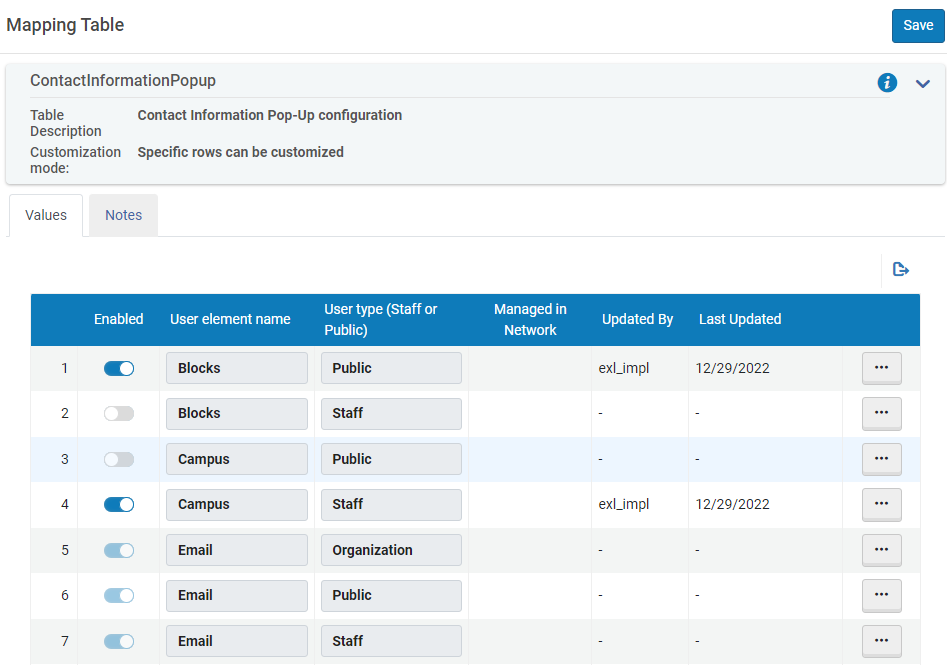
To enhance user privacy, you can configure which elements of user information appear in the user contact information icon pop-up window (see User Information Icon), as well as user names of requesters and assignees that appear in the resource-sharing borrowing and lending task lists in the New Layout (see New Layout 2022). The configuration process distinguishes between Staff and Public user record types.
You configure these elements in the Contact Information Pop-Up mapping table (Configuration Menu > User Management > General > Contact Information Pop-Up). By default, certain elements are enabled (shown in the pop-ups) and others are disabled (not shown in the pop-ups), but you can enable and disable any of them. For more information about mapping tables, see Mapping Tables.