
Fulfillment Configuration Utility
View fulfillment configuration settings in the fulfillment configuration utility.
For links to all the main fulfillment documentation pages see Fulfillment.
- Fulfillment Services Manager
- Fulfillment Administrator
- General System Administrator
- User Manager
- Circulation Desk Operator
- Circulation Desk Manager
- Circulation Desk Operator Limited
- Fulfillment Services Operator
You can view fulfillment configuration information for a specific item. The Fulfillment Configuration Utility displays the information that would take effect if a specified item were loaned to a specified patron, as follows:
- The Fulfillment Unit Name, Fulfillment Unit Rule, and Terms of Use associated with the item.
- The due date calculated by the system if the specified item would be loaned to the indicated patron.
- The overdue fine for an item returned after its due date.
In addition to the Terms of Use details that are displayed for a loan, the Request and Booking tabs display the Terms of Use details that would be associated with requests or bookings. The Overdue and Lost Loan Profiles tab displays the applicable overdue and lost loan profiles for a given overdue loan.
You can also access this information when viewing a patron's loan information on the Patron Services page (see Loaning Items).
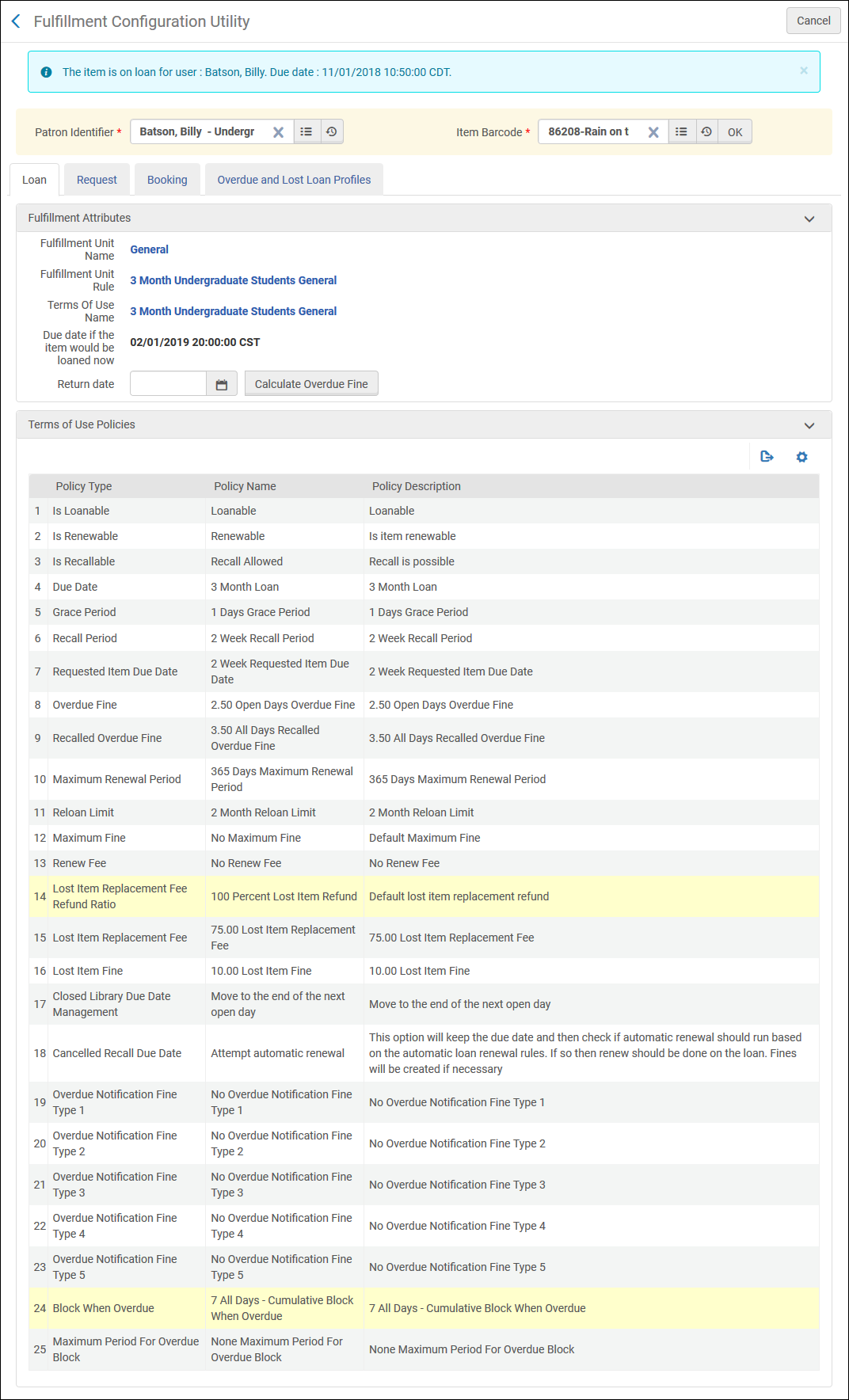
- On the Fulfillment Configuration Utility page (Fulfillment > Advanced Tools > Fulfillment Configuration Utility), search for a patron in the Patron identifier field.
- In the Item barcode field, search for an item. After selecting an item, the item's barcode displays in this field.
- Select OK. The due date for the specified item and patron appears next to Due date if the item would be loaned now, and the Terms of Use for the item and patron appears on the bottom of the page.
- In the Optional Return Date field, enter a date and time to return the item and select Calculate Overdue Fine. The Overdue fine for given return date appears. If the item is not currently on loan, the amount indicates the fine that would be accrued if the item were returned on the indicated date and time. If the item is currently on loan, the overdue fine is calculated based on the current loan date.

Fulfillment Configuration Utility Page – Overdue Fine for Given Return Date - Optionally, you can perform the following actions for the item:
- Select the link next to Fulfillment Unit Name to view and edit the item's fulfillment unit.
- Select the link next to Fulfillment Unit Rule to view and edit the item's fulfillment unit rule.
- Select the link next to Terms of Use Name to view and edit the item's Terms of Use.
- Select the Request tab to view the applicable policies to a request for the selected item by the selected user.
- Select the Booking tab to view the applicable policies to a booking request for the selected item by the selected user.
- Select the Overdue and Lost Loan Profiles tab to view the applicable overdue and lost loan profiles for a given overdue loan.
