
Digital Resource Management - September 2017 Enhancements
History Information Available for Digital Resources
A history of actions performed now appears under a new History tab in the following areas:
- Collection Resource Editor
- Digital Representation Resource Editor
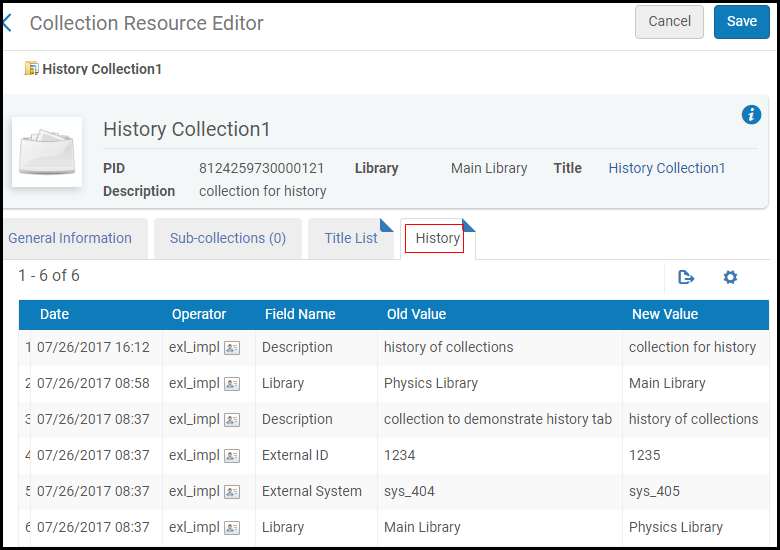
- Adding titles to collections or files to representations are not included in the History tab.
- For collections and representations in the repository at the time of the release (September 2017), an additional change is needed in order to display the change in the history tab.
Status Update Email for Deposits
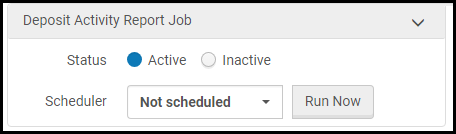
You can configure the new Deposit Activity Report job to send an email to depositors that indicates the status of their active deposits. In addition, the email contains a link to the Deposits interface where the depositor can view the status of the deposits and edit them if required. The job is configured from Configuration > Resources > General > Resource Management Jobs Configuration.
Assign Imported Digital Titles to Collection Based on MARC Record
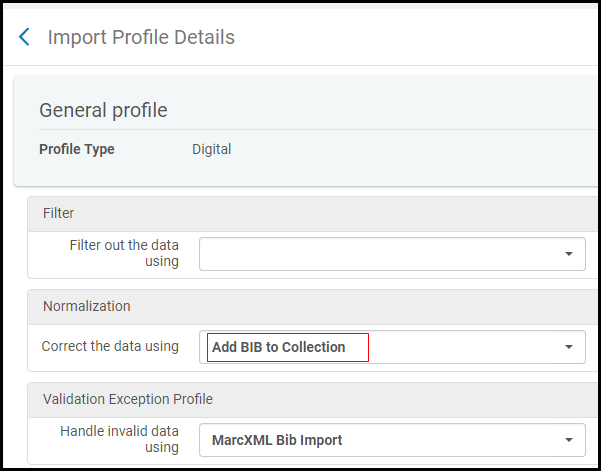
To configure an import profile to have Alma automatically assign imported digital titles to a collection according to the value of the 787 field of the MARC record, you must now activate a normalization process that contains the new addBibToCollectionNormalizationTask. The new, out-of-the-box Add BIB to Collection process contains this task and can be selected from the Correct the data using drop-down list on the Normalization and Validation tab when configuring digital import profiles.
Page tags: article:topicproduct:almacontent:Documentationlang:english
