
Collaborative Networks - September 2017 Enhancements
Pushing Persistent Blocks to Member Institutions
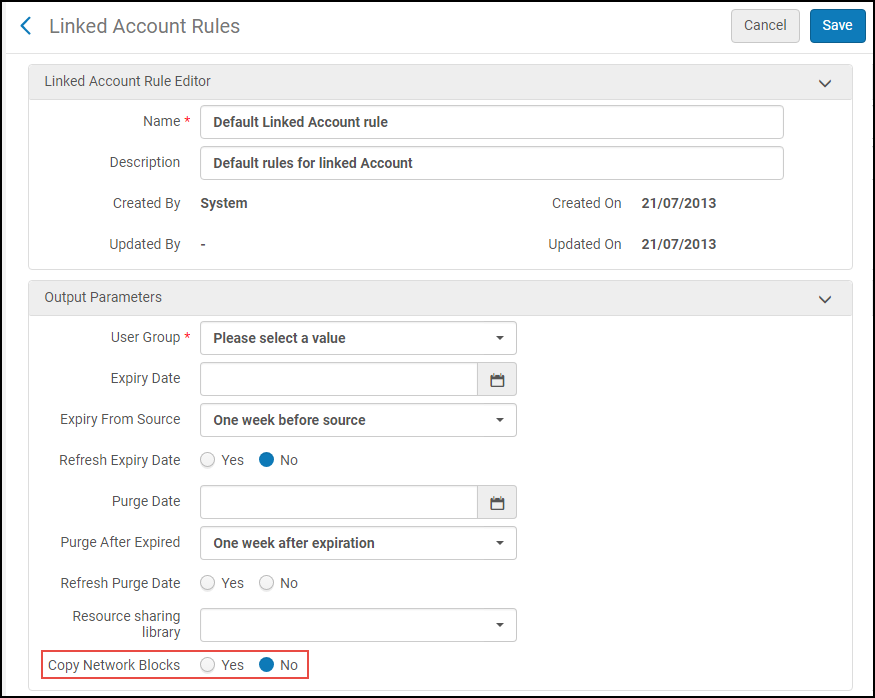
In addition to user data that is copied when linking an account between libraries, a library may now copy a user's existing blocks from the user's source account and use them in the linked account. The Linked Account Rules Output Parameters contains a new option,Copy Network Blocks. When Copy Network Blocks is set to Yes, Alma deletes all the current Network Zone blocks that exist on the linked account and re-creates them each time the linked record is refreshed. When this parameter is set to No, no blocks will be copied from the source account to the linked account.No is the default value. See Configuring Linked Account Rules.
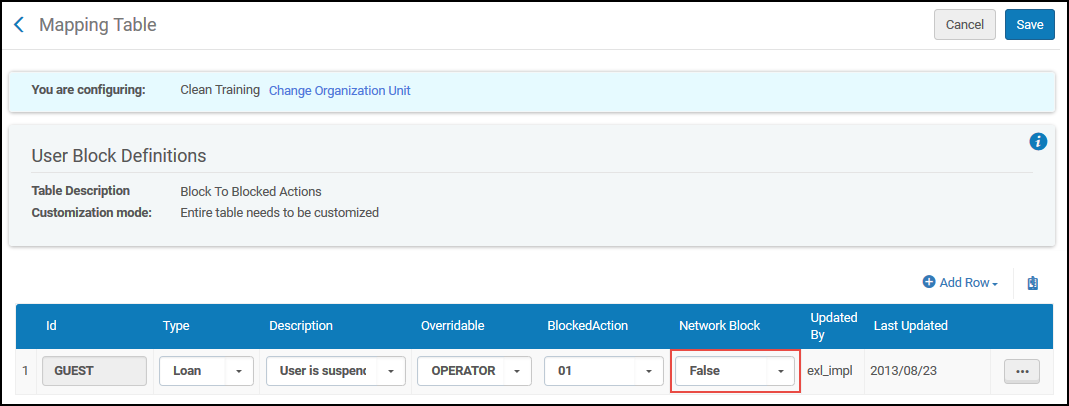
The User Block Definitions mapping table now contains a new column,Network Block. This column defines which blocks will be copied when creating or refreshing a linked account. The default value for the field is False. See Configuring User Block Descriptions and Definitions.
At the target institution, the block will be created with the new Consortia block type. To use this block type, configure it with your required attributes in the User Blocks Definitions table. See Configuring User Block Definitions and Descriptions.
Network-Managed Authority Templates Available to Member Institutions
Templates created in the Network Zone for locally managed authority records (such as LC Name, LC Subject, and so forth) are automatically available to member institutions that work with the same local authority records. See Creating Templates in the Network Zone for more information.
Additional Network Zone Staff Search Fields
In the Network Zone, you can specify additional local fields for staff search display and distribute them to member institutions. See Centrally Managing Additional Staff Search Fields in a Network Zone for more information.
Page tags: article:topicproduct:almacontent:Documentationlang:english
