
Digital Resource Management - April 2016 Enhancements
Configuring Representation Label Templates
You can create a template that can be used to create a label for partial representations. These representations are used when a bibliographic record is not fully represented by a single representation. For detailed information about creating such templates, see Configuring Representation Label Templates.
Auto-Generate Labels
After you configure a representation label template, you can click the Auto-Generate Label button when editing a partial representation to create a label based on the template. For more information, see Editing Representation Metadata and Content.
Sorting and Find Options Available for Multiple Representations List
When clicking View It and More... for a bibliographic record with multiple representations, the complete list of representations appears with sort and find options. For example:
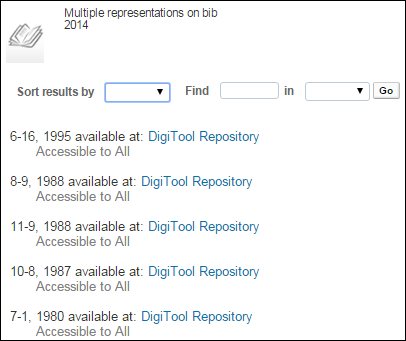
You can sort the results by:
- Volume
- Issue
- Date
For more information, see Viewing Digital Representations.
Additional Digital Resource Management Enhancements
- Various issues associated with the creation and editing of Dublin Core records in the MD Editor were fixed. Additionally, documentation has been added describing how to create Dublin Core records in the MD Editor. [to be added within the next few days]
- It is now possible to remove the Dublin Core options from the MD Editor. For more information, contact Ex Libris Support.
Page tags: article:topicproduct:almacontent:Documentationlang:english
