
Resource Management - April 2016 Enhancements
Browsing Bibliographic Headings
Alma now supports browse functionality for authors, subjects, series, and titles from within the MD Editor. Subject searching also supports the option to choose a vocabulary, such as Library of Congress Subject Headings or Medical Subject Headings, and a source code (for example,Genre/Form)
For detailed information about browsing bibliographic headings, see Browsing Bibliographic Headings.
Authority Control Task List
The Authority Control Task List provides more details regarding authority record updates and authority control processes that are relevant to the institution's bibliographic record headings. The Authority Control Task List makes it easier to manage cataloging maintenance tasks. Specifically, this list highlights authority headings updates that require manual intervention.
For detailed information, see Using the Authority Control Task List.
Control Global Authorities Displayed/Accessed in the MD Editor
With the April release, support is provided for controlling which global authorities can be viewed and/or accessed in the MD Editor. Metadata configuration options in Resource Management have been enhanced to allow you to tailor the display of authority options when working in the MD Editor. With this new capability, you can limit the display of options to only the vocabularies that you commonly use as opposed to all that might be available. These same Metadata Configuration options also tailor the list of available Vocabulary code options that appear in the drop-down list on the Import Profile Details page for an Authority type of profile.
For detailed information, see Controlling the Display and Access of Global Authorities in the MD Editor located on the Configuring Cataloging page.
Authority Control Based on Multiple Authority Identifiers in a Bibliographic Record
With new Metadata Configuration options, you can identify how you want the system to handle matching and linking bibliographic to authority records when there are multiple authority identifiers in the bibliographic record.
For detailed information, see Authority Control Based on Multiple Authority Identifiers in a Bibliographic Record on the Working with Authority Records page.
Multilingual Authority Record Preferred Term Support
With a new option available in the Metadata Configuration, you can configure the system to handle preferred term support for multilingual authority records.
For detailed information, see Working with Multilingual Authority Record Preferred Terms on the Working with Authority Records page.
KORMARC Non-Filing Indication
When working with KORMARC records, searching in the Alma repository and browsing headings has been enhanced to include logic for processing records with non-filing indicators and characters. Sorted results lists ignore non-filing characters and when browsing headings, the non-filing characters are ignored. For example, articles such as a, an, and the can be ignored.
For detailed information, see Using Non-Filing Indicators in KORMARC located on Navigating the MD Editor Page.
Electronic Resource Editing Improvements
Several improvements to the electronic resource editors have been made with a focus on better visualization of group settings for different levels of electronic resources. The following list highlights the changes that have been made:
- For consortial and multicampus environments, a new column labeled Available For Groups has been added to the Available Services section of the Additional Information tab on the Electronic Collection Editor page.
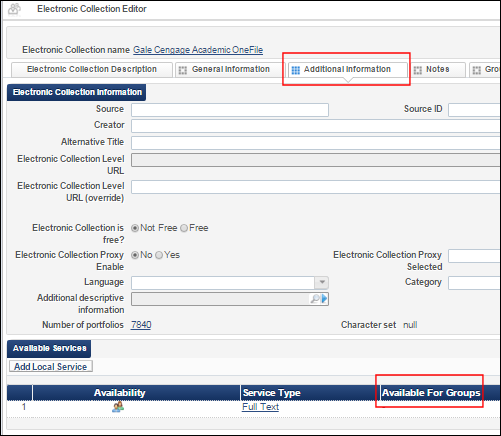 Available For Groups Column – Additional Information Tab
 - For consortial and multicampus environments, a new column labeled Available For Groups has been added to the Portfolios tab on the Electronic Service Editor page.
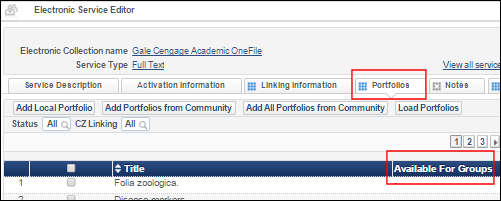 Available For Groups Column - Portfolios Tab
If the list of group names displayed in a row under the Available For Groups column requires more than two lines to display all of the groups, an ellipsis is added at the end of the content that can be displayed in those two lines and the complete list can be displayed as a tooltip when you position your cursor in the two lines that are displayed.
 Available For Groups Tooltip Display
 - For consortial and multicampus environments, group inheritance information from the collection and the service is provided in the Group Settings tab on the Electronic Service Editor page and the Electronic Portfolio Editor page, respectively. When there is a group setting for the collection and no group setting for the service, the collection-level group setting displays in the Group Settings tab on the Electronic Portfolio Editor page. If you add a group setting to a resource that has inherited group settings, a tooltip warning appears.
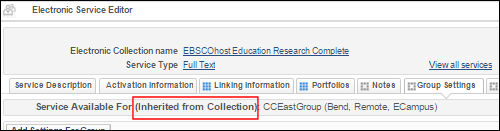 Group Settings Inherited from the Collection on the Service Editor Page
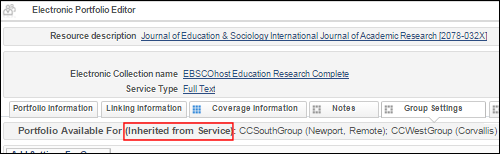 Group Settings Inherited from the Service
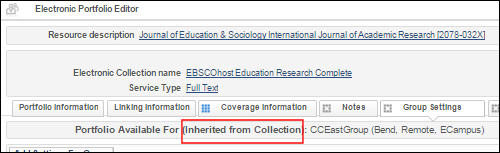 Group Settings Inherited from the Collection on the Portfolio Editor Page
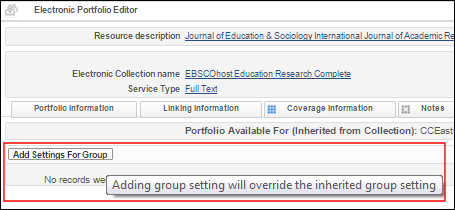 Tooltip Warning When Inherited Group Settings Exist
 - From the Group Settings tab on the Electronic Portfolio Editor page, the Coverage column now displays the details of the coverage information specified for the group.
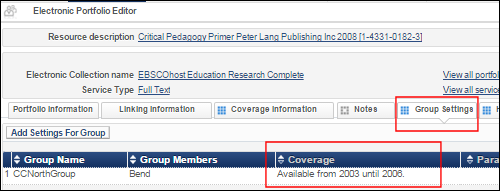 Coverage Details in the Group Settings Tab on the Electronic Portfolio Editor Page
 Group Settings Coverage Details Entered
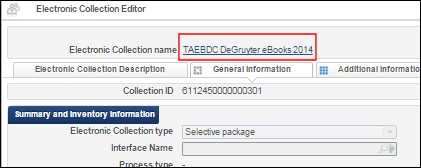
 - The electronic collection name is now hyperlinked text in the header area of the Electronic Collection Editor page and the Electronic Service Editor page.Electronic Collection Editor Hyperlinked Name
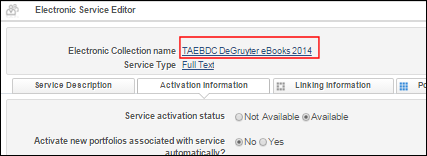 Electronic Service Editor Hyperlinked Name
When you use the hyperlink to move about and make changes from tab to tab, your changes are maintained but they are not permanently saved until you click the Save button in either the Electronic Collection Editor or the Electronic Service Editor.
- The service type is now hyperlinked text in the header area of the Electronic Service Editor and the Electronic Portfolio Editor page.
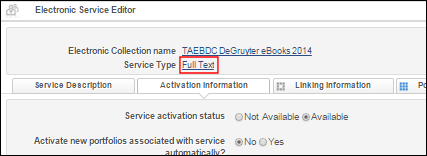 Electronic Service Editor Hyperlinked Service Type
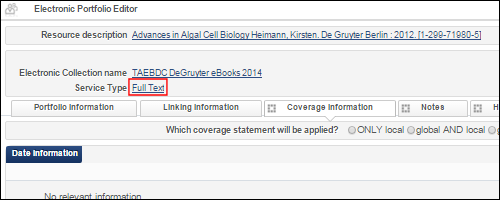 Electronic Portfolio Editor Hyperlinked Service Type
 - From the electronic resource editor pages, the record ID for electronic resources has been added for information purposes in the following manner:
- The portfolio record ID, service record ID, and electronic collection record ID appear in the Portfolio tab on the Electronic Portfolio Editor page.
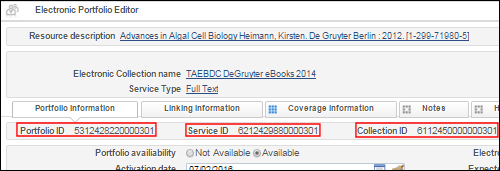 Electronic Resource Record IDs in the Portfolio Information Tab on the Electronic Portfolio Editor Page
 - The service record ID and electronic collection record ID appear in the Service Description tab on the Electronic Service Editor page.
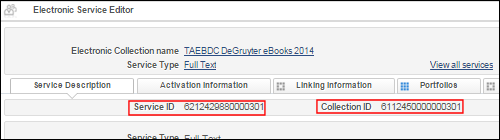 Electronic Resource Record IDs in the Service Description Tab on the Electronic Service Editor Page
 - The electronic collection record ID appears in the General Information tab on the Electronic Collection Editor page.
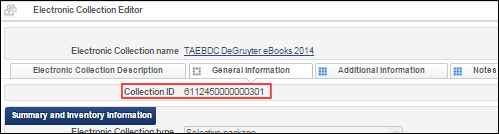 Electronic Resource Record ID in the General Information Tab on the Electronic Collection Editor Page
- The portfolio record ID, service record ID, and electronic collection record ID appear in the Portfolio tab on the Electronic Portfolio Editor page.
Enhance Primo Publishing of MARC Bibliographic Records to Include Linked Data URIs
Primo publishing may now include URIs in addition to the regular bibliographic information. The URIs are entered in the 0 subfield of the relevant fields.
A sample of the enriched record follows:
700 1 |a Lockyer, Norman, |c Sir, |d 1836-1920. |0 (uri)http://id.loc.gov/authorities/names/n86860325|0 (uri)http://viaf.org/viaf/sourceID/LC|n86860325 650 0 |a Science |v Periodicals. |0 (uri)http://id.loc.gov/authorities/subjects/sh85118580
For information on configuring linked data enrichment, see http://knowledge.exlibrisgroup.com/Alma/Product_Documentation/Alma_Online_Help_(English)/Alma-Primo_Integration/Publishing_Alma_Data_to_Primo/Exporting_Alma_Records_to_Primo#ww1352217
Additional Resource Management Enhancements
- User information details displayed in a pop-up window have been added to the Templates tab and the Rules tab in the MD Editor. Specifically, this has been added for Created by and Last updated by user information. When you view the properties for templates or normalization, merge, or indication rules and click the user ID link, the user information details appear. See the illustrations below.
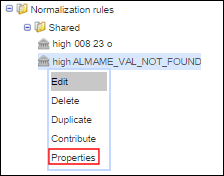 Properties Option
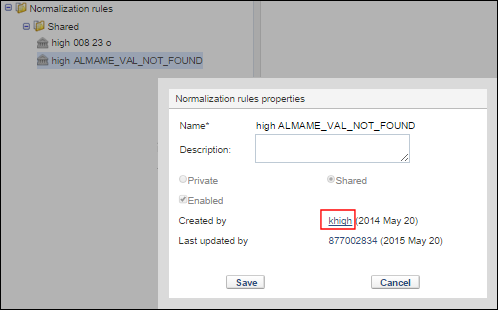 User ID Link
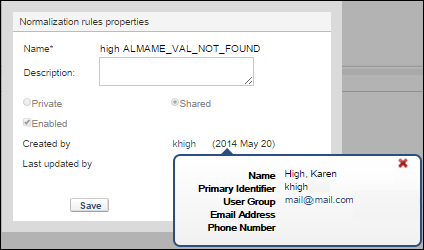 User Information Pop-UpThe user information link to display the user pop-up window is active for rules (or templates) that have been locally created in the Shared or Private folders. For rules (or templates) obtained from the Community, no user pop-up link is provided.
 - With the March release of Alma, sharing rules (normalization, merge, and indication in the MD Editor) in the Community Zone was introduced. In April, several enhancements have been incorporated into this capability, such as filtering and a Properties option in the drop-down list of the Community folder. For more information about these enhancements that have been added, see Contributing to the Community Zone - Normalization, Merge, and Indication Rules.
- In order to start maintaining URLs in the Community Zone, the ability to locally override the URL value of an activated Community Zone collection has been added. URLs will be added to the Community Zone collections in upcoming releases.
- A new drool combineFields can be used to combine all fields of the specified number. All subfields of the second and subsequent lines will be combined into the first line unless excluded (only the first occurrences of excluded subfields are copied into the first line, and only if they don't already exist in the first line). For more information, see Working with Normalization Rules.
Page tags: article:topicResource Managementproduct:almacontent:Documentationlang:english
