
AI Features Management
- General System Administrators can access the page directly from Configuration > General > AI Features > AI Features Management
- Users with admin roles for their area can access the page via their specific area in the menu. For example, a Repository Administrator can access the Metadata Assistant from the Resources menu, which leads to the AI Features Management page.
- Each feature on the page is visible only to its specific role/s. For example, an Acquisitions Administrator will see Alma AI Assistant on this page.
AI Features Management consolidates the enablement and configuration of all AI-based features that are gradually being added to this page. It includes feature descriptions, enable/disable toggles, and role-based visibility of the relevant AI features.
General System Administrators can access this page from Configuration > General > AI Features > AI Features Management, and other roles can access it from the relevant menu area as described in the Permissions section above.
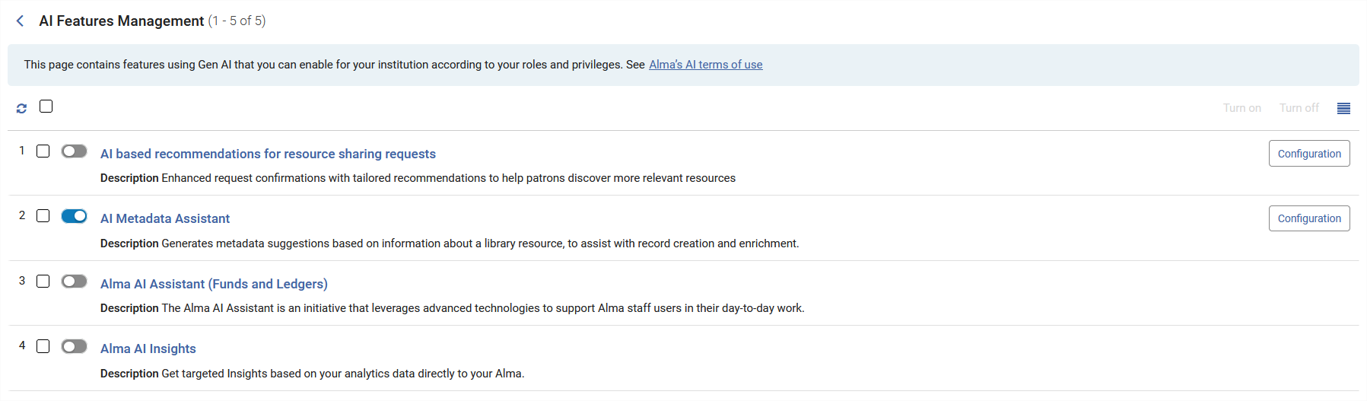
You can use the toggle to turn off a specific feature. You can select one, many, or all features in the list by selecting the relevant checkbox(es) and then selecting the Turn off/Turn on buttons that appear.
If you turn a feature on or off, the change applies to the entire institution.
EU Artificial Intelligence Act: Enhancing Transparency for AI-Generated Content
As part of our ongoing commitment to responsible AI and regulatory readiness, Clarivate has implemented updates designed to support the transparency requirements of new AI regulations, including in particular the European Union Artificial Intelligence Act (EU AI Act).
The EU AI Act imposes certain transparency obligations to inform users when they are interacting directly with AI systems and when content has been generated or altered using AI. To support these requirements, we have introduced a number of transparency features across our AI-powered experiences.
Where AI is used to generate content, users may now see indicators, labels, or disclosures that identify AI-generated outputs. These transparency measures are designed to help users understand when AI has contributed to a piece of content, while maintaining a consistent and intuitive user experience.
In AI-powered workflows such as search assistance, recommendations, insights, and conversational experiences, transparency indicators may be displayed to make AI involvement visible at the point of use. Users can therefore more easily distinguish between AI-generated content and content created through other means.
We have also improved transparency for exported AI-generated content. Depending on the experience and file format, exported documents, reports, presentations, or other files may include visible AI-related disclosures to indicate that AI contributed to the generation of the content. This helps support transparency even when content is shared outside the original application.
Behind the scenes, we have introduced additional technical capabilities to the Clarivate AI Platform to support content provenance and traceability. The Academic AI platform enables accelerated and consistent deployment of AI capabilities across our portfolio of solutions, and doing so at scale. AI-generated content can include embedded provenance information that helps identify the origin of the content generated by us. The platform also maintains records of AI-generated content, helping provide an auditable record of generation activity.
These capabilities are intended to support transparency and accountability while protecting sensitive information about the underlying AI technologies used to generate content.
While the Clarivate AI Platform provides these transparency and provenance capabilities, individual product teams determine how those capabilities are implemented within their user experiences, taking account of customer needs and applicable legal and compliance obligations.
These enhancements are part of our broader commitment to responsible AI development and to helping users understand when and how AI contributes to their workflows. By making AI involvement more visible, we aim to support informed use of AI-generated content and increase confidence in AI-assisted experiences.
