
Jobs Progress Details
Introduction
Alma Jobs run batch processes on a large number of entities. Some jobs split the job population into discrete units of work called bulks, which are not dependent on one another, and can be processed in parallel.
Job Progress details are available for jobs that run in bulks, providing information about the progress of the job over its entire runtime, increasing transparency regarding the job’s state, and assisting in determining the job’s health.
Job Stages
- Pending — A submitted job waiting to be triggered by Alma. If no available system resources exist, the job remains in Pending status until system resources become available.
- Initialization — When started, a job begins with the initialization stage. The operations performed during the initialization stage vary between job types. For jobs that work with bulks, bulks are created during the initialization stage.
- Processing — The main job stage during which the job’s work is done.
- Finalization — Before the job ends, the finalization stage is run. The operations performed during the finalization stage vary between job types.
Jobs Queue
Bulks are created during job initialization and are initially assigned the Waiting for processing status. Bulks in the waiting list are periodically moved to the queue in a process called a Round. A job cannot exceed the maximum allowed number of bulks in the queue at a time. A job Round moves the maximum number of bulks to the queue without exceeding the limit.
Bulks are processed from the Jobs Queue. Alma continuously optimizes and prioritizes running jobs to allocate resources effectively. Bulks of jobs assigned a higher priority may be processed before bulks of jobs with lower priority.
Job Progress Details
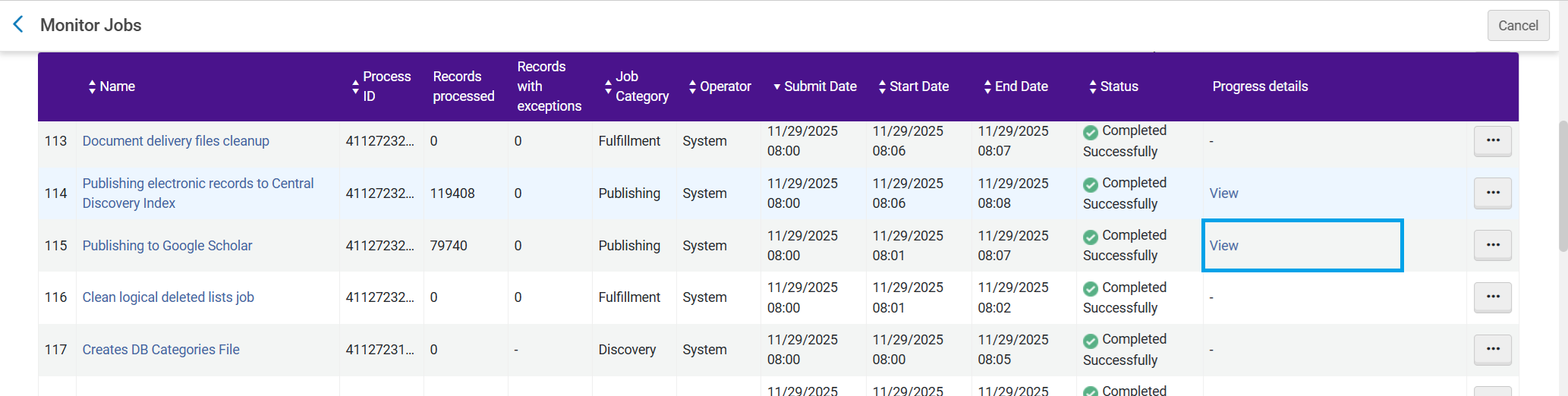
To access a job’s “Progress Details” page, from the Monitor Jobs page (Admin > Monitor Jobs), in the Progress details column, select View, or from the job's action menu, select Progress details.
Not every job has a progress details page.
Basic Details
The job progress detail includes:
- Job ID, Name, Description, Status.
- Job progress rate – a score of the job’s overall progress
- Low— when the progress is significantly lower than expected
- Medium— when the progress is slightly lower than expected
- Normal— when the progress is as expected
- High— when the progress is higher than expected
- Job stages start times
.png)
Bulks Awaiting Processing
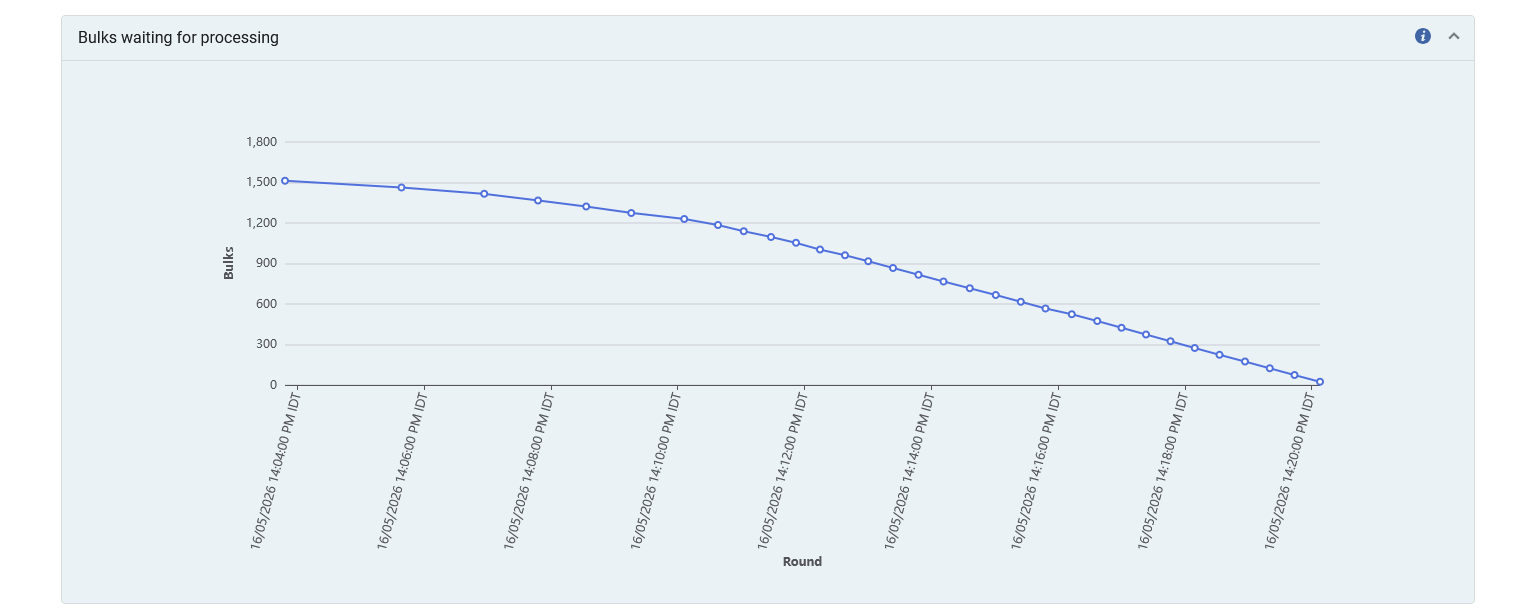
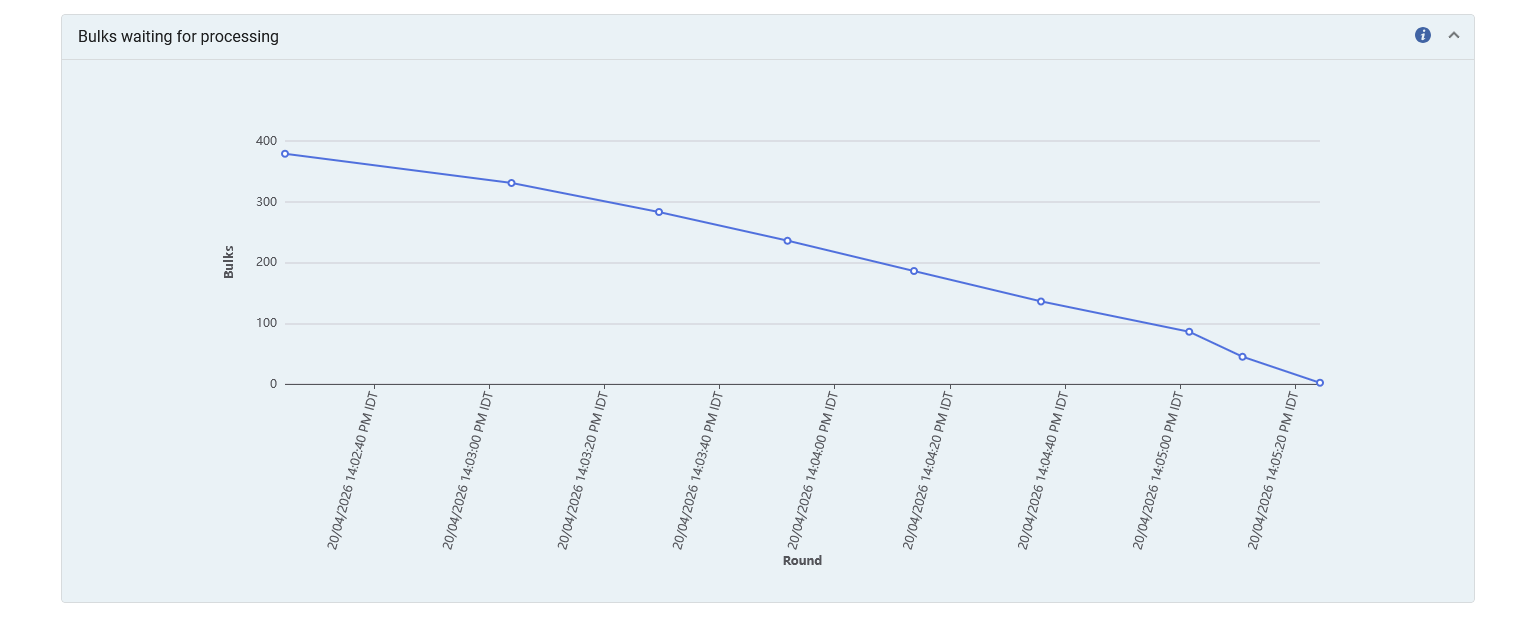
The number of bulks awaiting processing and have not yet been moved into the Jobs queue in each Round. After the initialization stage, the number of awaiting bulks should decrease steadily.
Bulks in Queue and Transferred
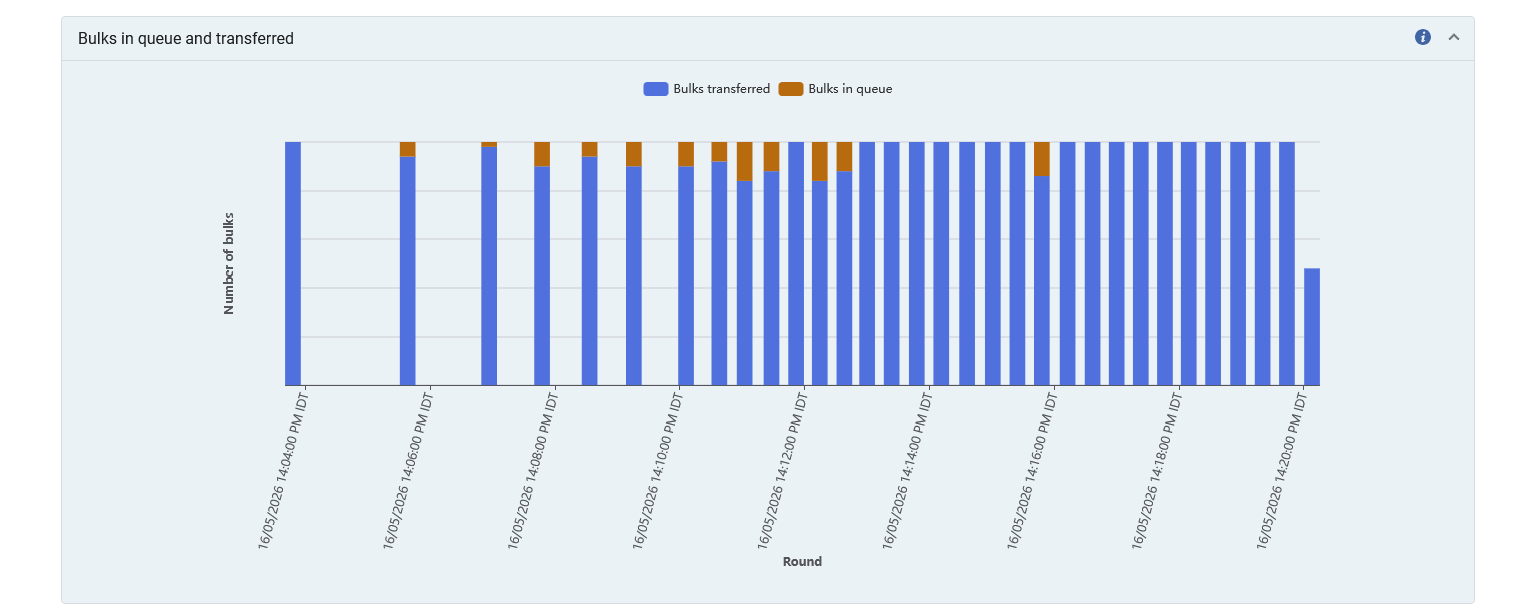
The Bulks in queue transferred graph displays the number of bulks in the Jobs Queue and the number of bulks transferred from the waiting list into the Jobs Queue in each Round.
If there are bulks still in the queue when a Round is run, fewer bulks are transferred into the queue. The number of bulks transferred corresponds to the decrease in the number of waiting bulks.
Progress Rate Distribution
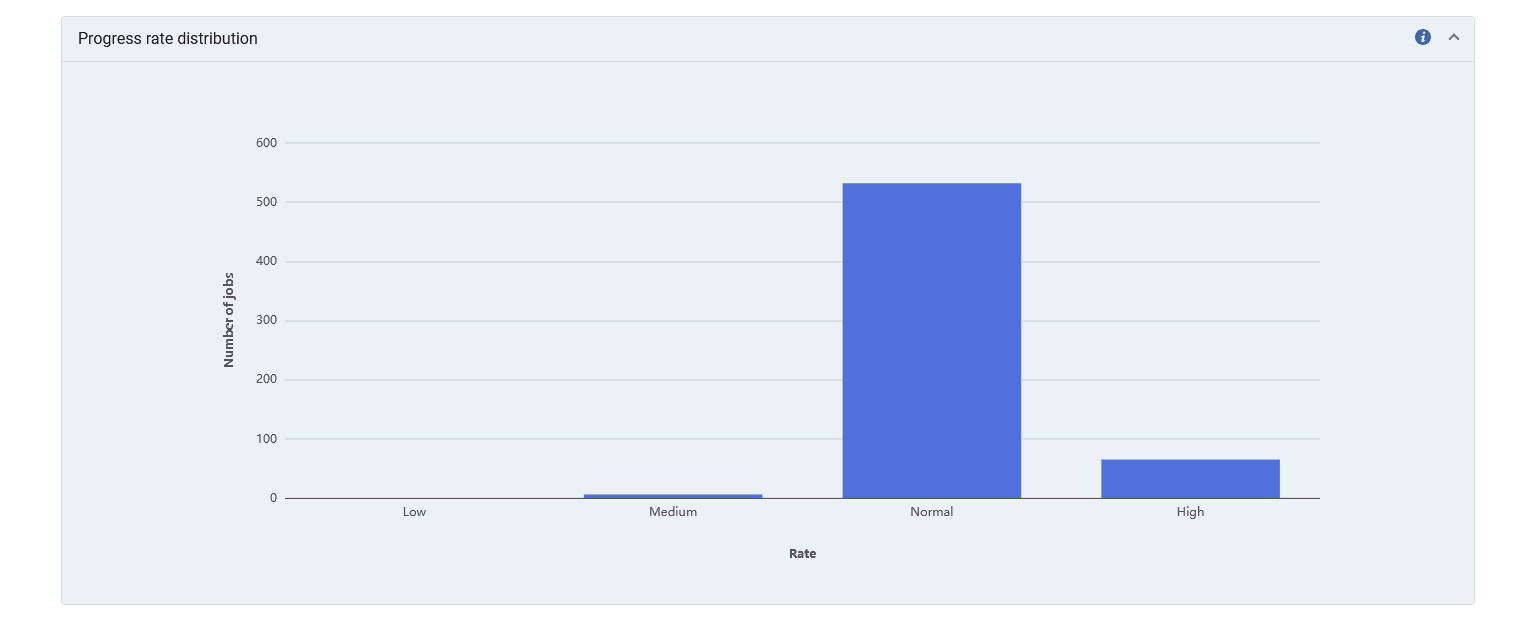
Shows for each of the progress rates the number of job runs that had that progress rate for jobs of the same type from the past 3 months.
Bulks Processing Examples
- Smooth sailing — The number of waiting bulks decreases steadily, and the number of bulks in the queue at the start of each round is 0.
-
Waiting bulks is 0 at the end of the job for multiple rounds, and there are still bulks in the queue. The job is still running and needs to process the remaining bulks in the queue, and there are no more bulks waiting to be moved into the queue.
.png)
-
Waiting bulks is 1 at the start of the job for multiple rounds. This is the initialization stage.
.png)
FAQ
Question
What does it mean when I do "View" from the "History" tab of the "Monitor Jobs" for jobs which "Completed Successfully" and everything is empty except for "progress rate distribution"? For example, see job ID: 8657531650000121, Name: Publishing to OCLC - Bibliographic Records. You can see that the graph for "Bulks waiting for processing" is empty and the graph "Bulks in queue and transferred" is empty. How can it be that no bulks were processed but the job “Completed Successfully”?
Answer
When a job runs there are several stages including: Submitted, Initialization, Processing, Finalization and End. During initialization, the bulks are created.
In some cases, the job can move all the bulks into the queue during the initialization stage and then they are ready for immediate processing. This is because the bulks were transferred during the initialization stage, there will be no activity recorded in the sections "Bulks waiting for processing" and "Bulks in queue and transferred".
Regarding this, you will notice that for a case such as this, the following message will appear in the sections "Bulks waiting for processing" and "Bulks in queue and transferred": “There could be no data because all bulks were already transferred for processing when the job started”.
Question
Sometimes when I click "View" from with the “Running” or the "History" tab of the "Monitor Jobs" and scroll down to the “Progress rate distribution” section I see jobs which have been defined as either “Low, “Medium”, “Normal” or “High”. I see that the pop-up help text for this section states “The progress rate distribution for jobs of the same type from the past 3 months”. Two issues regarding this:
1. Does this include the currently being-run job?
2. The descriptions of the “Progress rate” - “Low”, “Medium,” and “High”, seem logical. However, there is also “Normal” - why is there also normal?
Answer
1. Yes, this includes the job currently being run.
2. The values low, medium, and high are relative to the “Normal”.
a. Normal means that it is behaving as expected.
b. Low is significantly lower than expected (lower than normal)
c. Medium is slightly lower than expected (slightly lower than normal)
d. High is higher than expected (higher than normal)
Question
When I click "View" from within the “Running” or the "History" tab of the "Monitor Jobs" and look at the screen there are many references to “Bulks”. For example,
There is a section “Bulks waiting for processing” described as “The number of bulks waiting to be processed over the run time of the job. We expect to see a steady decline in the number of waiting bulks.”
There is a section “Bulks in queue and transferred” described as “The number of bulks still in the queue and the number of bulks transferred into the queue.”
I am not a programmer (I work at the circulation and reference desk) and I am not familiar with the term “bulks”. I do however run many jobs. What is a “bulk”? Can you describe for librarians and not for programmers?
Answer
A bulk is a group of entities which need to be handled as part of a job.
For example, in the job “PO Line – Packaging” the entities to be handled are PO Lines.
If the job will handle ten PO Lines at a time, then there will be five bulks of ten entities in each bulk.
Question
Sometimes when I click "View" from the "History" tab of the "Monitor Jobs" for jobs which "Completed Successfully" I see that there are still green bars in the table in the section “Bulks in queue and transferred”. According to the legend in the graph, the green means “Bulks in Queue”. How can this possibly be the case? If the job “Completed Successfully” then how can there still be bulks in the queue. If the job completed successfully, then I would expect that all bulks have left the queue.
Answer
What we see in the table “Bulks in queue and transferred” is not the current (at the time of viewing the table) situation, but rather the state of the job bulks from the beginning of the job running until it finished. What we see in the table “Bulks in queue and transferred” are bulks which were sent to the queue during initialization of the job and were later processed. You will notice that there are time stamps under each bulk, and these time stamps represent the approximate time of the presence bulks. It is not the current situation at the current time.
Question
Why was my job in Pending status for an extended time?
Answer
A job may remain in Pending status for several reasons, for example, when waiting for available system resources.
Question
Why did the initialization/finalization stage of my job take a long time compared with other jobs?
Answer
The operations performed in the initialization and finalization stages vary between job types, and may also depend, in some cases, on the items on which the job runs.
.
