
Sistemas financieros
Handling orders and invoices by vendors can be managed in the institution's financial system. Information about/for the transactions must be imported from these systems into Alma, or exported to these systems from Alma.
- Administrador general del sistema
Las adquisiciones de Alma incluyen el pedido y recepción de materiales de los proveedores, lo que incluye que los proveedores gestionen pedidos y facturas. Cuando estas se gestionan en el sistema financiero de la institución, se debe importar la información sobre/para las transacciones desde estos sistemas a Alma, o exportarlos a estos sistemas desde Alma. De esta forma, la información financiera sobre los fondos y pedidos se mantiene regularmente sincronizada con estos sistemas.
For details on the integration between Alma and financial systems (including XSD and XML samples), see https://developers.exlibrisgroup.com/alma/integrations/finance.
Para configurar exportar e importar a/desde un sistema financiero, se configuran las conexiones FTP para el sistema y se crean perfiles de integración para las acciones que se desean llevar a cabo. El perfil de integración permite definir las tareas que se pueden programar o ejecutar manualmente.
If the jobs are scheduled, they appear in the Scheduled tab on the Monitor Jobs page (see Viewing Scheduled Jobs). The jobs also appear in the Running/History tabs on the Monitor Jobs page when/after they run. Las tareas son:
- Import Payment Confirmation –ERP Import Using Profile <integration profile>Importa confirmaciones de pago desde ERP a Alma. Esto permite a Alma mover ejemplades pagados al siguiente paso del flujo de trabajo.
- Export Invoices for Payment –ERP Export Using Profile <integration profile>Exporta facturas desde Alma a un ERP. La tarea exporta cada factura a un fichero separado. El propietario de la factura es uno de los campos en el fichero.
- Funds Allocation Loader –Fund Allocation Loader(called Update Fund Tx Job in the list of scheduled jobs).Importa balances de fondos actualizados desde un sistema financiero a Alma. Esto cambia las asignaciones de los fondos en Alma para que coincidan en el ERP. For information regarding the format of the input file, see Synchronize Fund Information.
- Export Orders (PO) –Export Order (PO) Job(cannot be scheduled)Exporta órdenes de compra enviadas desde Alma al sistema financiero.
- Export PO Lines (POL) –Export PO Lines (POL) JobExporta líneas de orden de compra cerradas o canceladas desde Alma a los sistemas financieros. La tarea solo puede exportar un máximo de 1.000 líneas de orden de compra. Si se marcan más de 1.000 Líneas de orden de compra para su exportación, la tarea exporta 1.000 de ellas y la página del informe de la tarea incluye una alerta que sugiere que el usuario vuelva a ejecutar la tarea para exportar las líneas de orden de compra restantes.
- Configure an S/FTP connection to be used by Alma and the financial system, as described in Configuring S/FTP Connections. (If you are working in a sandbox environment or pre-”Go Live” production environment, ensure that the S/FTP connection you configured is defined as an allowed S/FTP connection for your institution, as described in Configuring Allowed S/FTP Connections During Testing.)
- On the Integration Profile List page (Configuration Menu > General > External Systems > Integration Profiles), select Add Integration Profile. Se abre la primera página del asistente del perfil de integración.
- Se han de realizar las siguientes acciones en esta página:
- Introducir un código y un nombre para el perfil que se está definiendo.
- From the Integration type drop-down list, select Finance.
- From the S/FTP connection type drop-down list, select the name of the FTP connection that you defined in step 1.
- Indicate the type of financial system with which you are integrating (for Ex Libris' informational purposes). Téngase en cuenta que esto es obligatorio.
- Si se selecciona Otro en la lista de sistemas, aparecerá el campo Descripción del Sistema para mostrar más información del sistema.
- De forma opcional, se puede introducir una descripción de la integración que se está configurando.
La casilla de selección por defecto no funciona para este tipo de integración.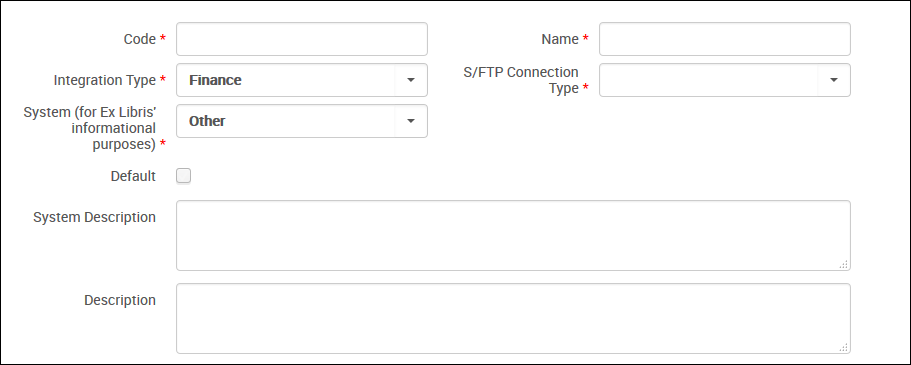
Definición del perfil de integración de finanzas – Página 1 - Select Next. Aparecerá la segunda página del asistente.
- Perform the following actions in the Import Payment Confirmation,Export Invoices For Payment,Funds Allocation Loader,Import PO Approvals,Export Orders (PO), and Export PO Lines (POL) sections on this page.
- Select Active or Non Active. Select Active to enable the import/export job to run. By default,Non Active is selected.
- In the Input file path/Output file path fields, enter a subdirectory of the path specified when creating the S/FTP connection. For example, if you specified Alma in the Sub-directory field during S/FTP connection configuration and you enter payments in the Output file path field, the invoices are exported to the Alma/payments directory. When the action is Active, the file path is mandatory.The value of the Input file path field cannot be identical to any of the other Input file path or Output file path values.
- Configurar los siguientes campos específicos de tarea:
- For a Funds Allocation Loader job, in the File Extensions field, select the type of file that is being imported for the fund allocation,.CSV(.csv) or Excel(.xls).
- For an Export Invoices For Payment job, select Split by Owner to split the files into separate files, one for each invoice owner (library). When split by owner, the exported file names are named <LibraryName>_<OwnershipType>…xml where <OwnershipType> is LBR for library or INT for institution. For example,BC01_LBR.
- For an Export Orders (PO) job, select Integrate by ERP Number if the PO requires ERP approval before moving to the next stage of the process. Cuando se seleccione, se exportará una orden de compra a la ERP si no tiene un número de ERP. POs are subsequently re-imported to Alma using the Import PO Approvals job. Cuando no se seleccione, se enviará una orden de compra directamente al proveedor al mismo tiempo que se envía al ERP.
- From the Schedule drop-down list, select a predefined scheduling option. If you select Not scheduled, the invoice import/export job runs only when you manually run it (by selecting Run). For details, see To manually run a finance job. Note that the Export Orders (PO) job is not scheduled, it is simply invoked whenever a PO is ready to be sent to the ERP/vendor.
- Select Save. El perfil de integración que se ha configurado aparecerá en la Lista de Perfil de integración. Si se programó una tarea, aparecerá en la página de Gestionar tareas.
- On the Integration Profile List page, locate the profile and select Edit in the row actions list. Aparecerá la pestaña de Información general.The Contact Information tab is not operational.
- Select the Actions tab. The details you defined appear.
- To run an import, export, funds allocation, or PO line export job immediately, select Run in the relevant section. La tarea se ejecutará y el fichero se enviará a/desde la ubicación FTP configurada. Si están habilitadas las notificaciones por correo electrónico en Alma, recibirá una notificación por correo electrónico.In Export Invoices For Payment, leave the field Use updated XSD format as it is, unless XSD version 1 is required. For more information about XSD versions, see https://developers.exlibrisgroup.com...ations/finance.To manually run an export of POs, select Rerun Failed Orders in the Export Orders (PO) section. Todas las órdenes que tuvieron error previo se envían para exportar, y aparecerá un mensaje en la parte superior de la página.
To view the status of the job, the number of files processed, and so forth, see Viewing Running Jobs and Viewing Completed Jobs.
Page tags: article:topic product:alma content:Documentation lang:english fund allocation loader fund loader loading funds ERP enterprise resource planning system integrating with ERP import invoices import PO lines export invoices export PO lines finance job
