
重複およびコレクションアナリシスに関する操作
重複分析の概要と重複分析の実行方法
- 購入オペレーター
- 購入マネージャー
- リポジトリマネージャー
- 電子目録オペレータ
重複分析ツールを使用して、図書館の電子所蔵のコレクション開発分析機能を向上させます。
Among the main use cases in which the Overlap Analysis Tool can help your collection-development analysis:
- When considering to order an electronic collection, can help you establish which part of this collection is already covered in other electronic collections available in your existing library content, to learn which collection has a better value for money, and to avoid content overlap and purchasing of duplicate resources.
- When considering to cancel electronic collections, can help you determine content overlap rate for possible resource cancellation scenarios, in order to learn what full text access would be lost if a resource were cancelled.
分析の種類
With Overlap and Collection Analysis, Alma can provide you with the following information about your electronic collections:
- Compare Electronic Collections- Compare an Alma electronic collection in the Institution Zone or the Community Zone with the titles of one or more electronic collections in the Institution Zone or in the Community Zone, or with the entire Institution Zone, to find titles with overlapping coverage dates in these collections.これはISSNやISBNなどの識別子を使用して、タイトルレベルのAlmaレコードを照合し、ポートフォリオレベルでカバレッジ情報を比較するものです。See Performing Compare Electronic Collections Analysis for more information.
- Look Up Titles - Compare a list of identifiers contained in an Excel spreadsheet with Alma records from various population scopes to generate overlap analysis reports.See Performing Look Up Titles Analysis for more information.
- When you perform an overlap analysis (using either of these two methods), the analysis searches for matching electronic collections that have a service type of FullText or SelectedFullText.
- 分析で考慮されるのは、補償年のみで、月や日ではなく、重複を判断します。その結果、若干の差異が生じる可能性があります。
Managing Overlap and Collection Analysis Reports
All reports generated by the institution's Alma users appear in the Overlap and Collection Analysis page (Resources > Advanced Tools > Overlap and Collection Analysis).すべてのレポートは、すべてのAlmaユーザーが見ることができます(ただし、ドラフトレポートは、レポートを作成したユーザーのみが見ることができます)。
Once the report is generated, it is read-only: it can be viewed, but cannot be edited.
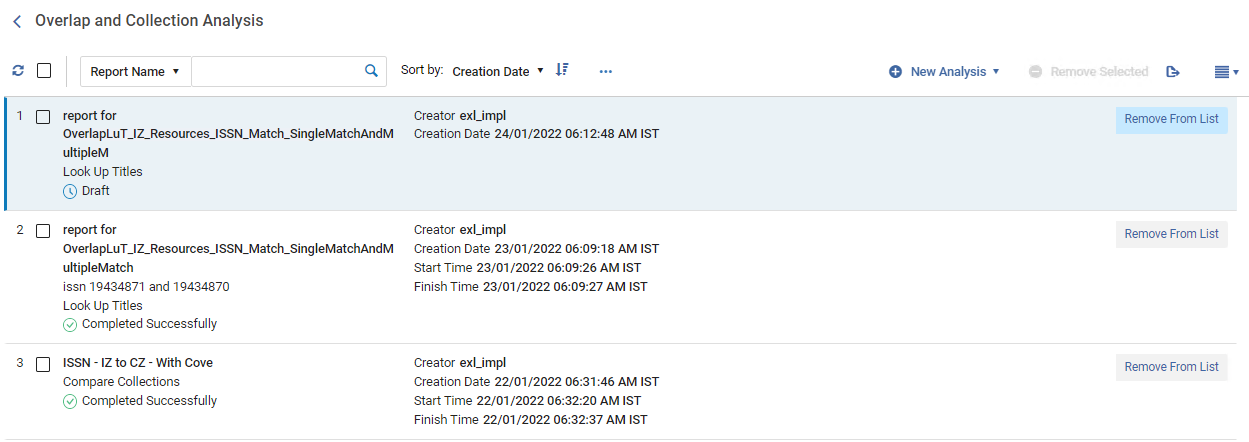
- 名前をクリックします。
- To remove one report, select Remove From List in the row actions.
- 複数のレポートを削除するには、削除したいレポートのチェックボックスにチェックを入れ、上部の選択したものを削除を選択します。
検索とフィルタリングのオプションを使用して、目的のレポートを見つけます。
| 検索オプション | 説明 |
|---|---|
| レポート名/説明 | Select whether to search by report name or description, specify the name/description, and select the search icon  . |
| で並べ替え | レポートを並べ替えるオプションのいずれかを選択します:作成者、作成日、開始/終了時刻、名前、ステータス、タイプSelect whether to display the reports in ascending or descending order. |
| レポートタイプ | Select report type to display only the reports of this type.オプションは、[すべて]、[コレクションの比較]、[タイトルの検索]です。 |
| レポートステータス | Select report status to display only the reports of this status.Options are: All, Completed Successfully, Draft, Failed, Pending, In Process, Completed with Errors. |
比較電子コレクション分析の実行
Use to compare two Alma electronic collections to find titles with overlapping coverage dates in these collections.
Compare an Alma electronic collection in the Institution Zone or the Community Zone with the titles of one or more electronic collections in the Institution Zone or in the Community Zone, or with the entire Institution Zone, to find titles with overlapping coverage dates in these collections.これはISSNやISBNなどの識別子を使用して、タイトルレベルのAlmaレコードを照合し、ポートフォリオレベルでカバレッジ情報を比較するものです。
分析では対象日(年、月、日)を考慮しますが、ポートフォリオによっては対象日が日付ではなく巻次/版数で定義されている場合があります。異なる形式で定義されたカバレッジを持つポートフォリオを比較すると、わずかな違いが生じる可能性があります。
The comparison generates a number of reports, see Compare Electronic Collections Reports.
- Open the Overlap and Collection Analysis page (Resources > Advanced Tools > Overlap and Collection Analysis).
- Select New Analysis and then select Compare Collections.A page opens where you can see existing reports on the left side and create a new report on the right side.
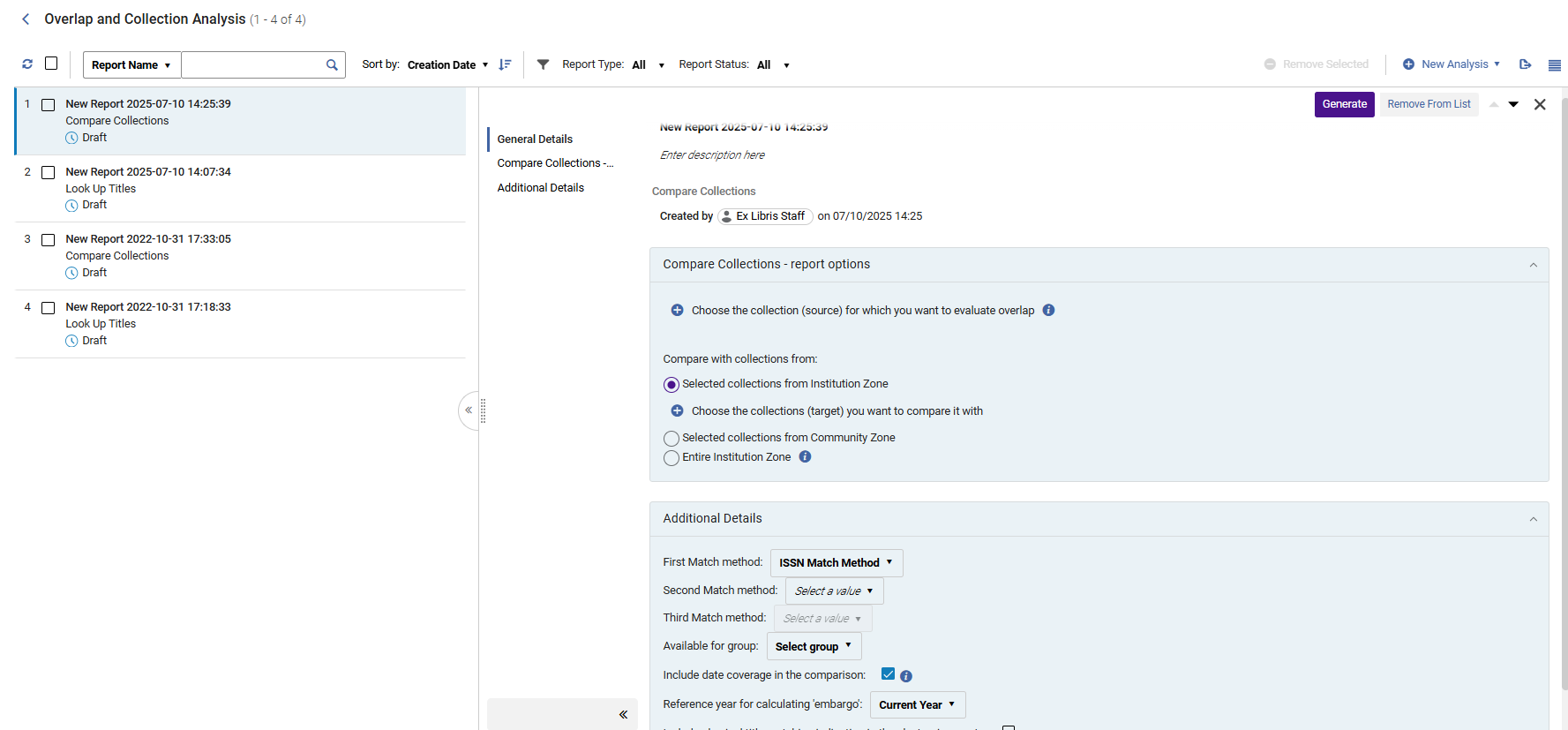
- Name your new report and provide a description by selecting inside the field and typing.To exit, select anywhere outside of the fields.
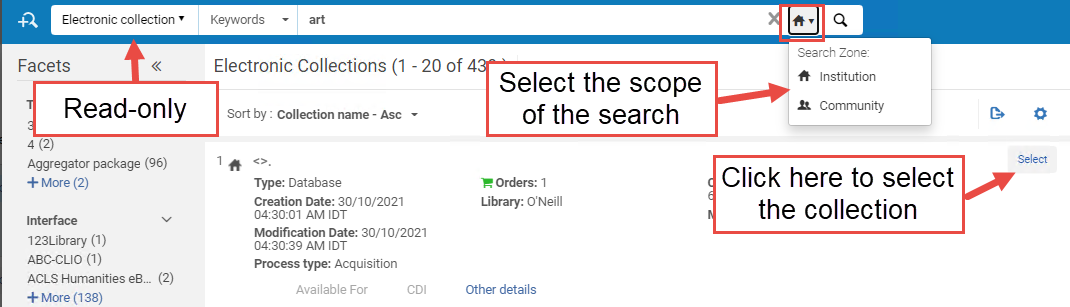
- Select Choose the collection for which you want to evaluate overlap.A sliding panel opens where you can search for your electronic collection within your Institution/Community.To select it, click Select.Once selected, the search panel is closed automatically, and the selected electronic collection is added to the Overlap and Collection Analysis page.
- [比較元コレクションと比較] セクションでは、比較元コレクションと比較する対象コレクションのゾーンタイプを選択します。
The selected source collection is not included in the target collections.If you select as the target the option "Entire Institution Zone" of which the selected source is part, the source collection is excluded from the target population.
ターゲットコレクション 説明 ユースケース: Selected collections from Institution Zone
Select electronic collections from the Institution Zone as the target collections for comparison.
This option helps you know which part of your electronic collection is already covered in other electronic collections available in your IZ electronic inventory.
Selected collections from Community Zone
Select electronic collections from the Community Zone as the target collections for comparison.
このオプションは次のことに役立ちます。
When considering to purchase (or cancel) CZ electronic collection(s), to know what portion of it is already covered in other electronic collections available in your IZ electronic inventory (coverage can be taken into consideration).
To see which percentage of titles overlaps in source CZ collection(s) and other CZ collection(s), to learn which collection has a better value for money.
Entire Institution Zone
Select the entire Institution Zone as the target for comparison.
This includes all electronic collections available for your institution (both active and inactive).This means all local collections, as well as all activated CZ collections AND standalone portfolios.
このオプションは、次のことに役立ちます。
Compare specific collection(s) in the Institution Zone against the entire Institution Zone electronic holdings, to determine content overlap rate for possible cancellations
コミュニティゾーンの特定のコレクションを機関ゾーンの所蔵全体と比較して、新規購入の可能性や重複リソースの購入を回避するためのコンテンツの重複を判断します。
Compare limited number of active IZ collections against all the active IZ holdings, to determine overlap for resource cancellation scenarios, in order to learn what full text access would be lost if a resource were cancelled.
Compare a limited number of non-activated Community Zone collections against all the active IZ holdings to determine overlap when considering whether to add a new resource, in order to learn whether the resource has sufficient enough unique full text to justify acquiring it.
- [比較するコレクションを選択] をクリックします。上で選択した範囲内で電子コレクションを検索できるパネルが開きます。To select a collection, check the checkbox and select Done.Once selected, the search panel is closed automatically, and the selected electronic collection is added to the Overlap and Collection Analysis page.
- Select the First Match method: ISSN, ISBN, Title, LCCN, or 035.Note that the match is performed using the same fields for these indexes as used in the repository search as described in Available Search Indexes.
- If relevant, select a Second Match method: ISSN, ISBN, Title, LCCN, or 035 and Third Match method: ISSN, ISBN, Title, LCCN, or 035.
The Identifiers are used in the defined order.The first match method is used first.第1一致方法で一致しなかったタイトルに対してのみ、次の一致方法が使用されます。結果リポートには、各一致に使用された一致方法が記載されます。The additional match methods, if defined, also apply to the physical indication search.It is not possible to select the same identifier more than once.
- 「利用可能」グループグループを選択して、このグループに関連付けられているポートフォリオ、またはどのグループにも関連付けられていないポートフォリオ(すべてのグループで使用可能)のみを比較します。If no group is selected, portfolios are compared regardless of the group they belong to.このオプションは、マルチキャンパスとして定義されている機関にのみ表示されます。When an institution is defined as multi-campus, this feature is not activated by default.Contact Ex Libris Customer Support to enable it.The list of groups is taken from the Inventory Network Group code table.
- Ensure the Include date coverage information in the comparison option is selected to enable analysis down to the level of coverage, taking into account the coverage ranges and embargo periods of the source and target portfolios.
- When selected, the "Reference year for calculating embargo" parameter is activated.ドロップダウンから差し止め措置を計算する年を選択します。This option enables you to perform the analysis and test the coverage overlap, pretending the current year is the year you selected in the dropdown ("Current year +1", "Current year +2", "Current year +3", etc.).For example, if the current year is 2021, but you would like to test what the Overlap Analysis would be two years from now (since some resources have embargoes that might affect the availability in two years), select "Current year +2".The analysis compares the coverage overlap considering the embargo, as if the analysis took place in 2023.
- When finished setting the parameters, select Generate.Alma generates the report and displays the results in the Analysis Report section, with percentages for unique and overlap content.This enables you to see at a glance which collections have high overlap with others (and therefore could be cancelled), or have high levels of unique content (and therefore should be retained).分析リポートでは、定義されたすべての一致方法によって見つかった一致の概要が示されますExcelリポートには、それぞれの一致に使用された一致方法の詳細が記載されます。
- Select the download icon
 to download the reports as Excel files.
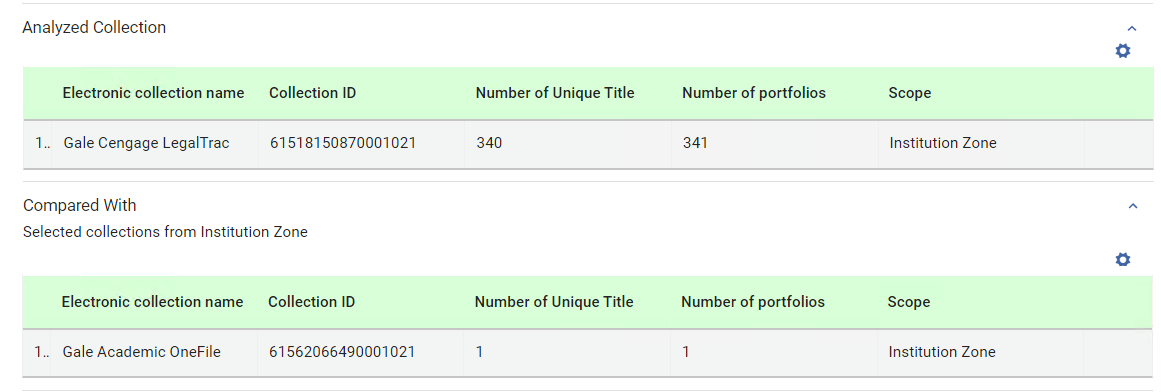
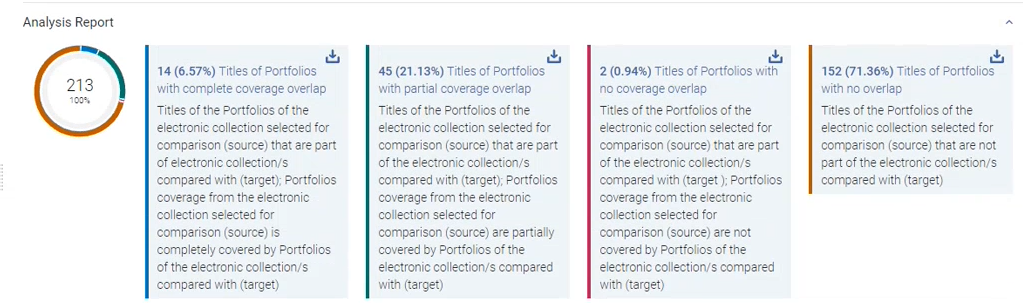 In addition, Alma places the report as the top-most report in the list of reports on the left, where you can access it at any time.For detailed information about the report, see Compare Electronic Collections Reports.When the results are displayed for the analyzed and compared collections, the Number of unique title column appears in the table.This column is the count of titles in the source that are searched for comparison in the selected target collections.The label of the column indicates that the comparison is performed on the level of the bibliographic record (title level).There could be more than one portfolio for the same bibliographic record (title).The reports are title-based, and this column shows where the total number of titles are derived from.
Performing Look Up Titles Analysis
Compare a list of identifiers contained in an Excel spreadsheet with Alma records from various population scopes to generate overlap analysis reports.
This comparison generates a number of reports, see Look Up Titles Reports.
Overlap and Collection Analysis Look up title for physical titles does not return a match when there are physical holdings but no items,only physical titles with items are considered for the matching.
Excel File Containing Identifiers for Comparison
機関/コミュニティ/ネットワークゾーンと比較したいタイトルの一意の識別子を含むExcelファイルを準備します。
入力Excelファイルには複数のシートが含まれている場合があります。ただし、重複分析ジョブでは、最初のシートのみが処理対象となります。他のシートには、あなたの機関に関連する情報が含まれている場合があります。
To identify the method for comparing the records, the identifier column must be placed in the first sheet of the input Excel file.必要に応じて、2番目と3番目の一致する識別子を、列Bと列Cに追加できます。
列Aの列見出しは、以下のいずれかで指定してください:
- eISBN/ISBN (eISBN and ISBN values can occur in the same column (each in a separate line))
- eISBN / ISBN(eISBNとISBNの値を同一列に含め、行ごとに分けて記載)
- LCCN
- TITLE

第2および第3の照合方法を定義するには、列B および C の列見出しを以下のいずれかに設定する必要があります。
- eISBN / ISBN(一致する識別子)
- eISSN / ISSN(一致する識別子)
- LCCN(一致する識別子)
- タイトル(一致する識別子)
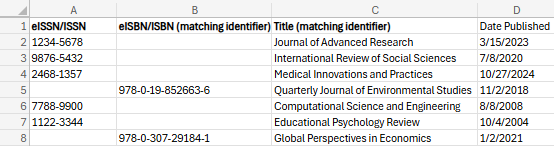
以下は、列Aと列Bに2つの一致する識別子があるExcelファイルの例です。列Cのヘッダーは(一致する識別子)としてマークされていないため、照合には使用されない点に注意してください。
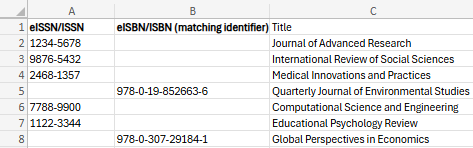
Excelファイルには、1シート目のみ、識別子列の後に追加情報の列が含まれる場合があります。ヘッダーが一致方法として認識されない場合、これには、列Bと列Cが含まれます。これらの列(1シート目のみ)もリポート出力に含まれます。これはヘッダーがある列に対してのみ行われます。ヘッダーのない列は、システムが追加の列の検索を停止することを示します。入力ファイル内の追加列は、出力リポート内で分析情報列の末尾に続けて、Excelの入力ファイル内の表示順に従って配置されます。各識別子については、追加の列の値は対応する識別子の行の出力リポートに表示され、入力ファイルからの関連情報が含まれます。
同じ一致する識別子列を複数回使用して、たとえば、タイトルごとに3つの異なる eISSN / ISSN 値を使用して検索を実行することができます。
タイトルの検索
- Open the Overlap and Collection Analysis page (Resources > Advanced Tools > Overlap and Collection Analysis).
- Select New Analysis and then select Look Up Titles.A page opens where you can see existing reports on the left side, and create a new report on the right side.
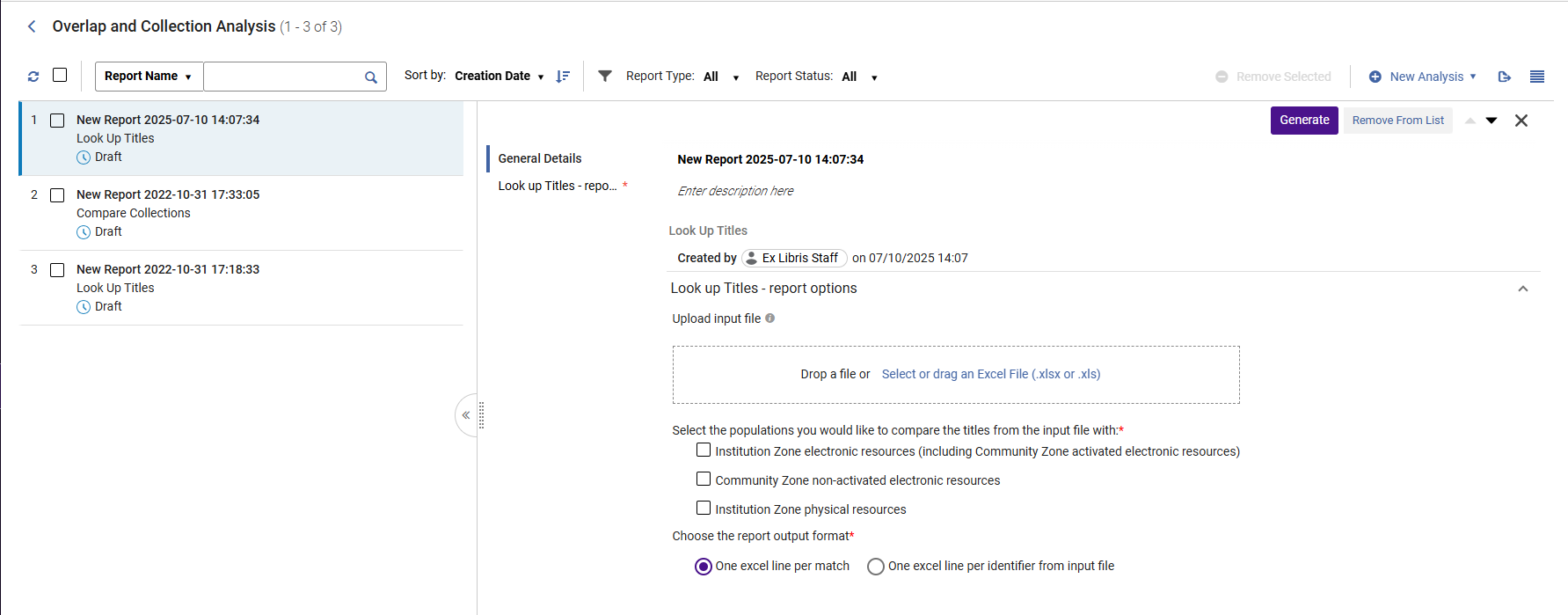
- 新しいリポートに名前を付け、フィールド内を選択して入力し、説明を指定します。To exit, select anywhere outside the fields.
- Under Upload input file, browse to locate the Excel file containing the identifiers of the titles for comparison.
- Under "Available For group", select a group to compare only portfolios of the selected collection that are available for this group OR portfolios that are not associated with any group (which are then available for all groups).If no group is selected, portfolios are compared regardless of the group they belong to.このオプションは、マルチキャンパスとして定義されている機関にのみ表示されます。When an institution is defined as multi-campus, this feature is not activated by default.Contact Ex Libris Customer Support to enable it.The list of groups is taken from the Inventory Network Group code table.
-
入力ファイルからタイトルを比較する母集団を選択します(複数のオプションを選択できます)。
母集団 説明 コメント 機関ゾーンの電子リソース(コミュニティゾーンでアクティブ化された電子リソースを含む)
Alma compares the Excel file with the electronic resources in the Institution Zone and the activated Community Zone resources.
This option generates the following report:Look Up Titles – Institution Zone Electronic Resources
See Overlap and Collection Analysis Job Reports for more information
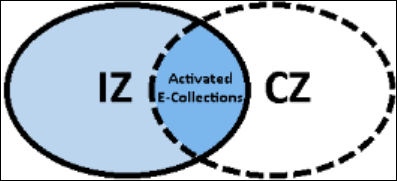
- When "Institution Zone Electronic Resources (including Community Zone activated electronic resources)" is selected, the title set in blue (both shades) is compared to the titles in the Excel file:
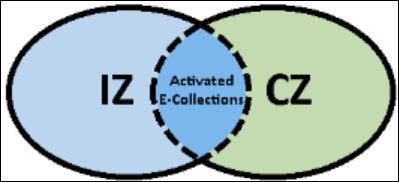
- When "Community Zone non-activated electronic resources" is selected, the title set in green is compared to the titles in the Excel file:
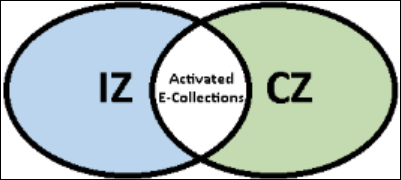
- When both options are selected, both the title sets in blue and in green are compared to the titles in the Excel file:
コミュニティゾーンの非アクティブ化された電子リソース
Alma compares the Excel file with the non-activated Community Zone resources.
This option generates the following report:Look Up Titles – Community Zone non-activated electronic resources.See Overlap and Collection Analysis Job Reports for more information.
機関ゾーンの物理リソース
Alma compares the Excel file with the physical resources in the Institution Zone.
This option generates the following report:Look Up Titles – Institution Zone Physical Resources
See Overlap and Collection Analysis Job Reports for more information.
Network Zone electronic resources available to my institution
コンソーシアムメンバー機関のみが利用できます。
Alma compares the Excel file with the electronic resources available to your institution in the Network Zone.
This option generates the following report:Look Up Titles – Network Zone resources available to my institution.See Overlap and Collection Analysis Job Reports for more information.
Network Zone electronic resources available to my institution
コンソーシアムメンバー機関のみが利用できます。
Network Zone electronic resources not available to my institution
コンソーシアムメンバー機関のみが利用できます。
Alma compares the Excel file with the electronic resources not available to your institution in the Network Zone.
This option generates the following report:Look Up Titles – Network Zone resources not available to my institution.See Overlap and Collection Analysis Job Reports for more information.
Network Zone electronic resources not available to my institution
コンソーシアムメンバー機関のみが利用できます。
電子レポートの情報とマッチする冊子タイトルを含める
電子関連オプションのいずれかを選択する場合、
-
機関ゾーンの電子リソース(コミュニティゾーンでアクティブ化された電子リソースを含む)
-
コミュニティゾーンの非アクティブ化された電子リソース
-
機関で利用できるネットワークゾーンの電子資源
-
機関で利用できないネットワークゾーンの電子資源
追加詳細セクションに次のオプションを追加します。
-
電子レポートの情報とマッチする冊子タイトルを含める
This option enables users to select whether they would like to receive an indication in the Excel reports on whether the titles from the uploaded file also have a matching physical title.
電子レポートの情報とマッチする冊子タイトルを含める
関連タイトル表示を含める 重複分析を実行し、タイトルを冊子目録と比較する場合、Almaは(必要に応じて)一致したタイトルに関連する冊子タイトルも見つけることができます。これにより、分析を実行して冊子の一致を検索するユーザーは、重複するタイトル・アイテムの全体像を把握し、情報に基づいた意思決定を行うことができます。 Once this type of match, which has a related physical title with physical inventory is found, the job marks the related physical indication.This physical hint indication is included as four columns in the Excel report:
- Has Physical Matching(Yes / No)
- 冊子所蔵図書館: 場所(数)
- Has Related Physical Matching(Yes / No)
- Related Physical Holdings Library: Location (count)
複数の一致方法が指定されている場合、特定の一致方法の分析を実行するときに、同じ一致方法を使用して物理インジケータ(ヒント)を検出します。If a hint is found for any match method, we do not continue to the next one - this is independent of the main match (main match and physical hint match may not match each other).The found hints are stored with the addition of saving the match method used to find each hint.
メインの分析が完了し、ポートフォリオが各リポートに分類された後、各行に対応する物理的インジケータが付加されます。
If no physical hint/related was found, the physical hint columns remain empty (including the Physical MatchingBy'column)
[関連] リポートには、[関連種別]という列が含まれ、次の値が表示されることがあります:
- 含む
- 空
関連タイトル表示を含めるWhen the Contains indication is displayed in the column, an additional indication (Related title) is displayed next to the MMS ID.
グループで利用可能
マルチキャンパスとして定義されている機関でのみ利用できます。
Alma compares the Excel file with the electronic resources that do not exist in the Institution Zone or in the activated Community Zone electronic holdings for the selected Available For group.
This option generates the following report:Look Up Titles – From file not available for the selected Available For Group.See Overlap and Collection Analysis Job Reports for more information.
- When "Institution Zone Electronic Resources (including Community Zone activated electronic resources)" is selected, the title set in blue (both shades) is compared to the titles in the Excel file:
- レポートの出力形式を選択します。
出力フォーマット 説明 一致1件ごとにExcel1行 単一の識別子が複数のExcel行に表示される場合があります。一致するたびに1行です。Since each cell holds just one value of a specific matching portfolio, filtering and sorting are more accurate and specific.たとえば、「元(機関ゾーンまたはコミュニティーゾーン)」という列を追加することで、コミュニティーゾーンにリンクされているポートフォリオとリンクされていないポートフォリオを区別できます。 
One Excel line per identifier from the input file
For each unique identifier from the input file, there is a single line in the output report, with information of all matching portfolios concatenated in each cell:

すべてのポートフォリオ値は中括弧{}内に表示されます。
When there are several values within the {} brackets, each value appears within its own double quotes "", separated from other values by pipeline sign |.
AlmaはMicrosoft Excelを使用しており、1つのセルに表示できる情報量はExcelの仕様に制限されます。サポートされている制限文字数よりも多くの情報を含むセルは切り捨てられます。
- When finished setting the parameters, select Generate.Alma generates the report and displays the results in the Analysis Report section that opens on the right side.Select the download iconto download the report as an Excel file to your machine.In addition, Alma places the report in the left section, where you can access it at a later time.For detailed information about the report, see Look Up Titles Reports.
- 重複とコレクションのアナリシスジョブが完了すると、重複とコレクションのアナリシスレターがスタッフユーザーに送信され、ジョブが完了したことを示します。For information on configuring the letter, see Configuring Alma Letters.
コンソーシアムにおける重複およびコレクション分析
上記のすべてのオプションに加えて、コンソーシアムのメンバー機関向けに追加のオプションが提供されています。
- Compare Electronic Collections- Compare an Alma electronic collection in the Institution/Community/Network Zone with the titles of one or more electronic collections in the Network Zone or with the entire Network Zone.See Working with Overlap and Collection Analysis
- Look Up Titles - Compare a list of identifiers contained in an Excel spreadsheet with Network Zone electronic resources that are either available, or not available, to your institution.See Working with Overlap and Collection Analysis
Working with Network Zone is enabled for consortia members only.
Compare Electronic Collections Analysis in Consortia
コンソーシアムのメンバーは、ネットワークゾーンから比較するソース電子コレクションを選択することもできます。
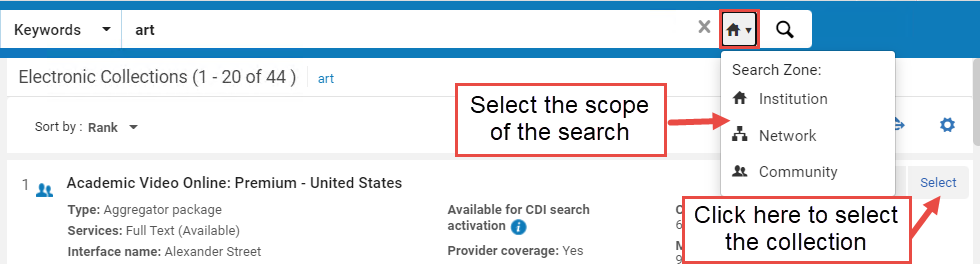
- Click "Choose the collection for which you want to evaluate overlap".A sliding panel opens where you can search for your electronic collection within your Institution/ Community / Network Zone.To select it, click "Select".Once selected, the electronic collection is added to the Overlap and Collection Analysis page:
In addition, Network Zone options are enabled as targets with which you want to evaluate overlap with the source collections:
The selected source collection is not included in the target collections.If you select as the target the options "Entire Institution Zone" or "Entire Network Zone" of which the selected source is part, the source collection is excluded from the target population.
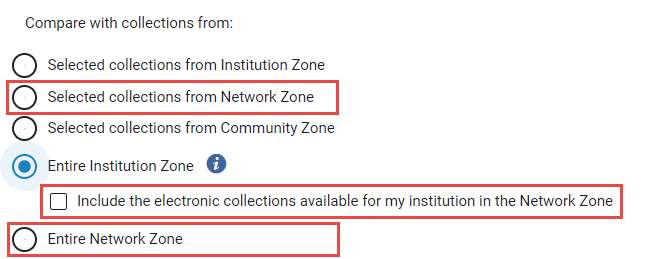
| ターゲットコレクション | 説明 | ユースケース: |
|---|---|---|
|
ネットワークゾーンから選択したコレクション |
Select electronic collections from the Network Zone (NZ) as the target collections for comparison. この機関で利用可能なネットワークゾーンコレクションのみを選択できます。 |
このオプションは次のことに役立ちます。
|
| Entire Institution Zone |
Select the entire Institution Zone as the target for comparison. For consortia member institutions only: When selected, the checkbox "Include the electronic collections available for my institution in the Network Zone" also appears.Select it to include in the target population also all NZ collections available for your institution (either by explicit Available For group, or by not having any group settings set on the NZ collection). |
このオプションは、次のことに役立ちます。
|
|
全ネットワークゾーン コンソーシアム会員機関のみが利用できます。 |
Select the entire Network Zone as the target for comparison. This includes both active and inactive resources. 選択すると、次のチェックボックスも表示されます。
When "Multi-Campus" Group Settings is enabled, the target population contains the collections available for your institution (either by explicit Available For group, or by not having any group settings set on the NZ collection). |
このオプションは、次のことに役立ちます。
|
Look Up Titles Analysis in Consortia
For Consortia members, additional Network Zone options are enabled for comparison with the Excel input file: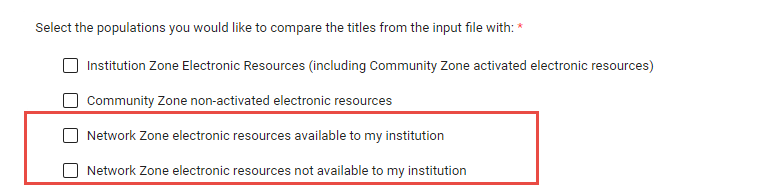
| 母集団 | 説明 | |
|---|---|---|
|
機関で利用できるネットワークゾーンの電子資源 |
Alma compares the Excel file with the electronic resources available to your institution in the Network Zone. This option generates the following report:Look Up Titles – Network Zone resources available to my institution.See Overlap and Collection Analysis Job Reports for more information. |
|
|
機関で利用できないネットワークゾーンの電子資源 |
Alma compares the Excel file with the electronic resources not available to your institution in the Network Zone. This option generates the following report:Look Up Titles – Network Zone resources not available to my institution.See Overlap and Collection Analysis Job Reports for more information. |
|
Overlap and Collection Analysis Reports
レポートが生成されると、そのレポートは機関のすべてのユーザーに表示されます。以下のいずれかの場所から表示できます。
- 重複およびコレクション分析ページ > レポート一覧。
- Monitor Jobs page >History tab (see Viewing Completed Jobs).
レポートは読み取り専用であり、編集することはできません。
レポートは、アクティブなポートフォリオと非アクティブなポートフォリオの両方を含む、コミュニティゾーンからアクティブ化されたすべての機関ゾーンポートフォリオを返します。結果をさらに絞り込むために、Excelファイルでフィルターを使用することができます。
Compare Electronic Collections Reports
| レポート | 説明 | リポート列 |
|---|---|---|
| Compare Collections - Titles of portfolios with complete coverage overlap |
Titles included in portfolios of the electronic collection selected for comparison (source) that are also part of electronic collection/s compared with (target); Portfolio coverage from the electronic collection selected for comparison (source) is completelycovered by portfolios of the electronic collection/s compared with (target). For the Analysis Information sheet, see Analysis Information below in this table. |
|
| Compare Collections - Titles of portfolios with partial coverage overlap |
Titles included in portfolios of the electronic collection selected for comparison (source) that are also part of the electronic collection/s compared with (target); Portfolio coverage from the electronic collection selected for comparison (source) are partially covered by portfolios of the electronic collection/s compared with (target). For the Analysis Information sheet, see Analysis Information below in this table. |
|
| Compare Collections - Titles of portfolios with no coverage overlap |
Titles included in portfolios of the electronic collection selected for comparison (source) that are part of the electronic collection/s compared with (target); Portfolios coverage from the electronic collection selected for comparison (source) are not covered by portfolios of the electronic collection/s compared with (target). For the Analysis Information sheet, see Analysis Information below in this table. |
|
| Compare Collections - Titles of portfolios with no overlap |
Titles included in portfolios of the electronic collection selected for comparison (source) that are not part of the electronic collection/s compared with (target). For the Analysis Information sheet, see Analysis Information below in this table. |
|
| Compare Collections - Titles of portfolios not available for selected Available For Group |
Titles included in portfolios that are part of the electronic collection selected for comparison (source), but are not available for the selected 'Available For Group'. Appears only for multi-campus and only if you selected to specify groups in the "Available for Group" option. For the Analysis Information sheet, see Analysis Information below in this table. |
|
| Analysis Information | このレポートは、ジョブに関する一般的な情報を提供します。他のすべてのレポートの最後のシートとして表示されます。 |
|
タイトルレポートを検索
| レポート | レポートシート | リポート列 |
|---|---|---|
| Look Up Titles – Institution Zone Electronic Resources All titles from input files that have a match with electronic resources in the Institution Zone. |
Matches with Single Resource Includes all the titles with a single match (either in the Institution Zone or activated Community Zone populations) |
|
|
Matches with Multiple Resources Include all the titles with multi matches (either in Institution Zone or activated Community Zone populations). |
||
|
No Matches or No Resources include all the titles with no match. |
|
|
|
Analysis Information General information about the job |
|
|
| Look Up Titles – Community Zone non-activated electronic resources All titles in input file that have a match in with electronic resources in the Community Zone that are not activated in the Institution Zone. |
Match Includes all the titles with one or more matches in the non-activated Community Zone population. |
|
|
No Matches or No Resource Includes all the titles with no matches in the non-activated Community Zone population. |
|
|
|
Analysis Information General Information about the job |
See Analysis Information Sheet. | |
| Look Up Titles – Institution Zone Physical Resources All titles from the input file that match with physical resources in the Institution Zone. | Matches with Single Resource Includes all the titles with a single match in the Institution Zone. |
|
| Matches with Multiple Resources Include all the titles with multi matches in Institution Zone. | ||
| No Matches or No Resources Include all the titles with no match. |
|
|
| Analysis Information General information about the job |
|
|
|
Look Up Titles – Network Zone resources available to my institution All titles in input file that have a match with electronic resources managed in the Network Zone for my institution. コンソーシアムメンバー機関のみが利用できます。 |
Match Includes all the titles with one or more matches in the Network Zone electronic resources available for your institution. |
|
|
No Match Includes all the titles with no matches in the Network Zone electronic resources that are available for my institution. |
|
|
|
Analysis Information General Information about the job |
See Analysis Information Sheet. | |
|
Network Zone resources not available to my institution All titles in input file that have a match with electronic resources managed in the Network Zone for other institutions in my consortia. コンソーシアムメンバー機関のみが利用できます。
|
Match Include all the titles with one or more matches in the Network Zone electronic resources that are not-available for my institution). |
|
|
No Match Includes all the titles withno matchesin the Network Zone electronic resources that are not-available for your institution. |
|
|
| Analysis Information General Information about the job | See Analysis Information Sheet. | |
|
Look Up Titles - from file not available for the selected Available For Group Titles that do not exist in the Institution Zone or in activated Community Zone electronic holdings for the selected Available For group |
選択したグループで利用できないタイトル |
|
Page tags: article:topiccontype:documResource ManagementAdvanced Toolsproduct:almacontent:Documentationlang:englishCollection AnalysisOverlap AnalysisCommunity Zone AnalysisInstitution Zone AnalysisElectronic Collection Analysis
