
重複タイトル分析の使用
重複タイトル分析の概要と重複タイトル分析ジョブの実行方法。
- リポジトリマネージャー
The Duplicate Title Analysis job creates a report that identifies duplicate bibliographic records.Records are considered duplicates if they have the same data in one of the following parameters:
- (OCLC)などの接頭語付きまたは接頭語なしのシステム制御番号(035フィールド)
- その他の標準識別子 (024フィールド)
- ISSN
- ISBN Note: The ISBN match here is not identical to the ISBN match method in the MD import.このISBNの一致は、ジョブのパラメーターを考慮しながら、SYSTEM_CONTROL_NUMBER、VALID_ISBN、VALID_ISSN、およびVALID_STANDARD_IDENTIFIERの値を比較します。
After the Duplicate Title Analysis job runs, its results can be viewed from the History tab on the Monitor Jobs page (Admin > Manage Jobs and Sets > Monitor Jobs).[履歴]タブは、重複タイトル分析ページで[ジョブ履歴]を選択することでアクセスすることもできます。
重複タイトル分析ジョブからの出力ファイルは、次の2つの方法で使用できます。
- 機関が重複レコードを独自に分析する。
- As an input file for the Merge Records and Combine Inventory job.
「重複タイトル分析」ジョブは、機関レベルでのみ実行されます。If there is a Network Zone, the job will need to be run at the Network Zone and Institution Zone separately.
重複タイトル分析を実行する
- Open the Duplicate Title Analysis page (Resources > Advanced Tools > Duplicate Title Analysis).
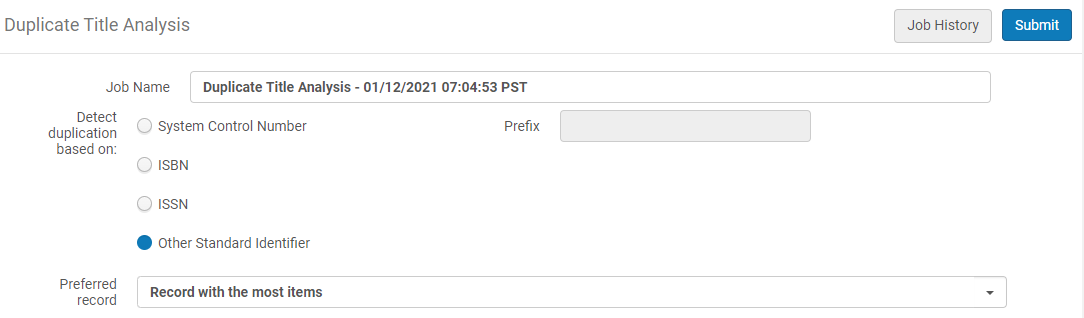
- [重複を検出する]パラメータで、重複する書誌レコードを照合するための次のオプションのいずれかを選択します。
- システムコントロール番号/接頭語:システムコントロール番号パラメーターは、一致を判別するためにMARC 21 035フィールドを使用します。さらに、035フィールドに含まれる(OCoLC)などの接頭語を指定して、035フィールドでの照合に使用される基準を絞り込むことができます。接頭語フィールドはオプションです。
- ISBN
- ISSN
- その他の標準識別子:その他の標準識別子パラメーターは、一致の判別にMARC 21 024フィールドを使用します
- In the "Preferred record" parameter, select which record will be treated by the system as the preferred record (the record into which the other records are merged):
- Do not calculate – the report does not include the preferred record.
- 目録が最も多いレコード – 優先レコードは、グループ内でアイテム/ポートフォリオ/コレクション/デジタル表現の数が最も多いレコードです。エンティティの数が同じであるレコードが複数ある場合は、簡易レベルが最も高いレコードが優先されます(エンティティの数が最も多いレコードから)。The Network Zone does not hold physical inventory.優先レコードを選択するには、別の基準を使用することをお勧めします。
- 簡易レベルが最も高いレコード – 優先レコードは簡易レベルが最も高いレコードです(10は1よりも高くなります)。同様の最も高いの簡易レベルを持つレコードが複数ある場合は、エンティティが最も多いレコードが優先されます。
- If preferred record cannot be determined(there are multiple records with the same "preferred" characteristics) – the record with the lowest MMS ID is taken as the preferred.
- 送信を選択します。[作業の監視]ページに実行中タブが開き、[実行中](またはジョブ列内のアクティビティに応じて[保留中]) のジョブステータスが表示されます。
- ジョブの実行が完了したら、[履歴]タブを選択してジョブの結果を表示します。
- 実行した重複タイトル分析ジョブの場合、行アクションのリストから[リポート]を選択して、[ジョブリポート]ページを開きます。
- カウンタセクションで、Excel.csvフォーマットの重複タイトルリポートをダウンロード/開くリンクを選択します。
タイトル分析リポートを重複する
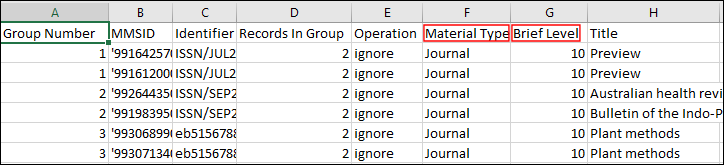
The report displays duplicate records in groups, and provides the following information:
- Group Number – Matching bibliographic records are identified by the same group number in the Group Number column.
- MMS ID
- Identifier – The value upon which the system found a match from the field that was selected for Detect duplication based on in your Duplicate Title Analysis job.
- Records in Group – The total number of records in the same group.
- 操作 - システムによって計算された優先レコードがどれであるかを示します。
- 優先 – 優先レコードの場合。
- 統合 - 非優先レコードの場合。Non preferred records in the group are merged into the preferred record according to the selected merge routine.非優先レコードに関連付けられている目録は、優先レコードの目録と結合されます。
- 無視 - 機関に属していないレコードがあるグループのレコードの場合。For example, if the process is activated in a Network Zone member and a group contains records from the NZ, the group is not handled.
- Not Merged- When it is not possible to merge one of the records in a group, the whole group is not handled and reported as "Not Merged".
- 資料タイプ
- 簡易レベル
- タイトル
- Resource Type – This column displays the resource type information as described in The Resource Type Field section.
- Held By – A semicolon-delimited list of the member institutions that have inventory for the record.This only appears in reports when the Duplicate Title Analysis job is run in the Network Zone.
- レコード関係の構築ジョブ (システムジョブ) の前に重複タイトル分析のジョブを実行すると、削除されたレコードもこのリポートに含まれます。
- レコード関係の構築ジョブの後に重複タイトル分析ジョブを実行した場合、削除されたレコードはこのリポートに含まれません。
Page tags: article:topicProd:AlmaResource Managementproduct:almacontent:Documentationlang:englishduplicate title analysis
