
メタデータフィールドの編集制限
The Consortia central office is now able to control which Network Zone bibliographic metadata fields can be added, edited, or deleted by Network Zone members, allowing the Consortia office to maintain the quality of Network Zone bibliographic records by preventing unwanted edits of specific fields.
2023 年 8 月のリリースの時点で、ネットワーク ゾーン機関の運営者は、ネットワーク ゾーン機関が実施する制限ポリシーから免除されています。
There are several use cases in which certain fields within a record can be restricted from add/edit or delete even when the cataloger has privilege's to edit the complete record.For example, the consortia office can protect the Network Zone bibliographic record 035 field from any edits by the consortia members or prevents consortia members from editing bibliographic 6XX fields of a certain vocabulary.
In the event there is one restriction for the 035 field with no prefix defined and another restriction for a 035 field with a prefix, the latter of the two options (with a prefix) overrides the other.
In addition, there is an option to define restrictions based on a user's cataloger level, see Restrictions by Cataloger Level.
設定
ネットワークゾーンレコードの特定のフィールドに対する制限を追加するために、新しい設定テーブルが追加されました。
- 設定テーブルにアクセスし、Alma構成 > リソース > 目録> メタデータ設定に移動し、目的のプロファイルを選択して制限を追加します(例:MARC21書誌レコード)。
- Select the Other Settings tab and select the Fields Restrictions Policy link.
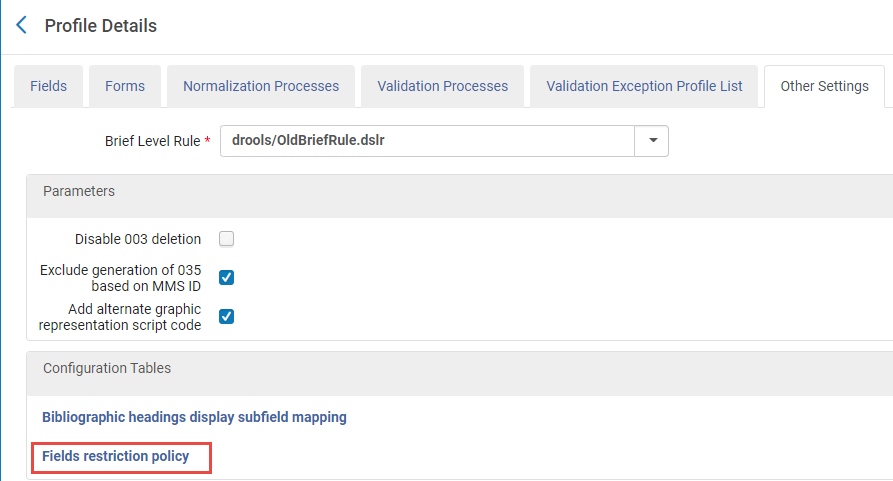 その他の設定 > フィールド制限ポリシーリンク
- マッピングテーブルで、制限するフィールドごとに行を追加します (行の追加を選択) 。
- 次のフィールドに入力します:
設定オプション アクション 説明 タグ Specific field (e.g. 035) or group of fields (e.g. 6XX). 2023 年 8 月のリリース以降、035 フィールドはプレフィックスによって制限できます。
フィールドのグループに制限を追加するためにサポートされている形式は、具体的には次のとおりです。 <number>XXたとえば、この形式を使用する9XX フィールドすべてを簡単に制限できます。
Please note that other formats, such as X<number>X(e.g., X9X),XX<number>(e.g., XX9), and <number><number>X(e.g., 99X), are not supported.
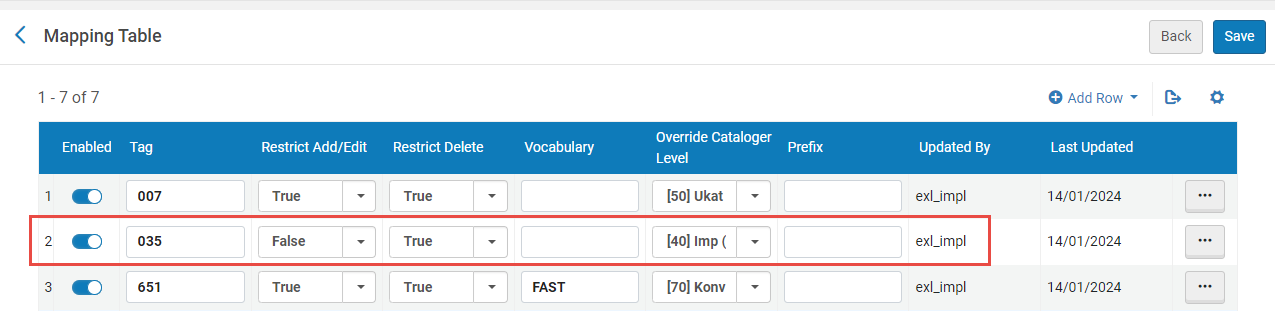
追加/編集の制限 TrueまたはFalse。Trueを指定すると、アクションが制限されます。 削除を制限 TrueまたはFalse。Trueを指定すると、アクションが制限されます。 語彙 語彙コードを定義する場合、特定の語彙に6XXフィールドの制限が適用されます。 目録者レベルを上書き 目録者レベルを定義する場合、目録者レベルが 「同等」 または 「高い」 ユーザーは除外されます。 プレフィックス 例えば、035 フィールドに対する指定された制限が定義されたプレフィックスに関するものであることをフィールド制限ポリシーに示します。例えば、 OCoLC。この例では、プレフィックス「OCoLC」を持つ 035 フィールドのみが制限されます。 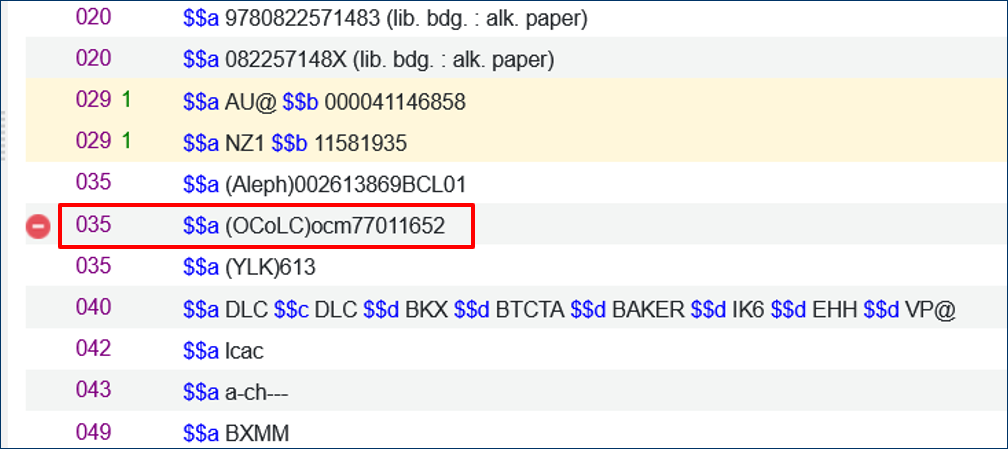
- 行を追加を選択します。
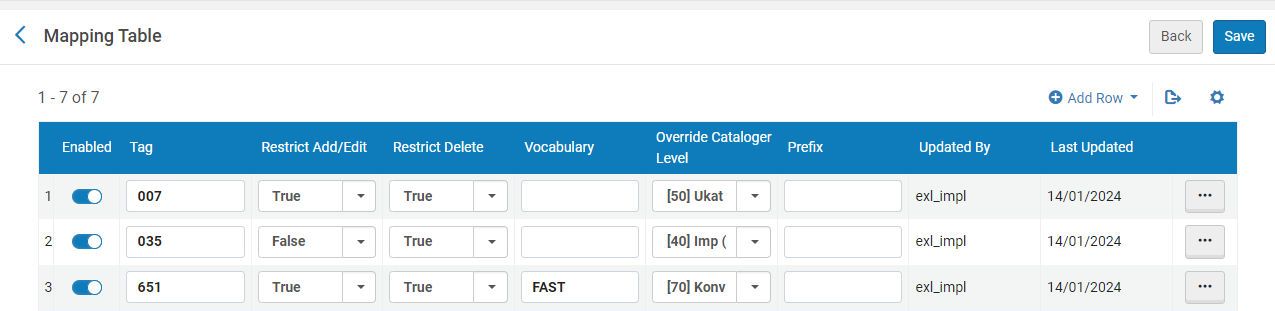 設定マッピングテーブル-編集の制限
- 次のフィールドに入力します:
- [保存]を選択します。
制限されたフィールドの追加、編集、または削除
Once a field is restricted, users who access the record and attempt to remove or add/edit the restricted field receive an alert message "You cannot delete/add <field_name> field.これは制限されたアクションです。」

A restricted field is displayed with a no-access ( ) icon, indicating the field is restricted and cannot be deleted or added/edited.
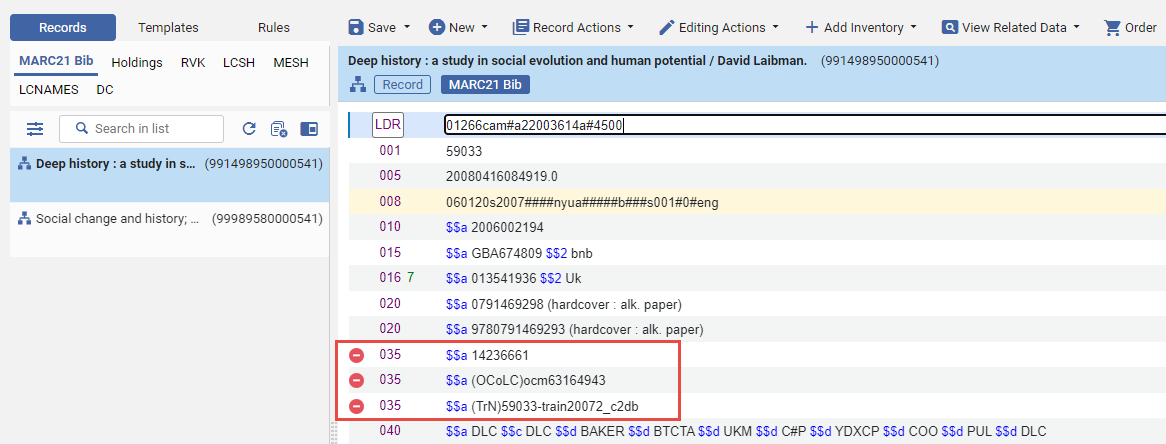
フィールドグループの制限事項
The supported format for adding restrictions to a group of fields is specifically <number>XX.For instance, you can easily restrict all 9XX fields using this format.
Please note that other formats, such as X<number>X(e.g., X9X),XX<number>(e.g., XX9), and <number><number>X(e.g., 99X), are not supported.
You can restrict a group of fields by using an X instead of a specific position, (e.g. 00X).When you define the field 00X, this includes all fields that fall between 001 to 009.この操作は、一度に1つずつ定義するのではなく、広範囲のフィールドを含めることができるため、非常に役立ちます。
Moreover, when defining a group of fields for subjects (e.g. 6XX), you can specify explicitly the vocabulary code for which this group of fields is restricted.For example, if you define a restriction for the group of "6XX" fields for NLI, the restrictions of these fields will only be for the NLI subjects, see mapping table image above - item # 3.
目録者レベルによる制限
You can restrict a field or group of fields with an exemption based on cataloger level (which is defined on each restriction row in the configuration).特定の目録者レベルに対して特定のフィールドを制限できます。つまり、同じ目録者レベル以上のユーザーは制限を受けないということです。For example (below), the tag 035 is restricted for adding/editing and deleting.However, the column Overwrite Cataloger Level is defined with [90] Expert Level.This means that all users are restricted from adding/editing or deleting anything from the 035 fieldexcepta user with a [90] cataloger level or higher.
When defining a Cataloger Level, for instance 60, all users with a cataloger level equal or greater than 60 are exempt.カタログ担当者レベル60、70、80、90のユーザーは制限の対象外です。
Page tags: article:topicproduct:almacontent:Documentationlang:english
