
その他の設定(リソース管理)
リソース管理機能をオンまたはオフにしたり、特定のパラメータ値を提供したりするための追加設定(顧客パラメータ)。
- 目録管理者
- リポジトリ管理者
- 統括システム管理者
このオプションを使用すると、他のリソース管理アクションにはないその他の設定をカスタマイズできます。
これらの設定は、[顧客パラメータマッピング表]ページから設定します([設定メニュー > リソース > 一般 > その他のセッティング])。
Network zone administrators can view and configure the settings only through the Consortia Central Configuration Dashboard.
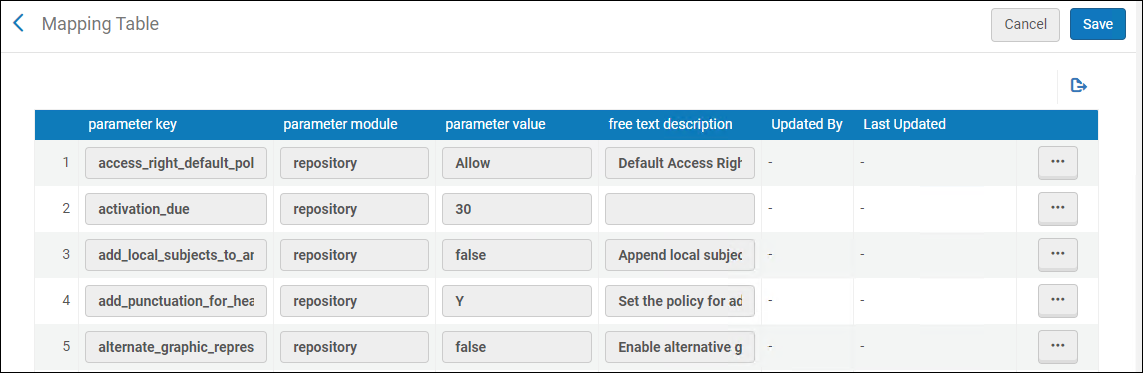
次の表には、このページのオプションを示します。
| パラメータキー | 説明 | ||||||||||||||
|---|---|---|---|---|---|---|---|---|---|---|---|---|---|---|---|
| access_right_default_policy | The access rights that are applied to all digital inventory that are not attached to access rights (see Configuring Access Rights).可能な値は以下の通りです:
|
||||||||||||||
| activation_due | デフォルトのeアクティベーションタスクの期日を計算するために、現在の日付からさらに追加する日数。この値は、すべてのeアクティベーションタスクに追加されます。When the due date passes, a notification is sent to the user that is assigned the e-resource activation task and an alert is displayed in the user's list of tasks.For more information, see Managing Electronic Resource Activation and Manually Creating a PO Line. | ||||||||||||||
| add_local_subjects_to_analytics | ローカル サブジェクト (69x フィールド) を Analytics サブジェクト フィールドに追加する機能です。 | ||||||||||||||
|
add_punctuation_for_heading |
このユーザーパラメータを使用することで、書誌レコードの標目情報がアップデートされるときの句読点の処理方法を制御します。次のオプションを構成することができます。
Enter Y to add or correct punctuation when bibliographic records are updated by authority records.If the bibliographic record originally had punctuation in a subfield, but the authority record does not have punctuation in that same subfield, when the authority record updates the bibliographic record during the Preferred Term Correction run, the authority record updates the bibliographic record with the latest headings information and runs a script according to the table in Implemented Punctuation Rules for Updated Bibliographic Records section to add or correct punctuation in the heading, before it is added to the bibliographic record.This is the default setting.
Enter N not to add or correct punctuation when bibliographic record are updated by authority records.If the bibliographic record originally had punctuation in a subfield, but the authority record does not have punctuation in that same subfield, when the authority record updates the bibliographic record during the Preferred Term Correction run, it will update the bibliographic record with the latest headings information and will remove the punctuation from that subfield in the bibliographic record.
Enter 'LDR' when you want the system to determine how to handle the punctuation based on the content of position 18 in the LDR.位置18にcまたはnが含まれている場合(MARC 21基準を参照)、句読点は書誌レコードに追加されません。位置18に他の指定が含まれている場合、書誌レコードに句読点が追加または修正されます。
これらの句読点設定は、次の場合に適用されます。
|
||||||||||||||
| allow_link_resolver_usage_indications | Use this customer parameter to turn OFF "Link Resolver Usage" information in search results and the Overlap Analysis tool.When set to false, data about "link resolver usage" in search results and in Overlap Analysis tool will not be available.For more information, see Link Resolver Usage. | ||||||||||||||
| alternate_graphic_representation_editing | このパラメータの値をtrueに設定することで、MDエディタの編集メニューの[代替グラフィック表記]オプションを有効にします。The Alternate Graphic Representation function replaces the Add Alternate Graphic Representation function in the Edit menu and can be expanded to provide the following options:
このパラメータの値が空白またはfalseに設定されている場合、[代替グラフィック表記の追加]機能は、MDエディタの編集メニューに表示されるオプションとなります。 この機能は、主に非ラテン文字を扱う機関に提供されます。 See Working with Linked 880 Fields in Bibliographic Records for more information. |
||||||||||||||
| alternative_mde_enhance_record_shortcut | このパラメータを有効にすると、[レコードを強化する] アクションのキーボード ショートカットが制御されます。falseに設定する場合、ショートカットはCtrl+Alt+Eになります。trueに設定する場合、ショートカットはCtrl+Shift+Eになります。 | ||||||||||||||
| asrs_job_message_delay | This parameter sets the delay between ASRS calls in minutes in the Inventory Remote Storage Update Job. | ||||||||||||||
| asrs_remove_diacritics | trueに設定すると(デフォルトはfalse)、発信 ASRS メッセージから分音記号が削除されます。 | ||||||||||||||
| asrs_socket_timeout | 機能なし(将来使用するため)。 | ||||||||||||||
| aut_see_also_link | By default, this parameter is set to true, and if an authority vocabulary does not use authority IDs, selecting the "See also" link generates a search for the term in the 5XX field.検索演算子が「キーワードを含む」から「等しい」に変更されました。The search is performed in the background for the term in 5XX and the Originating System of the record.
Institutions that prefer the previous keyword-based “See also” search behavior can select to opt out of the enhanced system by setting the customer parameter to false. |
||||||||||||||
|
aut_name_partial_linking
|
When set to true, enables the partial linking behavior.This ensures that any new or modified bibliographic records are included in the partial linking process.
When activated, the Unlink bib records from authority records job operates in the following manner:
|
||||||||||||||
| authority_control_link_available | このパラメータをtrueに設定すると、正常にリンクされた標目が、[すべて]タブの権威管理タスクリストに表示、リポートされます。このパラメータのデフォルト設定は偽です 。For more information, see Using the Authority Control Task List. | ||||||||||||||
| authority_ptc_ignore_suffix | Enables libraries to configure Alma to correct bibliographic headings based on authority cross-references, updating them to the preferred term and changing the field tag in the bibliographic record accordingly (such as, from 610 to 630).This ensures bibliographic data stays aligned with authority records' preferred terms.
To enable this functionality in your institution, input the vocabulary codes in upper case for the relevant authority vocabularies into the customer parameter, separated by commas, for example, LCNAMES, LCSH, LCGFT, MESH. |
||||||||||||||
| auto_copy_catalog_search_profile_default_id | 自動コピーカタログ作成に使用されるデフォルトの検索プロファイル。 | ||||||||||||||
| avoid_fuzzy_search_resolving | When set to true, enables the institution to indicate to Alma to avoid "Fuzzy matches" ("title only" matches) attempts if other information (like identifiers or author) exists in the URL.By default, the new customer parameter is set to false.For more information, see Control Ability to Ignore Title Based Link Resolving. | ||||||||||||||
| bib_heading_check_max_number | チェックする見出しの最大数。 | ||||||||||||||
| bib_heading_correct_max_number | 修正する見出しの最大数。 | ||||||||||||||
| brief_level | レコードの簡易レベル閾値を識別する値を設定します。同じ/等しい値またはそれ以下のレコードは、簡易レコードと見なされます。値00から09を使用して、簡易レベルの閾値を識別することができます。このパラメータのデフォルト値は01です。
brief_levelパラメータに00を指定するとすべてのレコードが簡易でないと評価されます(書誌レコードに保存できる最小の簡易レベル値は01であるため)。たとえば、レコードの評価に簡易レベルの基準を使用しないことを選択し、注文明細の作成時に発生する簡易レベルの警告も回避したい機関では、brief_levelパラメータを00に設定する必要があります。 brief_levelパラメータは、レコードの簡易レベルを評価するための閾値として使用されます。個々のレコードに割り当てられた簡易レベル値は変更されません。 For more information, see Working with Brief Record Levels. |
||||||||||||||
|
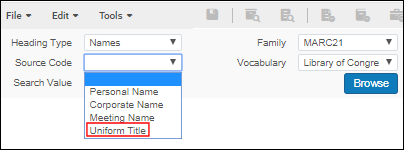
browse_headings_use_uniform_title_in_names |
Use this parameter to control the option for Uniform Title when doing a Names browse in Browse Bibliographic Headings (Resources > Cataloging > Browse Bibliographic Headings).[標目タイプ]に[名称]が選択され、browse_headings_use_uniform_title_in_namesユーザーパラメータがtrueに設定されている場合、[ソースコード]ドロップダウンリストに[統一タイトル]オプションが表示されます。これはデフォルトのパラメータ設定です。
統一タイトルソースコードオプション
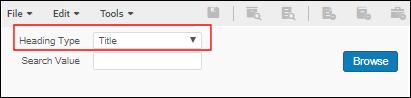
browse_headings_use_uniform_title_in_namesがfalseに設定されている場合、[名称]ブラウズのソースコードドロップダウンリストに、オプションとして[統一タイトル]は表示されません。 browse_headings_use_uniform_title_in_namesの設定に関係なく、[統一タイトル](フィールド130、630および730)はタイトルの標目タイプの下に索引が付けられ、[書誌標目をブラウズ]でこのオプションを使用して参照することができます。 Browsing of UNIMARC Uniform Titles includes field 500 all subfields and 501 $a data.
標目タイプタイトル
|
||||||||||||||
|
call_number_type |
特定の所蔵レコードの請求番号タイプが指定されておらず(MARC 852のファーストインジケータ)、所蔵レコードの配架場所にデフォルトの請求番号タイプが設定されていない場合、ここで選択した値がデフォルトで使用されます。請求番号タイプには次の値が対応しています。 請求番号のソートは正規化された値に基づいて行われます。正規化は請求記号の種類によって異なります。一般に、デフォルトの汎用請求番号正規化があり、先頭と末尾のスペースを削除し、スペースを詰め、すべてを小文字に変換し、12 までのゼロを左パッドを追加します。This is done for cases that aren't specifically defined to have their own normalization.
|
||||||||||||||
| cataloging_level_user_preferences | MDエディタの[目録者権限レベル]のドロップダウンリストの動作をカスタマイズします。trueの場合、レコードの操作中に[目録者権限レベル]のドロップダウンリストに表示される目録レベルが、デフォルト値になります。このデフォルト値は、ログアウトして再度ログインした場合でも、後のレコード編集時にはそのまま残っています。デフォルト値は、[目録者権限レベル]のドロップダウンリストから別の目録レベルが選択されるまで変わりません。 新しいレベルが選択された場合、その値がデフォルトになります。
新しいカタロガ レベルのスティッキー性は、レコードが新しいカタロガ レベルで保存された後にのみ維持されます。 オプションは次の通りです:
このパラメータは、書誌レコード、ローカル典拠レコード、および外部管理典拠レコードのデフォルトの目録レベルを制御します。これはuse_record_cataloging_level_by_defaultパラメータによって無効にされることに注意してください(詳細は以下に記します)。 See Cataloging Privileges for more information. |
||||||||||||||
| cdi_consortia_inheritance |
CDIでの検索のためにネットワークゾーンでアクティブ化されたコレクションが機関に引き継がれるかどうかを決定します。 When set to Y(which is the default for institutions connected to a Network Zone):
Nに設定した場合、ネットワークゾーンからのデータベースタイプのコレクションのCDI検索アクティブ化およびフルテキストアクティブ化の引き継ぎは発生しません。 コンソーシアムの一部であるすべてのメンバー機関は、ネットワークゾーンからポートフォリオを含むコレクションのためのフルテキストアクティブ化を引き継ぎます。これらのタイプのコレクションのネットワークゾーンのアクティブ化を引き継がないことは不可能です。 The value of this parameter corresponds to the Inherit Consortium Central office resources check box in the Primo Central Institutional profile, for institutions set up with a Central Office.See Consortium Activation in Primo Central. |
||||||||||||||
|
central_record_management |
ネットワークゾーンでレコードが管理される場所です。メンバー機関で設定されます。For more information, see Network-Managed Records in a Collaborative Network.オプションは次のとおりです:
Note that when DEFAULT_NETWORK is selected, the validation of bibliographic records is executed in the Network Zone.As a result, the Institution Zone validation profiles/configurations are not used. |
||||||||||||||
| ckb_descriptive_bib_merge_routine | ckb 更新中に記述的 bib 更新のルールをマージするかどうか。 | ||||||||||||||
| controlled_vocabulary_remove_punctuation | メタデータエディタ:レコード内の値を統制ボキャブラリと比較する場合、統制ボキャブラリ検証メカニズムは次のように動作します。
|
||||||||||||||
|
course_restricted_bib_data_will_be_deleted
|
コースが非アクティブ化されたときに、コース制限として作成された書誌レコードを削除するには、trueを選択します。
Select false to suppress the record from publication.Also see Adding Citations to a Reading List.
パラメータは、次の場合にのみコースに接続されたbibレコードを削除/抑制します。
書誌レコードに次のいずれかが含まれている場合、書誌レコードは削除されません。
|
||||||||||||||
| course_restricted_field |
このパラメータキーは、Primoにのみ機能します。It does not work with Primo VE. 書誌レコードがコースでの使用に制限されているかどうかを示す書誌MARCレコードのフィールドです。Almaでは、$$や‡などの定義済みのサブフィールドセパレータを使用できることに留意してください。サブフィールド区切り文字として定義されているタイプも、このフィールドに指定する必要があります。Also see Adding Citations to a Reading List. |
||||||||||||||
| cz_clone_last_tested_time | コミュニティ ゾーンのクローン ステータス テストの最終実行時刻。 | ||||||||||||||
| days_to_preform_ingest_jobs_info | 直接取込みジョブ情報レポートを実行する日数。(-1) - > に設定すると、パラメータは無視されます。 | ||||||||||||||
|
db_categories_field |
PrimoおよびPrimo VEの場合、このフィールドは、どのMARCフィールドがデータベース検索のデータベースカテゴリを保持するかを示します。For more details, see Database Search for Primo or Configuring Database Search for Primo VE. | ||||||||||||||
| delete_access_type_via_portfolio_loader | trueに設定すると(デフォルトはfalse)、入力ファイルでアクセス タイプ列が空のままになっている場合、ポートフォリオ ローダーは指定されたポートフォリオのアクセス タイプ コラムを削除します。 | ||||||||||||||
| delete_nz_bib_without_inventory |
Set to true to enable automatic deletion of the Network Zone bibliographic record when its last inventory is deleted in the NZ member. The delete_nz_bib_without_inventory parameter does not delete NZ electronic inventory (bib and portfolios) linked to CZ. Set to false to leave the bibliographic record in the Network Zone when its last inventory is deleted in the NZ member.この場合、スタッフユーザーはネットワークゾーンの書誌レコードを手動で削除する必要があります。 Define this parameter in the Network Zone. |
||||||||||||||
| deletion_nz_bib_records_with_relations_new_behavior | When set to true, a cross-consortia check is performed for related records (as configured in the Network Zone).When set to false (default), a single-institution check is performed for any related records. | ||||||||||||||
| deposit_activity_report_last_run | デポジットアクティビティレポートジョブの最終実行時間。 | ||||||||||||||
| direct_ingest_last_loaded_folder_name | 最後に更新されたフォルダー名。 | ||||||||||||||
| directional_character_embedding_sign_box_draw | true に設定すると(デフォルトはfalse)、方向を示す文字にはボックス描画記号が使用されます。 | ||||||||||||||
|
disable_preferred_term_correction_job |
When the job Authorities - Preferred Term Correction runs, it:
デフォルトでは、このパラメータはtrueに設定されています。For more information on this parameter and the Authorities - Preferred Term Correction job, see Working with Authority Records.
|
||||||||||||||
|
display_specific_related_items |
For MARC 21, set this parameter to true to display in repository search results only the specific items identified in $g for related records cataloged with the 773 field. For UNIMARC, set this parameter to true to display in repository search results only the specific items identified in $v for related records cataloged with the 461 or 463 field. In order for this to work properly, you must catalog $g (MARC 21) or $v (UNIMARC) using yr: and no:.For example: $g yr: 2014 $g no: 1 See $g and $v item identification labels on the Configuring Related Records for Physical Inventory page for more information. |
||||||||||||||
| distribute_resource_management_changes_last_run | 今後の使用のため。 | ||||||||||||||
|
enable_binding_of_items_committed_to_retain
|
When set to true(default false), enable binding of items committed to retain, which means deleting the item in the process.
アイテムを装丁すると、元のアイテムの一部のデータが失われます。一方、[保存コミット済み] ステータスが維持され、[保持理由] と [保持ノート] フィールドは結果のアイテムに転送されません。
|
||||||||||||||
| enable_consortia_actl | When set to true (default false), processing of Network Zone authority control task list entries from consortia members is enabled. | ||||||||||||||
|
enable_deletion_of_linked_nz_record_without_inventory |
This parameter controls the ability for users with cataloging extended privileges to delete recordswithoutinventory for their institution, the Network Zone, and other member institutions. Note that linked (cached) Network Zone recordswithinventory cannot be deleted by the Network Zone or Network Zone members. Also note that this customer parameter affects only linked Network Zone records.That is, a Network Zone record that is not linked to any member institution can be deleted regardless of this parameter's value, either by a member institution or by the Network Zone. This parameter should be set in the Network Zone.ネットワークゾーンのこのパラメータのtrue/false設定は、すべてのネットワークゾーンメンバーの削除機能に影響します。
For more information regarding linking/unlinking, see To copy Network Zone records to local records (without linking the records), or to unlink local and Network Zone records. |
||||||||||||||
|
enable_directional_characters |
Set this parameter to true to enable right-to-left and left-to-right directional editing in the Metadata Editor. When you set this parameter to false, the right-to-left and left-to-right directional editing feature is disabled (does not appear) in the Metadata Editor. このパラメータのデフォルト設定はtrueです。 |
||||||||||||||
| enable_exact_start_with_compare_condition(Not applicable) | 対象外。 | ||||||||||||||
|
enable_extender_index_linked_aut |
Set this parameter to true in order to enable the capability to include matches to non-preferred terms in any associated authority records for Keywords, Creator, Uniform Title, Names, Subject, and Subject (LC) repository searches.See Non-Preferred Terms in Repository Search for more information. |
||||||||||||||
|
Set this customer parameter to true to have the system update or create the LDR, 005, or 008 fields of the imported record that is stored in Alma.これらのフィールドでは、システムは次の方法でインポートを処理します。
このパラメータのデフォルト設定は偽です 。 このパラメータをtrueに設定すると、インポートされたすべてのレコード/タイプ(リポジトリや典拠など)に適用されます。 |
|||||||||||||||
|
enable_nz_record_assignment This parameter is available only for the Network Zone, since the network sets this policy for all its member.Stand-alone institutions and NZ members do not have access to this parameter. |
Set this customer parameter to true to allow users to assign Bibliographic and Authority Network Zone records to a cataloger from another institution within the network, using the Assign Record to Another Cataloger action in the Metadata Editor. この機能は、新しいメタデータエディタでのみ使用できます。 |
||||||||||||||
|
enable_view_it_show_all_results |
この顧客パラメータをtrueに設定し、「View It」で25件を超えるエントリを表示できるようになります。See View It for more information. この機能は Primo VE 環境でのみサポートされます。If you have an Alma-Primo environment, set this parameter to false to prevent unexpected results. |
||||||||||||||
| enable_xsl_normalization_rules | デフォルトでfalseに設定する。When set to true, enables users the option to create/edit XSL normalization rules.This gives users control over the new XSL normalization rules capabilities.
For more information, see Alma XSL Normalization Rule Examples. |
||||||||||||||
|
export_portfolio_file_name_contains_id |
Set this parameter to true when running the export electronic portfolio job with KBART files, and the file name contains diacritics.このパラメータをtrueに設定すると、ファイル名にはパッケージ名ではなくIDが含まれます(発音区別記号付き)。このオプションを使用すると、発音区別記号を含むファイル名で発生する問題を回避することができます。 When you leave this parameter set to the default,false, the system uses the package name in the file name when running the export electronic portfolio job with KBART files. See Export Electronic Portfolios for more information. |
||||||||||||||
| external_central_SFX_API_base_url | 一般的には機能しません。 | ||||||||||||||
| f3_use_network_configuration_in_iz | F3 は、機関ゾーンで編集されたネットワーク bib に対してネットワーク ゾーン設定を使用します。 | ||||||||||||||
| fields_33x_use_controlled_vocabulary_for_search | When set to true (default false), bib and hol fields 336, 337, 338, show controlled vocabulary in the search drop-down. | ||||||||||||||
|
fix_multiple_004_in_oclc_publishing |
Set this parameter to true to avoid having the Publish your Local Holdings Records (LHRs) to OCLC publishing job mistakenly take a bibliographic record 035 field value and add it to the holdings record 004 field when there is already a 004 field, thus creating a second 004 field. |
||||||||||||||
| force_new_cache_cz_records_in_nz | When set to true (default false), set in member inst: Force the new ERM Cache CZ Records in NZ mechanism even in non-production environment. | ||||||||||||||
| generate_unique_barcode_max_retries | 検証中に固有でないバーコードが識別された場合に、Almaが新しい固有バーコードを作成しようとする最大回数を設定します。デフォルト設定は3です。
固有でないバーコードが見つかると、Almaは指定された最大回数まで一意のバーコードを生成しようとします。再試行回数内に固有バーコードが生成されない場合、エラーメッセージが表示されます。 See Configuring Barcode Validation for more information. |
||||||||||||||
| gnd_like_correction | GND 特殊修正に類似したローカル語彙修正を有効にします。 | ||||||||||||||
| gnd_token | パラメータ値にGNDが提供するトークンを入力します。このトークンは、レコードをGNDに提供するときに、GNDによる認証に使用されます。
コンソーシアムの場合、ネットワークゾーンとメンバー機関はgnd_tokenのパラメータ値に同じトークンを使用して指定します。 |
||||||||||||||
| han_proxy_multi_license | Enables users of the HAN proxy who are utilizing HAN's multi-license functionality to manage various licenses in Alma to accommodate the scenario where an electronic resource can have a distinct service per license, in the View It section.For example, this feature is intended to address situations where different levels of access to the E-Resource are required depending on the type of patron, such as researchers or external users. | ||||||||||||||
| holdings_accession_number_generation_extended | このパラメータを「機関」、「ライブラリ」または「場所」に設定することで、機関レベルおよびライブラリレベルの登録番号シーケンスを設定して使用できます。See Configuring Accession Numbers for more information. | ||||||||||||||
| ignore_cz_records | Almaの次のようなさまざまなプロセスは、機関の目録にレコードを追加する前にレコードの一致機能を使用します。
一致プロセスを微調整するためにAlmaでは、コミュニティゾーンにリンクされている一致レコードを、機関レベルで検討するかどうかを示すことができます。 The valid values for ignore_cz_records are true and false. If this parameter is set to true, Alma matches incoming records with any record that exists in the catalog and ignores bibliographic records that are linked to the Community Zone. If this parameter is set to false(the default setting), Alma presents the following options in the Match Actions section of the import profile for Repository, Update Inventory, or New Order import profiles:
See Community Zone linked records handling for more information. |
||||||||||||||
|
import_unlink_cz_remove_subfield_9_from_local_fields
|
When set to true(default), when selecting Unlink record from Community Zone and create a local record, the subfield 9 of local fields is not deleted.
When set to false, the subfield 9 of local fields is deleted.
|
||||||||||||||
| index_and_display_handle_information | true に設定すると(デフォルトはfalse)、スタッフ検索用のハンドル情報をインデックス化し、レコード上に表示します。 | ||||||||||||||
| instance_match_profile |
Alma 内の BIBFRAME インスタンス レコードのデフォルトの一致プロファイル、およびエンティティの URI (エンティティを表す rdf:about または代替 URI) に基づいてレコードをインポートする場合 (API 経由)。 |
||||||||||||||
| item_call_numbers_generate_enable | このパラメータをtrueに設定すると、[冊子エディタ]ページの[生成]ボタンを使用できるようになり、[受入番号]設定で定義されたシーケンスから代替または一時的なアイテムレベルの請求番号を作成します。
See Configuring Accession Numbers to configure your call numbers sequences and Updating Item-Level Information for information regarding how to use this capability. |
||||||||||||||
| item_editor_inventory_price_regex |
In the parameter value, configure a regular expression (regex) that will determine which characters may be used when manually entering an inventory price in the item editor.When an item with an invalid value in the inventory price is edited and saved, the operator is alerted that the inventory price does not match the institution's configuration, so they can check and correct the data if needed.これは、図書館が目録価格を手動で入力するときに間違いがないことを確認するのに役立ちます。 Libraries that populate an inventory price automatically from the PO Line should verify they configure a regex that supports the values in their PO Lines to prevent frequent alerts from being displayed to operators. |
||||||||||||||
| linking_identical_headings |
When set to true(default false), duplicate authority links remain linked in the bibliographic record.Every occurrence for any MARC field, even for identical bibliographic headings within the same record remains linked to the correct authority.If already linked, the PTC does not disrupt the existing link. |
||||||||||||||
| lod_uri_enrichment_for_partial_match | Set this parameter to false to prevent URI enrichment for partially linked authority records and add URIs only for full matches.
Alma の典拠管理プロセスでは、細分化されていない件名標目と典拠レコードの間で部分的な一致が生成されることがあります。このような場合、典拠にリンクされた書誌レコードのリンクデータ拡充プロセスでは、完全な主題に部分的にのみ対応する URI が生成されます。Libraries can prevent partial linking and add URIs only for full matches by setting this parameter to false. |
||||||||||||||
| lod_use_lc_converter | When set to true (default false), use the lc convertor. | ||||||||||||||
| marc_holding_in_use | 所蔵レコードをMARC形式で表示するかどうか(trueまたはfalse)。 | ||||||||||||||
| md_import_keep_inventory_fields | The fields in the inventory tab are not deleted if the profile field definition is empty. | ||||||||||||||
| merge_method | 正規化ルール(Drools)は、外部ソースからのコピーカタロギングや、インポートプロファイルを通じたレコードのマージ時に、メタデータ・エディタで使用されるマージプロファイルのロジックを定義します。 | ||||||||||||||
| minutes_to_sleep_cache_cz_records_in_nz | CacheCzRecordsInNz ジョブの次回実行までのスリープ時間 (分)。 | ||||||||||||||
| network_description_templates_rules_precedence | この(メンバー機関からの)パラメータを使用して、ネットワークまたはメンバーのアイテム説明ルールを最初に実行するかどうかを識別します。このパラメータを次のように構成します。
See Configuring Description Templates for more information regarding item description rules. |
||||||||||||||
| network_label | [クイック目録]([リソース管理 > 目録の作成 > 冊子を追加])および[新しいポートフォリオ]([リソース管理 > 目録を作成する > ローカルポートフォリオの追加])ページの[新しいレコードの配置]フィールドの[ネットワーク]ラベルの値。See Network-Managed Records in a Collaborative Network. | ||||||||||||||
| network_label_template_rules_precedence | ネットワークゾーンではこの部分をtrueに設定し、ローカルで定義されたルール(存在する場合)の代わりに、ネットワークゾーンのラベル生成ルールを使用します。See Managing Label Generation Rules Using a Network Zone. | ||||||||||||||
| networkSearchInstitution | ネットワークゾーンのコード。 | ||||||||||||||
| networkSearchInstitutionId | ネットワークゾーンのID。 | ||||||||||||||
| networkSearchPassword | ネットワークゾーンのパスワード。 | ||||||||||||||
| networkSearchServer | ネットワークゾーンのサーバーの名称。
このパラメーターを変更は、Ex Librisカスタマーサポート担当者のみが行ってください。 |
||||||||||||||
| non_serial_match_profile | MDエディタおよび[外部リソースを検索する]の非逐次刊行物におけるデフォルトの一致プロファイル(インポートプロファイルでの一致プロファイルは他の場所で定義されています)。以下のうちの一つを入力して下さい。
For detailed information on all of the below methods, see Match Methods – Explanations and Examples.
In member institutions implementing a Network Zone, the setting is taken from the Network Zone, even if this parameter is set and the Manage in Network flag is not enabled (see Centrally Managing Configuration Tables at the Row Level). |
||||||||||||||
| nz_campus_library_display_format | ネットワーク ゾーン内のコンソーシアム メンバーのキャンパス/ライブラリの表示形式。有効な値には、必須の CAMPUS_LIBRARY_NAME とオプションの INST_NAME が含まれます。 | ||||||||||||||
| nz_multi_campus_members | When set to true, in the Network Zone institution, Inventory network groups in the network zone can include libraries and campuses from within member institutions, see Configuring Distributed Access to Electronic Resources from the Network Zone. | ||||||||||||||
| oclc_add_hol_to_deleted_bib | When set to true (default false), this profile includes deleted record without its holdings.Institutions can customize this profile to include all deleted holdings of the bibliographic record in the published file.This facilitates OCLC in matching their OCLC symbols and processing the deletion.For more information, see Publishing Deleted Records. | ||||||||||||||
| po_line_reference_use_contain_search | When set to true (default false), PO line reference searches use contains instead of equals as the search type. | ||||||||||||||
| pre_distribution_number_of_records_to_distribute | 配布するレコードの最大数。 | ||||||||||||||
| preferred_term_correction_dont_duplicate_711_sub_e | When set to true, the authority preferred term correction job does not duplicate subfield e in field 711 or its 880 equivalent. | ||||||||||||||
| reload_record_from_central_catalog | メタデータエディターで開いたときに、中央カタログからレコードを再読み込みします。 | ||||||||||||||
| replace_hash_call_number_type_with_space | アイテム エディターまたはアイテム情報の変更ジョブを使用してアイテムの永続場所を変更する場合は、所蔵フィールド 852 の最初のインジケータのハッシュをスペースに置き換えます。 | ||||||||||||||
| repository_search_extended_item_availability_info | サブフィールド a、z、9 を含む 866/7/8 のすべての出現を表示 | ||||||||||||||
| reset_reminder_timezone | trueに設定すると、リマインダーの日付の時間、分、秒は00:00:00になります。 | ||||||||||||||
| search_limit | 使用中でない。 | ||||||||||||||
| serial_match_profile | MDエディタおよび[外部リソースを検索する]の逐次刊行アイテムにおけるデフォルトの一致プロファイル(インポートプロファイルの一致プロファイルは他の場所で定義されています)。以下のうちの一つを入力して下さい。
For detailed information on all of the below methods, see Match Methods – Explanations and Examples.
In member institutions implementing a Network Zone, the setting is taken from the Network Zone, even if this parameter is set and the Manage in Network flag is not enabled (see Centrally Managing Configuration Tables at the Row Level). |
||||||||||||||
| share_item_usage_across_network |
When set to True in the Network Zone, then upon network search results, item usage data is shared for all network's members in the Physical Usage tab. When set to False, the Physical Usage tab does not appear. |
||||||||||||||
| sharing_project_merge_method | デフォルトのsharing_projectマージ プロファイル。 | ||||||||||||||
| sharing_project_use_member_profile | sharing_project はメンバー プロファイルを使用します。 | ||||||||||||||
| show_all_relevant_work_orders_type_for_bind_items | このパラメータはEx Librisが使用するためのものです。このパラメータのデフォルト設定は偽です 。 | ||||||||||||||
| show_item_description_confirmation_message | trueに設定されている場合、オペレーターが逐次刊行物アイテムを編集し、アイテムの説明に関連する可能性のあるフィールドを更新すると、説明フィールドも更新されていない場合は確認メッセージが表示されます。When false, there is no confirmation message regarding the item description when editing item information, regardless of the type of item or the fields changed. | ||||||||||||||
| show_version_cataloger_name_for_other_members | ネットワークゾーンで true に設定すると、メンバーの MDE でレコードバージョンを表示するときに、他のメンバー機関の目録者の名前が表示されます (NZ レベルでのみ設定できます)。 | ||||||||||||||
| sort_library_by_relevance |
次の場所に所蔵レコードが表示される順序を制御します。 右側のペインの所蔵セクションで選択した並べ替えは、リスト結果の所蔵セクションと所蔵ドロワーの両方に適用されます。In addition:
The privilege PHYSICAL_INVENTORY_MANAGE is part of the below roles:
|
||||||||||||||
| split_line_including_hebrew_abbreviations | ヘブライ語の略語を含む Excel の行分割の修正 | ||||||||||||||
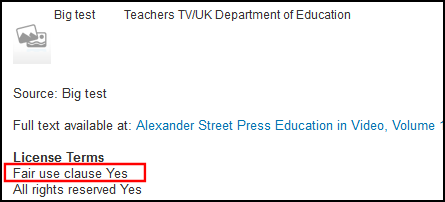
| split_values_in_display_license |
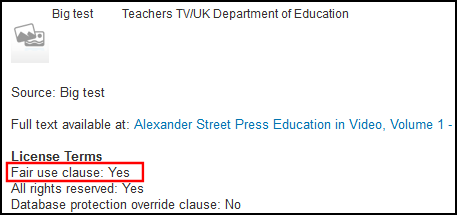
このパラメータは、ライセンスフィールドがHTMLのコンテンツから[見る]に分割されるかどうかを示します。この操作により、フィールドとその内容によって個別フォーマットを指定することができます。 trueに設定すると、ライセンスフィールドとそのコンテンツが別々の行に表示され、コロン区切りが[見る]のHTMLから削除されます: <b>License Terms</b> <br> <c>Fair use clause</c> <c>Yes</c>
[見る]でライセンスを表示 - HTMLで行を分割
falseに設定すると、ライセンスフィールドとそのコンテンツはコロンで区切られ、[見る]のHTMLの同じ行に表示されます。 <b>License Terms</b> <br> <c>Fair use clause: Yes</c>
[見る]でライセンスを表示 - HTMLで同じ行
|
||||||||||||||
| statistics_note_controlled | [冊子エディタ]で[統計ノート1]、[統計ノート2]および[統計ノート3]の固定ドロップダウンリストを実装するには、このパラメータをtrueに設定します。(デフォルトでは、falseに設定されており、[冊子エディタ]のノートフィールドでフリーテキストを使用することができます。)
このパラメータをtrueに設定すると、[統計ノート1]、[統計ノート2]および[統計ノート3]の設定オプションを、[リソース管理設定]の[一般]セクションで設定可能になります。 See Configuring Statistics Notes for more information. |
||||||||||||||
| suppressBibWithDeletedHol | Use this parameter to suppress a bibliographic record from publishing when all its holdings records are deleted (true or false).
trueになっている場合は、所蔵レコードの最後の物理アイテムが削除され、オペレーターが書誌の最後の所蔵レコードを削除することを選択すると、当該書誌レコードは抑制されます。This parameter is used only for deletion workflows where the operator cannot choose whether to suppress the bib record and the system determines the behavior. For PrimoVE, the definition of this parameter impacts the physical inventory availability for scope definition. When the value of this parameter is changed, the change is not implemented until re-indexing takes place. |
||||||||||||||
| suppressBibWithSuppressedHol | このパラメーターを使用して、所蔵レコードがすべて抑制されている場合に書誌レコードの公開を抑制します(trueまたはfalse)。
When set to true, the bib record is suppressed if an operator suppresses all of its holdings records.これは、書誌レコードをAlmaで抑制されているものとしてマークしないことに注意してください。 For PrimoVE, the definition of this parameter impacts the physical inventory availability for scope definition.
|
||||||||||||||
| system_date_format | dd(日)、MM、MMM、またはMMMM(月)、およびyyyy(年)を使用して、システムの日付形式を設定します。これらを、スラッシュ、ハイフンまたはスペースで区切り、好みの順に配置します。例:dd / MM / yyyyまたはMM / dd / yyyy、dd-MMM-yyyy(30-Jan-2017など)、またはdd MMMM yyyy(30 January 2017など)。 | ||||||||||||||
| temp_enable_changes_in_overlap_analysis_excel_formatting | Enable the changes of overlap analysis Excel formatting. | ||||||||||||||
|
temp_enable_holdings_field_852_subfields_reordering |
このパラメータはEx Librisが使用するためのものです。このパラメータのデフォルト設定はtrueです。 |
||||||||||||||
| temp_enable_identifier_combined_search | このパラメータはEx Librisが使用するためのものです。このパラメータのデフォルト設定はtrueです。
The functionality to combine the EISSN and ISSN searches is controlled by the parameter:temp_enable_identifier_combined_search which is set to true by default.This functionality opens URLs generated for items that have EISSN and ISSN and matches them on EISSN.When set to false, the combined search functionality is turned OFF. |
||||||||||||||
| temp_publishing_ignore_file_name_extension | 公開ファイル名を生成するときに、ファイル名プレフィックスの拡張子を無視します。 | ||||||||||||||
| unimarc_decimal_classification_authority_sorting | Unimarc 小数分類ソートを有効にします。 | ||||||||||||||
| unimarc_uniform_title_headings_split | UNIMARC F3 enables finding authority and Bib headings for field 500 and links to the headings.The default setting for this parameter is true.
|
||||||||||||||
| update_call_number_type_upon_item_move | TRUEに設定する際、アイテムの場所が変更されていると、それに応じて新しい所蔵の請求番号タイプが更新されます。
Default =false(no update to call number type). |
||||||||||||||
| upload_e_holdings_collection_file_prefix | 不要な上書きを回避するために、xlsx 入力ファイルにコレクション ID プレフィックスを追加します。 | ||||||||||||||
| upload_single_record_from_file | 単一の書誌レコードをインポートするときに使用するリポジトリタイプのインポートプロファイル。値はプロファイルの名称である必要があります(大文字と小文字が区別されます)。For more information, see Importing Records Using an Import Profile.For more about the profile name, see Creating/Editing an Import Profile: General Profile Information. | ||||||||||||||
| use_holdings_form | MDエディタで所蔵レコードを表示するためにフォーム形式を使用するかどうかについて。このパラメータをtrueに設定すると、MDエディタのオプションの一部が使用できなくなります。所蔵レコードについては、以下のみを編集することができます。
|
||||||||||||||
|
use_marc_record_holdings_template |
受入でオーダーを出すときや、所蔵レコードのリポジトリインポートを行うときなど、MDエディタの外部で所蔵レコードをデフォルトテンプレートに使用する場合は、trueに設定します。See Working with Record Templates and Additional Holdings Record Information for more information. | ||||||||||||||
| use_record_cataloging_level_by_default | レコードに既に保存されている目録レベルをレコードの編集時にデフォルトとして使用する場合は、このパラメータをtrueに設定します。このパラメータのデフォルト設定は偽です 。See Using Cataloging Permission Levels in the MD Editor for more information.
このパラメータは、上記のcataloging_level_user_preferencesパラメータを無効にします。 |
||||||||||||||
|
use_space_as_call_number_type |
Set this parameter to true to have the system recognize the 852 with a first indicator of a space, blank, or # (when entered in the MD Editor) as a valid value that should not be overridden by a different default call number type that is specified in the call_number_type customer parameter. このパラメータのデフォルト設定は偽です 。When this parameter is set to false, a default call number type is specified based on the call_number_type customer parameter setting. See Browsing the Shelf Listing for more information. |
||||||||||||||
| serial_match_profile | Alma 内の BIBFRAME 作業レコードのデフォルトの一致プロファイル、およびエンティティの URI (エンティティを表す rdf:about または代替 URI) に基づいてレコードをインポートする場合 (API 経由)。 | ||||||||||||||
| working_copy_lock_timeout | 編集中の書誌レコードを別のユーザーが編集できないように、MDエディタの使用終了後のロック時間数を指定します。指定する値は0を除外して最大9999まで設定することができます。デフォルトは1時間です。
See Edit Record in the Performing Actions on the Repository Search Results Page section for additional information. |
||||||||||||||
- 顧客パラメータマッピング表ページで、必要に応じて[表の説明]を変更します。
- [マッピング表の行]で、編集したい設定を指定し、[カスタマイズ]を選択します。
- 必要に応じてパラメータ値を変更します。
- [保存]を選択してください。変更されたユーザーパラメータは、Almaシステムに保存されます。
Page tags: article:topicConfiguring Resource Managementproduct:almacontent:Documentationlang:englishCustomer Parametersother settingsmatch methodsmatch routines
