
Alternative Lecturer Check-In
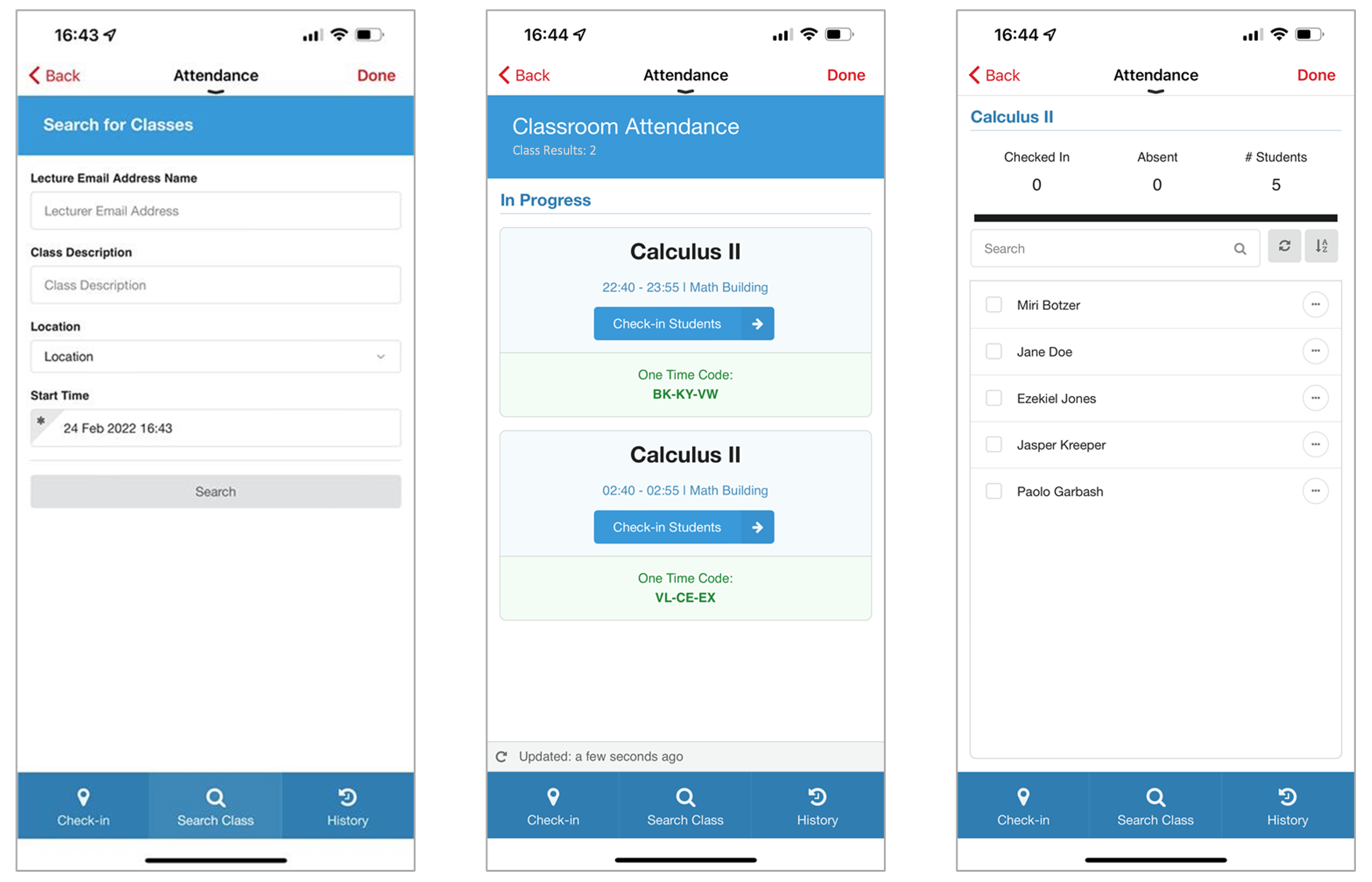
The alternative lecturer feature provides the ability for lecturers or administration staff to search the timetable to locate other teachers’ events so that they can share the One Time Code or check students in if they are covering classes.
The alternative lecturer feature is optionally available through the existing lecturer check-in screens when enabled. This provides a new Search Class tab through which the alternative member of staff can search for the event.
Technical Overview
The following section describes technical information for the Alternative Lecturer service.
API Information
campusM expects a RESTful API that supports two requests:
Request #1
This request gets the events based on the query parameters.
GET https://{base URL and path to return events data}?startDate={start of events}&email={email of lecturer}&desc={course name}&loc={locCode}
- Mandatory query parameter
- startDate
- Optional query parameters
- desc
- loc - this should be the locCode and not the location description
Expected Response:
{ "events": [ { "eventRef": "12345", "desc1": "Calculus III", "desc2": "Fall Semester", "desc3": "", "alertCom": "", "calDate": "2022-02-21T12:40:00.000-05:00", "start": "2022-02-21T12:40:00.000-05:00", "end": "2022-02-21T16:55:00.000-05:00", "durationUnit": "", "teacherName": "Nico Harold", "teacherEmail": "lecturerExample@gmail.com", "legendCol": "", "locCode": "123456", "locImg": "", "locCom": "", "locAdd1": "Math Building", "locAdd2": "Main Campus", "locAddPostCode": "", "locWorkTel": "406-123-4567", "attendanceExclude": "false", "meeting": "true", "meetingURL": "https://zoomLinkExample.com", "meetingURLDesc": "Join the virtual class" } ... ] }
Request #2
This request gets the students that are relevant to the specified event.
GET https://{base URL and path to return attendees data}?eventRef={event ID}
Mandatory query parameter
- eventRef
Example:https://baseurl.com/path/to/the/attendees/data?eventRef=12345
Expected Response:
{ "students": [ { "userEmail": "jane.doe@gmail.com", "firstName": "Jane", "lastName": "Doe" }, { "userEmail": "ezekiel.jones@gmail.com", "firstName": "Ezekiel", "lastName": "Jones" } ] }
Configuration
| Configuration Option | Description | Mandatory | Data Type | Default | Example |
|---|---|---|---|---|---|
| Vendor | |||||
| Vendor Name | Defines to which vendor the integration connects. | Yes | Drop-down list | RESTful API | |
|
RESTful API Configuration for Request #1 This section contains the RESTful API details to define the API structure. |
|||||
| URL to retrieve the information | The URL for the Web service | Yes | URL | ||
| URL Query Parameters | The parameters sent as part of the query | No | String | ||
| URL Path Parameters | The parameters sent as part of the path | No | String | ||
| General Headers | Add (key, value) for additionally needed headers | No | String | ||
| Authentication Type | Authentication type against the web service. The options are the following:
|
Yes | Drop-down list | ||
|
RESTful API Configuration for Request #2 This section contains the RESTful API details to define the API structure. |
|||||
| URL to retrieve the information | The URL for the Web service | Yes | URL | ||
| URL Query Parameters | The parameters sent as part of the query | No | String | ||
| URL Path Parameters | The parameters sent as part of the path | No | String | ||
| General Headers | Add (key, value) for additionally needed headers | No | String | ||
| Authentication Type | Authentication type against the web service. The options are the following:
|
Yes | Drop-down list | ||
|
Alternative Lecturer Check-in Window Start |
Sets the number of days in the past a student can be checked in by the lecturer |
Yes |
Integer |
28 |
|
|
Alternative Lecturer Check-in Window End |
Sets the number of days in the future a student can be checked in by the lecturer |
Yes |
Integer |
28 |
|
Output
As part of deploying the Alternative lecturer, we provide the ability to track these check-ins within the Check-in Report. The checkedInBy field indicates who made the check-in on behalf of the student.
Page tags: article:topiccontent:Documentationproduct:campusmlang:english
