
Leganto April 2024 Release Notes
May 2024 Sneak Preview
- Mobile experience for the new UI
- Cite it! redesigned for the new UI
Main Features
Streamline Access to Digitization
April 2024 Leganto URM-209996
It is now possible to place digitization requests when adding an item to a list. When an item is manually added to a list, and the item is eligible for digitization the Digitize checkbox is displayed in the Library services section. When the Digitize checkbox is checked, the Digitize form is displayed.
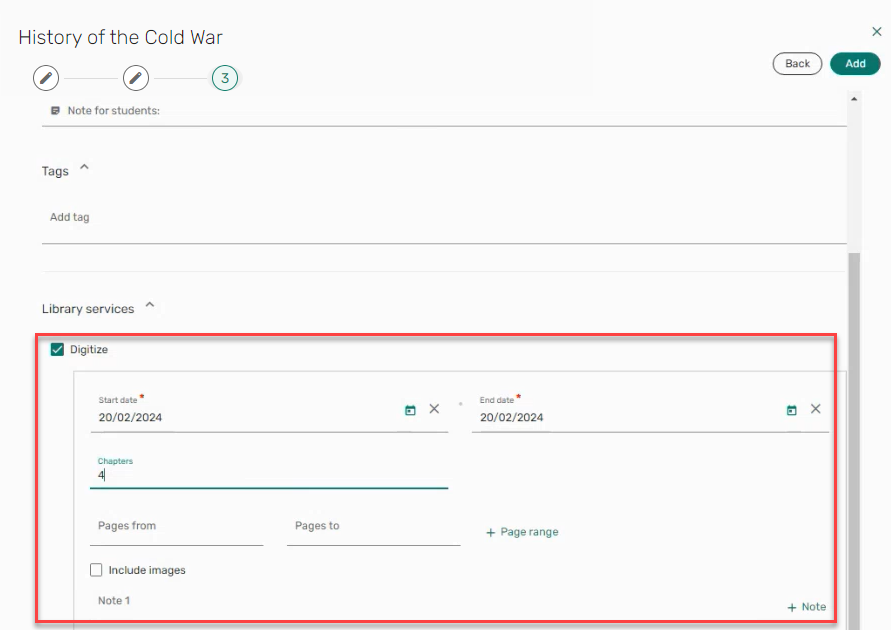
When selecting Add, the request is submitted, and a message is displayed informing the user that the Digitization request was created.

For more information, see Requesting Digitization.
Citation Usage Tab Added to Leganto Student Usage Dashboard
April 2024 Analytics and Insights URM-213292
The Citation Usage tab was added to the Leganto Student Usage Dashboard. It displays a table with the following columns concerning student citation usage for a reading list:- Title
- Author
- Citation material type
- Citation public tag
- Active students
- Total events
- Students that viewed citation
- Number of citation views
- Students that viewed the full text
- Number of full text views
- Students that downloaded files
- Number of files downloaded
- Citation number of loans (from citations folder)
- Students that marked as done

Year Over Year Tab Added to Leganto Student Usage Dashboard
April 2024 Analytics and Insights URM-213293
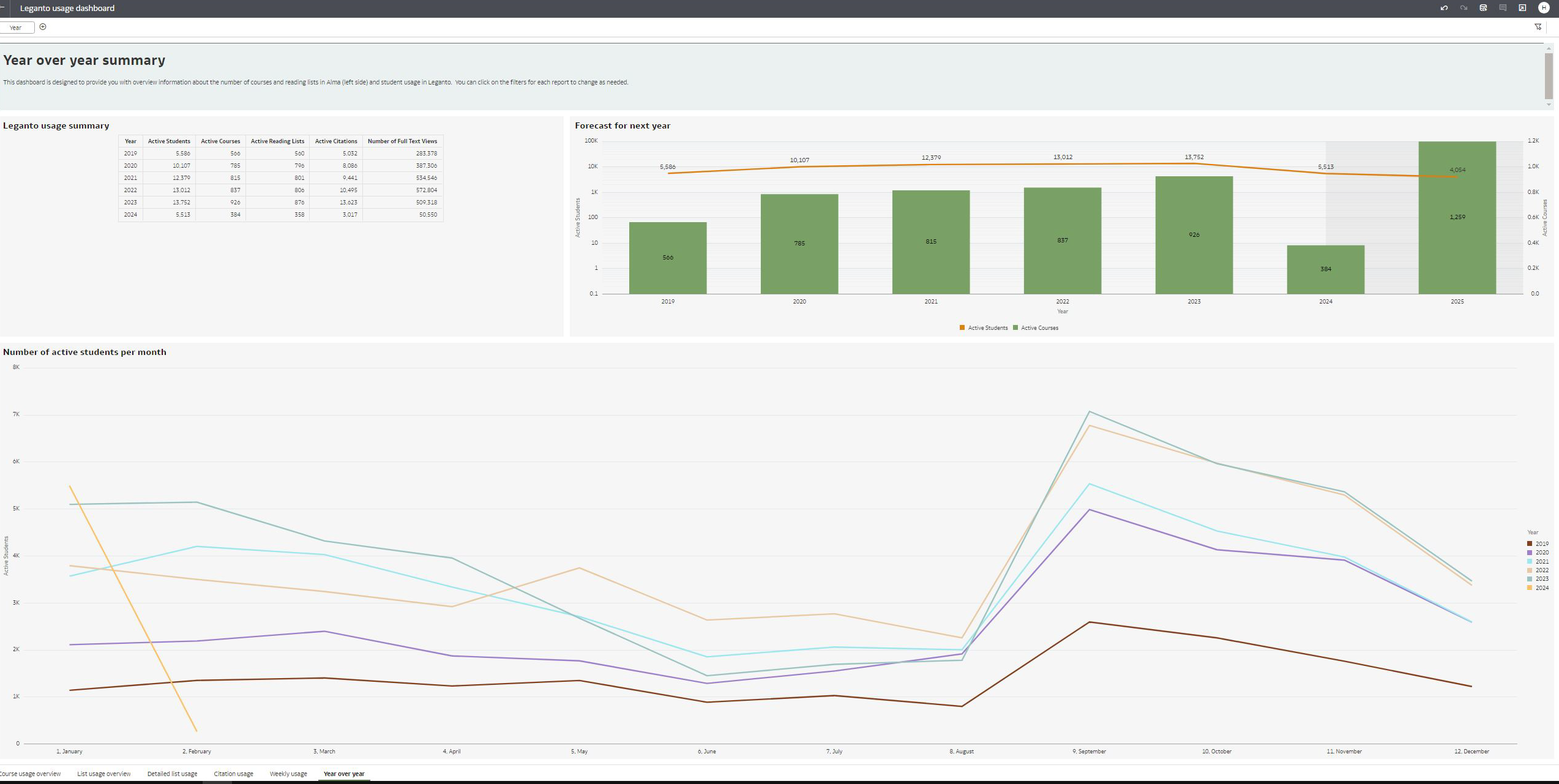
The Year Over Year tab was added to the Leganto Student Usage Dashboard. It displays the following information concerning Leganto usage across multiple years, including future projections:- Number of active students per year
- Number of active courses per year
- Number of active reading lists per year
- Number of active citations per year
- Number of full text views per year
Additional Enhancements
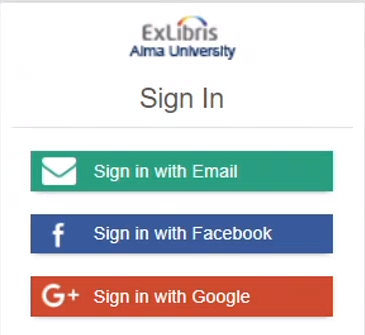
April 2024 Leganto URM-213290 SF: 06937211 Leganto now supports authentication through social networks. When OpenID Connect (Configuration > General > External Systems > Integration Profiles) is configured,?auth=social is appended to your Leganto link (<leganto login url>?auth=social) and, the configured social network sign in options are available.
April 2024 Leganto URM-210017 When a default status is set for citation_digitization_request_submitted(Configuration > Leganto > List Management > Course Reserves Automatic Statuses), requests submitted for digitization now automatically receive that status.
For more information, see Configuring Default Statuses for Citations/Reading Lists.
April 2024 Leganto URM-214257 In the March 2024 release, we added the option to automatically trigger the copyright clearance request form when creating a new citation with a file. It is now also possible to automatically trigger the copyright clearance form when adding a file to an existing citation in Leganto. To automatically trigger the copyright clearance request in both instances, ensure that the parameter instructor_copyright_clearance(Configuration > Fulfillment > Copyright Management > Leganto CopyrightSettings) is set to course_association. The copyright clearance form will appear when the list is linked to a course and the user selects a copyright option that is mapped to a Copyright Status (Configuration > Leganto > List Management > File Upload Copyright Options) that is not set to Self Declared,Fair Use,Declined, or Approved. The status of the copyright request is viewable in the Item actions > Library services section.
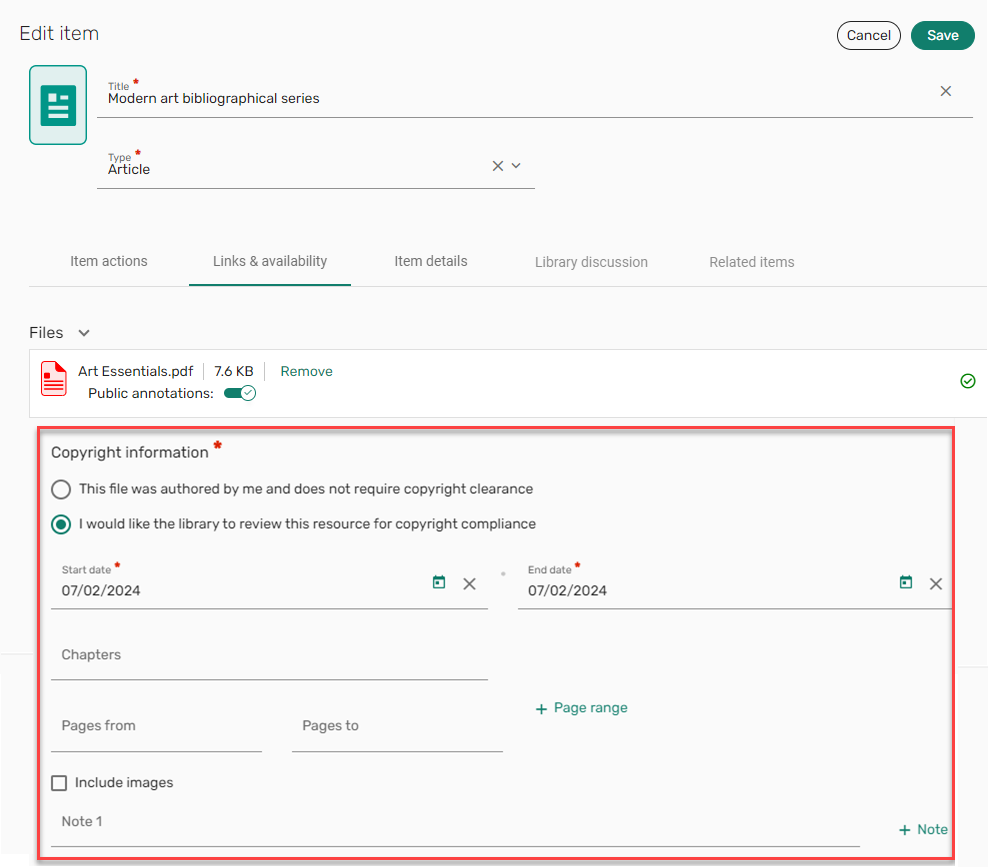
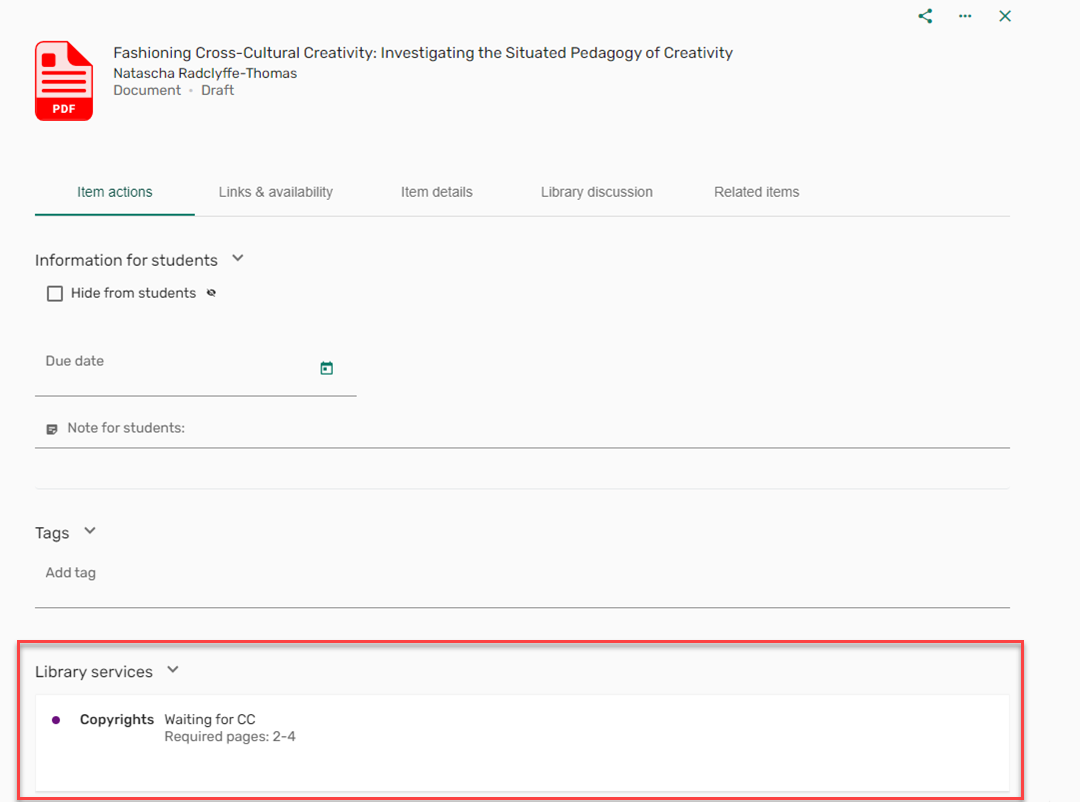
For more information, see Automatically Trigger Copyright Clearance Form.
April 2024 Leganto URM-213161 URM-214348 URM-213745 URM-213398 URM-209032 SF: 07023572 Based on customer feedback,
- When typing in a drop down list, the drop down options now offer auto-complete suggestions.
- The main actions are now hidden when the bulk actions are displayed.
- Long names in drop-down lists now include a tooltip when hovering over the name in the list so that the full name is viewable.
- The Newer list indication is no longer displayed when shareable links were not set to point to the newer list.
- When adding multiple lines in the Library discussion and pressing Enter, the comments are now displayed on multiple lines rather than single lines.
- The physical ability information on the full view is now presented so that all information is viewable without the need to use a scroll within the page.
Resolved Issues
| SF number | Description |
|---|---|
| URM-215418 | When viewing Upcoming due dates, availability was not displayed. This was fixed. |
| URM-216898/ | In some letters, when selecting URL in the letter, the user was directed to the reading list sign in page rather than prompting the user to authenticate. This was fixed. |
| URM-217935 / | Previously, the Leganto copyright status changed after the list was sent to library rather than retaining its status. This was fixed. |
| URM-216919 07033086 | In some cases, the force_login (Configuration > Leganto > General > Settings) did not work with shareable links. This was fixed. |
| URM-216963 07053162 | When adding physical resources to a list by searching Summon, an incorrect URL was added to the item as well. This was fixed. |
| URM-217240 07052940 | Previously, pop-up windows were blocked in Firefox. This was fixed. |
| URM-217338 07044854 07084222 07087498 | Previously, when marking an item as broken and mark_as_broken_email_notification (Configuration > Leganto > Features > Leganto Features) was configured, the wrong notification letter was sent. This was fixed. |
| URM-217583 07075784 | Previously, thumbnails from BrowZine were not added when using the editor button integration in Canvas. This was fixed. |
| URM-215535 06995153 07039167 07054762 07065467 | Previously, when the Color Theme - New UI (Configuration > Leganto > UI > Branding) was set to Dark blue, when hovering over buttons, the button turned black, and the text was unreadable. This was fixed. |
| URM-216965 07048899 | Previously, Links and availability was not displayed when selecting Add and edit when adding a new item to a list. This was fixed. |
| URM-215820 07013523 07034841 | Previously, when adding a website to a list in the classic UI using CiteIt! or the manual form, the citation received the Ready for Processing status rather than the Being Prepared status. This was fixed. |
| URM-215774 07014087 | Previously, resource locate did not run when adding an article. This was fixed. |
| URM-215480 07041692 07048016 | Previously, the new UI did not have the option to customize the label for the Draft publication status. This was fixed. |
| URM-215140 07031929 | Previously, when adding a JSTOR citation using CiteIt!, the citation was not compiled accurately. This was fixed. |
| URM-214567 07024467 07058730 | In some cases, when copying a section from one list to another list, the original list needed to be refreshed before being displayed correctly, and the copied section was not added to the correct place in the list. This was fixed. |
| URM-214258 07042015 | Previously, the Book Extract URL was not marked as mandatory even when the Source (Configuration > Leganto > UI > Citation Field Mapping) was configured as mandatory. This was fixed. |
| URM-213921 07014738 | Previously, the Leganto Detailed Notifications Email Letter (Configuration > General > Letters > Letters Configuration) did not display the correct data for <event_type> and <event_type_display>. This was fixed. |
| URM-213451 07042111 | When using the revert_completed_citation_status_by_metadata_change (Configuration > Leganto > List Management > Course Reserves Automatic Statuses), changing the source URL in the new UI did not change the citation status as in the classic UI. This was fixed. |
| URM-213300 07013377 | When adding an item from a reference manager (Add > Import references > select a reference manager), the bottom of the scroll bar was not visible. This was fixed. |
| URM-211603 06964605 07009175 07017231 | Some event notifications were missing from the Leganto Detailed Notifications Email Letter (Configuration > General > Letters > Letters Configuration). This was fixed. |
| URM-210609 06967283 | In some cases, the text of items with long titles continued out of the item box. This was fixed. |
| URM-207929 06918883 | In some cases, exporting citations from a list to Excel failed. This was fixed. |
| URM-197877 06782140 | The self-registration page was missing the header and footer tables. This was fixed. |
