
Leganto August 2026 Release Notes
The default Help links have been updated to point to the new Leganto documentation platform. These links are configured under Configuration > Leganto > Features > Help Pages and are available to users from the Help icon ( ) in Leganto.
September 2026 Sneak Preview
- Accessibility improvements across the Leganto user interface
Main Features
Indicate Potential License Issues on Lists
August 2026 Leganto URM-319493
Leganto now displays indicators for list items where the e-resource license might impact user access. To support this functionality, two new parameters have been added under Configuration > Leganto > List Management > Settings:
-
display_license_restriction (true/false, default: false) — Determines whether license restriction indicators are displayed for items with limited access licenses.
-
display_license_restriction_unlimited_access_models (comma-separated free text values) — Defines access model codes that should not trigger a limited access indicator. Any access models listed here are treated as unrestricted and will not result in a warning to list administrators. By default, this field is populated with codes from the unlimited_access_model_code field in Configuration > Leganto > List Management > Course Reserve Automatic Statuses.
When display_license_restriction is set to true, Leganto evaluates each list item's Public access model (visible under the Acquisition tab when viewing an electronic portfolio in Alma) to determine whether it is subject to limited access license restrictions. No indicator is shown if either of the following applies:
-
The Public access model matches one of the access model codes specified in display_license_restriction_unlimited_access_models. If multiple portfolios are linked to the item, all linked portfolios are evaluated.
-
The Public access model is defined as unlimited.
-
No Public access model is defined for any linked portfolio.
If neither of the above conditions is met, a license restriction indicator is displayed in the item's brief view. Hovering over the indicator displays the Access limits apply message.The indicator is visible only to list administrators and is not shown to students.
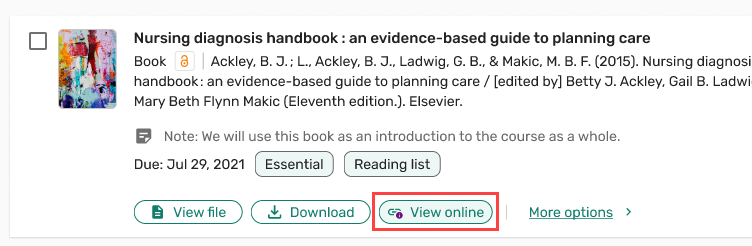
This enhancement helps instructors and librarians quickly identify items with limited access licenses, improving awareness of potential availability limitations when preparing lists. For details, see Displaying Limited Access License Indicators for List Items.
Institutions that previously disabled the display of access models through Ex Libris Support will not see the display_license_restriction and display_license_restriction_unlimited_access_models parameters. Contact Ex Libris Support to re-enable the display of access models if you wish to use restrictive license indicators at your institution.
Customize the +Add Menu
August 2026 Leganto
 Idea Exchange URM-328852
Leganto now enables institutions to configure which options are available in the +Add menu in both the Lists and Favorites sections. Disabled options are hidden from all users, regardless of their role.
To support this functionality, a new Add item options mapping table has been added under Configuration > Leganto > UI > Add Item Options. To enable or disable an option in the new mapping table, set the corresponding field in the Enable column to Yes or No.
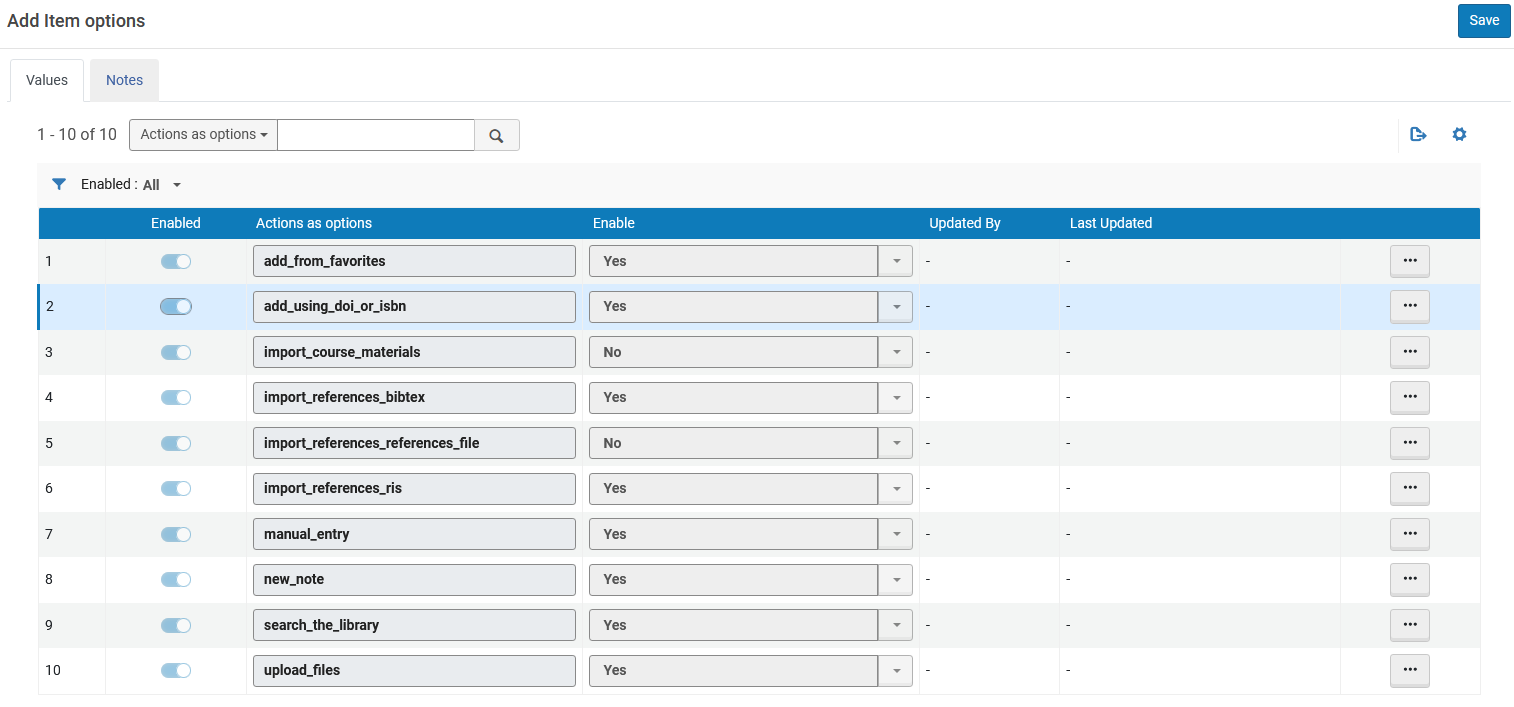
The configuration table includes all available +Add menu options. By default, all options are enabled, with the following exceptions:
-
Upload files – Enabled out-of-the-box only when the display_file_option parameter (Configuration > Leganto > Features > Leganto Features) is enabled.
-
Import course materials – Enabled out-of-the-box only when the leganto_import_syllabus parameter (Configuration > Leganto > List Management > List Creation) is set to all, library, or true.
-
Import references from reference file – Enabled out-of-the-box only when the display_import_references parameter (Configuration > Leganto > Features > Leganto Features) is set to all, library, or true.
If all +Add menu options are disabled in the mapping table, the +Add button remains available in Lists and only displays the New section option. The +Add button is not displayed in Favorites in that case.
This enhancement enables institutions to streamline the +Add menu by displaying only the options relevant to their workflows. For details, see Configuring the +Add Menu.
Additional Enhancements
-
August 2026 Leganto URM-328723 The Read and Respond assignment feature in Leganto has been deprecated, and instructors can no longer create new assignments.
If instructors attempt to create a new assignment from an LMS, an informational screen is now displayed instead of the assignment creation page.
Existing assignments remain fully functional and are not affected by this change. If the assignment integration is enabled in the LMS but there are no active Read and Respond assignments, institutions are recommended to disable the assignment integration in the LMS. For instructions, see Remove from your LMS.
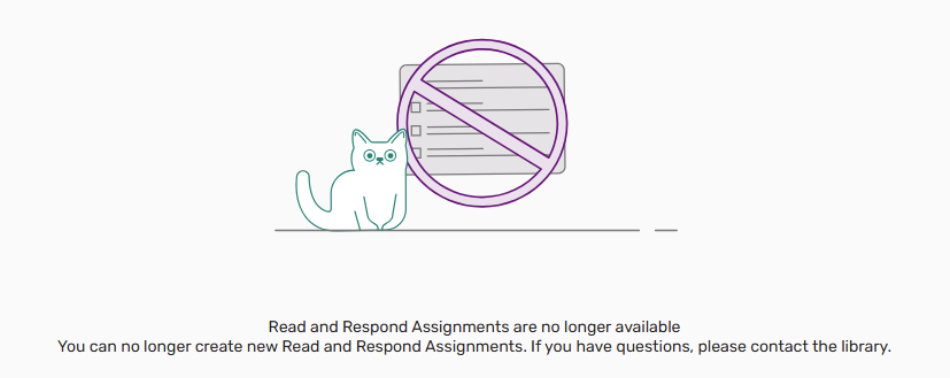
The deprecation of Read and Respond assignments does not affect Leganto's Social Reading functionality that enables users to add annotations to PDF files.
-
August 2026 Leganto
Idea Exchange URM-328850Leganto now enables institutions to configure which filters are available to users when viewing lists. To support this functionality, a new mapping table has been added under Configuration > Leganto > UI > Citation Filters. The table is system-defined, so rows cannot be added or removed.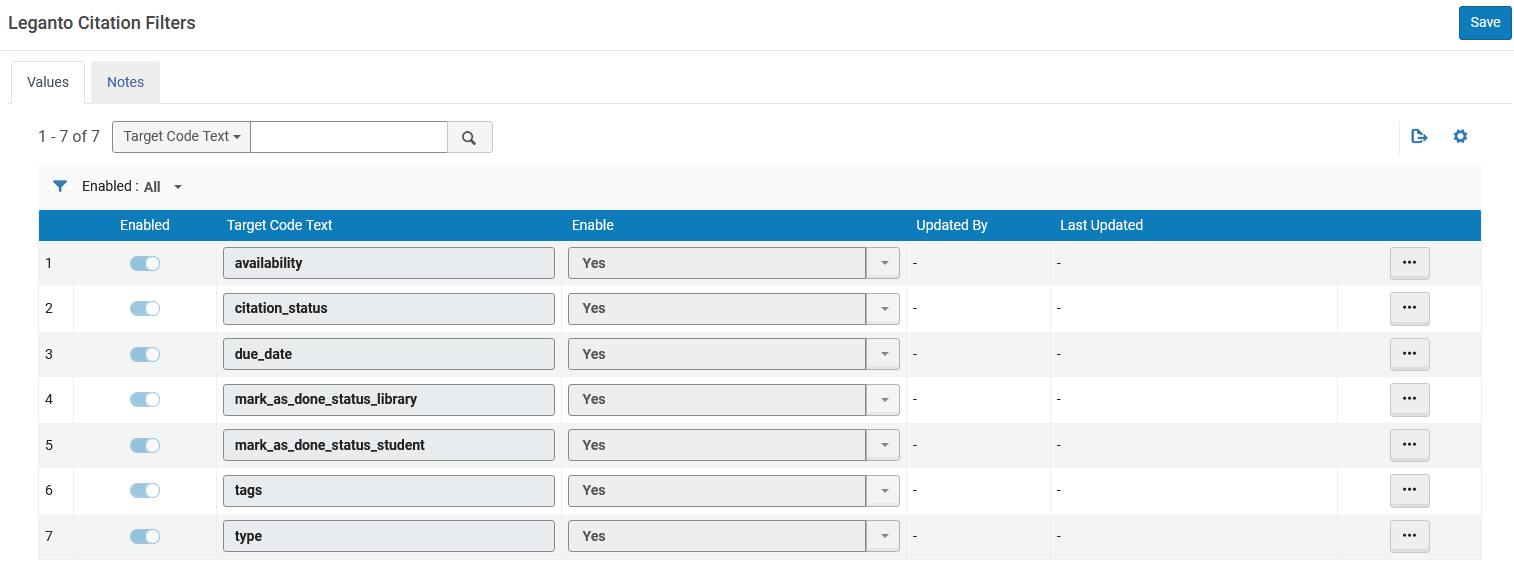
Each filter can be enabled or disabled from the new mapping table. By default, all filters are enabled.
These settings do not affect role-based visibility. Some filters may still be hidden based on user role, even if enabled in the table. For example, non-library staff do not see the Citation Status filter, even when it is enabled in the mapping table.
This enhancement enables institutions to display only relevant item filters, improving usability and reducing interface complexity for instructors and library staff. For details, see Configuring Item Filters in Lists.
The Due Date filter is only displayed when due dates exist in the list. This behavior remains unchanged and may cause the filter to not appear even when it is enabled in the new mapping table.
-
August 2026 Leganto
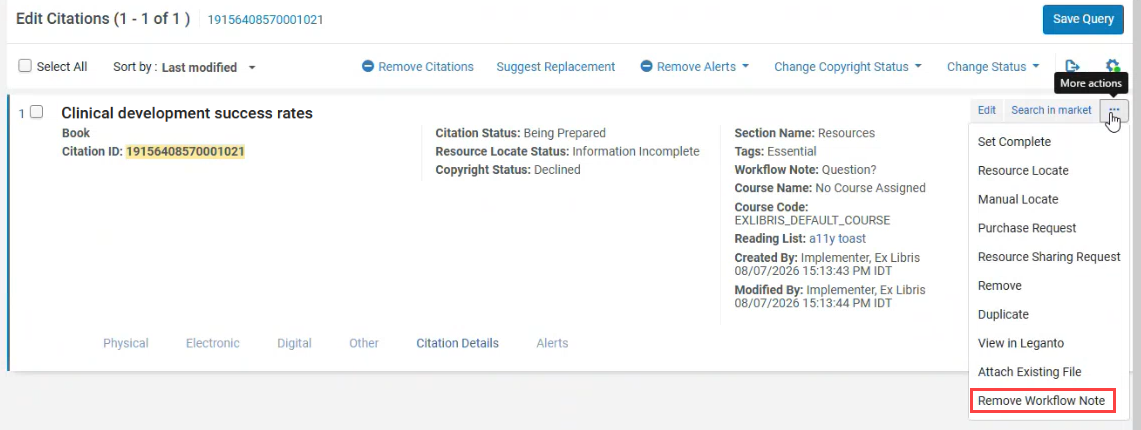
Idea Exchange URM-328851Leganto now enables library staff to remove workflow notes displayed in the Item details tab when viewing items in Leganto.A new action, Remove Workflow Note, has been added to the More actions menu in Alma when viewing an item. This action is available only for items that include a workflow note created by Leganto Questions.
-
August 2026 LegantoURM-328721 Leganto now enables institutions to configure whether the My list is ready banner is displayed persistently, regardless of list publication status. When this functionality is enabled, users cannot dismiss the banner and it displays regardless of whether instructors have added any new items to the list.
To enable the persistent banner, set the persistent_my_list_is_ready parameter (Configuration > Leganto > List Management > Settings) to true (default: false). This parameter only has an effect when auto_send_list_updates is set to false; it also overrides the display_my_list_is_ready_button parameter (Configuration > Leganto > List Management > Settings).
When auto_send_list_updates is set to false and persistent_my_list_is_ready is set to true, the banner remains visible regardless of whether the list has been published or updated. The banner text adapts based on list state, as in existing behavior.
The persistent banner is compatible with all instructor_publishing_options parameter settings (Configuration > Leganto > List Management > Settings).
-
August 2026 LegantoURM-327853 Leganto now provides improved accessibility for forms containing mandatory fields.
If a user attempts to submit a form with missing required information, focus now moves to the first mandatory field, which displays an error message. The error message remains visible until the field is completed correctly.
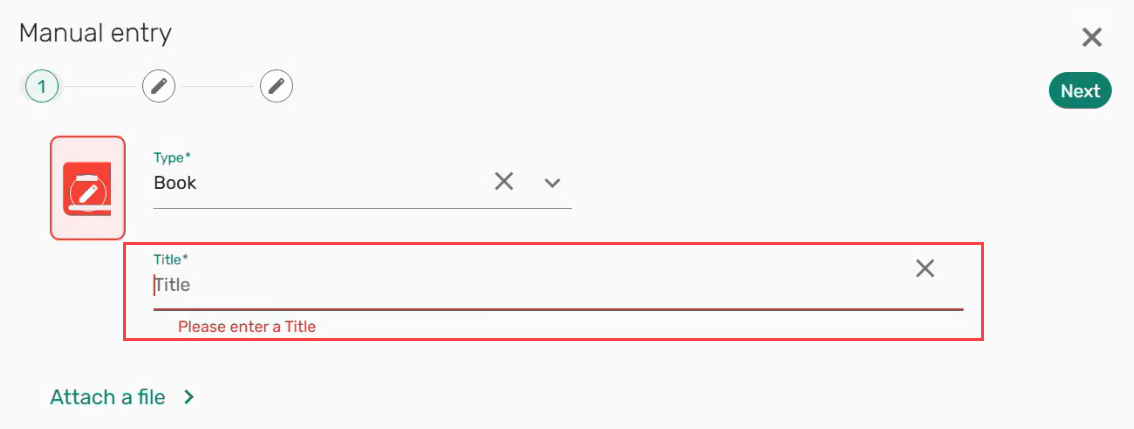
Mandatory fields are now also announced as required by screen readers when they receive focus.
These improvements provide a more accessible and consistent form experience, helping users complete forms more easily while supporting compliance with accessibility best practices.
-
August 2026 Leganto
Idea Exchange URM-325286 When exporting Leganto lists as PDF, the exported PDFs now include structured tagging that defines the role and reading order of each element in the document, such as headings, paragraphs, lists, tables, and images. This structure enables screen readers to navigate the content more accurately.This improvement ensures that exported PDFs are more accessible and easier to interpret for users relying on assistive technologies.
-
August 2026 Analytics and Insights URM-330030A new field, Date of Work has been added to the following Analytics Subject Areas. It displays the original publication date of the citation.
-
Course Reserves > Citation Metadata Details
-
Leganto Instructor Usage Events > Citation Metadata Details
-
Leganto Student Usage > Citation Metadata Details
For more information, see Course Reserves, Leganto Instructor Usage Events, and Leganto Student Usage.
-
-
August 2026 Analytics and Insights URM-329504A new field, Page Range, has been added to the Leganto Instructor Usage Events > Citation Metadata Details and Leganto Student Usage > Citation Metadata Details Analytics Subject Areas.
For more information, see Leganto Instructor Usage Events and Leganto Student Usage.
Resolved Issues
| SF number | Description |
|---|---|
| 10611439 URM-330564 | Adding a note to an item with an approved copyright status caused the status to revert to Waiting for Approval. This was fixed so that adding a note no longer changes the item's copyright status. |
| 10617112 URM-330480 | When an item's URL source contained an extra space at the beginning, the link displayed and worked correctly in Leganto but was not visible in Alma. Only after removing the extra space did the availability link appear. This was fixed so that URLs are now correctly displayed in both Alma and Leganto even if they start with an extra space. |
| 08429111 URM-330244 | Users with the Course Reserves Viewer role were unable to remove lists from My lists if they had been added from the list catalog, while users with no Leganto roles or with the Course Reserves Manager role could perform this action. This was fixed so that Course Reserves Viewer users can now remove lists from My lists, regardless of how they were added. |
| 08442218 URM-329329 | The AI Syllabus Assistant did not consistently recognize multiple heading levels in uploaded Word documents, which resulted in only partial extraction of content. In addition, the number of items extracted could vary between runs for the same document. This was fixed so that all headings and sub-sections are now correctly processed and item extraction is now both consistent and more accurate. |
