
Leganto July 2026 Release Notes
August 2026 Sneak Preview
-
Indicate potential license issues on lists
-
Customize the "Add item" menu
Main Features
Users will no longer be able to upload .svg and .xml files to Leganto starting with the November release. This change follows a security audit recommendation to prevent the upload of file types that may contain embedded JavaScript, which could pose a security risk when opened by users.
Set Priority for Course Reserves Automatic Statuses
July 2026 Leganto URM-322279
Leganto now enables libraries to control the priority of Course Reserves Automatic Status rules when multiple rules apply to the same item.
Previously, when multiple rules configured in Configuration > Leganto > List Management > Course Reserves Automatic Statuses matched the same item, Leganto applied the first matching rule based on an internal processing order. Because this order could not be configured, libraries had no control over which rule determined the final status.
To address this limitation, a new configuration table is now available under Configuration > Leganto > List Management > Course Reserves Automatic Statuses – Prioritization. The table displays the different automatic status parameters and enables libraries to reorder them.
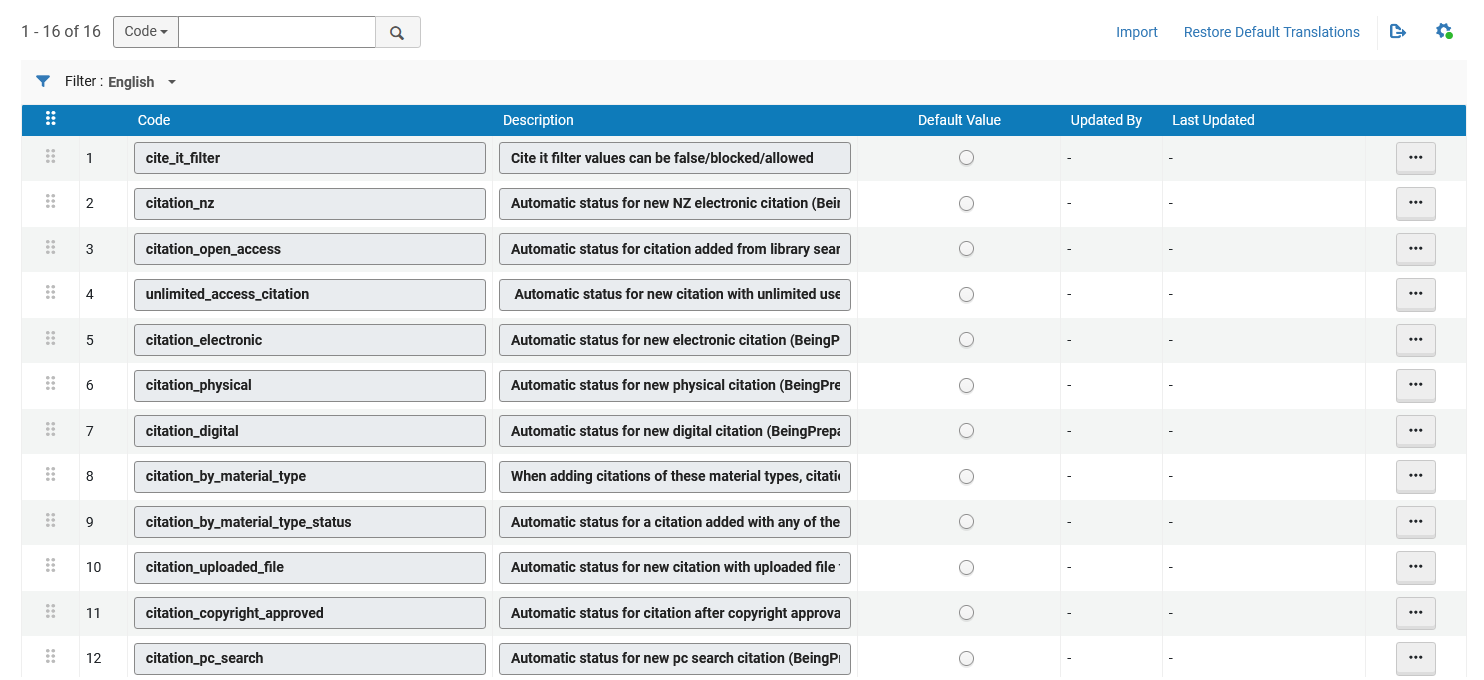
The order of parameters in the new prioritization table determines which rule is applied to an item that matches multiple rules. For example, if both citation_electronic and unlimited_access_citation apply to an item, the rule that appears higher in the prioritization table determines the resulting status.
This enhancement gives libraries greater control over automatic status assignment and helps ensure that auto-statuses effectively support institutional workflows.
Date of Work Now Supported in Leganto
July 2026 Fulfillment and Resource Sharing Idea ExchangeURM-228160
Leganto now supports the display of a work's original publication date through the Date of Work field, enabling institutions to distinguish between the original publication date of a title and the publication date of a later edition or format.
The Date of Work field is not enabled by default. Institutions that want to display this information must configure the relevant bibliographic mapping and display settings.
To map the field in Alma, go to Configuration > Fulfillment > Courses > Bibliographic Mapping Rules and update the production Drools rules to map the desired MARC field to the date_of_work field. For example:
end
rule "Display - Date of work 035"
priority 10
when
MARC is "035"."a"
then
create citation."date_of_work" with MARC "035"."a"
end
You can verify the mapping using Configuration > Fulfillment > Courses > Test BIB to Citation Normalization by entering an item's MMS ID and confirming that the Date of Work field is populated as expected.
To display the field in Leganto:
-
Go to Configuration > Leganto > UI > Citation Field Mapping.
-
Map Date of Work to a Book type (and/or other material type).
-
Configure the display order.
-
Choose whether the field appears immediately when a user opens Item details or under More details.
-
Specify whether the field is mandatory.
Once configured, the Date of work field appears in Leganto under the item's Item details tab.
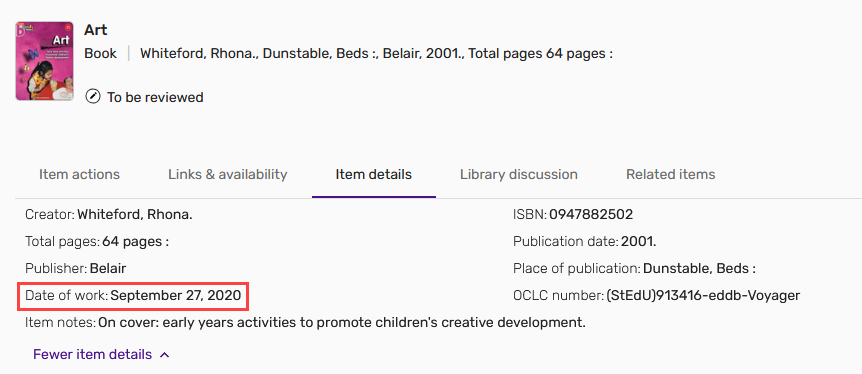
Institutions using Primo or Summon can also display this information in discovery records. Configure the field in Configuration > Leganto > Discovery > Primo Mapping or Configuration > Leganto > Discovery > Summon Mapping using the date_of_work code (for details, see Primo Mapping and Summon Mapping).
This enhancement improves metadata clarity and helps users identify the original publication date of a work, regardless of the format or edition being used.
Additional Enhancements
-
July 2026 Leganto URM-331403Leganto now enables institutions to control whether changes made by library staff update the list's Initial Request for Review and Current Request for Review fields in Alma.
Previously, these fields were updated only when changes were made by instructors, course operators, or collaborators. Changes made by library staff did not affect the review request information.
To provide greater flexibility, a new update_review_list parameter has been added under Configuration > Leganto > List Management > Settings. The parameter supports the following values:
-
instructor (default value) – The Initial Request for Review and Current Request for Review fields are updated only when changes are made by instructors, course operators, or collaborators.
-
all – The Initial Request for Review and Current Request for Review fields are updated when changes are made by instructors, course operators, collaborators, or library staff.
This enhancement provides greater flexibility in how review requests are tracked and helps institutions align the process with local review workflows.
-
-
July 2026 Leganto URM-321487 Leganto now supports AI-generated alternative text (alt text) for images. Institutions can enable or disable this functionality with the alt_text_using_AI parameter (Configuration > Leganto > Features > Leganto Features). By default, the parameter is set to true.
When the feature is enabled, users can select the new Fill with AI option next to the Alt text field when adding a new image or editing an existing one. Leganto then analyzes the image and generates a suggested description, which is automatically populated in the field.
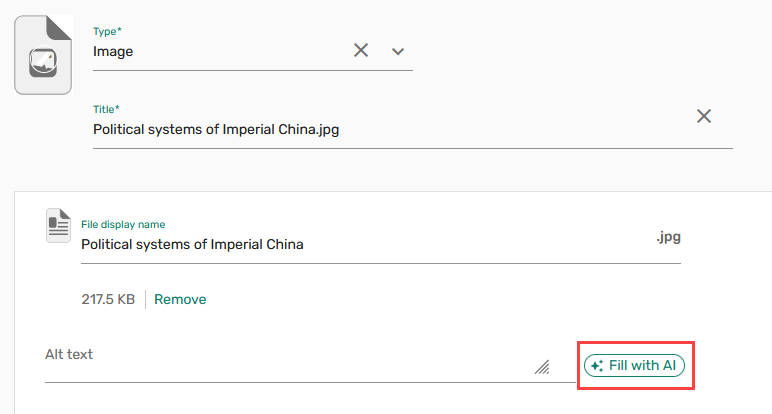
The generated text is fully editable, so users can review and modify the image description before saving. Users can also regenerate the description if needed and provide feedback on the generated content with the Rate this result button.
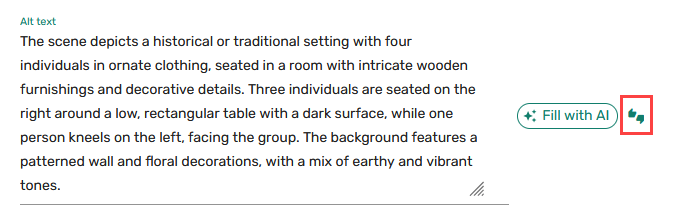
This enhancement simplifies the creation of high-quality alt text and helps institutions improve the accessibility of image-based content.
-
July 2026 Leganto URM-327854 The visual focus indicator for buttons in Leganto has been enhanced to improve visibility and contrast during interaction.
Previously, focused buttons were highlighted with a single colored outline. With this update, a white ring has been added between the button and the focus outline, creating greater visual separation and making the focused element easier to identify.

This UI enhancement improves accessibility across Leganto, with particular benefit for users who navigate the interface using a keyboard.
-
July 2026 Leganto
Idea Exchange URM-252973, URM-327588 Libraries can now perform syllabus bulk imports directly in Leganto. To enable this capability, institutions must submit a support ticket.Once enabled, the Syllabus option becomes available in the Type dropdown under the Actions tab of the Reading List Loader integration profile (Configuration > General > External Systems > Integration Profiles). After selecting Syllabus, users then need to enter the Input File Path, which specifies the path to the input files on the FTP server, and then select Run to perform a bulk upload of syllabus files.
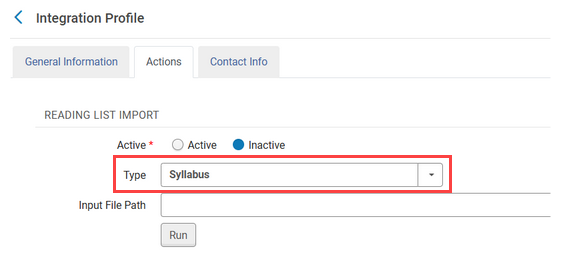
It is also possible to map the syllabus files to course codes. To enable course association, add an Excel or tab-delimited file named coursemapping to the Input File Path field. The file must contain the following columns:
-
File_name
-
Course_code
-
Section_id
-
Searchable_id1
-
Searchable_id2
-
Searchable_id3
This example file shows the required format for the coursemapping file.
During the import process, Leganto uses this file to link imported lists to the corresponding courses. If no course mapping file is provided, or if a specified course cannot be found, the list is still created but is not associated with a course. Any association issues are recorded in the error report.
This feature streamlines the import of syllabus content and reduces the need for manual loading of individual files.
-
-
July 2026 Analytics and Insights URM-325763A new field, Reading List Subjects, has been added to the following Alma Analytics Subject Areas:
-
Course Reserves (Analytics > Access Analytics > Create > Analysis > Course Reserves > Reading Lists)
-
Leganto Instructor Usage Events (Analytics > Access Analytics > Create > Analysis > Leganto Instructor Usage Events > Reading Lists)
-
Leganto Student Usage (Analytics > Access Analytics > Create > Analysis > Leganto Student Usage > Reading Lists)
For more information, see Course Reserves, Leganto Instructor Usage Events, and Leganto Student Usage.
-
-
July 2026 Analytics and Insights URM-328618The following fields have been removed from the Course Reserves, Leganto Instructor Usage Events, and Leganto Student Usage Alma Analytics Subject Areas:
-
Citation Digital File Date Added (Calendar) (to be deprecated)
-
Article End Page (to be deprecated)
-
End Page (to be deprecated)
-
End Page 2 (Calendar) (to be deprecated)
-
Start Page (Calendar) (to be deprecated)
-
Start Page 2 (Calendar) (to be deprecated)
-
-
July 2026 Leganto URM-326625Several improvements have been introduced to the file upload experience in Leganto:
-
During file upload, the Cancel option is now replaced with Cancel upload. Selecting Cancel upload returns the user to the upload component screen.
-
If a file upload fails or is manually canceled, the failure state is now shown with a red X icon for clearer visual indication.
-
When uploading a folder containing multiple files, canceling a single file upload no longer stops the entire process. Instead, the canceled file is marked with a red Upload canceled label and an X icon, while the remaining files continue to upload.
These improvements enhance the user experience by providing clearer feedback and more consistent behavior during file uploads.
-
-
July 2026 Leganto URM-322286The advanced_publish_options setting has been removed from the table under Configuration > Leganto > List Management > Publishing, as it is no longer relevant following the deprecation of the classic user interface in 2025.
Resolved Issues
| SF number | Description |
|---|---|
| 10577462 URM-329757 | Customizing descriptions in the Citation Copyright code table (Configuration > Fulfillment > Copyright Management > Citation Copyright) previously caused the Copyright Status field to disappear from the fulfillment page in Alma (Alma > Fulfillment > Citations). This was fixed so that copyright status information now continues to display correctly after customizing the Citation Copyright code table. |
| 10562762 URM-329084 | When a list was published with the Anyone Restricted, All Students Full publication status, digital files were incorrectly visible to guest users. This was fixed so that digital files are now properly restricted and visible only to authenticated users, as expected for this publication setting. |
| 08437800, 08322141, 105919, 10600815 URM-328296 | Some bibliographic styles could not be saved due to validation errors. The issue occurred because several existing styles were no longer supported, had been renamed or replaced. This was fixed by updating the affected style mappings so that unsupported styles are now replaced with valid alternatives. |
| 08426013 URM-327960 | When display_cms_entry_by_cms_role was set to true, users who were instructors in one LMS course but students in another could still create lists in courses where they only had a student role. This was fixed so that the Create new list option is now correctly displayed based on the user’s role in the specific course. |
| 08376986 URM-325734 | When using the australian-guide-to-legal-citation bibliographic style in Quick Cite, external links from the Source field were incorrectly displayed in the item output. This was fixed so that URLs from the Source field display correctly when using this bibliographic style. |
| 08357437 URM-324691 | When importing a list of items via the AI Syllabus Assistant from Word or PDF files, only a subset of items was sometimes extracted when working with longer documents. This was fixed so that all items in the uploaded document are now more likely to be correctly identified and imported as expected. |
| 08341101 URM-323782 | When using the Manual Entry form, the Start Page and End Page fields would disappear when you selected More Item Details. This was fixed so that the page range fields are now correctly shown in the expanded item details view. |
| 08323273 URM-323066 | Thumbnail images were not displayed for some journal items, and placeholder images were shown instead. This was fixed so that journal items now correctly display their thumbnail images when available. |
| 08226079 URM-317412 | When using the Rialto search in Leganto, selecting the More Details button caused the availability section to hang and not load. This was fixed so that availability now loads correctly and displays the expected information for items available via Rialto. |
