
Leganto March 2026 Release Notes
April 2026 Sneak Preview
-
CERV 6099: Improve the display of recent list changes
Main Features
Indicate Items Which Are Open Educational Resources (OER)
March 2026 Leganto URM-319495
Leganto now provides an automated way to identify Open Educational Resources in lists. A new configurable mapping table, available under Configuration > Leganto > List Management > Open Educational Resources, enables libraries to define which source URL domains and license types qualify as OER at their institution.
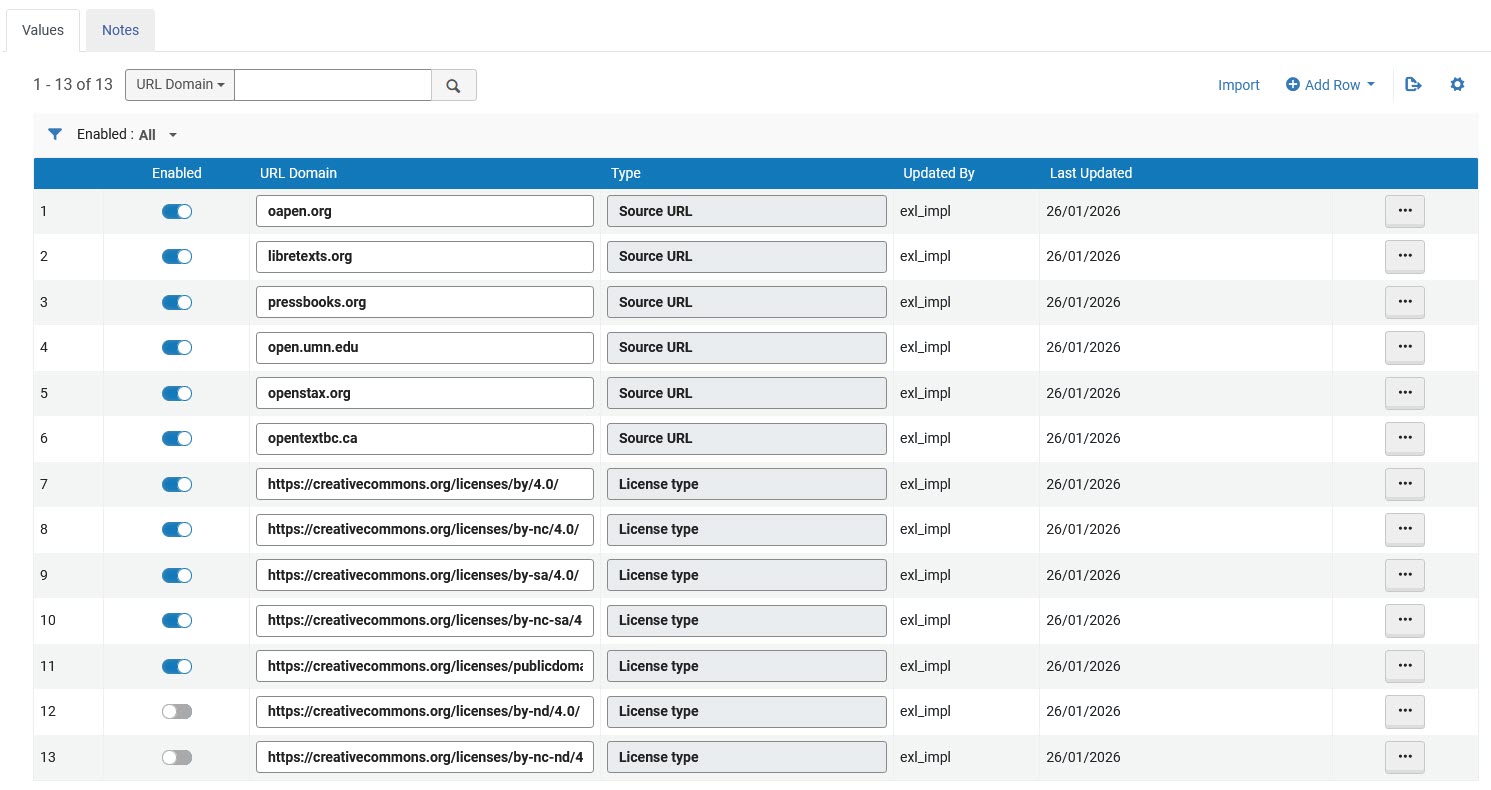
The new mapping table enables libraries to:
- Enable or disable predefined OER URL domains and license types
- Add new, edit existing, or remove URL domains and license types
Some commonly used OER source domains and the Creative Commons license types that are most widely considered to be OER are enabled by default. Two license types (CC BY-ND 4.0 and CC BY-NC-ND 4.0) are included in the table but disabled by default.
Leganto automatically identifies items as OER and updates their metadata when new or updated items match the defined domains or license types.
This update introduces a centralized approach to identifying OER materials in Leganto, helping libraries apply consistent rules while reducing manual effort. For details, see Open Educational Resource (OER) Item Identification and Configuration.
This release introduces the OER configuration table and metadata support only. A visual indicator for OER items in the Leganto user interface and Analytics support for OER will be introduced in future releases.
New Editions Available for Purchase
March 2026 Leganto URM-319121
Leganto now supports an end-to-end workflow for identifying and requesting newer editions of books in lists. This functionality is available for institutions that use Rialto and have the rialto_new_edition parameter (Configuration > Leganto > Features > Leganto Features) set to true.
When this parameter is enabled, users can check whether the book has a newer edition by opening an item’s details and navigating to the Related items tab.
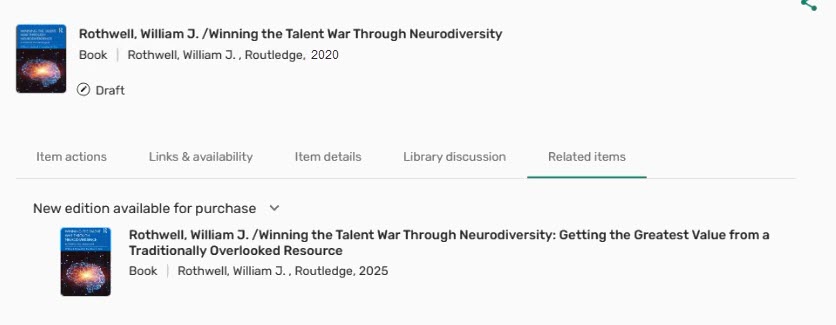
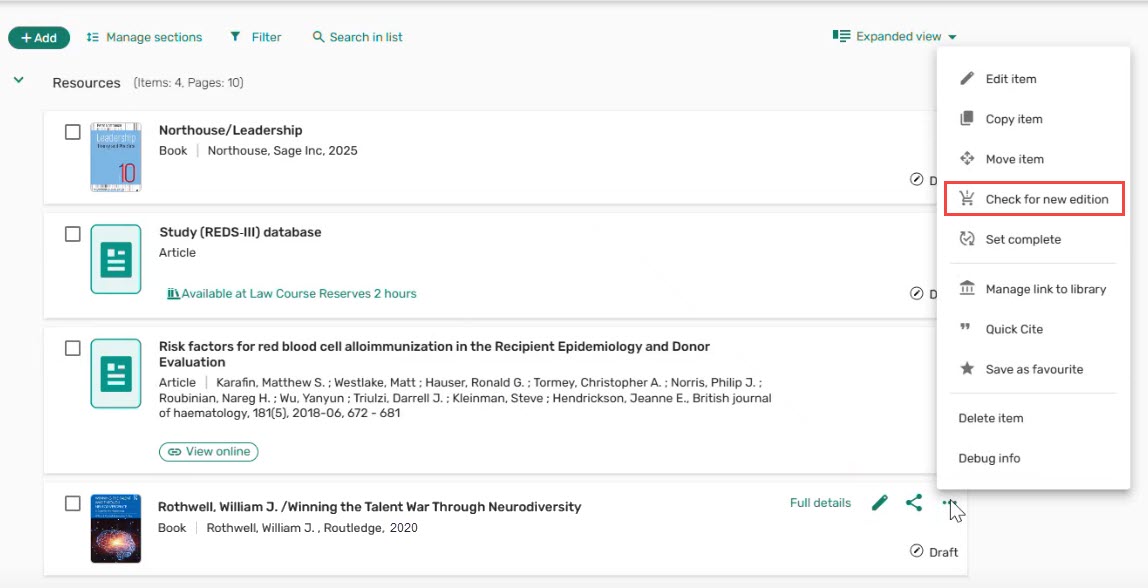
Institutions can also enable the new check_new_edition parameter (Configuration > Leganto > UI > Citation Menu) to add the Check for new edition option to the item’s row action menu, which opens the item’s Related items tab if a new edition of the book is available.
When a newer edition is available for purchase, it appears in the New edition available for purchase section of the Related items tab. From there, instructors can submit a purchase request using the Request purchase button. Instructors can monitor the progress of their request by seeing the status (Library processing,Purchase completed,Purchase request declined) in the Library services section under the Activity tab of the item's details.
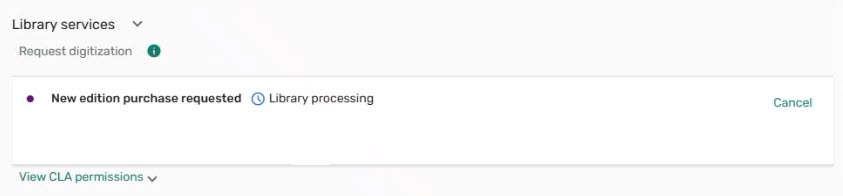
The system tag next to the original item in the brief view also enables instructors to track the progress of their request.

Requests for newer editions appear in Rialto under Collection Development > Orders > Faculty-Recommended Titles, where librarians can review and approve them. Once approved, the purchase is processed automatically. When a new edition becomes available, instructors see a New Edition Available tag next to the original item and a notification bar at the top of the list with a Show editions button.

Selecting Show editions leads instructors to a screen where they can review the editions and choose whether to replace the original item, add the new edition alongside it, or decline the new edition.
This enhancement simplifies the process of identifying and requesting newer editions of books, helping keep lists current and aligned with available materials. For details, see Enabling Instructors to Request New Editions of Books.
Additional Enhancements
-
March 2026 Leganto URM-319963 Leganto now supports displaying the request pane for physical items for Primo NDE customers, which enables users to place physical item requests directly from Leganto. When set up, the request pane appears in the Links & availability tab when viewing an item’s details.

This functionality is controlled by the new primoNDE_requests parameter (Configuration > Leganto > Discovery > Primo Settings), which can be set to true or false(default:false). Set the parameter to true to enable requesting physical items within Leganto.
This enhancement provides Primo NDE institutions with greater flexibility by extending physical item request capabilities into the Leganto experience.
-
March 2026 Fulfillment and Resource Sharing
 Idea Exchange URM-253833 Leganto now enables libraries to customize the labels of workflow tags, including those used for integrations with external systems such as Bolk and DCS.
To customize a tag, navigate to Configuration > Fulfillment > Courses > Reading List Citation System Tags, select More actions, and then choose Customize. Libraries can then update the text shown in the Description column to better reflect local terminology or workflows.

-
March 2026 Leganto
Idea Exchange URM-142772 Leganto now enables libraries to automatically set the status of open-access items when they are added to a list from the Search the library pane. Libraries control which status should be applied with the new citation_open_access(Configuration > Leganto > List Management > Course Reserves Automatic Statuses) parameter. By default, the parameter is left blank.When configured, open-access items are assigned the selected status upon addition to a list, eliminating the need for manual updates. This helps keep list statuses accurate while reducing routine administrative work.
-
March 2026 Leganto URM-319879 The item availability design has been updated to make resource access options more prominent. Files and online links in the brief view now use redesigned buttons that are more prominent.

This update helps users more easily recognize resource availability.
-
March 2026 Leganto
Idea Exchange URM-319983 Leganto now has clearer, more context-specific messages when users attempt to access an unavailable list.If a list exists but has not yet been published (code label list.noAccess.draft), users see a message explaining that the list is unavailable because it is still in draft status, with guidance to contact the instructor or the library for further information.

If a course does not have a list (code label list.noAccess.no.list), the error message indicates that no list currently exists for the course and similarly advises users to contact the instructor or the library if they have questions.

By clearly distinguishing between unpublished lists and courses without lists, this update helps students better understand why content is unavailable and helps the library troubleshoot.
-
March 2026 Leganto URM-247749 The description of the display_sticker_price parameter (Configuration > Leganto > Features > Leganto Features) has been updated to more accurately reflect its behavior. The description now reads:Whether to display sticker price in library view. true/false. For details on configuring this parameter, see Configuring Sticker Prices.
-
March 2026 Analytics and Insights The following fields have been removed from the Leganto Student Usage and Course Reserves Subject Areas:
- List Last Set to Complete Date — To Be Deprecated(Leganto Student Usage > Reading Lists)
- List Last Set to Complete Date (Calendar) — To Be Deprecated(Leganto Student Usage > Reading Lists)
- Leganto List Last Set to Complete Date — To Be Deprecated(Course Reserves > Reading Lists)
- Leganto List Last Set to Complete Date (Calendar) — To Be Deprecated(Course Reserves > Reading Lists)
These fields have been replaced by Leganto Reading List Last Set Complete By,Leganto Reading List Last Set Complete Date, and Leganto Reading List Last Set Complete Date (Calendar), which were added in the December release. The new fields contain more complete data and store the date when the list was last set to complete, either manually or automatically by the system.
Resolved Issues
| SF number | Description |
|---|---|
| 08324875 URM-323099 | When creating a new list and selecting Single Section from the Create Sections drop-down, the choice did not take effect immediately. Switching to another option and then back to Single Section updated the list correctly. This was fixed so that the selected template now applies on the first attempt. |
| 08318694 URM-322696 | When adding items to a list by DOI, the system was incorrectly running a locate request. This caused articles added by DOI to go through the locate process unnecessarily. This was fixed so that articles added by DOI no longer run a locate request and behave the same as items added from Primo search. |
| 08280310 URM-321587 | Some supported Cite it! websites were only pulling partial metadata via the browser extension, linking to the journal rather than the specific article and omitting details such as book title, pages, or year. This was fixed so that Cite it! now correctly retrieves complete metadata and links directly to the individual article when available. |
| 08206066 URM-319854 | Some article items were not consistently auto-completing when added to a list, even though the institution configured them for automatic completion. This was fixed so that article items now reliably auto-complete when added via library search (if set so by the library). |
| 08226184 URM-318814 | Sections in some lists did not always remain in the correct order after being moved, particularly in longer lists with multiple sections. This was fixed so that sections now retain their order after being moved to a different part of the list. |
| 08151320 URM-316208 | Instructors were able to link courses to locked lists when accessing them from Canvas via My Lists, even though this option was blocked in All Lists. This was fixed so that courses can no longer be linked to locked lists from Canvas, ensuring consistent behavior across both list views. |
| 08153470 URM-315007 | When an item was copied or linked to an existing list, its copyright information was sometimes lost or became editable. This was fixed so that the copyright information is retained during duplication and disabled for editing. |
| 07987493 URM-314373 | Adding a collaborator to a list did not work when using a touchpad tap, while using the touchpad's physical button or a mouse worked as expected. This was fixed so that collaborators can now be added successfully using a touchpad tap as well. |
