
Leganto May 2026 Release Notes
June 2026 Sneak Preview
-
New Course Loader integration profile which includes the Faculty/School field
-
Display different general messages to different user groups
Main Features
No main features match your criteria.
Highlight Open Access and OER on Lists
May 2026 Leganto URM-319494
Leganto now displays visual indicators for open access and open educational resources (OER) items in lists. When enabled, these indicators are visible to all users, including students and guests.
To enable this feature, set the access_type parameter (Configuration > Leganto > Features > Leganto Features) to true(default:false). Once enabled, Leganto displays OER and open access indicators in the brief view (next to the item type) and in the full view (in the Access Type section on the Item details tab).


Even if access_type is set to false, Primo and Summon searches in Leganto still display these indicators.
List administrators can manually edit the access type indication. When editing an item, the Open Access and Open Educational Resources checkboxes under Access Type control whether indicators are displayed.
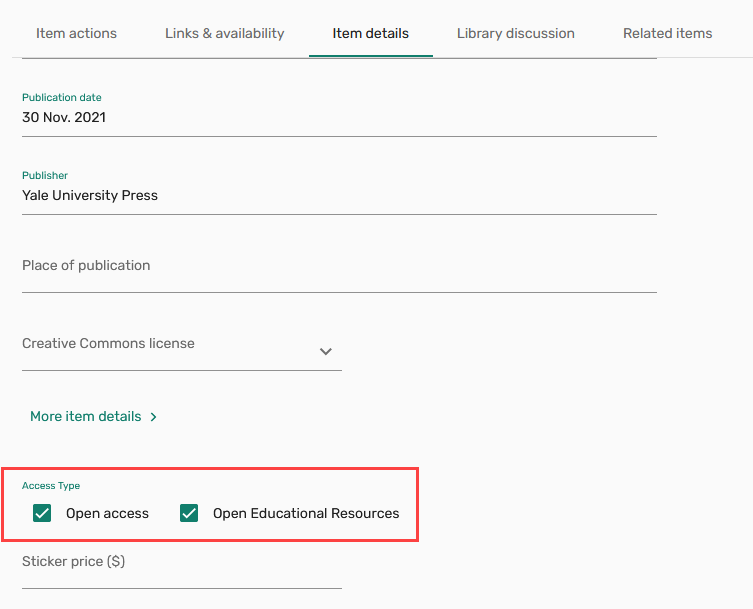
Additionally, a new Access Type field has been added to the Citation Parameters section when editing an item in Alma.

This enhancement provides immediate visual cues for open access and OER items, making it easy for students, instructors, and library staff to identify open and freely available resources.
Additional Enhancements
-
May 2026 Fulfillment and Resource Sharing URM-175629 Institutions can now customize copyright status labels in Alma, which enables libraries to align terminology with local regulations and practices.
You can configure these labels in Configuration > Fulfillment > Copyright Management > Citation Copyright by updating the text in the Description column.
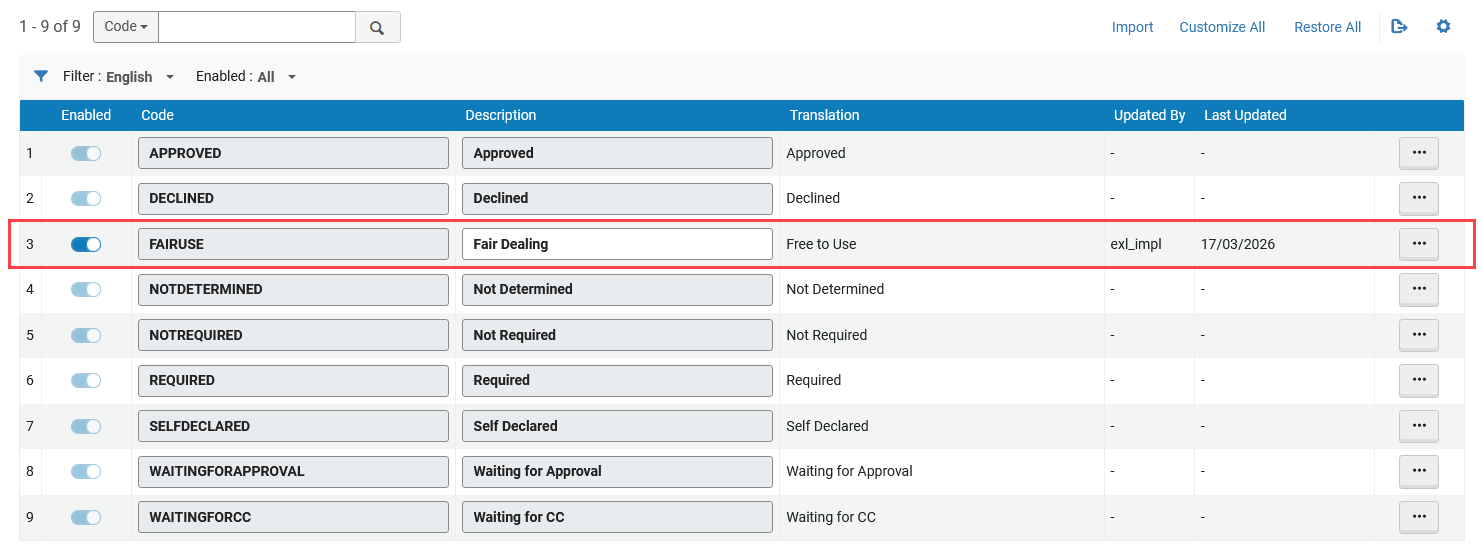
Institutions cannot add/delete entries or modify the underlying code in the Citation Copyright table; only the display text (Description) can be edited.
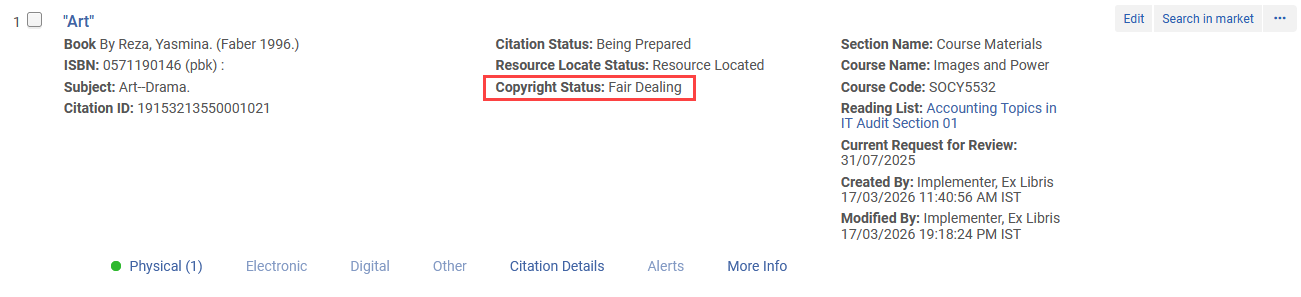
After updating the Description column, the custom label appears in Fulfillment > Course Reserves > Citations for all items with the corresponding copyright status. Updated labels are also reflected in facets and are available when applying bulk changes using Change Copyright Status.
-
May 2026 Leganto
 Idea Exchange URM-322608 When exporting a resource list from Leganto, the export now displays up to ten individual page ranges per item. Page ranges are supported in PDF, Excel, and Word exports.
In Word and PDF exports, page ranges are displayed on a single line, separated by commas. In Excel exports, the previous Item start page and Item end page columns have been replaced with a single Item Page Range column, which displays all page ranges separated by commas.
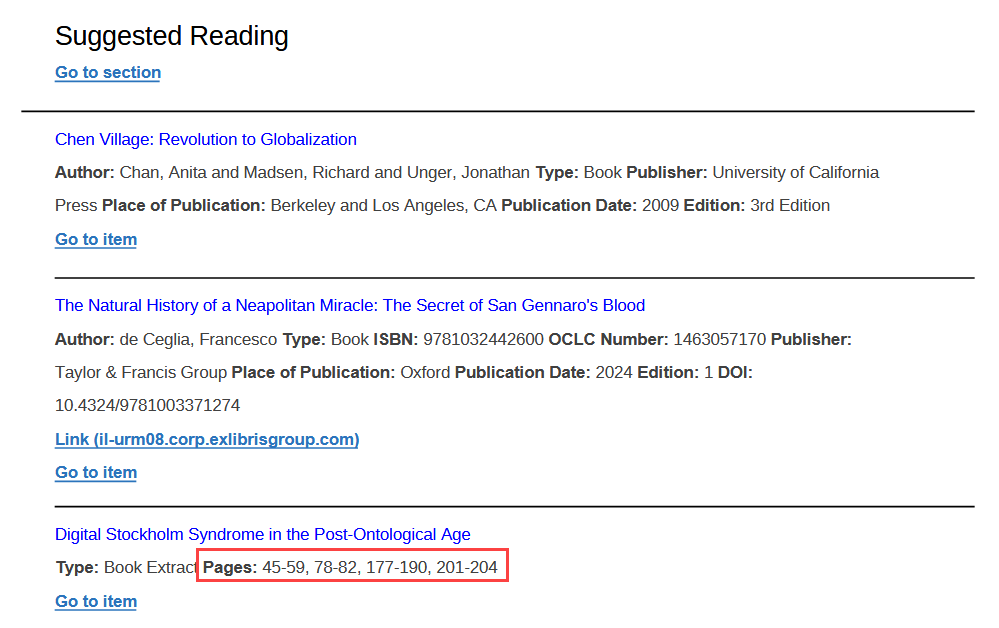
For Word exports, page ranges are included only when the Bibliography style is set to Expanded Reading List Style during exporting.
- May 2026 Leganto URM-225491 Leganto now includes the CC0 (Public Domain) license in the Creative Commons license options when editing an item or a list.
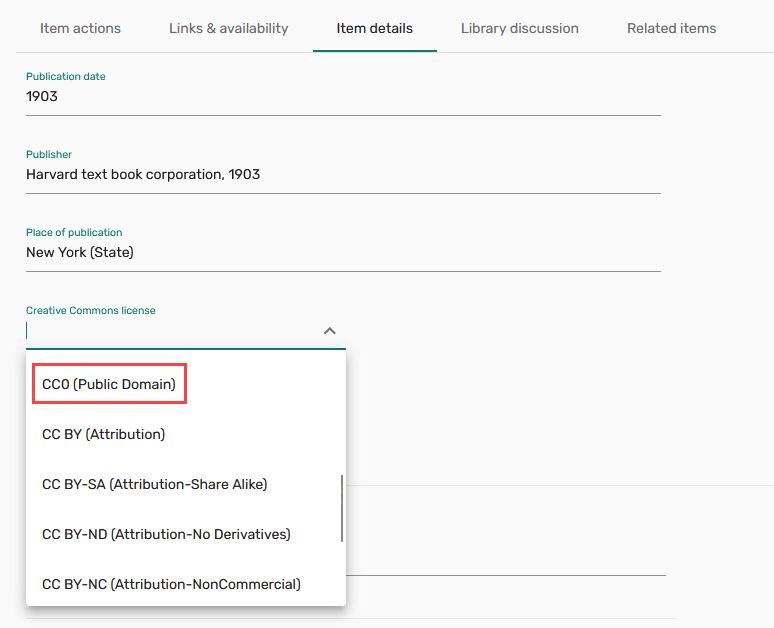
The CC0 (Public Domain) license has also been added to the Creative Commons License dropdown under Citation Parameters when editing an item in Alma.
Items with an assigned CC0 (Public Domain) license display an icon and description in the Item details tab in Leganto.
 license icon & description in Leganto.png)
The Creative Commons license dropdown in Leganto only appears for items without an existing license type.
-
May 2026 Analytics and Insights URM-324646 A new field,Portfolio IDs, is now available in the following Analytics Subject Areas:
-
Course Reserves(Analytics > Access Analytics > Create > Analysis > Course Reserves > Reading List Citations)
-
Leganto Instructor Usage Events(Analytics > Access Analytics > Create > Analysis > Leganto Instructor Usage > Citations)
-
Leganto Student Usage(Analytics > Access Analytics > Create > Analysis > Leganto Student Usage > Citations)
-
Purchase Requests(Analytics > Access Analytics > Create > Analysis > Purchase Requests > Reading List Citations)
For more information, see Course Reserves,Leganto Instructor Usage Events,Leganto Student Usage and Purchase Requests.
-
-
May 2026 Analytics and Insights Two new fields,Availability and Availability Type, are now available in the following Analytics Subject Areas:
-
Course Reserves(Analytics > Access Analytics > Create > Analysis > Course Reserves > Reading List Citations)
-
Leganto Instructor Usage Events(Analytics > Access Analytics > Create > Analysis > Leganto Instructor Usage Events > Citations)
-
Leganto Student Usage(Analytics > Access Analytics > Create > Analysis > Leganto Student Usage > Citations)
These fields identify the specific source or format through which a list item is accessible and group these values into broader categories to support higher‑level reporting and analysis.
For more information, see Course Reserves,Leganto Instructor Usage Events, and Leganto Student Usage.
-
-
May 2026 Analytics and Insights URM-322606 New fields,Citation Uploaded File Accessibility Comment,Citation Uploaded File Accessibility Information and Citation Uploaded File Alt Text are now available in the following Analytics Subject Areas:
-
Course Reserves(Analytics > Access Analytics > Create > Analysis > Course Reserves > Reading List Citations)
-
Leganto Instructor Usage Events(Analytics > Access Analytics > Create > Analysis > Leganto Instructor Usage > Citations)
-
Leganto Student Usage(Analytics > Access Analytics > Create > Analysis > Leganto Student Usage > Citations)
These fields let libraries record the file's accessibility status, add any related comments and include alt text for image-based items.
For more information, see Course Reserves,Leganto Instructor Usage Events and Leganto Student Usage.
-
Resolved Issues
| SF number | Description |
|---|---|
| 08380865 URM-325952 | Items could be added to a locked list from the clipboard, even though locked lists should not allow new items to be added. This was fixed so that items can no longer be added from the clipboard to locked lists. |
| 08359381, 08396002 URM-324529 | When adding items using Cite It! (both the bookmarklet and browser extension), tags could not be added to the item, even though tagging worked as expected in Leganto. This was fixed so that tags are now available and can be added when using the Cite It! bookmarklet and extension. |
| 08345560 URM-324083 | When linking an item to a library resource using Manage Links to Library, the material type was incorrectly changed, even when the link_to_library_locate parameter (Configuration > Leganto > Features > Leganto Features) was set to overlay_no_type. This was fixed so that the material type is no longer overridden during the linking process when this setting is configured. |
| 08336619 URM-323770 |
|
| 08334764 URM-323754 |
|
| 08329844 URM-323133 | When an instructor used Student View, exporting a list to PDF generated a blank file. In addition, items with a Ready for Processing status were incorrectly included in exports, and lists containing hidden items could result in no data being displayed for students. All of these export-related issues were fixed. |
| 08363118 URM-325279 | Items added using the syllabus assistant did not apply the default copyright statuses defined in the Citation Default Copyright Status table, and were instead set to Not Determined. This was fixed so that items created via the syllabus assistant now use the configured default copyright statuses as expected. |
| 08341151 URM-323883 |
|
| 08336581 URM-323611 |
|
| 08281273 URM-322993 | When editing a list in Alma, selecting the icon next to an instructor’s name in the Courses tab did not display the instructor’s contact information as expected. This was fixed so that the contact details now open correctly when selecting the instructor icon. |
