
2022 RefWorks Release Information
table#NoBorder {
    border:none;
}

table#NoBorder td {
    border:none;
    background-color:white;
}
December 13, 2022
Attach Full Text PDF When Importing References via Save to RefWorks
 Idea Exchange
When importing references via Save to RefWorks, users can select to import tags and can now also ask that RefWorks searches for full text. If RefWorks finds full text, the PDF will be imported. When import is complete, RefWorks will display how many full text PDFs were found and attached..
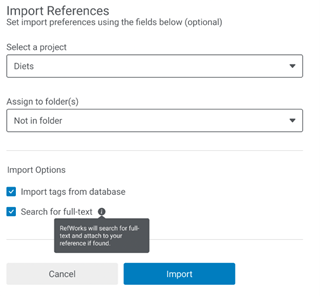
Save to RefWorks Import References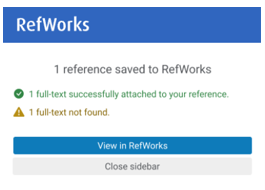
Save to RefWorks Import Complete
- During import, RefWorks searches for reference data in the open-source PubMed Central database for: PMCID, then PMID and lastly DOI (in this order).
- If a match is found, RefWorks checks if the reference has a full text PDF available.
- If there is a full text PDF available without copyright restrictions, PubMed Central will supply the full text and RefWorks will attach it to the reference. If there are copyright restrictions, PubMed Central will not return a full text attachment.
Refworks does not use non-open-source databases to check for full text.
New Reference Types Added
Idea Exchange
RefWorks now includes two new reference types. The new reference types added will appear in citations created with RefWorks Citation Manager (RCM), Write-n-Cite (WnC), RefWorks for Google Docs and Quick Cite. They are available in the Citation Style Editor.
Two new reference types were added:
- Archival Material
- Dissertation/Theses
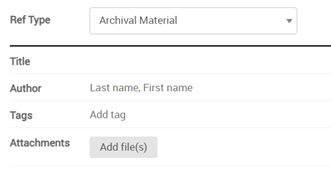
Archival Material Reference Type
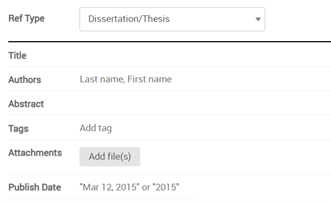
Dissertation/Thesis Reference Type
Accessibility Improvements
Added keyboard navigation to the Save to RefWorks pane.
New Messaging for Legacy Deactivation
Added new banner to the legacy log-in and direct export pages to notify users that as of June 30, 2023, legacy RefWorks will no longer be available. Follow the instructions in the Upgrade Guide to upgrade to the newest version of RefWorks.
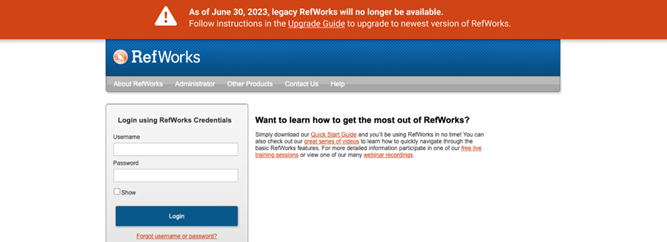
New banner on legacy log-in page
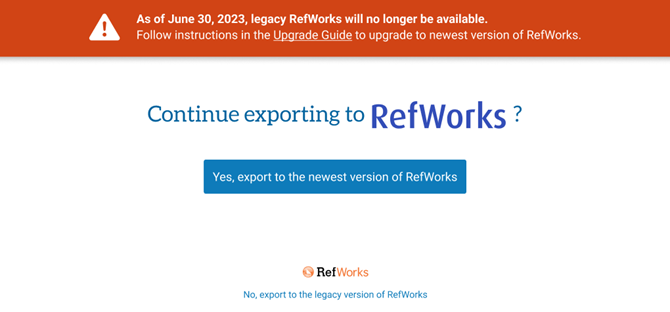
New banner on direct export page
New Citation Styles
RefWorks now supports the following new styles:
- 医療と社会
- Cite Them Right 12th Edition
November 8, 2022
Improved Find Duplicates Feature
Idea Exchange
The deduplication feature has been revamped. New search algorithms have been implemented and the user interface is updated. Now, users can pick a Primary Reference, have the choice of which fields to choose in search, search in shared folders, and delete all duplicates at once.
Users may continue working in RefWorks while a duplicates search is in progress. Users are no longer required to stay on the search page or be logged into RefWorks; they can return to search results at any time. Please refer to the Knowledge Article and How-To video for more information.
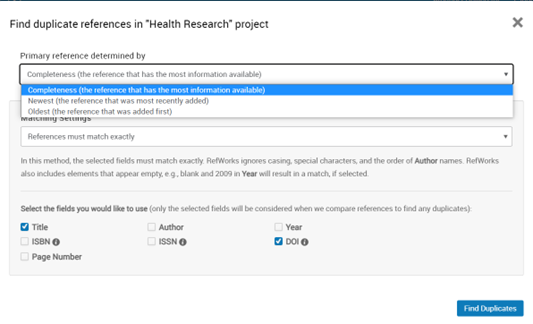
Find Duplicate References
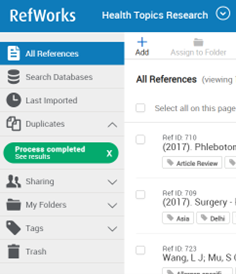
Duplicates Navigation Section Process Completed
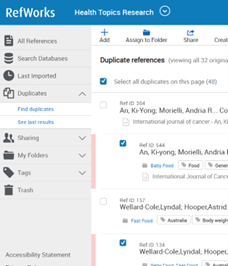
Duplicates Navigation Section
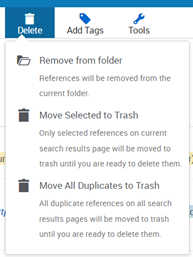
Delete Duplicates
Attach Full Text PDF When Importing References During Direct Export
Idea Exchange
When importing references via direct export, users can now also select for RefWorks to search for and attach full text PDF, if found. When import is complete, RefWorks will display how many full text PDFs were found and attached.
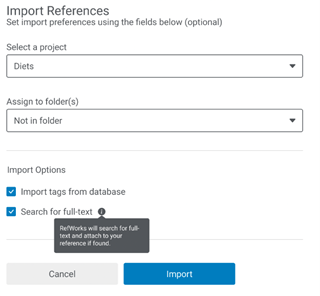
Import References
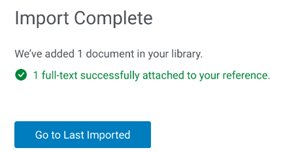
Import Complete
Finding full text during RefWorks direct export:
- During import, RefWorks searches for reference data in open-source PubMed Central database for: PMCID, then PMID and lastly, DOI (in this order).
- If a match is found, RefWorks checks if the reference has a full text PDF available.
- If there is a full text PDF available without copyright restrictions, PubMed Central will supply the full text and RefWorks will attach it to the reference. If there are copyright restrictions, PubMed Central will not return a full text attachment.
Refworks does not use non-open-source databases to check for full text.
New Citation Styles
RefWorks now supports the following new styles:
- ASA - American Sociological Association, 7th Edition
Updates to Citation Styles
RefWorks has updated the following styles:
- IEEE - Institute of Electrical and Electronics Engineers
October 11, 2022
Exciting News! Admin notifications will now be displayed in RefWorks.
RefWorks is very excited to announce the development of a brand new in-app notification, exclusively for Administrators. This new feature allows us to seamlessly communicate Admin related product enhancements, announcements, and webinar invites.
Make sure to log in to RefWorks regularly to find timely notifications.
New Catalog Searches
RefWorks now supports the following new Z39.50 catalog searches:
- Nottingham Trent University - Library OneSearch
Updates to Citation Styles
RefWorks has updated the following styles:
- IEEE - Institute of Electrical and Electronics Engineers
September 13, 2022
DOI is now a default field in Reference Editor
Idea Exchange
The DOI (Digital Object Identifier) field is now automatically listed in the Reference Editor and does not need to be added manually. This applies to editing existing reference metadata as well as for manual reference input.
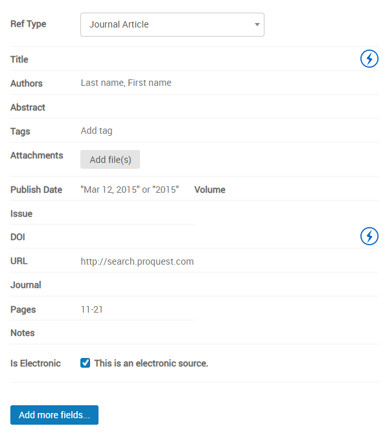
Reference Editor DOI Field When Creating a New Reference
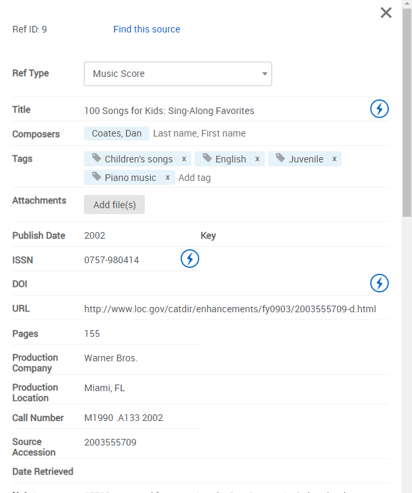
Reference Editor DOI Field When Editing an Existing Reference
New Catalog Searches
RefWorks now supports the following new Z39.50 catalog searches:
- Vocational Training Council Libraries
Updates to Citation Styles
RefWorks has updated the following styles:
- AMA 11th - American Medical Association, 11th Edition
- APA 7th - No Case Changes (No Title Casing), DOI: empty, Annotated
- APA 7th - No Case Changes (No Title Casing), DOI: https://
- APA 7th - No Case Changes (No Title Casing), DOI: https://, Annotated
- APA 7th - No Case Changes (No Title Casing), DOI: https://doi.org/
- APA 7th - No Case Changes (No Title Casing), DOI: https://doi.org/, Annotated
- APA 7th - Sentence Casing, DOI: empty
- APA 7th - Sentence Casing, DOI: empty, Annotated
- APA 7th - Sentence Casing, DOI: https://
- APA 7th - Sentence Casing, DOI: https://, Annotated
- APA 7th - Sentence Casing, DOI: https://doi.org/
- APA 7th - Sentence Casing, https://doi.org/, Annotated
- APA 7th (basic) - No Case Changes (No Title Casing), DOI: empty
- Cite Them Right, 11th edition - Harvard
August 9, 2022
Bibliography Sort and Numbering Limit Increased to 2,000 References
References will now be sorted or numbered up to 2,000 records. Previously, sorting and numbering was limited to 500 records.
Advanced Search Results are More Focused by Allowing User to Filter on Reference Type
Users can now choose Journal Article as the Reference Type to focus advanced search results.
Accessibility Improvements
- Added keyboard navigation to:
- Pagination elements and editing option in the View Pane.
- View options (Normal View, Full View and Citation View) dropdown menu.
- Added keyboard navigation and contrast in banner options.
- Reference Metadata author fields are now screen reader enabled.
- Folder location labels for references in Normal View and Full View clearly show which folder the reference is viewed in vs. in which folder it is also saved.
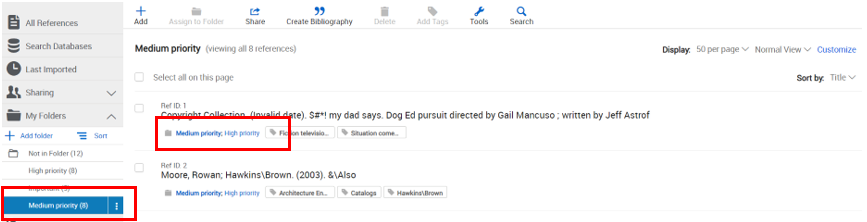
Normal View Folder Labels
July 12, 2022
Legacy RefWorks Updates - Institutional Upgrade
The new Institutional Upgrade feature provides institutional admins with the ability to move users from legacy to RefWorks in bulk.
This only affects those institutions who offer access to, and have active users on, legacy RefWorks.

Institutional Upgrade
New Messaging for Legacy Users who Try to Log in to their Old Legacy RefWorks Account after an Upgrade was Completed
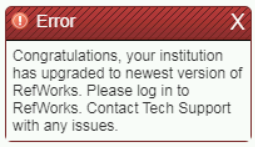
Institution has upgraded message
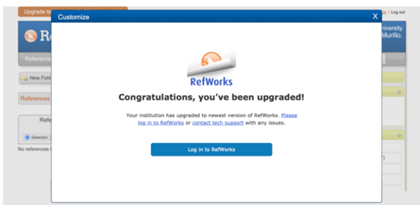
You've been upgraded message
RefWorks Updates
Added Ability to Edit DOI Field
Idea Exchange
Users can now add a prefix text to the DOI field to create a working link.
Delete References when in Table View
Users are now allowed to move references to the Trash when in Table View.
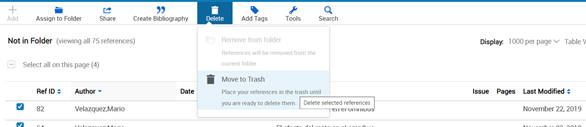
Move to Trash from Table View
Bulk Edit Feature now Includes Tags
In Bulk Edit, users are now able to add tags (multiple tags separated by semicolon, append, overwrite, or leave existing data), delete tags, and find & replace tags.
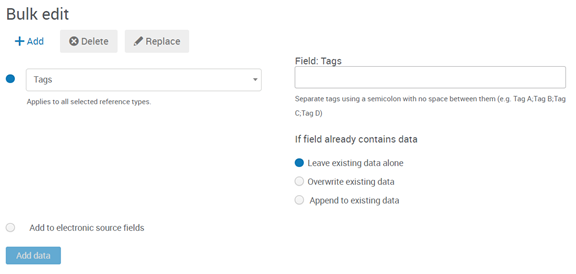
Tags in Bulk edit
Accessibility Improvements
- Improved accessibility for banner options for screen readers.
- Global header size adjustment is responsive and does not obscure content or functionality for low vision users.
- Create Account panels updated color contrast allows low vision or colorblind users the ability to read content on-screen instructions.
- Adding, editing, or removing names in the Authors field in the Reference Editor is now keyboard accessible.
Updates to Citation Styles
RefWorks has updated the following styles:
- AMA 11th - American Medical Association, 11th Edition
June 14, 2022
Legacy RefWorks Update - Institutional Upgrade Feature
The new Institutional Upgrade feature provides institutional admin the ability to move users from legacy to RefWorks in bulk.
This only affects those institutions who offer access to, and have active users on, legacy RefWorks.

Institutional Upgrade
RefWorks Updates
Users can Add References to Folders in Table View
Reference can be assigned to a folder in Table View via the Assign to Folder menu item or by dragging and dropping.
Reference Editor Button Placement Changes
Undo, Save and Cancel actions were moved to the bottom of the Reference Editor.
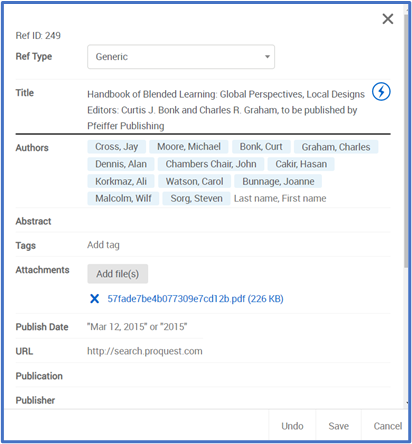
Changes to Reference Editor
Improved Accessibility Functionality
- RCM (RefWorks Citation Manager)
- RCM Menu
- Keyboard accessible and only considers elements visible on page
- Visible in high contrast mode
- Checkboxes are keyboard accessible; when in focus state, the label reader is enabled.
- The tabbing cycle follows the elements order in the user interface.
- RCM Menu
- Enhancements were made to the top banner site elements to provide a clear and consistent focus state.
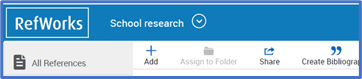
Enhanced Top Banner
- Reference Editor
- Undo, Save and Cancel are keyboard accessible.
- Add and Attachment are keyboard accessible.
Updates to Citation Styles
RefWorks has updated the following styles:
- Bluebook (notes only)
- Bluebook (notes & bibliography)
- Avian Diseases
- Journal of Veterinary Diagnostic Investigation
May 10, 2022
Users are Now Able to Search for References by RefID in RCM (RefWorks Citation Manager)
Users can click into the search box in RCM and key in the RefID.
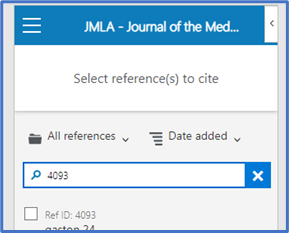
RCM with RefID
Improvements to Folder Count for Shared Folders and Folder Actions
The reference count for folders now reflects both references added by the sharer and the person shared with.
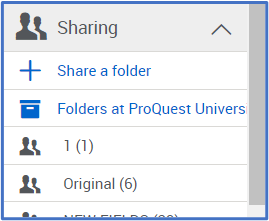
Reference Count for Folders
The Actions menu for folders with long names now appears without the need to adjust screen size.
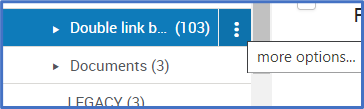
Actions Menu for Folders
Improved URL Field in References Metadata
Idea Exchange
The URL field now lists multiple links as separate, clickable hyperlinks. This allows for each link to be clicked individually, and no longer combines links resulting in errors.

URL Field
Reference and Folder Info Added to User Data in Admin Analytics
Admins are now able to see folder and reference totals for each user. This information is also included in the export in CSV format.

User Data in Admin Analytics
April 12, 2022
New YouTube Video for RefWorks Administration Settings Checklist was Added
Click here to see the video.
Removed Library Views from Admin Analytics
Library Views was removed from the Admin Analytics section because the information was redundant. We recommend viewing sessions and page views stats under Usage Analytics (Admin > Analytics > Usage Analytics).
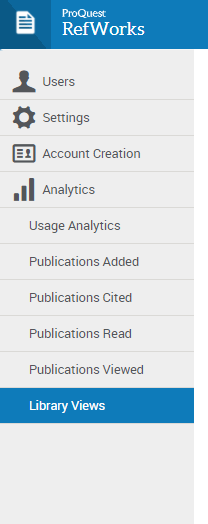
Library Views
Improved Accessibility of Reference Actions
Several changes were done to improve accessibility for Reference Actions for screen reader and speech-input users.
RCM Prominence in Tools Section
RCM was made more prominent in the Tools section. This was done to indicate that RCM is the preferred add-in.
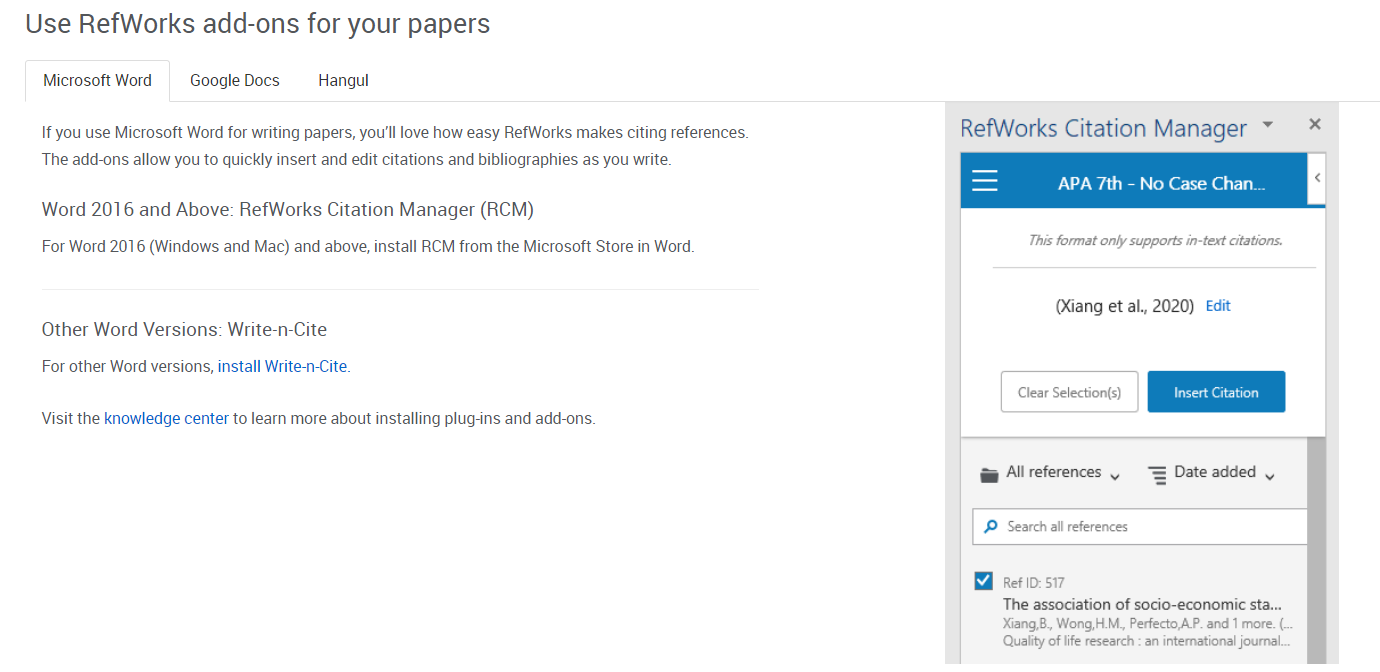
RefWorks add-ons for your papers
Resolved Issues
Delete Menu Remained Open after Removing References from a Folder
After removing references from a folder, the Delete menu would remain open. This was fixed and the Delete menu now closes.
Extra Space between Share and Create Bibliography Icons
There was extra space between the Share and Create Bibliography icons in the Reference Actions.

This was fixed and there is no longer extra space between the icons.
March 8, 2022
Updates to Search Area in RefWorks
The search area in RefWorks was updated with the following changes:
- New placeholder text "Search in all references and PDFs" was added to the search area. This indicates the ability to search text inside PDFs.

- The focus state is now on the search text field which enables keyboard users to keep track.
- The Advanced and Cancel options are now keyboard accessible.
Implementation of New Logo across RefWorks
The RefWorks logo was replaced with a new logo. It can be seen in all places where the old logo appeared including the main web app, RCM, RefWorks for Google Docs, etc.


Old Logo New Logo
Footer for RefWorks Login Page is now Responsive
When the screen was made smaller, its content was obscured by the footer. This was an obstacle to keyboard and vision impaired users. The footer is now pinned to the bottom of the page instead of the bottom of the browser window so that all the content is visible.
Updates to Citation Styles
RefWorks has updated the following styles:
- Physiotherapy Theory and Practice
- American Physiological Society
Resolved Issues
UI Alignment for Profile Creation Modal
The title and text box for "last name" was previously misaligned with the Role elements. It was moved and is now aligned with the Role elements.
February 8, 2022
Direct Export now Supports WAYFless
Admins of a Single-Sign On (SSO) institution that uses direct export from their databases to RefWorks can now integrate the WAYFless link. This allows users to directly export references without having to login into RefWorks (if they are signed into their institution).
To learn more about setting up direct export, click here.
To learn more about the WAYFless link, click here.
Web of Science Now Supports Direct Export to RefWorks
When a reference is selected in Web of Science, simply select RefWorks from the Export menu and follow the instructions.
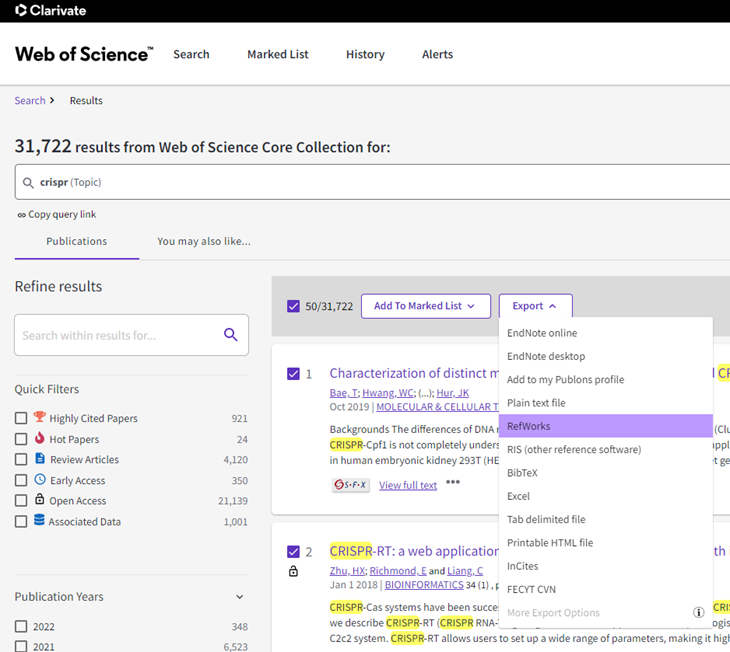
Export to RefWorks from Web of Science
Keyboard Accessibility for Reference Organization Area and Creating/Renaming a Folder
The Reference Organization area and folder creation and renaming is now accessible to keyboard users.
Users can use the Tab and TabShift keys to navigate through the menu, and use the Enter key to perform an action.
Users can also create folders and rename existing folders in the naming modal, pressing the Enter key to save changes.
To read the RefWorks accessibility statement, click here.
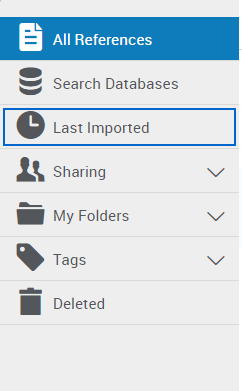
Navigate Menu with Keyboard
RefWorks APIs Testing
The RefWorks APIs have been updated to allow admins to test out API calls on the site by using the 'Authorize' function.
Admins must implement the first 3 steps noted in the documentation to receive the cookieString
The page also now includes the TLS 1.2 system requirement.
To view the RefWorks API documentation, click here.

Authorize Logo
Resolved Issues
HTML Tags Removed from Citekey String in Export Files
Following the addition of the new citekey to export files, text formatted titles resulted in HTML tags being added to the citekey. This issue was fixed, and the HTML tags no longer appear.
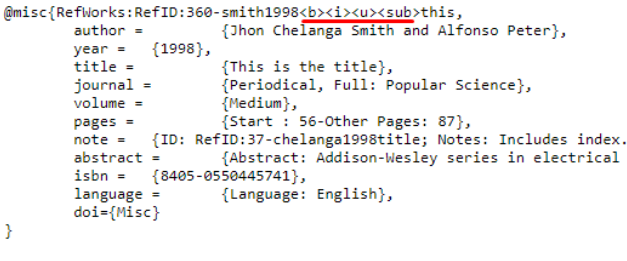
Citekey with HTML Tags - Before Fix
Updated ‘Contact Support’ Link for Admin and Projects areas
In the Admin area and in Manage Projects, the link to contact RefWorks was not the typical support link. This has been fixed and it is now the same as the support link available via the main RefWorks page, from the help menu in the Utility Toolbar. Users and admins can open a support case or start a chat with a support representative.
To contact RefWorks support, click here.
January 11, 2022
Citekey String Added to Export Files
Idea Exchange
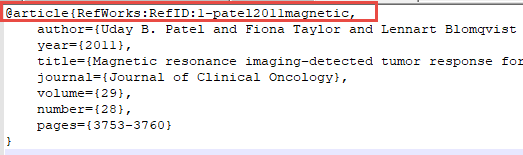
Reference Metadata in an exported Bibtex file
This is helpful to users of LaTeX, Overleaf and other word processors, citing references without using a RefWorks writing tool add-on.
Click here to learn more about exporting references.
Institutional Admin can Delete any Institutional Style
Idea Exchange

Delete Institutional Styles
Importing References with Multiple Attachments
When a user imports references with multiple attachments from legacy RefWorks or Mendeley to RefWorks, or upgrades their legacy RefWorks account to RefWorks, they remain as single references with multiple attachments. Previously, importing a reference with multiple attachments would create multiple references, one for each attachment.
This improvement was made as part of wider improvements to PDF metadata accuracy for importing references from Legacy or Mendeley.
Import References
