
XML Harvester Configuration File Examples
To harvest a repository, you edit the XML Harvester configuration file and run the harvest. (When you apply the same steps to a non-OAI repository, it is called "crawling" rather than "harvesting.") By editing the XML Harvester configuration file, you specify parameters for the harvest. Each line in the configuration file is a name-value pair called a "trigger." To load harvested bibliographic records into the Innovative system, see Loading MARC Records From a Harvest.
Below are examples of using XML Harvester. The examples demonstrate:
- harvesting the LCPhotographs database of the OAI-compliant Library of Congress (LOC) repository . The LCPhotographs database is one of many thematic collections available for harvest at the LOC repository.
- harvesting the OAI-compliant Northeastern University institutional (IRis) repository . This repository is created and managed using Innovative Content Pro / IRX. The IRis database is the only database available for harvest in this repository.
- crawling a non-OAI-compliant internal repository. XML Harvester can crawl non-OAI-compliant internal repositories to retrieve data. You must know the repository's URL . Its data must be in a format supported by XML Harvester.
Example: Harvesting the LCPhotographs Database in the Library of Congress Repository
To harvest the Library of Congress Photographs (LCPhotographs) repository:
- Edit the configuration file by following these steps:
- In the Data Exchange function, choose XML Harvester from the Select Process drop-down menu.
- Choose
Tools | Edit Configuration File .
The configuration file displays: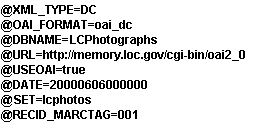
The triggers shown in this example are for the LCPhotographs database of the Library of Congress repository. - Select and edit text in the file.
- Save your edits.
- Harvest the repository by following these steps:
- In the Data Exchange function, choose XML Harvester from the Select Process drop-down menu.
- Choose
Tools | Execute | Harvest XML Records . - Choose Start to start the harvest.
Example: Harvesting the IRis Repository at Northeastern University
- Edit the configuration file by following these steps:
- In the Data Exchange function, choose XML Harvester from the Select Process drop-down menu.
- Choose
Tools | Edit Configuration File .
The configuration file displays: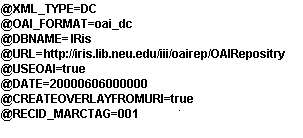
The triggers shown in this example are for the IRis repository at Northeastern University. - Select and edit text in the file.
- Save your edits.
- Harvest the repository by following these steps:
- In the Data Exchange function, choose XML Harvester from the Select Process drop-down menu.
- Choose
Tools | Execute | Harvest XML Records . - Choose Start to start the harvest.
Example: Crawling a non-OAI Compliant Internal Repository
- Edit the configuration file by following these steps:
- In the Data Exchange function, choose XML Harvester from the Select Process drop-down menu.
- Choose
Tools | Edit Configuration File .
The configuration file displays: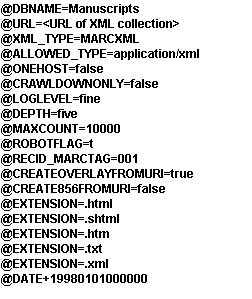
The triggers shown in this example are for a hypothetical internal repository. - Select and edit text in the file.
- Select and edit text in the file.
- Save your edits.
- Crawl the repository by following these steps:
- In the Data Exchange function, choose XML Harvester from the Select Process drop-down menu.
- Choose
Tools | Execute | Harvest XML Records . - Choose Start to start the crawl.
