
Release Date: January 4, 2024
Multi-Select Event Filters
The "All Libraries" and "All Categories" dropdowns will allow users to select more than one filter at a time.
API Documentation
The postman documentation has been updated with 5 new endpoints for managing resources, they are very similar to the endpoints available for room bookings. Differences to be aware of are:
-
availability_of_the_date returned is no longer true or false, but the quantity of the item available.
-
resource_categories are also added to the /organization endpoint.
Staff Roles
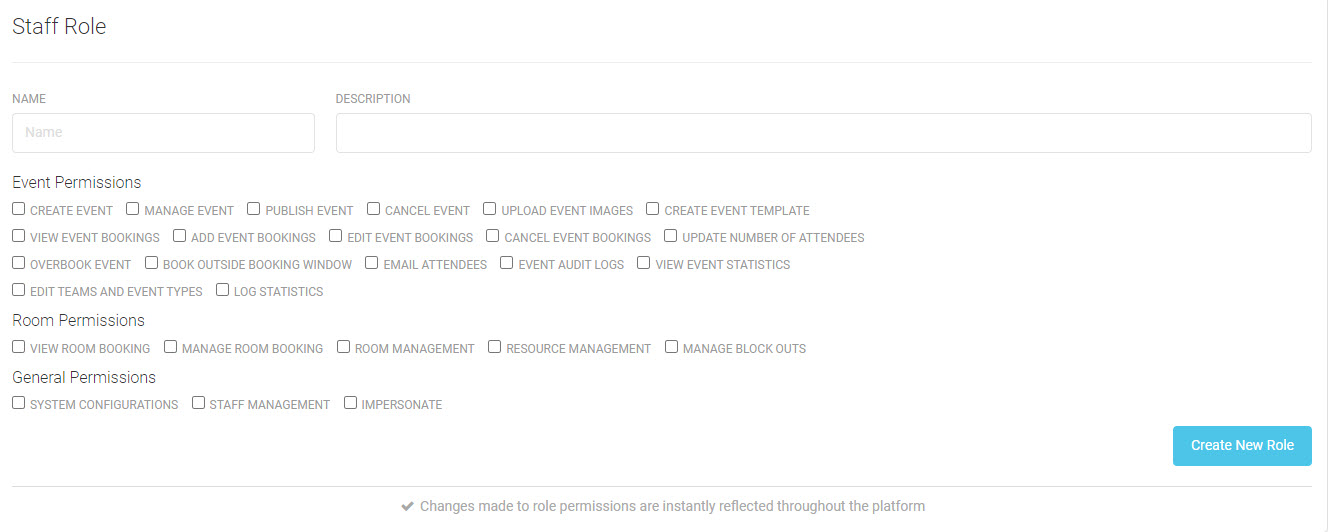
Admins have new functionality to create roles and assign them to staff. From the Advanced Menu choose Manage Staff Accounts. There is a new option to Manage Staff Role. You can create a new role and select granular permissions, or you can clone an existing role and make changes.
UI Text Editing
Admin will see more options added, including:
-
A special note about age restrictions.
-
Modify the text for where a virtual event takes place.
Release Date: January 17, 2024
At-a-Glance Icons
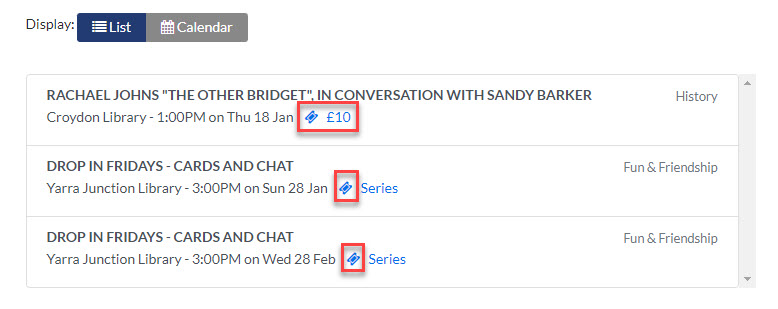
On the public-facing list view, icons are now available to help identify several event characteristics like payment or registration required.
Equipment Menus
Equipment has been moved into distinct menus to help staff get to the view they need more quickly.
-
Equipment Bookings
-
Equipment Calendar
-
Equipment Management (Admins)
Payment transaction_ID
Has been added to several API endpoints.
Security Improvements
Additional measures have been taken to prevent service disruptions.
Spaces
To help facilitate the phaseout of Spaces, Admins are no longer able to create new Spaces within the system. The existence of Spaces within a location may interfere with the ability of the API to return accurate room booking counts. To fix this issue, delete any Spaces within a location and recreate them as Rooms.
BUG FIXES
Resource Bookings
Details and item counts now properly appear in the Resource API endpoint.
Brochure Generation
A bug has been fixed where an intermittent error message was displayed when attempting to generate a brochure.
Event Search
A bug has been fixed where more results than were accurate displayed after applying search criteria.
Release Date: January 31, 2024
Alternate Hours
Admins have a new tool that will allow them to schedule alternate hours. Setting your hours globally before configuring individual meeting rooms will pre-populate the available hours.
-
Click the Room Management menu.
-
Click the Bulk Update/Schedule Update button.
-
Below the days of the week, use the Rooms to Be Updated filter to select all or some of your rooms.
-
Select the Availability for the days of the week.
-
Set the Available From and Available Until hours. You may add additional ranges if you have split open hours.
-
Set you Update Timing to immediately or schedule the update for a specific date.
-
Click the Apply Updates button.
-
Confirm your changes by clicking the Submit button.
-
Your changes will be reflected in the Scheduled Updates section and can be cancelled at the individual location level.
Website Links
Admins have new functionality to update the links shown on Vega Program. Please note that Terms and Conditions and Insurance will continue to be managed on the back end, this allows libraries to use different terms for each meeting rooms.
-
Click the Advanced menu.
-
On the Advanced Options page scroll down to update:
-
Library Website (header)
-
Sign Up Page (log in)
-
Password Reset Page (log in)
-
Booking Policy for Events (event registration)
-
Privacy Policy (footer)
-
Contact Page (footer)
-
Locations Directory (footer)
-
Icons for Registration and Paid Events
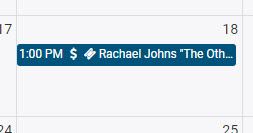
On the staff side, icons have been added to the calendar view to provide at-a-glance information from the Room Calendar menu.
Append Dates to Bulk Bookings
Bulk bookings are more efficient and allow more than one recurrence pattern.
-
Click the Room Bookings menu.
-
Click the Bulk Bookings tab.
-
Staff can create bookings for guests using the email address field.
-
After picking your start date, use the Append button to add a different recurrence period.
Vega Program Outage: Root Cause Analysis
On January 9 and 10, some of our Vega Program libraries reported service interruptions, including Bad Gateway, Gateway time-out, and Cloudflare errors.
As always, our goal is to provide an excellent user experience to your staff and your communities. Thank you for reporting the incidents quickly and working with our team while we resolved them.
If you experience any incidents in the future, please report them through a Supportal ticket.
Affected Products
Vega Program - North America
Event Timeline
The service interruption was experienced by North American customers during the following hours, causing Vega Program to be unavailable.
-
January 9, 2024 from 12:30 pm - 2:30 pm Eastern Standard Time
-
January 10, 2024 from 10:43 am - 11:16 am Eastern Standard Time
Root Cause Analysis and Preventative Measures
Program engineers investigated this event to determine the root cause of this issue and concluded that a distributed denial of service (DDoS) attack from the same source caused an unexpected disruption over 2 separate time periods.
Immediately after noticing the issue, engineers began restorative measures. After the initial outage on January 9 ended, another DDoS on January 10 and was quickly stopped due to knowledge of the source and situation.
Additional measures have been taken to prevent service disruptions, you may see a screen to verify that you are a human.
