
July 2026
Display Audio and Video Files in the Embedded Primo NDE Viewer
This new feature enables displaying audio and video files in the NDE viewer, including captions and subtitles. Video and audio resources can be uploaded and opened with the embedded viewer. Users can upload transcripts and display them as full texts. Support in the embedded viewer will prevent the need to link out for these resources via the Digital Versions.
Highlights
-
Video and audio content can be viewed directly within the Primo NDE full record page
-
Transcript upload and preview as full text in multiple languages
Book View and Scroll Mode in the Viewer
Users can now preview books two pages at a time in the Mirador Viewer. The Book View feature provides a more natural way of reading resources that have two pages side by side in a non-digital copy, improving long-term reading.
The Scroll View feature is perfect for previewing large IIF files that need continuous scroll to be viewed properly. This feature provides a easier way to read, view, and interact with your digital resources.
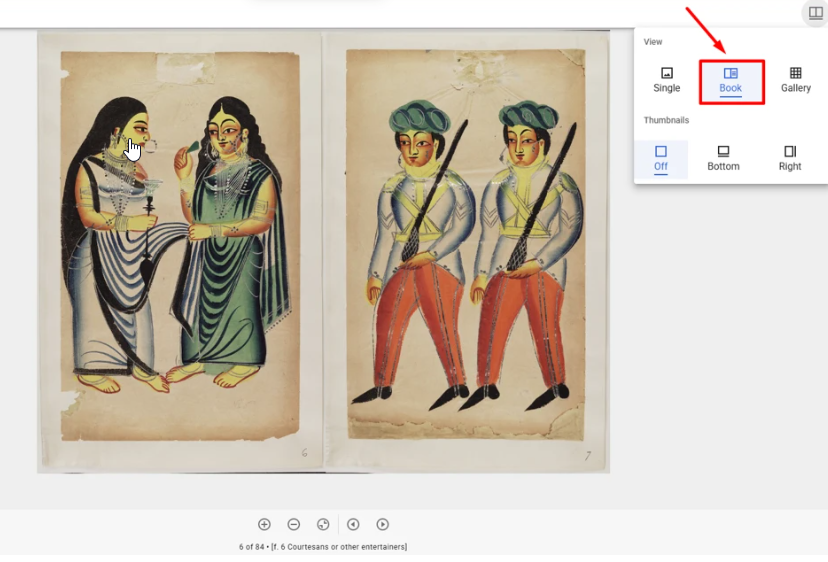
The options are hidden for PDF titles.
Highlights
-
Improves long‑form reading by supporting facing‑page spreads
-
Better continuous scrolling for image‑based IIIF manifests in both Alma and NDE
Display Multiple Representations in the Viewer
When viewing a title with multiple representations in the Alma backend, users can select between all available representations directly within the Viewer's RHS (Right-Hand Side).
Paging between representations updates the viewer to display all relevant files, with the default file being the first file of the selected representation. The default representation shown is the first primary representation.
All other sections of the Viewer's RHS are updated accordingly when switching between representations, while also respecting access rights and copyright restrictions.
If a title has only a single representation, pagination controls are hidden.
Highlights
-
Enables backend users to easily view and navigate all digital representations of a title
-
Ensures consistency between the selected representation and all RHS information
-
Respects access rights and copyright constraints per representation
-
Improves usability and clarity in the backend UI by showing pagination only when relevant
'Add MARC 21 Fields' Job Renamed to 'Add Metadata Fields' and Adapted to Support DC
The job that was previously called 'Add MARC 21 Fields' has been expanded to include the DC metadata format, and renamed to 'Add Metadata Fields'. The process runs the samewith the addition of covering Dublin Core metadata bulk updates.
Highlights
-
DC catalogers benefit from bulk updating metadata fields
-
A unified job that handles metadata
Changes to Generate Thumbnail and Generate Fulltext Jobs
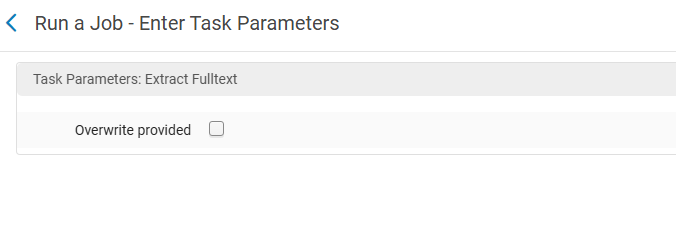
The Generate Thumbnail and Generate Fulltext jobs only generate new thumbnails or fulltext if those do not already exist for the title/file. If there is a need to re-generate the content, the existing thumbnail or fulltext files can be deleted prior to running the job.
Highlights
- Limiting the re-generation of existing content in ongoing jobs
- Reduction of duplicate messages, jobs, and resources
Display Only Relevant Representation in Primo NDE When RepID Is Provided
When a Primo NDE page is accessed via a URL containing a specific Representation ID (RepID), the system displays only the referenced Representation. If the requested Representation is not accessible to the user, the system automatically falls back to the next available Representation based on the predefined order. Manual selection of a different Representation overrides the original RepID-based selection.
For generic URLs without a RepID (e.g. permalinks), the system behavior remains unchanged and displays the first available Representation.
Ensures accurate navigation to the intended Representation when sharing direct NDE links
Highlights
- Accurate navigation to the intended representation when sharing direct NDE links
- Access rights for the representation are applied
