
September 2026
Easier Collection Selection When Adding Digital Representations
Selecting a collection when creating a digital representation is now faster and more intuitive.
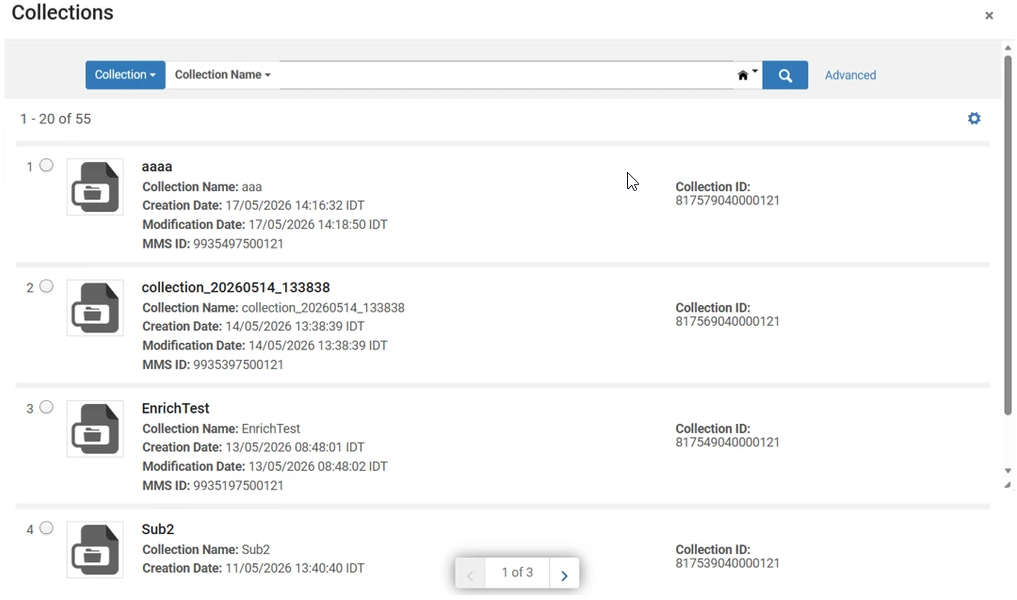
The dialog while assigning a representation to a collection now opens with a pre-populated list of your collections to select from, allowing you to immediately browse and select a collection while retaining the existing search functionality.
This enhancement is available in workflows where collection selection is required, including Add Digital Representations, Import Profiles, and Deposit Profiles.
User Interface Changes
-
The collection selection dialog now opens pre-populated with available collections.
-
Added a Look-up or select helper prompt in the collection selection field.

NDE Embedded Viewer: Time-Synced Transcripts for Audio/Video Content
Video and audio transcripts are now available in a dedicated Transcript pane in the NDE embedded viewer, making it easier to read, search, and navigate audiovisual content.
When captions or subtitles are available, the transcript is displayed separately from the media player and can be searched in the same way as Full Text content. For transcripts that include timestamps, the transcript and media playback remain synchronized. Selecting a transcript entry moves playback to the corresponding point in the recording, while playback automatically highlights and follows the active transcript text.
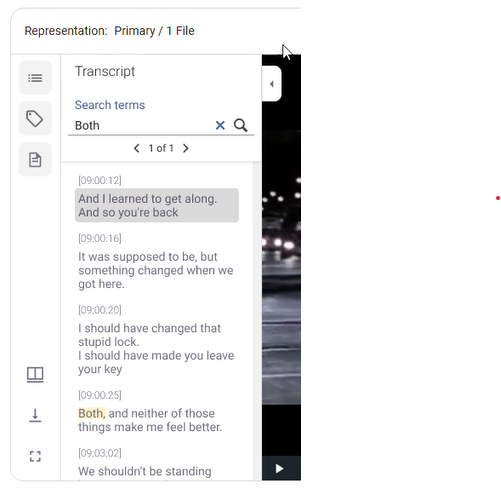
For multilingual content, the transcript automatically updates to match the selected subtitles or captions language.
NDE Embedded Viewer: Search Within Video and Audio Transcripts in Primo
Primo now indexes transcript content from audio and video resources, making spoken content searchable and easier to discover.
When captions or subtitles are available for audio or video content, the transcript text is added to Primo's full-text search index. Users can now find multimedia resources by searching for words or phrases that appear in the associated transcript, even when those terms do not appear elsewhere in the record metadata.
This enhancement supports transcript files associated with audiovisual content and makes transcript content searchable alongside other indexed full text.
NDE Embedded Viewer: Display Office Files
You can now view Microsoft Office files directly within the NDE embedded viewer.
The NDE embedded viewer now supports inline viewing of Word (.docx), PowerPoint (.pptx), and Excel (.xlsx) files. Rendering is handled automatically using an integrated Office viewing service.
When a file exceeds supported size limits or cannot be rendered, the viewer displays an appropriate message and, when permitted, provides a download option instead.
NDE Embedded Viewer: Enable Download for Unsupported or Unknown File Formats on the NDE Record Page
Users can now access unsupported or unknown file formats directly from the NDE full record page through a download option.
With this enhancement, unsupported files remain within the NDE viewing experience and display a message explaining that the file cannot be previewed. When download permissions allow, users are provided with a direct download option for the original file.
Access rights continue to be respected. Users without download permissions see an informational message but are not offered a download link.
NDE Embedded Viewer: Limited Options for Image Download Links
The Primo NDE embedded viewer now presents a simplified set of image download options, making it easier for users to select the appropriate download size.
With this enhancement, Mirador uses the predefined image sizes provided by the image service and limits the available download options to a smaller set of labeled sizes. Depending on the available image variants, users may see up to three download options: Small, Medium, and Large.
When enabled, the Original Source File option continues to be available as a separate download option.
This enhancement applies to image files displayed in both the Primo NDE and Alma back office viewers.
