
Alma Roadmap – Completed – 2024 H2
Metadata Management
Titles Staff Search – Enhanced UX General Availability

| What's New | Highlights | Impact |
|---|---|---|
| The Titles Staff Searches are updated and redesigned for better usability, performance, productivity, and overall user experience. |
|
Simpler workflows due to new user interface, introducing efficient navigation:
• Reduced number of steps needed for common actions • MARC simple view upfront • New Item section • Actionable inventory information Available for opt-in by all users. |
Open Authority Headings Menu Action in Metadata Editor
CERV Enhancement (ID #8819)
| What's New | Highlights | Impact |
|---|---|---|
| When working in the Metadata Editor, catalogers are able to open the authority headings lookup using a menu action (in addition to the F3 keyboard shortcut). |
|
Catalogers are able to efficiently work on a wider selection of devices, including ones (such as tablets) that don't have function keys. |
Support Preferred Term Correction Flipping Headings that Change Tag Number
 Idea Exchange
URM-91227: Linked heading should flip when 2nd two digit of authority record fields are not the same
| What's New | Highlights | Impact |
|---|---|---|
| Linking and preferred term correction handle cases where the bibliographic heading is linked to an authority via a cross-reference, but the preferred and non-preferred terms are in different fields (for example, the preferred term is in authority field 130, and cross-reference in authority is in 410). |
|
Better automated authority updates, keeping the library's catalog up to date, and reducing the need for manual corrections. |
Electronic Resource Management
Improved Auto-Holdings Job Report
Idea Exchange
URM-221890 Upload Electronic Holdings: Improve the job report
| What's New | Highlights | Impact |
|---|---|---|
|
The auto-holdings job report was improved, including better report navigation and additional information. |
|
The improved report provides better navigation and additional fields, making it easier and more efficient for customers to understand which data was processed. |
Network Zone Managed Electronic Resources - Library/Campus Level
Idea Exchange
URM-172073 Provide NZ institution the ability to make E-resource available for for library/campus from IZ
| What's New | Highlights | Impact |
|---|---|---|
|
Prior to this enhancement, the central office operator could manage electronic resources in the Network Zone and make them available for the entire network OR member(s) Institution Zone(s). With this feature, the central office operator can make electronic resources available for specific libraries/campuses within the member (IZ) institution. |
|
The central office can work more efficiently by centrally managing electronic resources on behalf of libraries/campuses hosted in member Institution Zones. |
Electronic Titles Staff Search - Early Access Enhanced UX
| What's New | Highlights | Impact |
|---|---|---|
|
The Electronic Titles Staff Search was updated and redesigned for better usability, performance, productivity, and overall user experience. |
|
Workflow simplification is achieved by an enhanced user experience, facilitating a smoother user-friendly layout and navigation options. The new layout enables easy switching between ongoing tasks in your main workflow and any peripheral tasks, enabling efficient work with electronic resources. |
Physical Resource Management
Physical Title Staff Search – Enhanced UX General Availability
| What's New | Highlights | Impact |
|---|---|---|
|
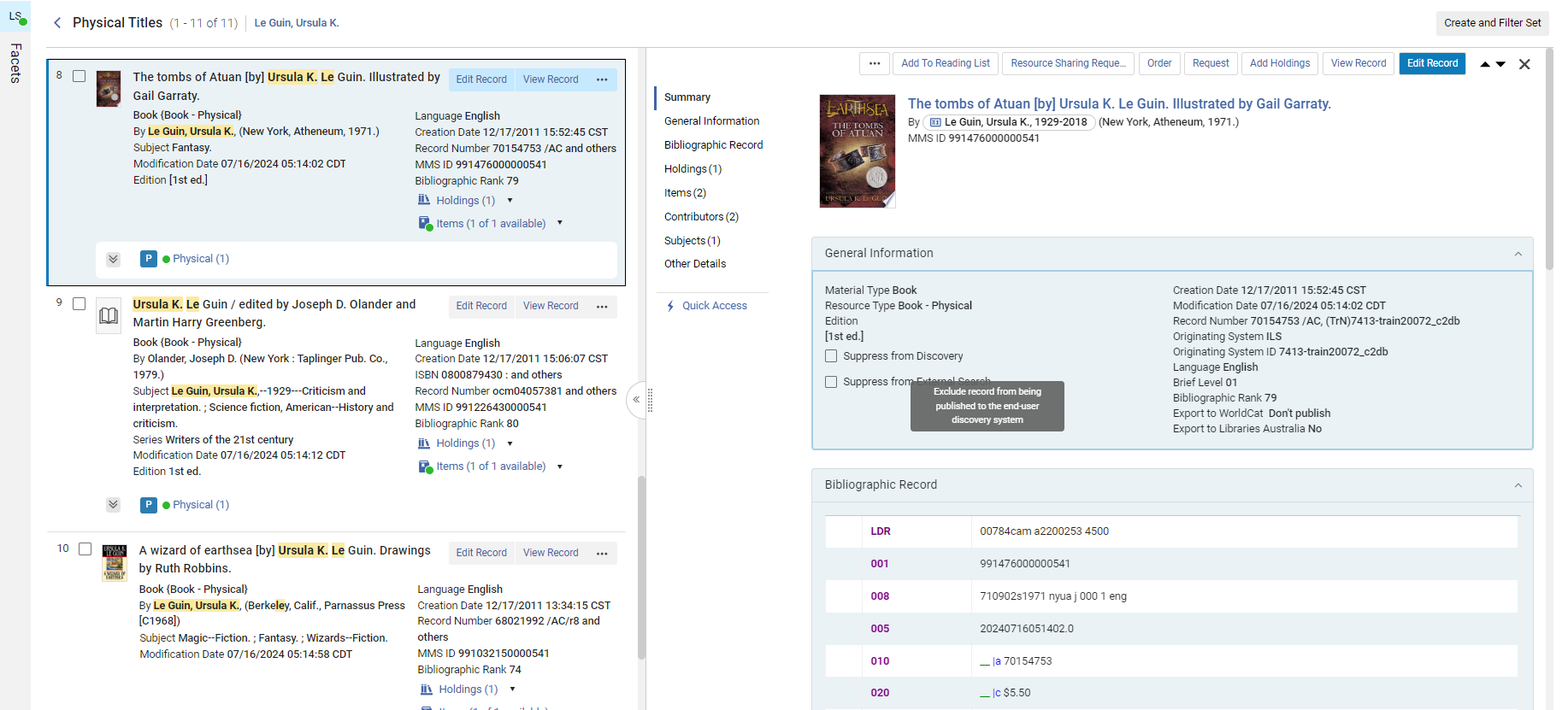
The Physical Title Search was updated and redesigned for better usability, performance, productivity, and overall user experience. |
|
The user can quickly find titles and perform actions as needed. |
Enhanced Handling of Bib Records When Holdings are Deleted
| What's New | Highlights | Impact |
|---|---|---|
|
Holdings deletion workflows now allow operators to handle bibliographic records in case there's no other inventory. |
When deleting a holdings record from the holdings list or search, the operator can decide if the bibliographic record should be suppressed or deleted if it has no other inventory. |
The user can quickly and efficiently manage the catalog when handling physical inventory. |
Efficiently Create Multiple Items
Idea Exchange
| What's New | Highlights | Impact |
|---|---|---|
|
Create multiple similar items for the same holdings in one go. |
When adding similar items to a holding, it is now possible to add them together and not individually. |
The user can quickly and efficiently add similar items, minimizing manual processing. |
Acquisitions
Open Access - Capture & Record
URM-226501 Acquisitions - Support Open Access Workflows: Additional work following to feedback
| What's New | Highlights | Impact |
|---|---|---|
|
An increasing number of publisher agreements offer opportunities for open-access publication. Additionally, some institutions designate libraries to oversee funds for covering article and book processing charges related to open access. Alma was enhanced to capture and record open access activities, including transformative agreements, article processing charges, and more. |
|
Streamlined APC management and transformative agreement handling to simplify administrative tasks, save time and ensure compliance with open access policies, leading to a more efficient workflow. |
Additional Fields in the Update PO Lines Information Job
IdeaExchange
URM-207493: Add more fields to the Update PO lines information job
| What's New | Highlights | Impact |
|---|---|---|
|
The "Update PO lines information" job was re-designed, enabling better form navigation and providing additional fields. |
|
The redesigned "Update PO Lines Information" job provides better form navigation and additional fields, making it easier and more efficient for customers to update purchase order lines, ultimately improving their workflow and data accuracy. |
Fulfillment and Resource Sharing
Manage Patron Services Screen – Opt-In to Enhanced UX
| What's New | Highlights | Impact |
|---|---|---|
|
New Patron Services User Interface |
The interface was redesigned to leverage new layout capabilities and provide a fresh and improved user experience. In this phase of the UI rollout, the new UI will not be activated by default, but it will be possible for institutions and individual users to activate it if they choose to do so. |
Quicker and more effective work at the circulation desk, using a cleaner and improved personalized Patron Services page. |
Notification Letter When Hold Shelf Expiration Date is Updated
IdeaExchange
| What's New | Highlights | Impact |
|---|---|---|
|
It is possible to configure the system to send a new email to the patron when hold shelf renewal takes place. |
​Updating the expiration date for items on the hold shelf enables resending a notification letter with the new expiration date. |
Patrons will be better updated about the status of their hold shelf items without requiring manual library staff work. |
Automatic Renew Notice
IdeaExchange
| What's New | Highlights | Impact |
|---|---|---|
|
Notices are automatically sent to patrons when their loans are automatically renewed. |
Patrons receive a notification when a loan is renewed by the system. |
This new option makes it easier for patrons to track the status of their loans. |
Linked Open Data
Cataloging via Sinopia - General Availability
| What's New | Highlights | Impact |
|---|---|---|
|
The cataloger is able to create BIBFRAME records in Sinopia and add them to the Alma catalog. |
|
The cataloger can perform catalog maintenance tasks more accurately with less effort, while using BIBFRAME. |
Info Cards in All Titles Staff Search
| What's New | Highlights | Impact |
|---|---|---|
|
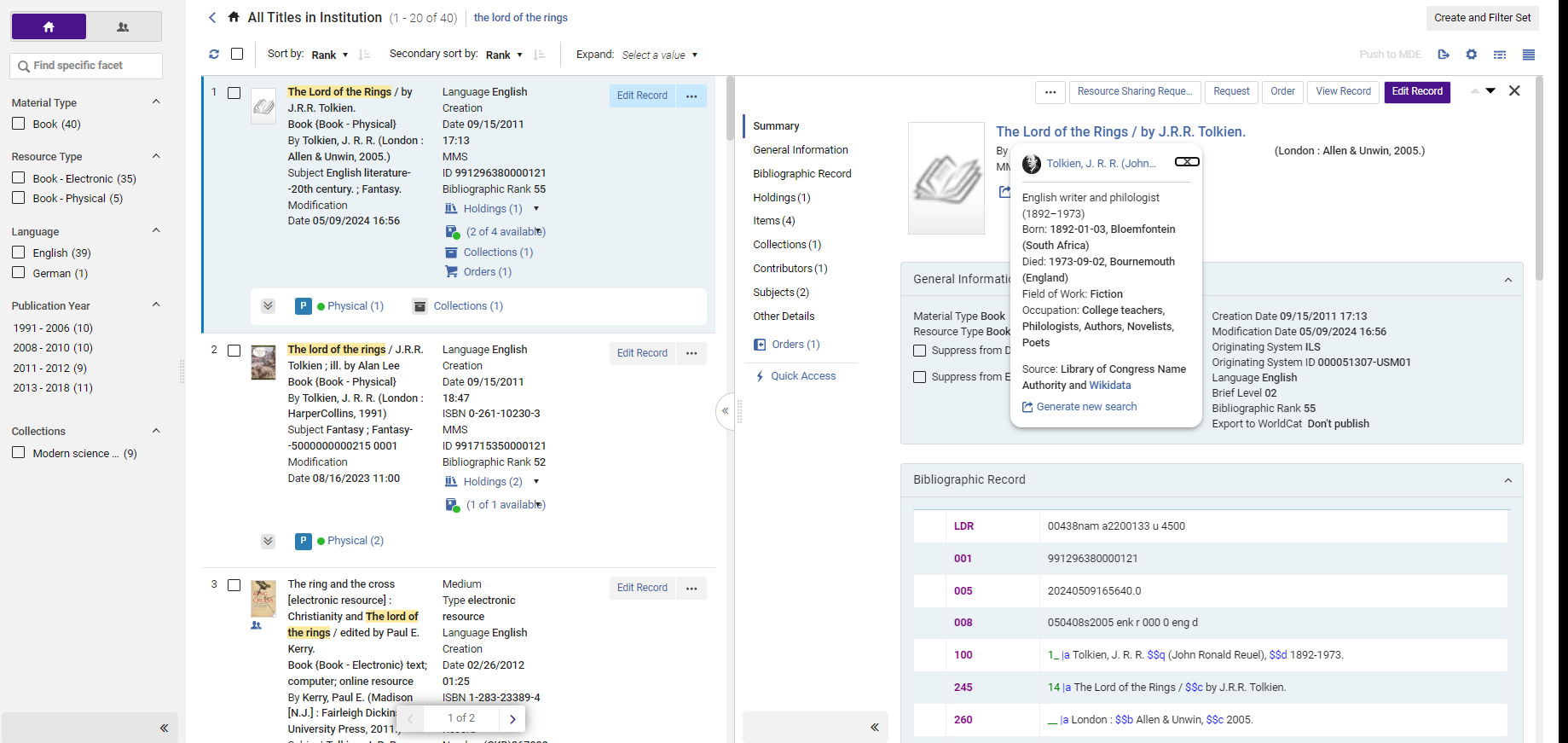
Librarians can see info cards with additional information about contributors in All Titles staff search results. |
The All Titles staff search presents short info cards regarding contributors based on authority data and Wikidata. |
The staff and cataloger enjoy a linked open data experience while quickly accessing external information from within Alma. |
Info Cards in Metadata Editor
| What's New | Highlights | Impact |
|---|---|---|
|
Catalogers can see contributor pages in the metadata editor with additional information about contributors. |
While linking authorities in the Metadata Editor, Alma presents additional information from external resources other than the authorities to assist with the linking. |
The staff and cataloger enjoy a linked data experience while quickly accessing external information from within Alma. |
User Experience, Accessibility, and Infrastructure
Support Microsoft Graph API For Sending Emails
| What's New | Highlights | Impact |
|---|---|---|
|
Sending emails from Alma can be done by calling Microsoft Graph APIs. The institution is able to configure the Mail Handling integration profile to send emails using MS Graph API. |
A new option of ‘Send using MS Graph API' was added to the Mail-Handling integration profile. |
Since Microsoft deprecated Basic Auth for SMTP, we provide support for sending emails by calling Microsoft Graph APIs, which allows for continued email distribution with no impact. |
Menu Simplification: Support Similar Terms in Hebrew
| What's New | Highlights | Impact |
|---|---|---|
|
Support similar terms in additional languages. |
Search-matching capabilities for non-identical terms in additional languages:
Note: The additional languages will be coordinated with the relevant Alma user community. |
The librarian can now find relevant entries in the menu based on a standard term in the same language as the interface language. |
Bulk Action Results Indication
URM-211846: List Bulk Action Results Indication
| What's New | Highlights | Impact |
|---|---|---|
|
A new and clearer indication in the result status of bulk actions performed by the user. |
|
An efficient workflow for error handling. |
Sets – Enhanced Functionality
| What's New | Highlights | Impact |
|---|---|---|
|
Simplified the set process to be quicker and more straightforward, including quick access capabilities. |
|
Simpler workflows with fewer steps and increased efficiency. |
Alma Analytics
Enhanced User Experience: Admin Global "Pin to Menu" and Sharing Objects with Roles – Role Selection Component
| What's New | Highlights | Impact |
|---|---|---|
|
When roles are selected for an analytics object, sharing a new object now allows for a more orderly and categorized workflow. |
|
Additional support capabilities added to Analytics administrators for easy and flexible analytics object sharing. More information allowing more control and a clearer workflow for selecting roles. |
More Granular Design Analytics Roles – Users and Administrative Data
Idea Exchange
| What's New | Highlights | Impact |
|---|---|---|
|
Enhanced granularity has been introduced to the new Analytics Designer roles, allowing for the separation of users and administrative data into distinct roles. |
|
This enhancement empowers more precise control over private data. |
Enhanced User Experience: Analytics Notifications
| What's New | Highlights | Impact |
|---|---|---|
|
A new feature was added to the library platform, notifying users when a new analytics object was shared with them or pinned to their menu by their Analytics administrator. |
|
Enable seamless and efficient communication and collaboration between Analytics administrators and their colleagues. |
Consortia
Central Configuration Dashboard for All Distributable Code and Mapping Tables & Rules
| What's New | Highlights | Impact |
|---|---|---|
|
Today, the central office operator needs to log in to the individual Institution Zone members' environment to configure some of the policies that are determined at a central level. The consortia central office will have more centralized operational policies. |
|
The central office will be able to work more efficiently, reducing time spent applying central policies. |
Authority Control Task List - Manage Network Zone Linked BIB records
| What's New | Highlights | Impact |
|---|---|---|
|
Network members will be able to take part in managing the Network Zone Authority Control workflow from within the member's Institution Zone Authority Control Task List. |
|
Network members can collaborate and jointly manage authority control activity. It will enhance the work of catalogers when working as a group and enable easier and more productive processing and corrections of their shared bibliographic data.​ |
Network Zone Managed Electronic Resources - Library/Campus Level
Idea Exchange
| What's New | Highlights | Impact |
|---|---|---|
|
Today, the central office operator can manage electronic resources in the Network Zone and make these resources available for the entire network OR for member(s) Institution Zone (s). With this feature, the central office operator can make electronic resources available for specific groups of libraries/campuses within the member (IZ) institution. |
|
The central office will be able to work more efficiently by centrally managing electronic resources on behalf of libraries/campuses hosted in member Institution Zones. |
Page tags: article:topicproduct:almacontent:Documentationlang:english
