
Alma Roadmap – Completed – 2025 H1
Metadata and Linked Open Data
| What's New | Highlights | Impact |
|---|---|---|
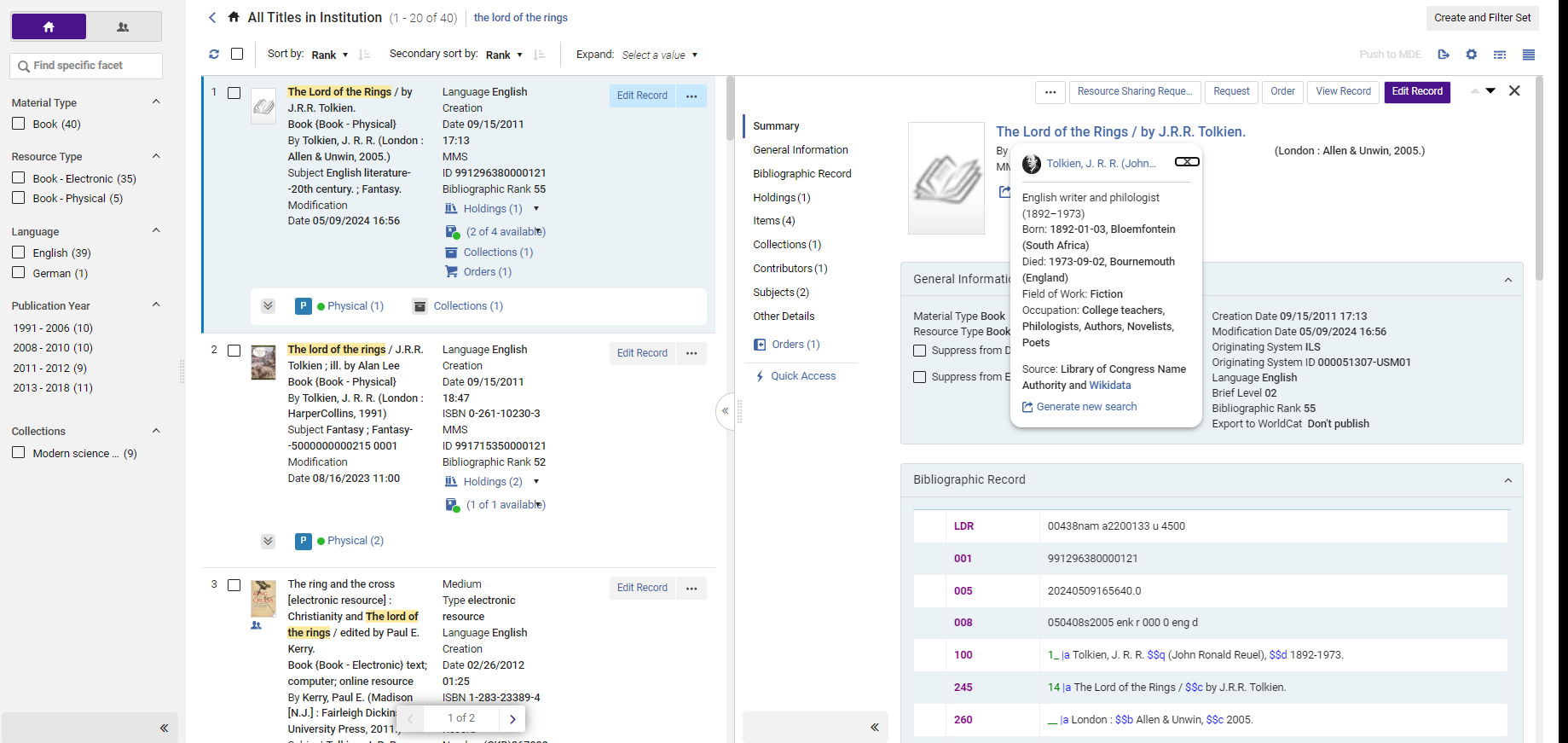
| The Titles Staff Searches are updated and redesigned for better usability, performance, productivity, and overall user experience. |
|
Simpler workflows due to new user interface, introducing efficient navigation:
• Reduced number of steps needed for common actions • MARC simple view upfront • New Item section • Actionable inventory information Available for opt-in by all users. |
AI Metadata Assistant - MARC 21 Records
| What's New | Highlights | Impact |
|---|---|---|
|
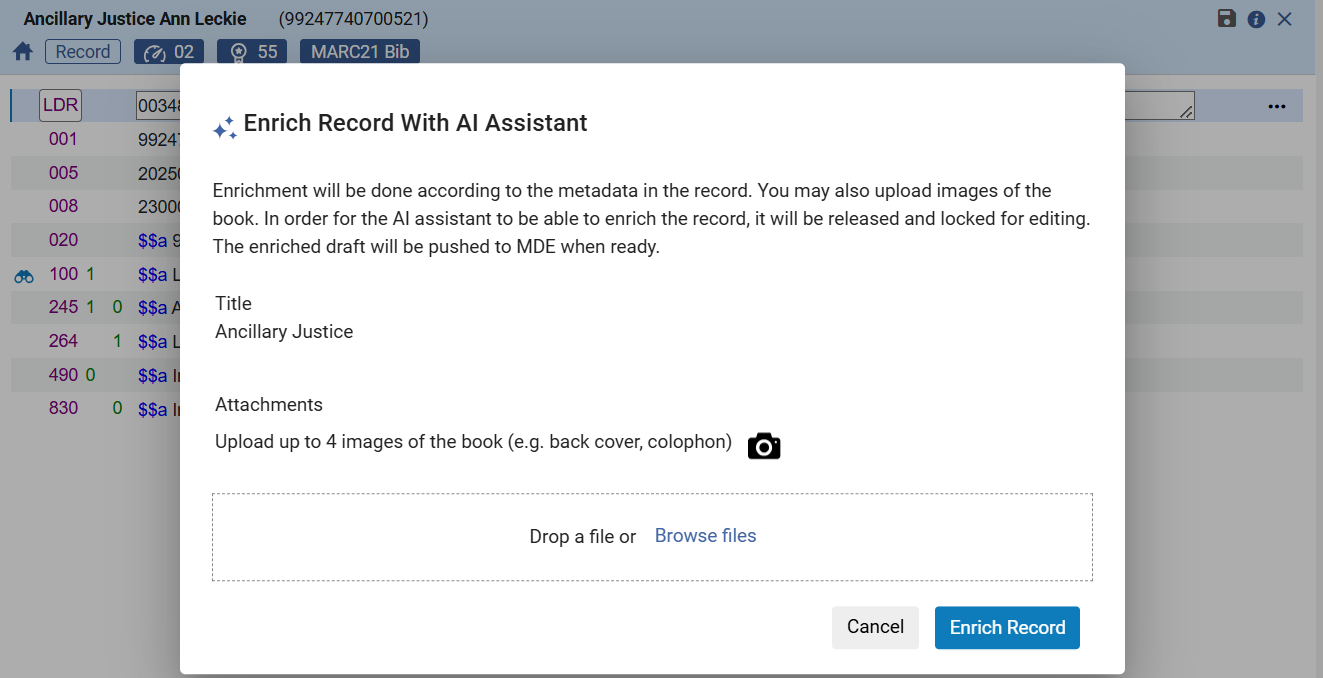
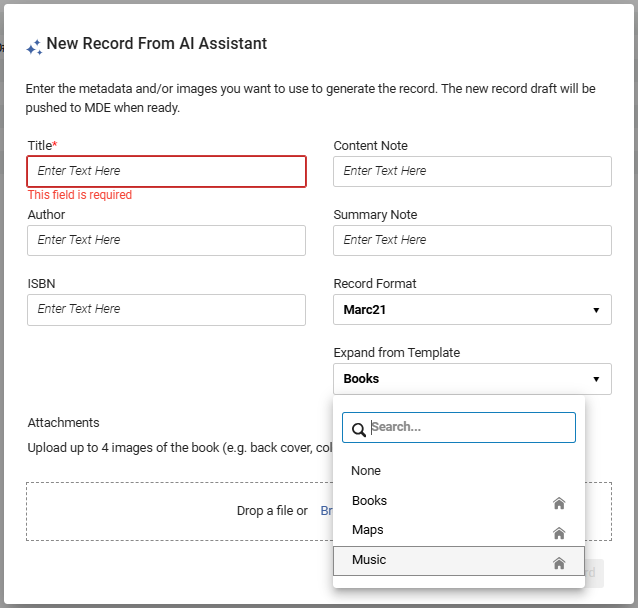
Alma allows libraries to combine innovative AI solutions along with expert cataloging knowledge to easily and efficiently create and enrich bibliographic data. |
|
Reduce the time and effort a cataloger spends on creating or enriching each bibliographic record. |
 |
|
AI Metadata Assistant - Granular Metadata Requests
URM-234172: AI Metadata Assistant: Improve tasks separation and make them configurable
| What's New | Highlights | Impact |
|---|---|---|
|
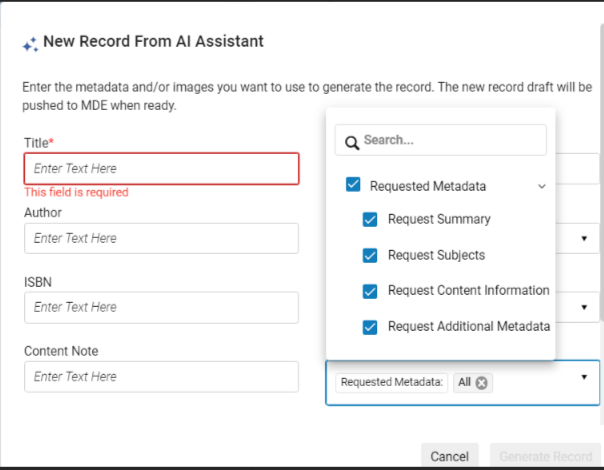
Libraries and librarians have more control over what metadata requests to set the AI. |
|
Enhance the library's and the librarian's control over the requested metadata types to generate, improving generated metadata quality and usefulness for the library. |
Open Authority Headings Menu Action in the Metadata Editor
CERV Enhancement (ID #8819)
| What's New | Highlights | Impact |
|---|---|---|
|
When working in the Metadata Editor, catalogers are able to open the authority headings lookup using a menu action (in addition to the F3 keyboard shortcut). |
|
Catalogers are able to efficiently work on a wider selection of devices, including ones (such as tablets) that don't have function keys. |
Support Preferred Term Correction Flipping Headings that Change Tag Number
Idea Exchange
URM-91227: Linked heading should flip when 2nd two digit of authority record fields are not the same
| What's New | Highlights | Impact |
|---|---|---|
|
Linking and preferred term correction handle cases where the bibliographic heading is linked to an authority via a cross-reference, but the preferred and non-preferred terms are in different fields (for example, the preferred term is in authority field 130, and cross-reference in authority is in 410). |
|
Better automated authority updates, keeping the library's catalog up to date, and reducing the need for manual corrections. |
XSL Normalization for Metadata Records
| What's New | Highlights | Impact |
|---|---|---|
|
By working with normalization rules, the institution is able to manipulate its metadata using XSL, enabling complex transformations with a powerful programming language. |
|
Using a programming language to manipulate metadata records enables the implementation of complex logic. |
Support Respecting MARC Subfields When Linking Bibliographic Headings - General Availability
|
What's New |
Highlights |
Impact |
|---|---|---|
|
Based on the Alma Authority Focus Group (AAFG) feedback, libraries are able to select whether to force subfields to be considered when linking to bibliographic headings. |
Bibliographic record fields only link to authority headings if the matching content is in the same subfields. |
The linking accurately reflects not only matching content but also matching cataloged subfields. |
Permanent Linked Data Enrichment of URIs in MARC Records
Linked Open Data theme
| What's New | Highlights | Impact |
|---|---|---|
|
The cataloger is able to add URIs of linked authorities to records as part of the cataloging process in the metadata editor and as part of the linking and PTC jobs. |
|
The cataloger enjoys a seamless workflow for adding URIs to relevant subfields automatically, creating a basis for continuous work based on the authorities' IDs. |
back to Metadata and Linked Open Data Roadmap
Work Search
Linked Open Data theme
URM - 182983: LOD - Searching for Works in the catalog
| What's New | Highlights | Impact |
|---|---|---|
|
Searching for Linked Open Data Work records and view related information in Alma's catalog. |
|
The cataloger has a simpler and quicker process for identifying Work records and the Instances linked to them. |
back to Metadata and Linked Open Data Roadmap
Support Linked Open Data for Local Authorities
Linked Open Data theme
URM-224050: Support VIAF for local authorities
| What's New | Highlights | Impact |
|---|---|---|
|
Local authorities can be linked to other authorities using VIAF and gain linked data capabilities. |
|
Librarians can extract global IDs from local authorities and map to VIAF and experience linked data enhancements. |
back to Metadata and Linked Open Data Roadmap
Partial Linking of Name/Title Headings - General Availability
| What's New | Highlights | Impact |
|---|---|---|
|
Based on work and feedback from the Alma Authority Focus Group (AAFG), Alma can control the name portion of the name/title combination so that changes to the authorized form in the name authority record are reflected in the bibliographic heading. |
|
Automated name authority updates for headings that include both name and title. |
back to Metadata and Linked Open Data Roadmap
Special Characters Dialog Box in Metadata Editor
CERV Enhancement (ID #8998)
| What's New | Highlights | Impact |
|---|---|---|
|
When working in the MD Editor catalogers are able to open a dialog box and select a special character to enter into the record. |
|
Cataloging records with special characters is more convenient and efficient. |
back to Metadata and Linked Open Data Roadmap
Support EDTF Date/Time Fields Validation
URM-196519: Support validation for EDTF-compliant data in Bibliographic and Authority data
| What's New | Highlights | Impact |
|---|---|---|
|
A new validation process based on the EDTF standard is available for MARC date/time fields. |
|
Catalogers who need the EDTF standard applied to specific date/time fields can now utilize the new validation process for their institution's data. |
back to Metadata and Linked Open Data Roadmap
Work Search - Additional Enhancements
Linked Open Data theme
URM - 182983: LOD - Searching for Works in the catalog
| What's New | Highlights | Impact |
|---|---|---|
|
Enhance the Work Search functionalities according to the user's needs. |
|
The user can enjoy the advantages of cataloging in BIBFRAME and searching within the additional hierarchical level the ontology provides while having a simpler and quicker process for identifying Work records and the Instances linked to them and performing relevant actions. |
back to Metadata and Linked Open Data Roadmap
Resource Management
Physical Holdings Staff Search – Enhanced UX

URM-188599: Align holdings search UX with updated UX from all titles
| What's New | Highlights | Impact |
|---|---|---|
|
The Physical Holdings Staff Search was updated with various improvements for better usability, performance, productivity, and overall user experience. |
|
The user can now quickly find holdings and perform actions as needed. |
Automatic Upload of Electronic Holdings - SAGE
 Idea Exchange
URM-227507 Upload Electronic Holdings with Sage: General availability
| What's New | Highlights | Impact |
|---|---|---|
|
Upload Electronic Holdings from SAGE replaces the manual, multi-step workflow for managing SAGE holdings. |
|
Reduces manual work involved in activating and maintaining the library holdings of SAGE electronic resources. |
Flexibility in the Definition of CZ Updates Behavior for New and Deleted Portfolios
Idea Exchange
URM-233539 Separate new and deleted portfolios behaviors of "Activate new portfolios associated with service automatically"
| What's New | Highlights | Impact |
|---|---|---|
|
It is now possible to define separately different behaviors for new and deleted Community Zone portfolios. |
|
Better flexibility in the definition of Community Zone updates behavior. This eases the management of electronic collections. |
User Preference for Physical Item Sort Routine
Idea Exchange
| What's New | Highlights | Impact |
|---|---|---|
|
Alma now remembers the user's selected sort routine in the physical items list. |
When viewing the items list, the sorting does not default to Library/Location, but to the last sort routine selected by the user. |
The user can easily scan the items list in the sort relevant for their needs, without having to reselect it each time. |
Comprehensive Identifier Integration in Overlap Analysis
Idea Exchange
URM-237625 Alma overlap analysis tool to include different identifiers in one comparison
| What's New | Highlights | Impact |
|---|---|---|
|
Overlap Analysis tool now supports comparison using multiple identifiers types. |
|
Enhanced overlap analysis features facilitates decision-making in purchasing. |
back to Resource Management Roadmap
Display Logic Rules - Shared Network Zone Choices in Institution Zone
Idea Exchange
URM-83433 Display Logic: shared NZ choices in IZ
| What's New | Highlights | Impact |
|---|---|---|
|
Network members are able to create Display Logic rules with a combination of e-resources managed centrally and locally, coming from the Network Zone and from the local institution. |
When configuring a Display logic rule in a consortia member, it is possible to choose Network Zone electronic collections as part of the rule criteria. |
Better usability of electronic resources activated at both levels improves the consortia's management of electronic resources. |
Back to Resource Management Roadmap
Automated Bibliographic Record Suppression
CERV Enhancement (ID #8182)
URM-237407 PrimoVE indexing: Logically mark titles as suppressed if they do not have inventory and do not have relations
| What's New | Highlights | Impact |
|---|---|---|
|
It is now possible to automatically suppress bibliographic records from PrimoVE, in case they do not have available inventory and do not have relations. This behavior is optional. |
|
A streamlined process for suppressing bibliographic records when there is no available inventory ensures that patrons are offered with available resources in discovery. |
back to Resource Management Roadmap
Acquisitions
Compliance with COUNTER 5.1
URM-239918: Compliance with COUNTER 5.1
| What's New | Highlights | Impact |
|---|---|---|
|
Alma now supports COUNTER 5.1 reports in the various usage workflows. |
|
Enables institutions to compare and analyze usage data effectively according to the latest COUNTER data release. |
Ability to Change PO Line Type to a Different Inventory and Continuity
CERV Enhancement (ID #8861)
URM-223779: NERS #8861 - Changing POL type after POL is sent
| What's New | Highlights | Impact |
|---|---|---|
|
The "Update PO lines information - advanced" job now supports changing PO line types across inventory and continuity. |
|
The ability to update existing PO lines across inventory and continuity simplifies PO line management and eliminate the need to delete and recreate them for significant changes. |
Changes in Bibliographic Records are Automatically Reflected in PO Lines
IdeaExchange
URM-154433: Changes in the BIB records should be reflected automatically in PO lines
| What's New | Highlights | Impact |
|---|---|---|
|
Changes in bibliographic records can be automatically reflected in the corresponding PO lines. |
|
Accurate PO line descriptive information eases the management of PO lines. |
Fulfillment and Resource Sharing
Manage Patron Services Screen – New UI is Default
| What's New | Highlights | Impact |
|---|---|---|
|
New Patron Services User Interface |
In this phase of the UX rollout, the new UX is the only usable UX. |
Quicker and more effective work at the circulation desk, using a cleaner and improved personalized Patron Services page. |
Back to Fulfillment & Resource Sharing Roadmap
Toggle Item "Missing" Status of Non-Available Items
CERV Enhancement (ID #8918)
| What's New | Highlights | Impact |
|---|---|---|
|
An option to toggle "Missing" status is available even if the item is currently not available. |
The option to toggle "Missing" status is available from the items search result and the items list even if the item is currently not available. |
Easier and more efficient missing status toggling. |
Back to Fulfillment & Resource Sharing Roadmap
User Management: Enhanced Users Search with Relative Date Operators
Idea Exchange
| What's New | Highlights | Impact |
|---|---|---|
|
Introducing new relative date search operators for key date-related search indexes, enabling users to perform more dynamic and flexible searches based on time ranges. |
New user search relative-date operators:
|
This enhancement provides greater flexibility in search capabilities, enabling users to efficiently filter and retrieve records based on relative timeframes. The introduction of relative date operators simplifies complex queries and improves workflow efficiency for managing time-based data. |
Back to Fulfillment & Resource Sharing Roadmap
User Management: Update the Last Activity Date at the Login
| What's New | Highlights | Impact |
|---|---|---|
|
The last activity date is updated whenever a user logs into Primo or Alma, regardless of the login method used. |
|
This enhancement allows libraries to accurately identify active patrons based on recent login activity, facilitating more effective user account management and purging of inactive accounts. |
Back to Fulfillment & Resource Sharing Roadmap
User Experience, Accessibility, and Infrastructure
Accessibility: Annual Conformance Report (VPAT)
| What's New | Highlights | Impact |
|---|---|---|
|
An updated Conformance Report on the newest compliance with WCAG 2.1 Levels A and AA, covering the current and new layout. |
|
|
Enhanced Multiple Facet Save Management on Manage Sets Page
| What's New | Highlights | Impact |
|---|---|---|
|
Users can save multiple combinations of facets under different names on the Manage Sets page. This enhancement simplifies facet management by allowing users to quickly access their preferred facet configurations. |
|
This feature empowers users with greater flexibility and efficiency in managing facets, reducing the time spent on repetitive filtering tasks. By providing easy access to customized facet configurations, users can streamline their workflows and enhance their overall experience. |
Configurable Session Timeout
| What's New | Highlights | Impact |
|---|---|---|
|
Institutions can configure Alma's session timeout duration, allowing greater flexibility for staff who require longer active sessions. Administrators can set institution-wide defaults and enable user-level overrides to suit individual needs. |
|
This enhancement provides institutions with greater control over session durations, improving staff efficiency by reducing frequent logins while maintaining security. Institutions can tailor the session timeout to meet operational needs, ensuring a better user experience. |
AI Knowledge Assistant in Alma
| What's New | Highlights | Impact |
|---|---|---|
|
The AI-powered Online Help Knowledge Assistant was embedded directly in Alma, enabling users to access instant, natural-language responses to documentation-related queries without leaving the platform. |
|
This enhancement empowers Alma users with immediate access to relevant documentation, streamlining workflows and improving overall efficiency. The intuitive AI assistant minimizes search time, ensuring users can focus on core tasks with greater ease. |
Alma Analytics
Additional Local Fields for Holdings Records ​
| What's New | Highlights | Impact |
|---|---|---|
|
It is possible to include 30 customizable Holdings fields in Analytics reports. |
Enhanced reporting options for Physical inventory by leveraging more data fields. |
Libraries have richer data analysis possibilities for their physical resource management needs. |
"General Notes" for Electronic Collections, Services, and Portfolios
Idea Exchange​
| What's New | Highlights | Impact |
|---|---|---|
|
It is possible to generate a report that includes the General Notes for Electronic Collections, Services, and Portfolios |
Allows libraries to extract useful information for their electronic resources stored in the General Notes fields. |
This provides greater clarity for electronic resource management, and makes the General Notes easily accessible. |
Compliance with COUNTER 5.1
URM-239918: Compliance with COUNTER 5.1
| What's New | Highlights | Impact |
|---|---|---|
|
Alma now supports COUNTER 5.1 reports in the various usage workflows. |
|
Enables institutions to compare and analyze usage data effectively according to the latest COUNTER data release. |
Collection Development - Record Distribution by Language, Publication Place and Classifications ​
| What's New | Highlights | Impact |
|---|---|---|
|
Out-of-the-box Data Visualizations focusing on identifying gaps in key metrics such as the languages of the titles, countries of publication and Classifications. |
|
These insights aid in strategic planning for a well-balanced and impactful collection. |
Collection Development - Consortia Central Office Shared Print Insight Dashboard
| What's New | Highlights | Impact |
|---|---|---|
|
An out-of-the-box Data Visualization focusing on identifying single copies based on various criteria to support deselection ("weeding") at the consortia level. This dashboard is one of several dashboards designed to support collection development. |
|
Provides consortia with an overview of the collections held by their members for efficient collection management at the consortia level |
Invoice Notes in Reports
​
| What's New | Highlights | Impact |
|---|---|---|
|
It is possible to generate a report based on the invoice note field. |
Allow acquisitions departments to extract useful invoice data that may be unique to their institution. |
Enhance acquisition workflows by enabling libraries to easily extract and analyze unique invoice data and improve financial tracking. |
Consortia
Central Configuration Dashboard - New added services and options
| What's New | Highlights | Impact |
|---|---|---|
|
The consortia central office has more centralized operational policies in the new Central Configuration Dashboard. |
New options and services to the new Central Configuration Dashboard:
|
The central office has more tools to work more efficiently, reducing time spent applying central policies. |
Add Network Zone Titles to Alma Collections
Idea Exchange
| What's New | Highlights | Impact |
|---|---|---|
|
Network Members, at their Institution Zone level, can search both Institution Zone titles and Network Zone titles while creating their Alma Collections, and are now able to add Network Zone titles to a collection. |
Member institutions can add both Institution Zone titles and Network Zone titles to their Alma Collections. |
Members can have access to all their titles (locally and centrally managed) in their collections. |
Page tags: article:topicproduct:almacontent:Documentationlang:english
